


How to sell 10,000 NFTs on OpenSea for FREE (Puppeteer/NodeJS)
So you've finished your NFT collection and are ready to sell it. Except you can't figure out how to mint them! Not sure about smart contracts or want to avoid rising gas prices. You've tried and failed with apps like Mini mouse macro, and you're not familiar with Selenium/Python. Worry no more, NodeJS and Puppeteer have arrived!
Learn how to automatically post and sell all 1000 of my AI-generated word NFTs (Nakahana) on OpenSea for FREE!
My NFT project — Nakahana |
NOTE: Only NFTs on the Polygon blockchain can be sold for free; Ethereum requires an initiation charge. NFTs can still be bought with (wrapped) ETH.
If you want to go right into the code, here's the GitHub link: https://github.com/Yusu-f/nftuploader
Let's start with the knowledge and tools you'll need.
What you should know
You must be able to write and run simple NodeJS programs. You must also know how to utilize a Metamask wallet.
Tools needed
- NodeJS. You'll need NodeJs to run the script and NPM to install the dependencies.
- Puppeteer – Use Puppeteer to automate your browser and go to sleep while your computer works.
- Metamask – Create a crypto wallet and sign transactions using Metamask (free). You may learn how to utilize Metamask here.
- Chrome – Puppeteer supports Chrome.
Let's get started now!
Starting Out
Clone Github Repo to your local machine. Make sure that NodeJS, Chrome, and Metamask are all installed and working. Navigate to the project folder and execute npm install. This installs all requirements.
Replace the “extension path” variable with the Metamask chrome extension path. Read this tutorial to find the path.
Substitute an array containing your NFT names and metadata for the “arr” variable and the “collection_name” variable with your collection’s name.
Run the script.
After that, run node nftuploader.js.
Open a new chrome instance (not chromium) and Metamask in it. Import your Opensea wallet using your Secret Recovery Phrase or create a new one and link it. The script will be unable to continue after this but don’t worry, it’s all part of the plan.
Next steps
Open your terminal again and copy the route that starts with “ws”, e.g. “ws:/localhost:53634/devtools/browser/c07cb303-c84d-430d-af06-dd599cf2a94f”. Replace the path in the connect function of the nftuploader.js script.
const browser = await puppeteer.connect({ browserWSEndpoint: "ws://localhost:58533/devtools/browser/d09307b4-7a75-40f6-8dff-07a71bfff9b3", defaultViewport: null });
Rerun node nftuploader.js. A second tab should open in THE SAME chrome instance, navigating to your Opensea collection. Your NFTs should now start uploading one after the other! If any errors occur, the NFTs and errors are logged in an errors.log file.
Error Handling
The errors.log file should show the name of the NFTs and the error type. The script has been changed to allow you to simply check if an NFT has already been posted. Simply set the “searchBeforeUpload” setting to true.
We're done!
If you liked it, you can buy one of my NFTs! If you have any concerns or would need a feature added, please let me know.
Thank you to everyone who has read and liked. I never expected it to be so popular.
More on Web3 & Crypto

TheRedKnight
3 years ago
Say goodbye to Ponzi yields - A new era of decentralized perpetual
Decentralized perpetual may be the next crypto market boom; with tons of perpetual popping up, let's look at two protocols that offer organic, non-inflationary yields.
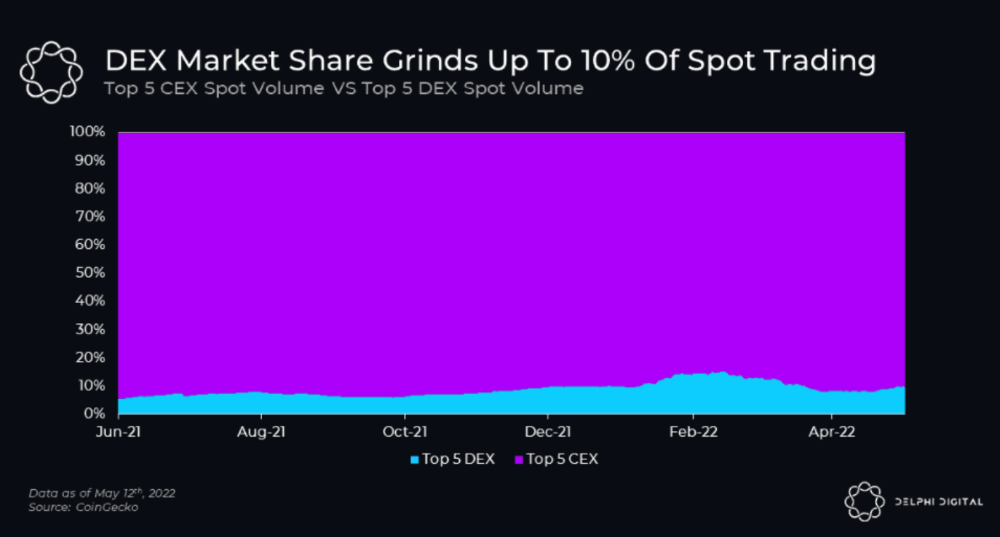
Decentralized derivatives exchanges' market share has increased tenfold in a year, but it's still 2% of CEXs'. DEXs have a long way to go before they can compete with centralized exchanges in speed, liquidity, user experience, and composability.
I'll cover gains.trade and GMX protocol in Polygon, Avalanche, and Arbitrum. Both protocols support leveraged perpetual crypto, stock, and Forex trading.
Why these protocols?
Decentralized GMX Gains protocol
Organic yield: path to sustainability
I've never trusted Defi's non-organic yields. Example: XYZ protocol. 20–75% of tokens may be set aside as farming rewards to provide liquidity, according to tokenomics.
Say you provide ETH-USDC liquidity. They advertise a 50% APR reward for this pair, 10% from trading fees and 40% from farming rewards. Only 10% is real, the rest is "Ponzi." The "real" reward is in protocol tokens.
Why keep this token? Governance voting or staking rewards are promoted services.
Most liquidity providers expect compensation for unused tokens. Basic psychological principles then? — Profit.
Nobody wants governance tokens. How many out of 100 care about the protocol's direction and will vote?
Staking increases your token's value. Currently, they're mostly non-liquid. If the protocol is compromised, you can't withdraw funds. Most people are sceptical of staking because of this.
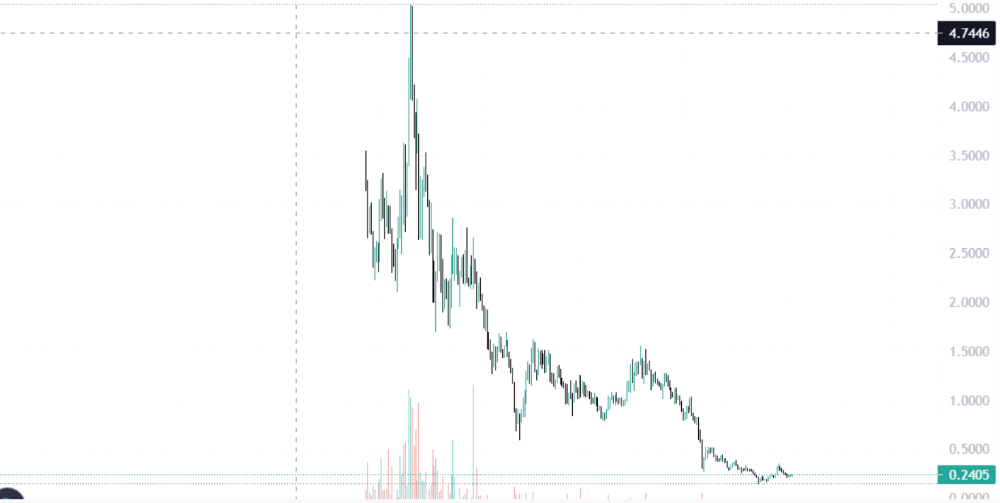
"Free tokens," lack of use cases, and skepticism lead to tokens moving south. No farming reward protocols have lasted.
It may have shown strength in a bull market, but what about a bear market?
What is decentralized perpetual?
A perpetual contract is a type of futures contract that doesn't expire. So one can hold a position forever.
You can buy/sell any leveraged instruments (Long-Short) without expiration.
In centralized exchanges like Binance and coinbase, fees and revenue (liquidation) go to the exchanges, not users.
Users can provide liquidity that traders can use to leverage trade, and the revenue goes to liquidity providers.
Gains.trade and GMX protocol are perpetual trading platforms with a non-inflationary organic yield for liquidity providers.
GMX protocol
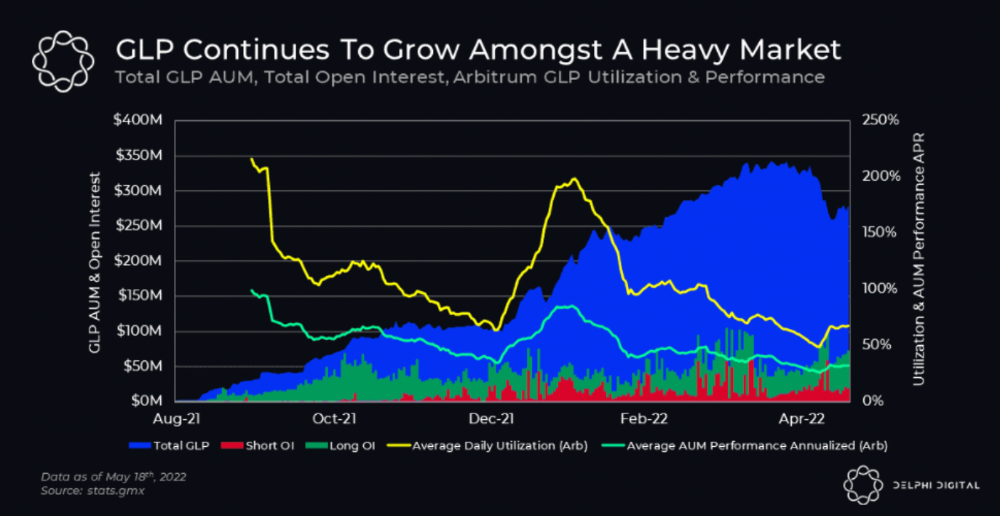
GMX is an Arbitrum and Avax protocol that rewards in ETH and Avax. GLP uses a fast oracle to borrow the "true price" from other trading venues, unlike a traditional AMM.
GLP and GMX are protocol tokens. GLP is used for leveraged trading, swapping, etc.
GLP is a basket of tokens, including ETH, BTC, AVAX, stablecoins, and UNI, LINK, and Stablecoins.
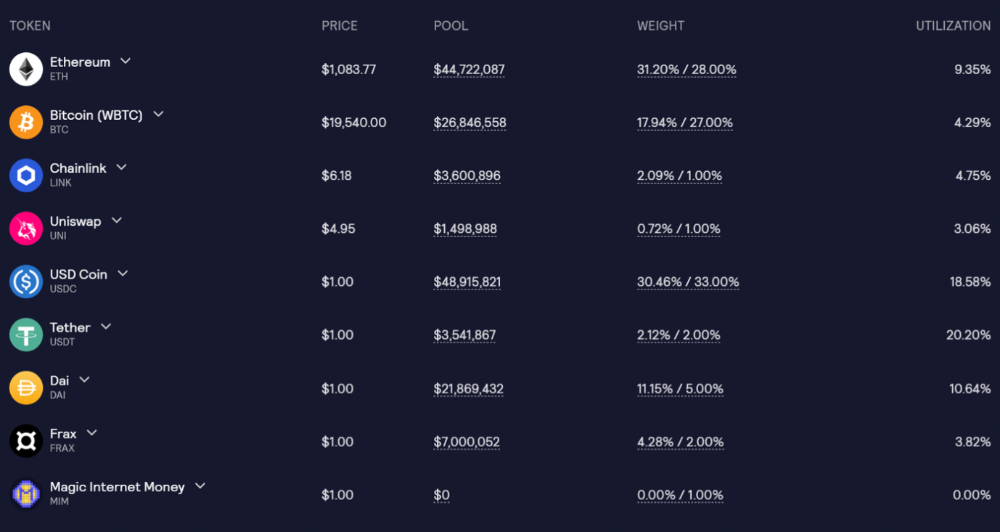
GLP composition on arbitrum
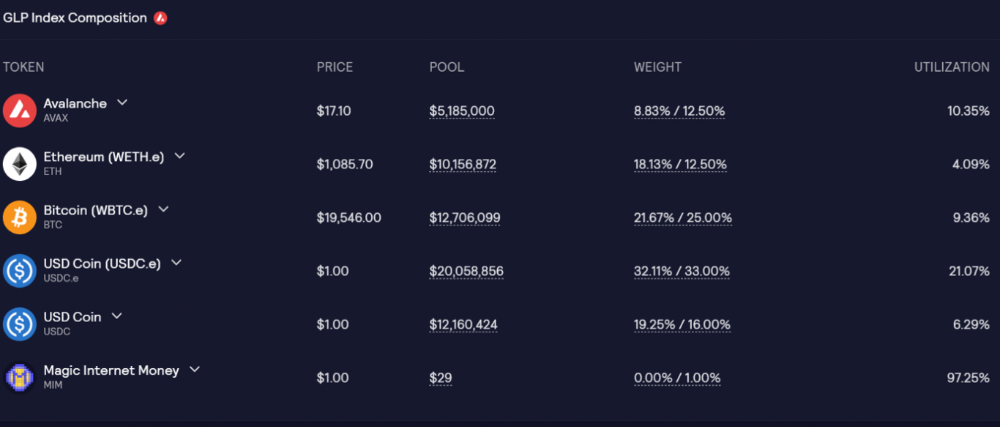
GLP composition on Avalanche
GLP token rebalances based on usage, providing liquidity without loss.
Protocol "runs" on Staking GLP. Depending on their chain, the protocol will reward users with ETH or AVAX. Current rewards are 22 percent (15.71 percent in ETH and the rest in escrowed GMX) and 21 percent (15.72 percent in AVAX and the rest in escrowed GMX). escGMX and ETH/AVAX percentages fluctuate.
Where is the yield coming from?
Swap fees, perpetual interest, and liquidations generate yield. 70% of fees go to GLP stakers, 30% to GMX. Organic yields aren't paid in inflationary farm tokens.
Escrowed GMX is vested GMX that unlocks in 365 days. To fully unlock GMX, you must farm the Escrowed GMX token for 365 days. That means less selling pressure for the GMX token.
GMX's status
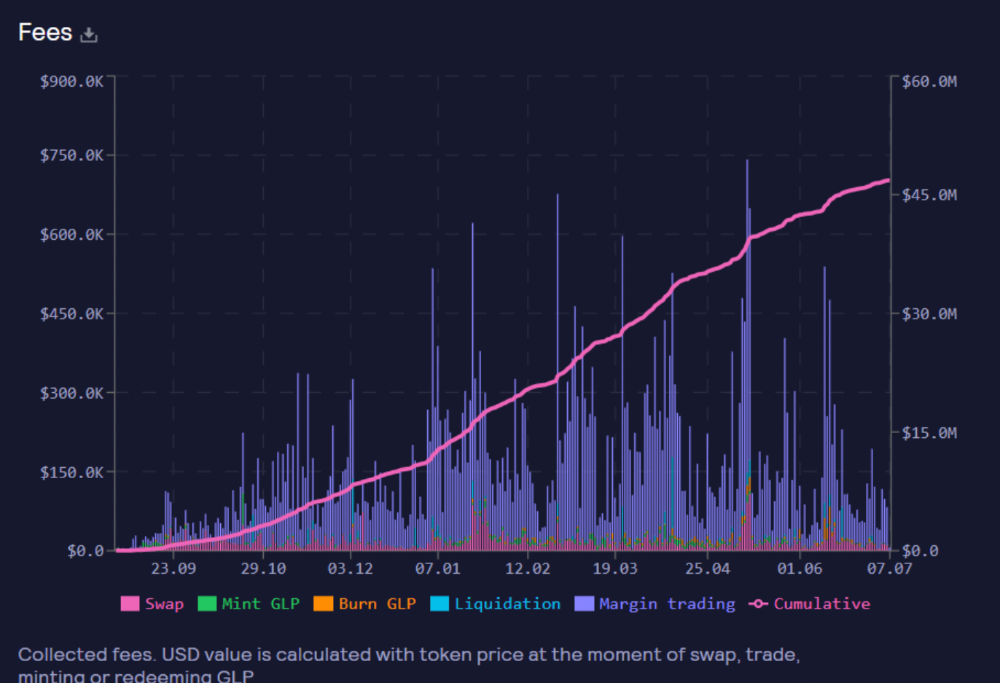
These are the fees in Arbitrum in the past 11 months by GMX.
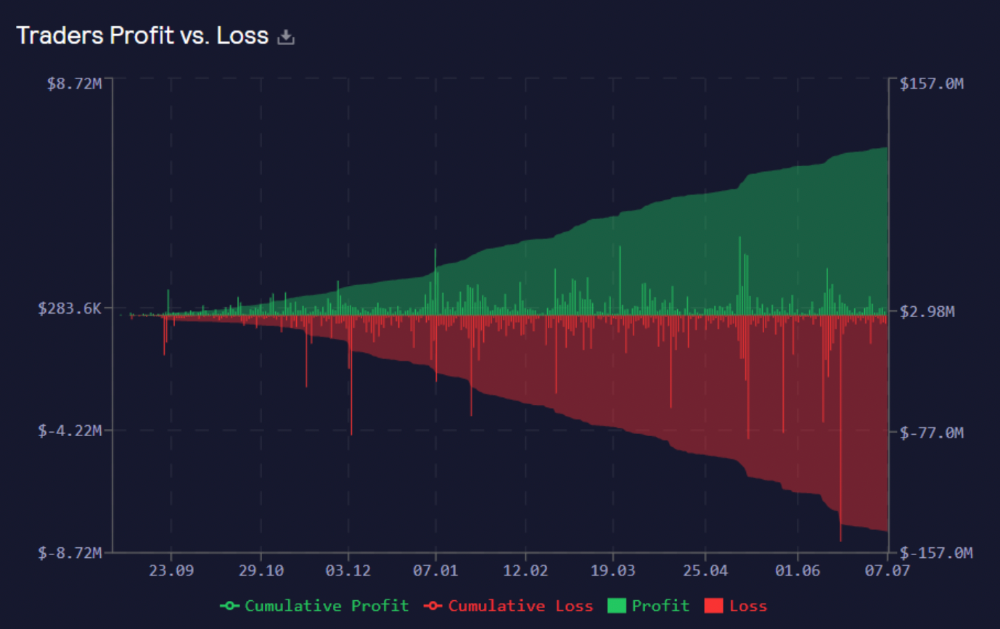
GMX works like a casino, which increases fees. Most fees come from Margin trading, which means most traders lose money; this money goes to the casino, or GLP stakers.
Strategies
My personal strategy is to DCA into GLP when markets hit bottom and stake it; GLP will be less volatile with extra staking rewards.
GLP YoY return vs. naked buying
Let's say I invested $10,000 in BTC, AVAX, and ETH in January.
BTC price: 47665$
ETH price: 3760$
AVAX price: $145
Current prices
BTC $21,000 (Down 56 percent )
ETH $1233 (Down 67.2 percent )
AVAX $20.36 (Down 85.95 percent )
Your $10,000 investment is now worth around $3,000.
How about GLP? My initial investment is 50% stables and 50% other assets ( Assuming the coverage ratio for stables is 50 percent at that time)
Without GLP staking yield, your value is $6500.
Let's assume the average APR for GLP staking is 23%, or $1500. So 8000$ total. It's 50% safer than holding naked assets in a bear market.
In a bull market, naked assets are preferable to GLP.
Short farming using GLP
Simple GLP short farming.
You use a stable asset as collateral to borrow AVAX. Sell it and buy GLP. Even if GLP rises, it won't rise as fast as AVAX, so we can get yields.
Let's do the maths
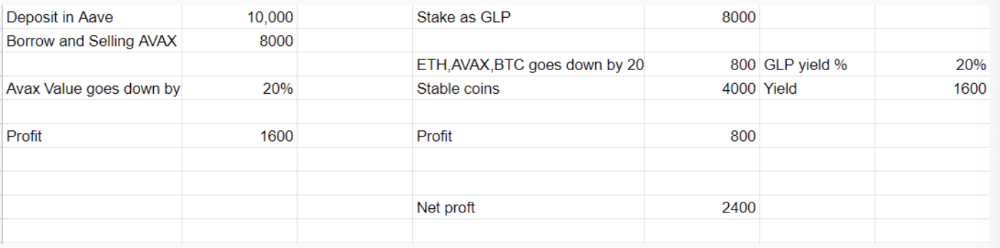
You deposit $10,000 USDT in Aave and borrow Avax. Say you borrow $8,000; you sell it, buy GLP, and risk 20%.
After a year, ETH, AVAX, and BTC rise 20%. GLP is $8800. $800 vanishes. 20% yields $1600. You're profitable. Shorting Avax costs $1600. (Assumptions-ETH, AVAX, BTC move the same, GLP yield is 20%. GLP has a 50:50 stablecoin/others ratio. Aave won't liquidate
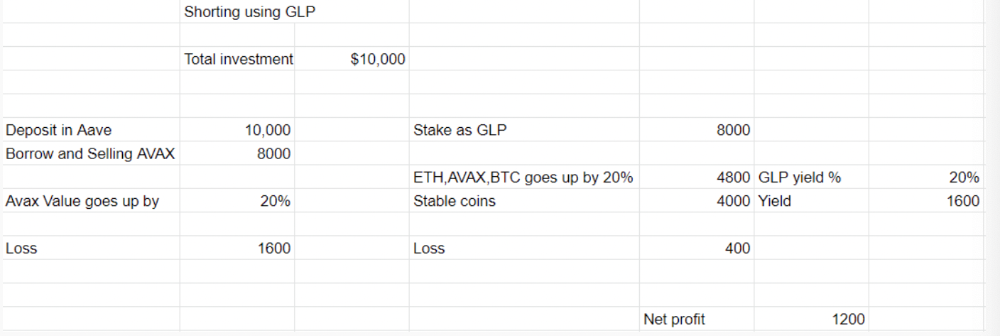
In naked Avax shorting, Avax falls 20% in a year. You'll make $1600. If you buy GLP and stake it using the sold Avax and BTC, ETH and Avax go down by 20% - your profit is 20%, but with the yield, your total gain is $2400.
Issues with GMX
GMX's historical funding rates are always net positive, so long always pays short. This makes long-term shorts less appealing.
Oracle price discovery isn't enough. This limitation doesn't affect Bitcoin and ETH, but it affects less liquid assets. Traders can buy and sell less liquid assets at a lower price than their actual cost as long as GMX exists.
As users must provide GLP liquidity, adding more assets to GMX will be difficult. Next iteration will have synthetic assets.
Gains Protocol
Best leveraged trading platform. Smart contract-based decentralized protocol. 46 crypto pairs can be leveraged 5–150x and 10 Forex pairs 5–1000x. $10 DAI @ 150x (min collateral x leverage pos size is $1500 DAI). No funding fees, no KYC, trade DAI from your wallet, keep funds.
DAI single-sided staking and the GNS-DAI pool are important parts of Gains trading. GNS-DAI stakers get 90% of trading fees and 100% swap fees. 10 percent of trading fees go to DAI stakers, which is currently 14 percent!
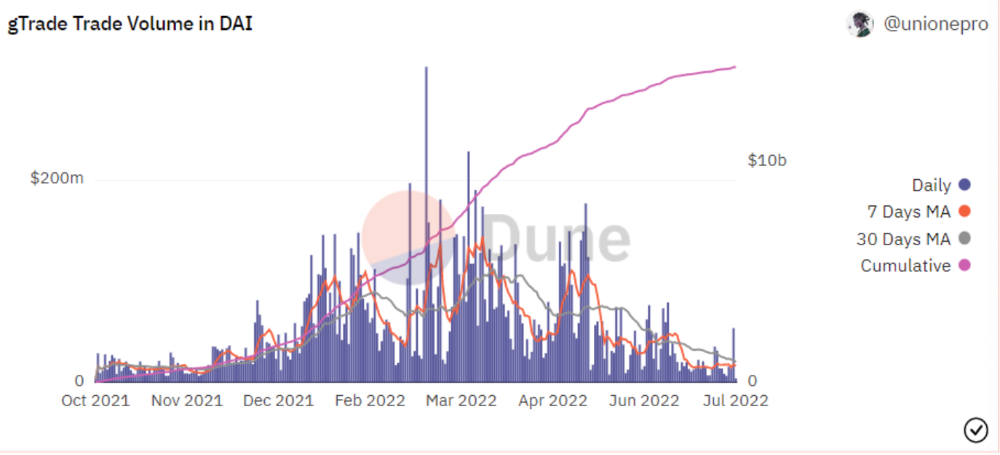
Trade volume
When a trader opens a trade, the leverage and profit are pulled from the DAI pool. If he loses, the protocol yield goes to the stakers.
If the trader's win rate is high and the DAI pool slowly depletes, the GNS token is minted and sold to refill DAI. Trader losses are used to burn GNS tokens. 25%+ of GNS is burned, making it deflationary.
Due to high leverage and volatility of crypto assets, most traders lose money and the protocol always wins, keeping GNS deflationary.
Gains uses a unique decentralized oracle for price feeds, which is better for leverage trading platforms. Let me explain.
Gains uses chainlink price oracles, not its own price feeds. Chainlink oracles only query centralized exchanges for price feeds every minute, which is unsuitable for high-precision trading.
Gains created a custom oracle that queries the eight chainlink nodes for the current price and, on average, for trade confirmation. This model eliminates every-second inquiries, which waste gas but are more efficient than chainlink's per-minute price.
This price oracle helps Gains open and close trades instantly, eliminate scam wicks, etc.
Other benefits include:
Stop-loss guarantee (open positions updated)
No scam wicks
Spot-pricing
Highest possible leverage
Fixed-spreads. During high volatility, a broker can increase the spread, which can hit your stop loss without the price moving.
Trade directly from your wallet and keep your funds.
>90% loss before liquidation (Some platforms liquidate as little as -50 percent)
KYC-free
Directly trade from wallet; keep funds safe
Further improvements
GNS-DAI liquidity providers fear the impermanent loss, so the protocol is migrating to its own liquidity and single staking GNS vaults. This allows users to stake GNS without permanent loss and obtain 90% DAI trading fees by staking. This starts in August.
Their upcoming improvements can be found here.
Gains constantly add new features and change pairs. It's an interesting protocol.
Conclusion
Next bull run, watch decentralized perpetual protocols. Effective tokenomics and non-inflationary yields may attract traders and liquidity providers. But still, there is a long way for them to develop, and I don't see them tackling the centralized exchanges any time soon until they fix their inherent problems and improve fast enough.
Read the full post here.

Henrique Centieiro
3 years ago
DAO 101: Everything you need to know
Maybe you'll work for a DAO next! Over $1 Billion in NFTs in the Flamingo DAO Another DAO tried to buy the NFL team Denver Broncos. The UkraineDAO raised over $7 Million for Ukraine. The PleasrDAO paid $4m for a Wu-Tang Clan album that belonged to the “pharma bro.”
DAOs move billions and employ thousands. So learn what a DAO is, how it works, and how to create one!
DAO? So, what? Why is it better?
A Decentralized Autonomous Organization (DAO). Some people like to also refer to it as Digital Autonomous Organization, but I prefer the former.
They are virtual organizations. In the real world, you have organizations or companies right? These firms have shareholders and a board. Usually, anyone with authority makes decisions. It could be the CEO, the Board, or the HIPPO. If you own stock in that company, you may also be able to influence decisions. It's now possible to do something similar but much better and more equitable in the cryptocurrency world.
This article informs you:
DAOs- What are the most common DAOs, their advantages and disadvantages over traditional companies? What are they if any?
Is a DAO legally recognized?
How secure is a DAO?
I’m ready whenever you are!
A DAO is a type of company that is operated by smart contracts on the blockchain. Smart contracts are computer code that self-executes our commands. Those contracts can be any. Most second-generation blockchains support smart contracts. Examples are Ethereum, Solana, Polygon, Binance Smart Chain, EOS, etc. I think I've gone off topic. Back on track. Now let's go!
Unlike traditional corporations, DAOs are governed by smart contracts. Unlike traditional company governance, DAO governance is fully transparent and auditable. That's one of the things that sets it apart. The clarity!
A DAO, like a traditional company, has one major difference. In other words, it is decentralized. DAOs are more ‘democratic' than traditional companies because anyone can vote on decisions. Anyone! In a DAO, we (you and I) make the decisions, not the top-shots. We are the CEO and investors. A DAO gives its community members power. We get to decide.
As long as you are a stakeholder, i.e. own a portion of the DAO tokens, you can participate in the DAO. Tokens are open to all. It's just a matter of exchanging it. Ownership of DAO tokens entitles you to exclusive benefits such as governance, voting, and so on. You can vote for a move, a plan, or the DAO's next investment. You can even pitch for funding. Any ‘big' decision in a DAO requires a vote from all stakeholders. In this case, ‘token-holders'! In other words, they function like stock.
What are the 5 DAO types?
Different DAOs exist. We will categorize decentralized autonomous organizations based on their mode of operation, structure, and even technology. Here are a few. You've probably heard of them:
1. DeFi DAO
These DAOs offer DeFi (decentralized financial) services via smart contract protocols. They use tokens to vote protocol and financial changes. Uniswap, Aave, Maker DAO, and Olympus DAO are some examples. Most DAOs manage billions.
Maker DAO was one of the first protocols ever created. It is a decentralized organization on the Ethereum blockchain that allows cryptocurrency lending and borrowing without a middleman.
Maker DAO issues DAI, a stable coin. DAI is a top-rated USD-pegged stable coin.
Maker DAO has an MKR token. These token holders are in charge of adjusting the Dai stable coin policy. Simply put, MKR tokens represent DAO “shares”.
2. Investment DAO
Investors pool their funds and make investment decisions. Investing in new businesses or art is one example. Investment DAOs help DeFi operations pool capital. The Meta Cartel DAO is a community of people who want to invest in new projects built on the Ethereum blockchain. Instead of investing one by one, they want to pool their resources and share ideas on how to make better financial decisions.
Other investment DAOs include the LAO and Friends with Benefits.
3. DAO Grant/Launchpad
In a grant DAO, community members contribute funds to a grant pool and vote on how to allocate and distribute them. These DAOs fund new DeFi projects. Those in need only need to apply. The Moloch DAO is a great Grant DAO. The tokens are used to allocate capital. Also see Gitcoin and Seedify.
4. DAO Collector
I debated whether to put it under ‘Investment DAO' or leave it alone. It's a subset of investment DAOs. This group buys non-fungible tokens, artwork, and collectibles. The market for NFTs has recently exploded, and it's time to investigate. The Pleasr DAO is a collector DAO. One copy of Wu-Tang Clan's "Once Upon a Time in Shaolin" cost the Pleasr DAO $4 million. Pleasr DAO is known for buying Doge meme NFT. Collector DAOs include the Flamingo, Mutant Cats DAO, and Constitution DAOs. Don't underestimate their websites' "childish" style. They have millions.
5. Social DAO
These are social networking and interaction platforms. For example, Decentraland DAO and Friends With Benefits DAO.
What are the DAO Benefits?
Here are some of the benefits of a decentralized autonomous organization:
- They are trustless. You don’t need to trust a CEO or management team
- It can’t be shut down unless a majority of the token holders agree. The government can't shut - It down because it isn't centralized.
- It's fully democratic
- It is open-source and fully transparent.
What about DAO drawbacks?
We've been saying DAOs are the bomb? But are they really the shit? What could go wrong with DAO?
DAOs may contain bugs. If they are hacked, the results can be catastrophic.
No trade secrets exist. Because the smart contract is transparent and coded on the blockchain, it can be copied. It may be used by another organization without credit. Maybe DAOs should use Secret, Oasis, or Horizen blockchain networks.
Are DAOs legally recognized??
In most counties, DAO regulation is inexistent. It's unclear. Most DAOs don’t have a legal personality. The Howey Test and the Securities Act of 1933 determine whether DAO tokens are securities. Although most countries follow the US, this is only considered for the US. Wyoming became the first state to recognize DAOs as legal entities in July 2021 after passing a DAO bill. DAOs registered in Wyoming are thus legally recognized as business entities in the US and thus receive the same legal protections as a Limited Liability Company.
In terms of cyber-security, how secure is a DAO?
Blockchains are secure. However, smart contracts may have security flaws or bugs. This can be avoided by third-party smart contract reviews, testing, and auditing
Finally, Decentralized Autonomous Organizations are timeless. Let us examine the current situation: Ukraine's invasion. A DAO was formed to help Ukrainian troops fighting the Russians. It was named Ukraine DAO. Pleasr DAO, NFT studio Trippy Labs, and Russian art collective Pussy Riot organized this fundraiser. Coindesk reports that over $3 million has been raised in Ethereum-based tokens. AidForUkraine, a DAO aimed at supporting Ukraine's defense efforts, has launched. Accepting Solana token donations. They are fully transparent, uncensorable, and can’t be shut down or sanctioned.
DAOs are undeniably the future of blockchain. Everyone is paying attention. Personally, I believe traditional companies will soon have to choose between adapting or being left behind.
Long version of this post: https://medium.datadriveninvestor.com/dao-101-all-you-need-to-know-about-daos-275060016663

Percy Bolmér
3 years ago
Ethereum No Longer Consumes A Medium-Sized Country's Electricity To Run
The Merge cut Ethereum's energy use by 99.5%.
The Crypto community celebrated on September 15, 2022. This day, Ethereum Merged. The entire blockchain successfully merged with the Beacon chain, and it was so smooth you barely noticed.
Many have waited, dreaded, and longed for this day.
Some investors feared the network would break down, while others envisioned a seamless merging.
Speculators predict a successful Merge will lead investors to Ethereum. This could boost Ethereum's popularity.
What Has Changed Since The Merge
The merging transitions Ethereum mainnet from PoW to PoS.
PoW sends a mathematical riddle to computers worldwide (miners). First miner to solve puzzle updates blockchain and is rewarded.
The puzzles sent are power-intensive to solve, so mining requires a lot of electricity. It's sent to every miner competing to solve it, requiring duplicate computation.
PoS allows investors to stake their coins to validate a new transaction. Instead of validating a whole block, you validate a transaction and get the fees.
You can validate instead of mine. A validator stakes 32 Ethereum. After staking, the validator can validate future blocks.
Once a validator validates a block, it's sent to a randomly selected group of other validators. This group verifies that a validator is not malicious and doesn't validate fake blocks.
This way, only one computer needs to solve or validate the transaction, instead of all miners. The validated block must be approved by a small group of validators, causing duplicate computation.
PoS is more secure because validating fake blocks results in slashing. You lose your bet tokens. If a validator signs a bad block or double-signs conflicting blocks, their ETH is burned.
Theoretically, Ethereum has one block every 12 seconds, so a validator forging a block risks burning 1 Ethereum for 12 seconds of transactions. This makes mistakes expensive and risky.
What Impact Does This Have On Energy Use?
Cryptocurrency is a natural calamity, sucking electricity and eating away at the earth one transaction at a time.
Many don't know the environmental impact of cryptocurrencies, yet it's tremendous.
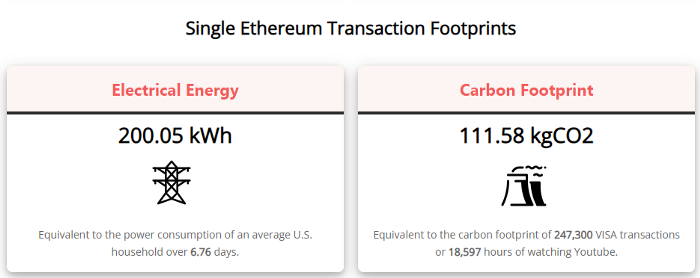
A single Ethereum transaction used to use 200 kWh and leave a large carbon imprint. This update reduces global energy use by 0.2%.
Ethereum will submit a challenge to one validator, and that validator will forward it to randomly selected other validators who accept it.
This reduces the needed computing power.
They expect a 99.5% reduction, therefore a single transaction should cost 1 kWh.
Carbon footprint is 0.58 kgCO2, or 1,235 VISA transactions.
This is a big Ethereum blockchain update.
I love cryptocurrency and Mother Earth.
You might also like

middlemarch.eth
3 years ago
ERC721R: A new ERC721 contract for random minting so people don’t snipe all the rares!
That is, how to snipe all the rares without using ERC721R!
Introduction: Blessed and Lucky
Mphers was the first mfers derivative, and as a Phunks derivative, I wanted one.
I wanted an alien. And there are only 8 in the 6,969 collection. I got one!
In case it wasn't clear from the tweet, I meant that I was lucky to have figured out how to 100% guarantee I'd get an alien without any extra luck.
Read on to find out how I did it, how you can too, and how developers can avoid it!
How to make rare NFTs without luck.
# How to mint rare NFTs without needing luck
The key to minting a rare NFT is knowing the token's id ahead of time.
For example, once I knew my alien was #4002, I simply refreshed the mint page until #3992 was minted, and then mint 10 mphers.
How did I know #4002 was extraterrestrial? Let's go back.
First, go to the mpher contract's Etherscan page and look up the tokenURI of a previously issued token, token #1:
As you can see, mphers creates metadata URIs by combining the token id and an IPFS hash.
This method gives you the collection's provenance in every URI, and while that URI can be changed, it affects everyone and is public.
Consider a token URI without a provenance hash, like https://mphers.art/api?tokenId=1.
As a collector, you couldn't be sure the devs weren't changing #1's metadata at will.
The API allows you to specify “if #4002 has not been minted, do not show any information about it”, whereas IPFS does not allow this.
It's possible to look up the metadata of any token, whether or not it's been minted.
Simply replace the trailing “1” with your desired id.
Mpher #4002
These files contain all the information about the mpher with the specified id. For my alien, we simply search all metadata files for the string “alien mpher.”
Take a look at the 6,969 meta-data files I'm using OpenSea's IPFS gateway, but you could use ipfs.io or something else.
Use curl to download ten files at once. Downloading thousands of files quickly can lead to duplicates or errors. But with a little tweaking, you should be able to get everything (and dupes are fine for our purposes).
Now that you have everything in one place, grep for aliens:
The numbers are the file names that contain “alien mpher” and thus the aliens' ids.
The entire process takes under ten minutes. This technique works on many NFTs currently minting.
In practice, manually minting at the right time to get the alien is difficult, especially when tokens mint quickly. Then write a bot to poll totalSupply() every second and submit the mint transaction at the exact right time.
You could even look for the token you need in the mempool before it is minted, and get your mint into the same block!
However, in my experience, the “big” approach wins 95% of the time—but not 100%.
“Am I being set up all along?”
Is a question you might ask yourself if you're new to this.
It's disheartening to think you had no chance of minting anything that someone else wanted.
But, did you have no opportunity? You had an equal chance as everyone else!
Take me, for instance: I figured this out using open-source tools and free public information. Anyone can do this, and not understanding how a contract works before minting will lead to much worse issues.
The mpher mint was fair.
While a fair game, “snipe the alien” may not have been everyone's cup of tea.
People may have had more fun playing the “mint lottery” where tokens were distributed at random and no one could gain an advantage over someone simply clicking the “mint” button.
How might we proceed?
Minting For Fashion Hats Punks, I wanted to create a random minting experience without sacrificing fairness. In my opinion, a predictable mint beats an unfair one. Above all, participants must be equal.
Sadly, the most common method of creating a random experience—the post-mint “reveal”—is deeply unfair. It works as follows:
- During the mint, token metadata is unavailable. Instead, tokenURI() returns a blank JSON file for each id.
- An IPFS hash is updated once all tokens are minted.
- You can't tell how the contract owner chose which token ids got which metadata, so it appears random.
Because they alone decide who gets what, the person setting the metadata clearly has a huge unfair advantage over the people minting. Unlike the mpher mint, you have no chance of winning here.
But what if it's a well-known, trusted, doxxed dev team? Are reveals okay here?
No! No one should be trusted with such power. Even if someone isn't consciously trying to cheat, they have unconscious biases. They might also make a mistake and not realize it until it's too late, for example.
You should also not trust yourself. Imagine doing a reveal, thinking you did it correctly (nothing is 100%! ), and getting the rarest NFT. Isn't that a tad odd Do you think you deserve it? An NFT developer like myself would hate to be in this situation.
Reveals are bad*
UNLESS they are done without trust, meaning everyone can verify their fairness without relying on the developers (which you should never do).
An on-chain reveal powered by randomness that is verifiably outside of anyone's control is the most common way to achieve a trustless reveal (e.g., through Chainlink).
Tubby Cats did an excellent job on this reveal, and I highly recommend their contract and launch reflections. Their reveal was also cool because it was progressive—you didn't have to wait until the end of the mint to find out.
In his post-launch reflections, @DefiLlama stated that he made the contract as trustless as possible, removing as much trust as possible from the team.
In my opinion, everyone should know the rules of the game and trust that they will not be changed mid-stream, while trust minimization is critical because smart contracts were designed to reduce trust (and it makes it impossible to hack even if the team is compromised). This was a huge mistake because it limited our flexibility and our ability to correct mistakes.
And @DefiLlama is a superstar developer. Imagine how much stress maximizing trustlessness will cause you!
That leaves me with a bad solution that works in 99 percent of cases and is much easier to implement: random token assignments.
Introducing ERC721R: A fully compliant IERC721 implementation that picks token ids at random.
ERC721R implements the opposite of a reveal: we mint token ids randomly and assign metadata deterministically.
This allows us to reveal all metadata prior to minting while reducing snipe chances.
Then import the contract and use this code:
What is ERC721R and how does it work
First, a disclaimer: ERC721R isn't truly random. In this sense, it creates the same “game” as the mpher situation, where minters compete to exploit the mint. However, ERC721R is a much more difficult game.
To game ERC721R, you need to be able to predict a hash value using these inputs:
This is impossible for a normal person because it requires knowledge of the block timestamp of your mint, which you do not have.
To do this, a miner must set the timestamp to a value in the future, and whatever they do is dependent on the previous block's hash, which expires in about ten seconds when the next block is mined.
This pseudo-randomness is “good enough,” but if big money is involved, it will be gamed. Of course, the system it replaces—predictable minting—can be manipulated.
The token id is chosen in a clever implementation of the Fisher–Yates shuffle algorithm that I copied from CryptoPhunksV2.
Consider first the naive solution: (a 10,000 item collection is assumed):
- Make an array with 0–9999.
- To create a token, pick a random item from the array and use that as the token's id.
- Remove that value from the array and shorten it by one so that every index corresponds to an available token id.
This works, but it uses too much gas because changing an array's length and storing a large array of non-zero values is expensive.
How do we avoid them both? What if we started with a cheap 10,000-zero array? Let's assign an id to each index in that array.
Assume we pick index #6500 at random—#6500 is our token id, and we replace the 0 with a 1.
But what if we chose #6500 again? A 1 would indicate #6500 was taken, but then what? We can't just "roll again" because gas will be unpredictable and high, especially later mints.
This allows us to pick a token id 100% of the time without having to keep a separate list. Here's how it works:
- Make a 10,000 0 array.
- Create a 10,000 uint numAvailableTokens.
- Pick a number between 0 and numAvailableTokens. -1
- Think of #6500—look at index #6500. If it's 0, the next token id is #6500. If not, the value at index #6500 is your next token id (weird!)
- Examine the array's last value, numAvailableTokens — 1. If it's 0, move the value at #6500 to the end of the array (#9999 if it's the first token). If the array's last value is not zero, update index #6500 to store it.
- numAvailableTokens is decreased by 1.
- Repeat 3–6 for the next token id.
So there you go! The array stays the same size, but we can choose an available id reliably. The Solidity code is as follows:
Unfortunately, this algorithm uses more gas than the leading sequential mint solution, ERC721A.
This is most noticeable when minting multiple tokens in one transaction—a 10 token mint on ERC721R costs 5x more than on ERC721A. That said, ERC721A has been optimized much further than ERC721R so there is probably room for improvement.
Conclusion
Listed below are your options:
- ERC721A: Minters pay lower gas but must spend time and energy devising and executing a competitive minting strategy or be comfortable with worse minting results.
- ERC721R: Higher gas, but the easy minting strategy of just clicking the button is optimal in all but the most extreme cases. If miners game ERC721R it’s the worst of both worlds: higher gas and a ton of work to compete.
- ERC721A + standard reveal: Low gas, but not verifiably fair. Please do not do this!
- ERC721A + trustless reveal: The best solution if done correctly, highly-challenging for dev, potential for difficult-to-correct errors.
Did I miss something? Comment or tweet me @dumbnamenumbers.
Check out the code on GitHub to learn more! Pull requests are welcome—I'm sure I've missed many gas-saving opportunities.
Thanks!
Read the original post here

Looi Qin En
3 years ago
I polled 52 product managers to find out what qualities make a great Product Manager
Great technology opens up an universe of possibilities.
Need a friend? WhatsApp, Telegram, Slack, etc.
Traveling? AirBnB, Expedia, Google Flights, etc.
Money transfer? Use digital banking, e-wallet, or crypto applications
Products inspire us. How do we become great?
I asked product managers in my network:
What does it take to be a great product manager?
52 product managers from 40+ prominent IT businesses in Southeast Asia responded passionately. Many of the PMs I've worked with have built fantastic products, from unicorns (Lazada, Tokopedia, Ovo) to incumbents (Google, PayPal, Experian, WarnerMedia) to growing (etaily, Nium, Shipper).
TL;DR:
Soft talents are more important than hard skills. Technical expertise was hardly ever stressed by product managers, and empathy was mentioned more than ten times. Janani from Xendit expertly recorded the moment. A superb PM must comprehend that their empathy for the feelings of their users must surpass all logic and data.
Constant attention to the needs of the user. Many people concur that the closer a PM gets to their customer/user, the more likely it is that the conclusion will be better. There were almost 30 references to customers and users. Focusing on customers has the advantage because it is hard to overshoot, as Rajesh from Lazada puts it best.
Setting priorities is invaluable. Prioritization is essential because there are so many problems that a PM must deal with every day. My favorite quotation on this is from Rakuten user Yee Jie. Viki, A competent product manager extinguishes fires. A good product manager lets things burn and then prioritizes.
This summary isn't enough to capture what excellent PMs claim it requires. Read below!
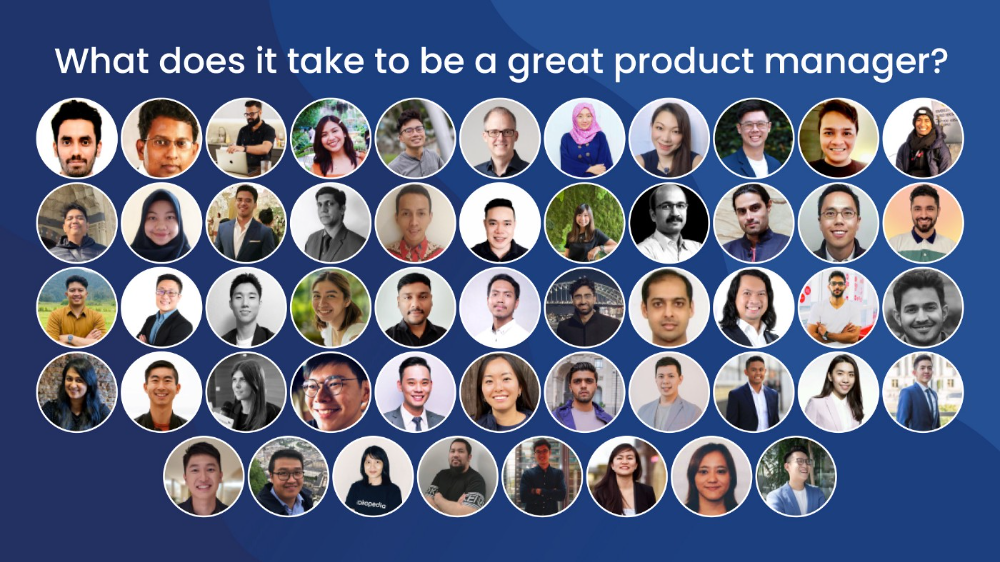
What qualities make a successful product manager?
Themed quotes are alphabetized by author.
Embrace your user/customer
Aeriel Dela Paz, Rainmaking Venture Architect, ex-GCash Product Head
Great PMs know what customers need even when they don’t say it directly. It’s about reading between the lines and going through the numbers to address that need.
Anders Nordahl, OrkestraSCS's Product Manager
Understanding the vision of your customer is as important as to get the customer to buy your vision
Angel Mendoza, MetaverseGo's Product Head
Most people think that to be a great product manager, you must have technical know-how. It’s textbook and I do think it is helpful to some extent, but for me the secret sauce is EMPATHY — the ability to see and feel things from someone else’s perspective. You can’t create a solution without deeply understanding the problem.
Senior Product Manager, Tokopedia
Focus on delivering value and helping people (consumer as well as colleague) and everything else will follow
Darren Lau, Deloitte Digital's Head of Customer Experience
Start with the users, and work backwards. Don’t have a solution looking for a problem
Darryl Tan, Grab Product Manager
I would say that a great product manager is able to identify the crucial problems to solve through strong user empathy and synthesis of insights
Diego Perdana, Kitalulus Senior Product Manager
I think to be a great product manager you need to be obsessed with customer problems and most important is solve the right problem with the right solution
Senior Product Manager, AirAsia
Lot of common sense + Customer Obsession. The most important role of a Product manager is to bring clarity of a solution. Your product is good if it solves customer problems. Your product is great if it solves an eco-system problem and disrupts the business in a positive way.
Edward Xie, Mastercard Managing Consultant, ex-Shopee Product Manager
Perfect your product, but be prepared to compromise for right users
AVP Product, Shipper
For me, a great product manager need to be rational enough to find the business opportunities while obsessing the customers.
Janani Gopalakrishnan is a senior product manager of a stealth firm.
While as a good PM it’s important to be data-driven, to be a great PM one needs to understand that their empathy for their users’ emotions must exceed all logic and data. Great PMs also make these product discussions thrive within the team by intently listening to all the members thoughts and influence the team’s skin in the game positively.
Director, Product Management, Indeed
Great product managers put their users first. They discover problems that matter most to their users and inspire their team to find creative solutions.
Grab's Senior Product Manager Lakshay Kalra
Product management is all about finding and solving most important user problems
Quipper's Mega Puji Saraswati
First of all, always remember the value of “user first” to solve what user really needs (the main problem) for guidance to arrange the task priority and develop new ideas. Second, ownership. Treat the product as your “2nd baby”, and the team as your “2nd family”. Third, maintain a good communication, both horizontally and vertically. But on top of those, always remember to have a work — life balance, and know exactly the priority in life :)
Senior Product Manager, Prosa.AI Miswanto Miswanto
A great Product Manager is someone who can be the link between customer needs with the readiness and flexibility of the team. So that it can provide, build, and produce a product that is useful and helps the community to carry out their daily activities. And He/She can improve product quality ongoing basis or continuous to help provide solutions for users or our customer.
Lead Product Manager, Tokopedia, Oriza Wahyu Utami
Be a great listener, be curious and be determined. every great product manager have the ability to listen the pain points and understand the problems, they are always curious on the users feedback, and they also very determined to look for the solutions that benefited users and the business.
99 Group CPO Rajesh Sangati
The advantage of focusing on customers: it’s impossible to overshoot
Ray Jang, founder of Scenius, formerly of ByteDance
The difference between good and great product managers is that great product managers are willing to go the unsexy and unglamorous extra mile by rolling up their sleeves and ironing out all minutiae details of the product such that when the user uses the product, they can’t help but say “This was made for me.”
BCG Digital Ventures' Sid Narayanan
Great product managers ensure that what gets built and shipped is at the intersection of what creates value for the customer and for the business that’s building the product…often times, especially in today’s highly liquid funding environment, the unit economics, aka ensuring that what gets shipped creates value for the business and is sustainable, gets overlooked
Stephanie Brownlee, BCG Digital Ventures Product Manager
There is software in the world that does more harm than good to people and society. Great Product Managers build products that solve problems not create problems
Experiment constantly
Delivery Hero's Abhishek Muralidharan
Embracing your failure is the key to become a great Product Manager
DeliveryHero's Anuraag Burman
Product Managers should be thick skinned to deal with criticism and the stomach to take risk and face failures.
DataSpark Product Head Apurva Lawale
Great product managers enjoy the creative process with their team to deliver intuitive user experiences to benefit users.
Dexter Zhuang, Xendit Product Manager
The key to creating winning products is building what customers want as quickly as you can — testing and learning along the way.
PayPal's Jay Ko
To me, great product managers always remain relentlessly curious. They are empathetic leaders and problem solvers that glean customer insights into building impactful products
Home Credit Philippines' Jedd Flores
Great Product Managers are the best dreamers; they think of what can be possible for the customers, for the company and the positive impact that it will have in the industry that they’re part of
Set priorities first, foremost, foremost.
HBO Go Product Manager Akshay Ishwar
Good product managers strive to balance the signal to noise ratio, Great product managers know when to turn the dials for each up exactly
Zuellig Pharma's Guojie Su
Have the courage to say no. Managing egos and request is never easy and rejecting them makes it harder but necessary to deliver the best value for the customers.
Ninja Van's John Prawira
(1) PMs should be able to ruthlessly prioritize. In order to be effective, PMs should anchor their product development process with their north stars (success metrics) and always communicate with a purpose. (2) User-first when validating assumptions. PMs should validate assumptions early and often to manage risk when leading initiatives with a focus on generating the highest impact to solving a particular user pain-point. We can’t expect a product/feature launch to be perfect (there might be bugs or we might not achieve our success metric — which is where iteration comes in), but we should try our best to optimize on user-experience earlier on.
Nium Product Manager Keika Sugiyama
I’d say a great PM holds the ability to balance ruthlessness and empathy at the same time. It’s easier said than done for sure!
ShopBack product manager Li Cai
Great product managers are like great Directors of movies. They do not create great products/movies by themselves. They deliver it by Defining, Prioritising, Energising the team to deliver what customers love.
Quincus' Michael Lim
A great product manager, keeps a pulse on the company’s big picture, identifies key problems, and discerns its rightful prioritization, is able to switch between the macro perspective to micro specifics, and communicates concisely with humility that influences naturally for execution
Mathieu François-Barseghian, SVP, Citi Ventures
“You ship your org chart”. This is Conway’s Law short version (1967!): the fundamental socio-technical driver behind innovation successes (Netflix) and failures (your typical bank). The hype behind micro-services is just another reflection of Conway’s Law
Mastercard's Regional Product Manager Nikhil Moorthy
A great PM should always look to build products which are scalable & viable , always keep the end consumer journey in mind. Keeping things simple & having a MVP based approach helps roll out products faster. One has to test & learn & then accordingly enhance / adapt, these are key to success
Rendy Andi, Tokopedia Product Manager
Articulate a clear vision and the path to get there, Create a process that delivers the best results and Be serious about customers.
Senior Product Manager, DANA Indonesia
Own the problem, not the solution — Great PMs are outstanding problem preventers. Great PMs are discerning about which problems to prevent, which problems to solve, and which problems not to solve
Tat Leong Seah, LionsBot International Senior UX Engineer, ex-ViSenze Product Manager
Prioritize outcomes for your users, not outputs of your system” or more succinctly “be agile in delivering value; not features”
Senior Product Manager, Rakuten Viki
A good product manager puts out fires. A great product manager lets fires burn and prioritize from there
acquire fundamental soft skills
Oracle NetSuite's Astrid April Dominguez
Personally, i believe that it takes grit, empathy, and optimistic mindset to become a great PM
Ovo Lead Product Manager Boy Al Idrus
Contrary to popular beliefs, being a great product manager doesn’t have anything to do with technicals, it sure plays a part but most important weapons are: understanding pain points of users, project management, sympathy in leadership and business critical skills; these 4 aspects would definitely help you to become a great product manager.
PwC Product Manager Eric Koh
Product managers need to be courageous to be successful. Courage is required to dive deep, solving big problems at its root and also to think far and dream big to achieve bold visions for your product
Ninja Van's Product Director
In my opinion the two most important ingredients to become a successful product manager is: 1. Strong critical thinking 2. Strong passion for the work. As product managers, we typically need to solve very complex problems where the answers are often very ambiguous. The work is tough and at times can be really frustrating. The 2 ingredients I mentioned earlier will be critical towards helping you to slowly discover the solution that may become a game changer.
PayPal's Lead Product Manager
A great PM has an eye of a designer, the brain of an engineer and the tongue of a diplomat
Product Manager Irene Chan
A great Product Manager is able to think like a CEO of the company. Visionary with Agile Execution in mind
Isabella Yamin, Rakuten Viki Product Manager
There is no one model of being a great product person but what I’ve observed from people I’ve had the privilege working with is an overflowing passion for the user problem, sprinkled with a knack for data and negotiation
Google product manager Jachin Cheng
Great product managers start with abundant intellectual curiosity and grow into a classic T-shape. Horizontally: generalists who range widely, communicate fluidly and collaborate easily cross-functionally, connect unexpected dots, and have the pulse both internally and externally across users, stakeholders, and ecosystem players. Vertically: deep product craftsmanship comes from connecting relentless user obsession with storytelling, business strategy with detailed features and execution, inspiring leadership with risk mitigation, and applying the most relevant tools to solving the right problems.
Jene Lim, Experian's Product Manager
3 Cs and 3 Rs. Critical thinking , Customer empathy, Creativity. Resourcefulness, Resilience, Results orientation.
Nirenj George, Envision Digital's Security Product Manager
A great product manager is someone who can lead, collaborate and influence different stakeholders around the product vision, and should be able to execute the product strategy based on customer insights, as well as take ownership of the product roadmap to create a greater impact on customers.
Grab's Lead Product Manager
Product Management is a multi-dimensional role that looks very different across each product team so each product manager has different challenges to deal with but what I have found common among great product managers is ability to create leverage through their efforts to drive outsized impacts for their products. This leverage is built using data with intuition, building consensus with stakeholders, empowering their teams and focussed efforts on needle moving work.
NCS Product Manager Umar Masagos
To be a great product manager, one must master both the science and art of Product Management. On one hand, you need have a strong understanding of the tools, metrics and data you need to drive your product. On the other hand, you need an in-depth understanding of your organization, your target market and target users, which is often the more challenging aspect to master.
M1 product manager Wei Jiao Keong
A great product manager is multi-faceted. First, you need to have the ability to see the bigger picture, yet have a keen eye for detail. Secondly, you are empathetic and is able to deliver products with exceptional user experience while being analytical enough to achieve business outcomes. Lastly, you are highly resourceful and independent yet comfortable working cross-functionally.
Yudha Utomo, ex-Senior Product Manager, Tokopedia
A great Product Manager is essentially an effective note-taker. In order to achieve the product goals, It is PM’s job to ensure objective has been clearly conveyed, efforts are assessed, and tasks are properly tracked and managed. PM can do this by having top-notch documentation skills.

Tech With Dom
3 years ago
6 Awesome Desk Accessories You Must Have!
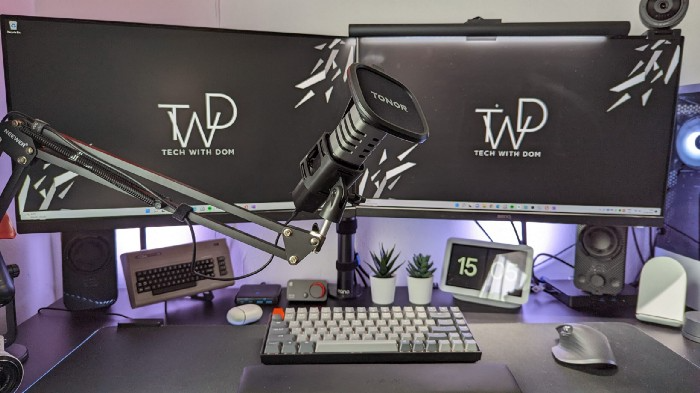
I'm gadget-obsessed. So I shared my top 6 desk gadgets.
These gadgets improve my workflow and are handy for working from home.
Without further ado...
Computer light bar Xiaomi Mi
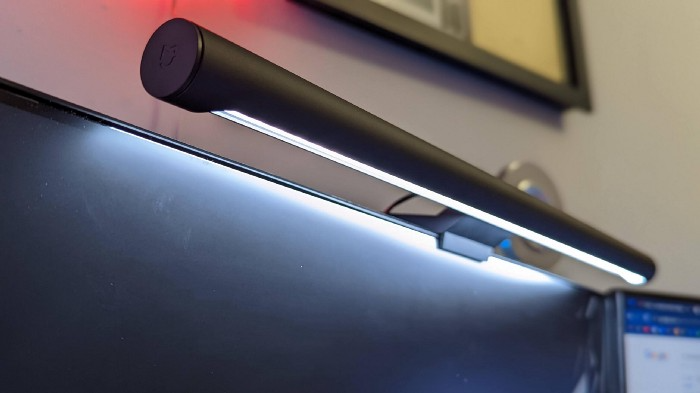
I've previously recommended the Xiaomi Mi Light Bar, and I still do. It's stylish and convenient.
The Mi bar is a monitor-mounted desk lamp. The lamp's hue and brightness can be changed with a stylish wireless remote.
Changeable hue and brightness make it ideal for late-night work.
Desk Mat 2.
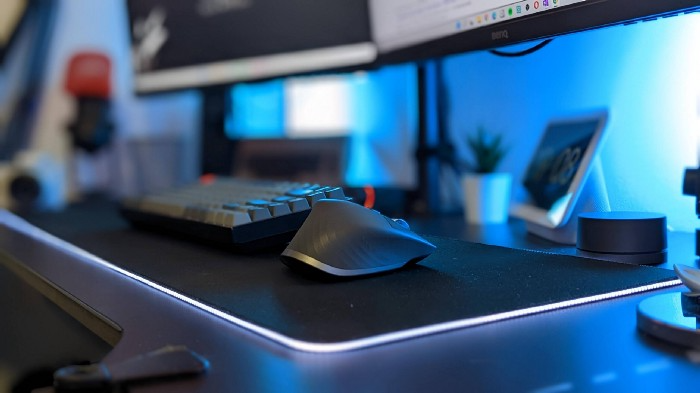
I wasn't planning to include a desk surface in this article, but I find it improves computer use.
The mouse feels smoother and is a better palm rest than wood or glass.
I'm currently using the overkill Razer Goliathus Extended Chroma RGB Gaming Surface, but I like RGB.
Using a desk surface or mat makes computer use more comfortable, and it's not expensive.
Third, the Logitech MX Master 3 Mouse
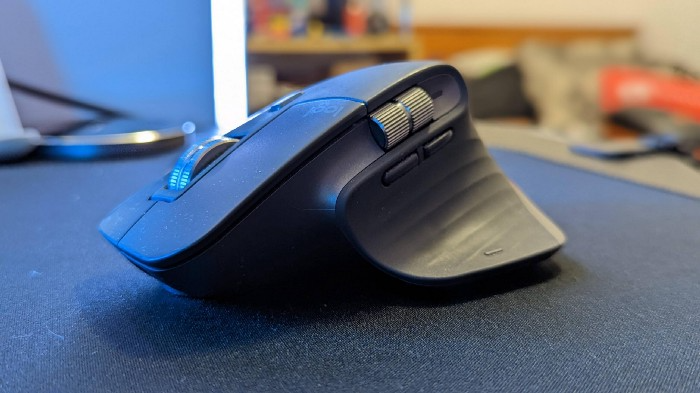
The Logitech MX Master 3 or any from the MX Master series is my favorite mouse.
The side scroll wheel on these mice is a feature I've never seen on another mouse.
Side scroll wheels are great for spreadsheets and video editing. It would be hard for me to switch from my Logitech MX Master 3 to another mouse. Only gaming is off-limits.
Google Nest 4.
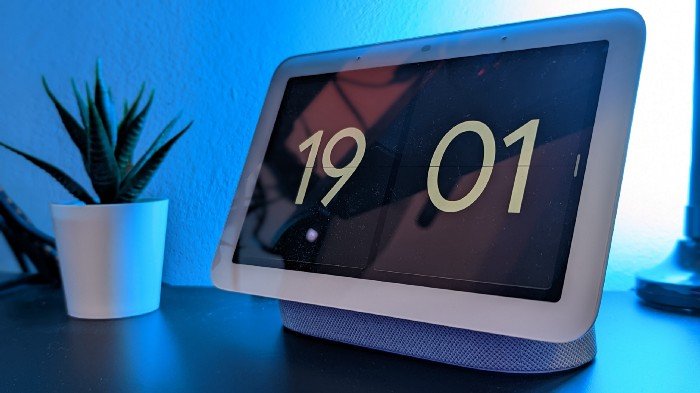
Without a smart assistant, my desk is useless. I'm currently using the second-generation Google Nest Hub, but I've also used the Amazon Echo Dot, Echo Spot, and Apple HomePod Mini.
As a Pixel 6 Pro user, the Nest Hub works best with my phone.
My Nest Hub plays news, music, and calendar events. It also lets me control lights and switches with my smartphone. It plays YouTube videos.
Google Pixel Stand, No. 5
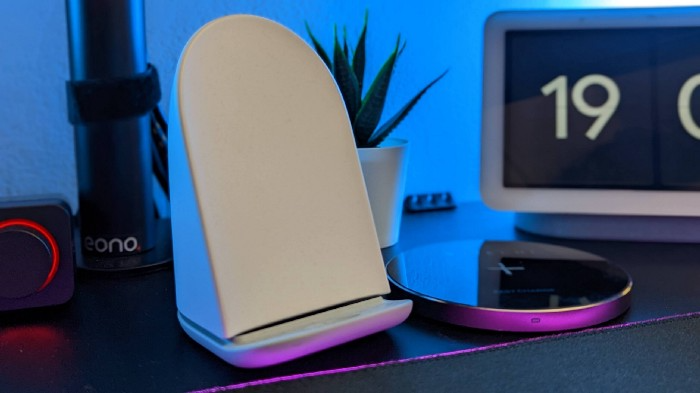
A wireless charger on my desk is convenient for charging my phone and other devices while I work. My desk has two wireless chargers. I have a Satechi aluminum fast charger and a second-generation Google Pixel Stand.
If I need to charge my phone and earbuds simultaneously, I use two wireless chargers. Satechi chargers are well-made and fast. Micro-USB is my only complaint.
The Pixel Stand converts compatible devices into a smart display for adjusting charging speeds and controlling other smart devices. My Pixel 6 Pro charges quickly. Here's my video review.
6. Anker Power Bank
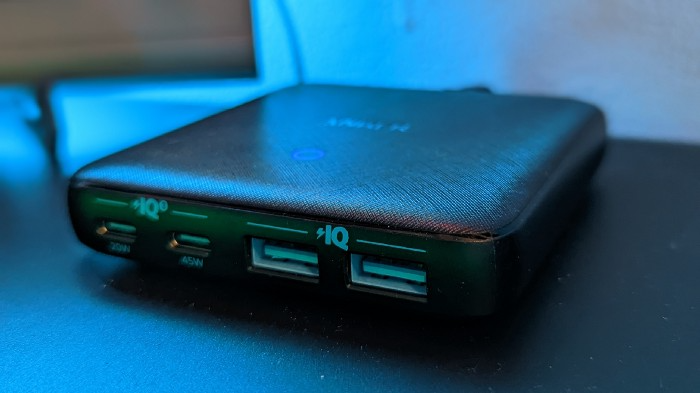
Anker's 65W charger is my final recommendation. This online find was a must-have. This can charge my laptop and several non-wireless devices, perfect for any techie!
The charger has two USB-A ports and two USB-C ports, one with 45W and the other with 20W, so it can charge my iPad Pro and Pixel 6 Pro simultaneously.
Summary
These are some of my favorite office gadgets. My kit page has an updated list.
Links to the products mentioned in this article are in the appropriate sections. These are affiliate links.
You're up! Share the one desk gadget you can't live without and why.