



More on Lifestyle

Sam Hickmann
3 years ago
The Jordan 6 Rings Reintroduce Classic Bulls
The Jordan 6 Rings return in Bulls colors, a deviation from previous releases. The signature red color is used on the midsole and heel, as well as the chenille patch and pull tab. The rest of the latter fixture is black, matching the outsole and adjacent Jumpman logos. Finally, white completes the look, from the leather mudguard to the lace unit. Here's a closer look at the Jordan 6 Rings. Sizes should be available soon on Nike.com and select retailers. Also, official photos of the Air Jordan 1 Denim have surfaced.
Jordan 6 Rings
Release Date: 2022
Color: N/A
Mens: $130
Style Code: 322992-126

Joanna Henderson
3 years ago
An Average Day in the Life of a 25-Year-Old -A Rich Man's At-Home Unemployed Girlfriend
And morning water bottle struggles.

Welcome to my TikTok, where I share my stay-at-home life! I'll show you my usual day from morning to night.
I rise early to prepare my guy iced coffee. I make matcha, my favorite drink. I also fill our water bottles, which takes time and effort, so I record and describe the procedure. As you see me perform the unthinkable by putting a water bottle in a soda machine, you'll see my magnificent but unowned condo. My lover has everything, including:
In the living room, a sizable velvet alabaster divan. I was unable to use the words white or sofa in place of alabaster or a divan since they are insufficiently elegant and do not adequately convey how opulent the item is. The price tag on the divan was another huge feature; I'm sure my lover wouldn't purchase any furniture for less than $20k because it would be beneath him.
A plush Swiss coffee-colored Tabriz carpet. Once more, white is a color associated with the underclass; for us, the wealthy, it's alabaster or swiss coffee. Sorry, my boyfriend is wealthy; I'm truly in the same situation. And yet, I’m the one whos freeloading off of him, not you haha!
Soft translucent powder is the hue of the vinyl wallcoverings. I merely made up the name of that hue, but I have to maintain the online character I've established. There is no room for adopting language typical of peasant people; I must reiterate that I am wealthy while they are not.
I rest after filling our water bottles. I'm really fatigued from chores. My boyfriend is skeptical about hiring a housekeeper and cook. Does he assume I'm a servant or maid? I can't be overly demanding or throw a tantrum since he may replace me with a younger version. Leonardo Di Caprio's fault!
After the break, I bring my lover a water bottle. He's off to work with my best wishes. After cleaning the shower, I text my BF saying I broke a nail. He charged $675 for a crystal-topped shellac manicure. Lucky me!
After this morning's crazy choirs, especially the water bottle one, I'm famished. I dress quickly and go to the neighborhood organic-vegan-gluten-free-sugar-free-plasma-free-GMO-free-HBO-free breakfast place. Most folks can't afford $17.99 for a caffeine-free-mushroom-plus-mud-and-electrolytes morning beverage. It goes nicely with my matcha. Eggs Benedict cost $68. English muffins are off-limits. I can't make myself obese. My partner said he'd swap me for a 19-year-old Eastern European if I keep eating bacon.
I leave no tip since tipping is too much pressure and math for me, so I go shopping.
My shopping adventures have gotten monotonous. 47 designer bags and 114 bag covers Birkins need their own luggage. My babies! I've never caught my BF with a baby. I have sleeping medications and a turkey baster. Tatiana is much younger and thinner than me, so I can't lose him to her. The goal is to become a stay-at-home wife shortly. A turkey baster is essential.
After spending $955 on La Mer lotions and getting a crystal manicure, I nap. Before my boyfriend's return, I can nap for 5 hours.
I wake up around 4 pm — it’s time to prepare dinner. Yes, I said “prepare for dinner,” not “prepare dinner.” I have crystals on my nails! Do you really think I would cook? No way.
My husband's arrival still requires much work. I clean the kitchen, get cutlery and napkins. I order UberEats while my BF is 30-45 minutes away.
Wagyu steaks with Matsutake mushroom soup today. I pick desserts for my lover but not myself. Eastern European threat?
When my BF gets home from work, we eat. I don't believe in tipping UberEats drivers. If he wants to appreciate life's finer things, he should locate a rich woman.
After eating, we plan our getaway. I requested Aruba's fanciest hotel for winter and expect a butler. We're bickering over who gets the butler. We may need two.
Day's end, I'm exhausted. Stay-at-home girlfriends put in a lot of time and work. Work and duties are never-ending.
Before bed, I shower and use a liquid gold mask in my 27-step makeup procedure. It's a French luxury brand, not La Mer.
Here's my day.
Note: I like satire and absurd trends. Stay-at-home-girlfriend TikTok videos have become popular recently.
I don't shame or support such agreements; I'm just an observer. Thanks for reading.

Will Lockett
2 years ago
There Is A New EV King in Town

McMurtry Spéirling outperforms Tesla in speed and efficiency.
EVs were ridiculously slow for decades. However, the 2008 Tesla Roadster revealed that EVs might go extraordinarily fast. The Tesla Model S Plaid and Rimac Nevera are the fastest-accelerating road vehicles, despite combustion-engined road cars dominating the course. A little-known firm beat Tesla and Rimac in the 0-60 race, beat F1 vehicles on a circuit, and boasts a 350-mile driving range. The McMurtry Spéirling is completely insane.
Mat Watson of CarWow, a YouTube megastar, was recently handed a Spéirling and access to Silverstone Circuit (view video above). Mat ran a quarter-mile on Silverstone straight with former F1 driver Max Chilton. The little pocket-rocket automobile touched 100 mph in 2.7 seconds, completed the quarter mile in 7.97 seconds, and hit 0-60 in 1.4 seconds. When looking at autos quickly, 0-60 times can seem near. The Tesla Model S Plaid does 0-60 in 1.99 seconds, which is comparable to the Spéirling. Despite the meager statistics, the Spéirling is nearly 30% faster than Plaid!
My vintage VW Golf 1.4s has an 8.8-second 0-60 time, whereas a BMW Z4 3.0i is 30% faster (with a 0-60 time of 6 seconds). I tried to beat a Z4 off the lights in my Golf, but the Beamer flew away. If they challenge the Spéirling in a Model S Plaid, they'll feel as I did. Fast!
Insane quarter-mile drag time. Its road car record is 7.97 seconds. A Dodge Demon, meant to run extremely fast quarter miles, finishes so in 9.65 seconds, approximately 20% slower. The Rimac Nevera's 8.582-second quarter-mile record was miles behind drag racing. This run hampered the Spéirling. Because it was employing gearing that limited its top speed to 150 mph, it reached there in a little over 5 seconds without accelerating for most of the quarter mile! McMurtry can easily change the gearing, making the Spéirling run quicker.
McMurtry did this how? First, the Spéirling is a tiny single-seater EV with a 60 kWh battery pack, making it one of the lightest EVs ever. The 1,000-hp Spéirling has more than one horsepower per kg. The Nevera has 0.84 horsepower per kg and the Plaid 0.44.
However, you cannot simply construct a car light and power it. Instead of accelerating, it would spin. This makes the Spéirling a fan car. Its huge fans create massive downforce. These fans provide the Spéirling 2 tonnes of downforce while stationary, so you could park it on the ceiling. Its fast 0-60 time comes from its downforce, which lets it deliver all that power without wheel spin.
It also possesses complete downforce at all speeds, allowing it to tackle turns faster than even race vehicles. Spéirlings overcame VW IDRs and F1 cars to set the Goodwood Hill Climb record (read more here). The Spéirling is a dragstrip winner and track dominator, unlike the Plaid and Nevera.
The Spéirling is astonishing for a single-seater. Fan-generated downforce is more efficient than wings and splitters. It also means the vehicle has very minimal drag without the fan. The Spéirling can go 350 miles per charge (WLTP) or 20-30 minutes at full speed on a track despite its 60 kWh battery pack. The G-forces would hurt your neck before the battery died if you drove around a track for longer. The Spéirling can charge at over 200 kW in about 30 minutes. Thus, driving to track days, having fun, and returning is possible. Unlike other high-performance EVs.
Tesla, Rimac, or Lucid will struggle to defeat the Spéirling. They would need to build a fan automobile because adding power to their current vehicle would make it uncontrollable. The EV and automobile industries now have a new, untouchable performance king.
You might also like

Shruti Mishra
3 years ago
How to get 100k profile visits on Twitter each month without spending a dime
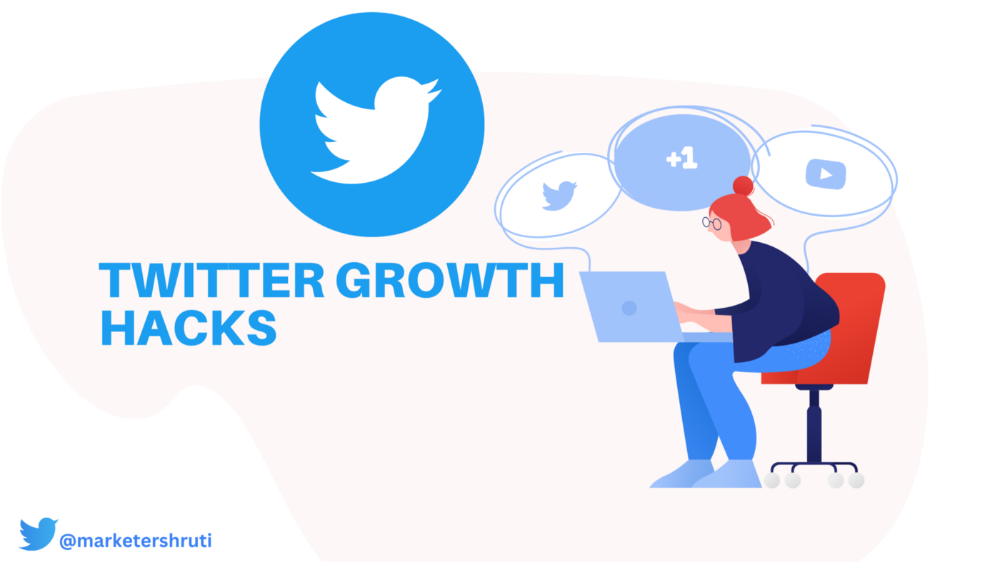
As a marketer, I joined Twitter on August 31, 2022 to use it.
Growth has been volatile, causing up-and-down engagements. 500 followers in 11 days.
I met amazing content creators, marketers, and people.
Those who use Twitter may know that one-liners win the algorithm, especially if they're funny or humorous, but as a marketer I can't risk posting content that my audience won't like.
I researched, learned some strategies, and A/B tested; some worked, some didn't.
In this article, I share what worked for me so you can do the same.
Thanks for reading!
Let's check my Twitter stats.

Tweets: how many tweets I sent in the first 28 days.
A user may be presented with a Tweet in their timeline or in search results.
In-person visits how many times my Twitter profile was viewed in the first 28 days.
Mentions: the number of times a tweet has mentioned my name.
Number of followers: People who were following me
Getting 500 Twitter followers isn't difficult.
Not easy, but doable.
Follow these steps to begin:
Determine your content pillars in step 1.
My formula is Growth = Content + Marketing + Community.
I discuss growth strategies.
My concept for growth is : 1. Content = creating / writing + sharing content in my niche. 2. Marketing = Marketing everything in business + I share my everyday learnings in business, marketing & entrepreneurship. 3. Community = Building community of like minded individuals (Also,I share how to’s) + supporting marketers to build & grow through community building.
Identify content pillars to create content for your audience.
2. Make your profile better
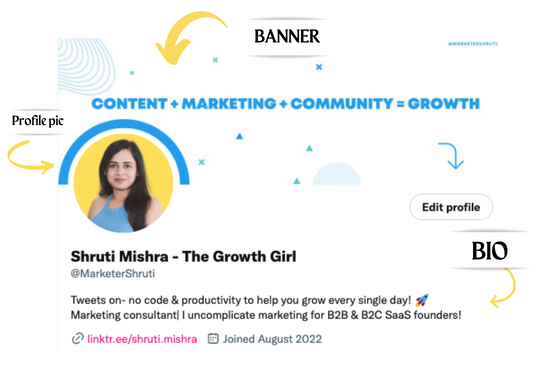
Create a profile picture. Your recognition factor is this.
Professional headshots are worthwhile.
This tool can help you create a free, eye-catching profile pic.
Use a niche-appropriate avatar if you don't want to show your face.
2. Create a bio that converts well mainly because first impressions count.
what you're sharing + why + +social proof what are you making
Be brief and precise. (155 characters)
3. Configure your banner
Banners complement profile pictures.
Use this space to explain what you do and how Twitter followers can benefit.
Canva's Twitter header maker is free.
Birdy can test multiple photo, bio, and banner combinations to optimize your profile.
Versions A and B of your profile should be completed.
Find the version that converts the best.
Use the profile that converts the best.
4. Special handle
If your username/handle is related to your niche, it will help you build authority and presence among your audience. Mine on Twitter is @marketershruti.
5. Participate expertly
Proficiently engage while you'll have no audience at first. Borrow your dream audience for free.
Steps:
Find a creator who has the audience you want.
Activate their post notifications and follow them.
Add a valuable comment first.
6. Create fantastic content
Use:
Medium (Read articles about your topic.)
Podcasts (Listen to experts on your topics)
YouTube (Follow channels in your niche)
Tweet what?
Listicle ( Hacks, Books, Tools, Podcasts)
Lessons (Teach your audience how to do 1 thing)
Inspirational (Inspire people to take action)
Consistent writing?
You MUST plan ahead and schedule your Tweets.
Use a scheduling tool that is effective for you; hypefury is mine.
Lastly, consistency is everything that attracts growth. After optimizing your profile, stay active to gain followers, engagements, and clients.
If you found this helpful, please like and comment below.

Raad Ahmed
3 years ago
How We Just Raised $6M At An $80M Valuation From 100+ Investors Using A Link (Without Pitching)
Lawtrades nearly failed three years ago.
We couldn't raise Series A or enthusiasm from VCs.
We raised $6M (at a $80M valuation) from 100 customers and investors using a link and no pitching.
Step-by-step:
We refocused our business first.
Lawtrades raised $3.7M while Atrium raised $75M. By comparison, we seemed unimportant.
We had to close the company or try something new.
As I've written previously, a pivot saved us. Our initial focus on SMBs attracted many unprofitable customers. SMBs needed one-off legal services, meaning low fees and high turnover.
Tech startups were different. Their General Councels (GCs) needed near-daily support, resulting in higher fees and lower churn than SMBs.
We stopped unprofitable customers and focused on power users. To avoid dilution, we borrowed against receivables. We scaled our revenue 10x, from $70k/mo to $700k/mo.
Then, we reconsidered fundraising (and do it differently)
This time was different. Lawtrades was cash flow positive for most of last year, so we could dictate our own terms. VCs were still wary of legaltech after Atrium's shutdown (though they were thinking about the space).
We neither wanted to rely on VCs nor dilute more than 10% equity. So we didn't compete for in-person pitch meetings.
AngelList Roll-Up Vehicle (RUV). Up to 250 accredited investors can invest in a single RUV. First, we emailed customers the RUV. Why? Because I wanted to help the platform's users.
Imagine if Uber or Airbnb let all drivers or Superhosts invest in an RUV. Humans make the platform, theirs and ours. Giving people a chance to invest increases their loyalty.
We expanded after initial interest.
We created a Journey link, containing everything that would normally go in an investor pitch:
- Slides
- Trailer (from me)
- Testimonials
- Product demo
- Financials
We could also link to our AngelList RUV and send the pitch to an unlimited number of people. Instead of 1:1, we had 1:10,000 pitches-to-investors.
We posted Journey's link in RUV Alliance Discord. 600 accredited investors noticed it immediately. Within days, we raised $250,000 from customers-turned-investors.
Stonks, which live-streamed our pitch to thousands of viewers, was interested in our grassroots enthusiasm. We got $1.4M from people I've never met.
These updates on Pump generated more interest. Facebook, Uber, Netflix, and Robinhood executives all wanted to invest. Sahil Lavingia, who had rejected us, gave us $100k.
We closed the round with public support.
Without a single pitch meeting, we'd raised $2.3M. It was a result of natural enthusiasm: taking care of the people who made us who we are, letting them move first, and leveraging their enthusiasm with VCs, who were interested.
We used network effects to raise $3.7M from a founder-turned-VC, bringing the total to $6M at a $80M valuation (which, by the way, I set myself).
What flipping the fundraising script allowed us to do:
We started with private investors instead of 2–3 VCs to show VCs what we were worth. This gave Lawtrades the ability to:
- Without meetings, share our vision. Many people saw our Journey link. I ended up taking meetings with people who planned to contribute $50k+, but still, the ratio of views-to-meetings was outrageously good for us.
- Leverage ourselves. Instead of us selling ourselves to VCs, they did. Some people with large checks or late arrivals were turned away.
- Maintain voting power. No board seats were lost.
- Utilize viral network effects. People-powered.
- Preemptively halt churn by turning our users into owners. People are more loyal and respectful to things they own. Our users make us who we are — no matter how good our tech is, we need human beings to use it. They deserve to be owners.
I don't blame founders for being hesitant about this approach. Pump and RUVs are new and scary. But it won’t be that way for long. Our approach redistributed some of the power that normally lies entirely with VCs, putting it into our hands and our network’s hands.
This is the future — another way power is shifting from centralized to decentralized.

Kaitlin Fritz
3 years ago
The Entrepreneurial Chicken and Egg
University entrepreneurship is like a Willy Wonka Factory of ideas. Classes, roommates, discussions, and the cafeteria all inspire new ideas. I've seen people establish a business without knowing its roots.
Chicken or egg? On my mind: I've asked university founders around the world whether the problem or solution came first.
The Problem
One African team I met started with the “instant noodles” problem in their academic ecosystem. Many of us have had money issues in college, which may have led to poor nutritional choices.
Many university students in a war-torn country ate quick noodles or pasta for dinner.

Noodles required heat, water, and preparation in the boarding house. Unreliable power from one hot plate per blue moon. What's healthier, easier, and tastier than sodium-filled instant pots?
BOOM. They were fixing that. East African kids need affordable, nutritious food.
This is a real difficulty the founders faced every day with hundreds of comrades.
This sparked their serendipitous entrepreneurial journey and became their business's cornerstone.
The Solution
I asked a UK team about their company idea. They said the solution fascinated them.
The crew was fiddling with social media algorithms. Why are some people more popular? They were studying platforms and social networks, which offered a way for them.

Solving a problem? Yes. Long nights of university research lead them to it. Is this like world hunger? Social media influencers confront this difficulty regularly.
It made me ponder something. Is there a correct response?
In my heart, yes, but in my head…maybe?
I believe you should lead with empathy and embrace the problem, not the solution. Big or small, businesses should solve problems. This should be your focus. This is especially true when building a social company with an audience in mind.
Philosophically, invention and innovation are occasionally accidental. Also not penalized. Think about bugs and the creation of Velcro, or the inception of Teflon. They tackle difficulties we overlook. The route to the problem may look different, but there is a path there.
There's no golden ticket to the Chicken-Egg debate, but I'll keep looking this summer.