


More on Science

Sara_Mednick
3 years ago
Since I'm a scientist, I oppose biohacking
Understanding your own energy depletion and restoration is how to truly optimize
Hack has meant many bad things for centuries. In the 1800s, a hack was a meager horse used to transport goods.
Modern usage describes a butcher or ax murderer's cleaver chop. The 1980s programming boom distinguished elegant code from "hacks". Both got you to your goal, but the latter made any programmer cringe and mutter about changing the code. From this emerged the hacker trope, the friendless anti-villain living in a murky hovel lit by the computer monitor, eating junk food and breaking into databases to highlight security system failures or steal hotdog money.
Now, start-a-billion-dollar-business-from-your-garage types have shifted their sights from app development to DIY biology, coining the term "bio-hack". This is a required keyword and meta tag for every fitness-related podcast, book, conference, app, or device.
Bio-hacking involves bypassing your body and mind's security systems to achieve a goal. Many biohackers' initial goals were reasonable, like lowering blood pressure and weight. Encouraged by their own progress, self-determination, and seemingly exquisite control of their biology, they aimed to outsmart aging and death to live 180 to 1000 years (summarized well in this vox.com article).
With this grandiose north star, the hunt for novel supplements and genetic engineering began.
Companies selling do-it-yourself biological manipulations cite lab studies in mice as proof of their safety and success in reversing age-related diseases or promoting longevity in humans (the goal changes depending on whether a company is talking to the federal government or private donors).
The FDA is slower than science, they say. Why not alter your biochemistry by buying pills online, editing your DNA with a CRISPR kit, or using a sauna delivered to your home? How about a microchip or electrical stimulator?
What could go wrong?
I'm not the neo-police, making citizen's arrests every time someone introduces a new plumbing gadget or extrapolates from animal research on resveratrol or catechins that we should drink more red wine or eat more chocolate. As a scientist who's spent her career asking, "Can we get better?" I've come to view bio-hacking as misguided, profit-driven, and counterproductive to its followers' goals.
We're creatures of nature. Despite all the new gadgets and bio-hacks, we still use Roman plumbing technology, and the best way to stay fit, sharp, and happy is to follow a recipe passed down since the beginning of time. Bacteria, plants, and all natural beings are rhythmic, with alternating periods of high activity and dormancy, whether measured in seconds, hours, days, or seasons. Nature repeats successful patterns.
During the Upstate, every cell in your body is naturally primed and pumped full of glycogen and ATP (your cells' energy currencies), as well as cortisol, which supports your muscles, heart, metabolism, cognitive prowess, emotional regulation, and general "get 'er done" attitude. This big energy release depletes your batteries and requires the Downstate, when your subsystems recharge at the cellular level.
Downstates are when you give your heart a break from pumping nutrient-rich blood through your body; when you give your metabolism a break from inflammation, oxidative stress, and sympathetic arousal caused by eating fast food — or just eating too fast; or when you give your mind a chance to wander, think bigger thoughts, and come up with new creative solutions. When you're responding to notifications, emails, and fires, you can't relax.
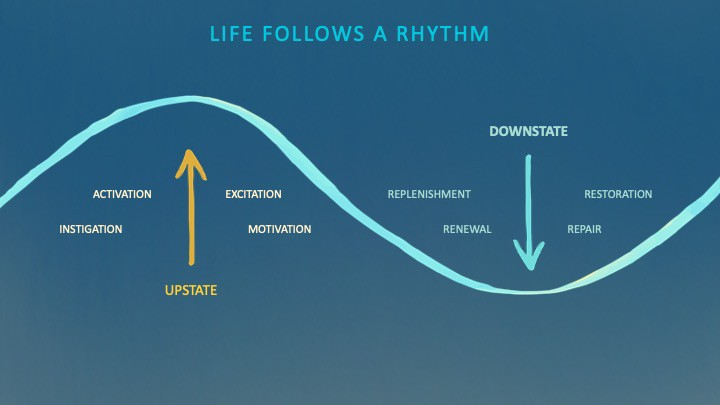
Downstates aren't just for consistently recharging your battery. By spending time in the Downstate, your body and brain get extra energy and nutrients, allowing you to grow smarter, faster, stronger, and more self-regulated. This state supports half-marathon training, exam prep, and mediation. As we age, spending more time in the Downstate is key to mental and physical health, well-being, and longevity.
When you prioritize energy-demanding activities during Upstate periods and energy-replenishing activities during Downstate periods, all your subsystems, including cardiovascular, metabolic, muscular, cognitive, and emotional, hum along at their optimal settings. When you synchronize the Upstates and Downstates of these individual rhythms, their functioning improves. A hard workout causes autonomic stress, which triggers Downstate recovery.
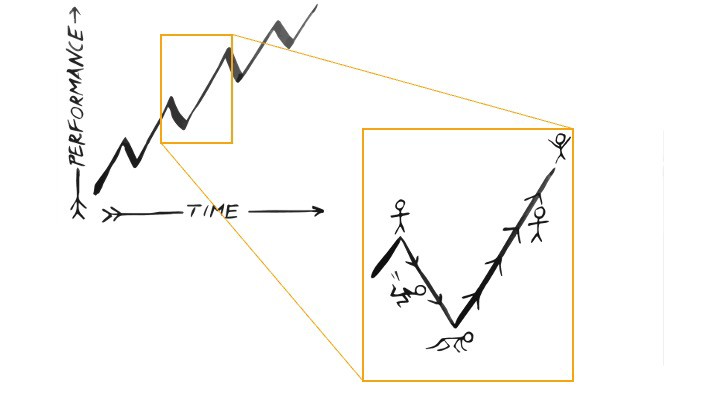
By choosing the right timing and type of exercise during the day, you can ensure a deeper recovery and greater readiness for the next workout by working with your natural rhythms and strengthening your autonomic and sleep Downstates.
Morning cardio workouts increase deep sleep compared to afternoon workouts. Timing and type of meals determine when your sleep hormone melatonin is released, ushering in sleep.
Rhythm isn't a hack. It's not a way to cheat the system or the boss. Nature has honed its optimization wisdom over trillions of days and nights. Stop looking for quick fixes. You're a whole system made of smaller subsystems that must work together to function well. No one pill or subsystem will make it all work. Understanding and coordinating your rhythms is free, easy, and only benefits you.
Dr. Sara C. Mednick is a cognitive neuroscientist at UC Irvine and author of The Power of the Downstate (HachetteGO)

Katherine Kornei
3 years ago
The InSight lander from NASA has recorded the greatest tremor ever felt on Mars.
The magnitude 5 earthquake was responsible for the discharge of energy that was 10 times greater than the previous record holder.
Any Martians who happen to be reading this should quickly learn how to duck and cover.
NASA's Jet Propulsion Laboratory in Pasadena, California, reported that on May 4, the planet Mars was shaken by an earthquake of around magnitude 5, making it the greatest Marsquake ever detected to this point. The shaking persisted for more than six hours and unleashed more than ten times as much energy as the earthquake that had previously held the record for strongest.
The event was captured on record by the InSight lander, which is operated by the United States Space Agency and has been researching the innards of Mars ever since it touched down on the planet in 2018 (SN: 11/26/18). The epicenter of the earthquake was probably located in the vicinity of Cerberus Fossae, which is located more than 1,000 kilometers away from the lander.
The surface of Cerberus Fossae is notorious for being broken up and experiencing periodic rockfalls. According to geophysicist Philippe Lognonné, who is the lead investigator of the Seismic Experiment for Interior Structure, the seismometer that is onboard the InSight lander, it is reasonable to assume that the ground is moving in that area. "This is an old crater from a volcanic eruption."
Marsquakes, which are similar to earthquakes in that they give information about the interior structure of our planet, can be utilized to investigate what lies beneath the surface of Mars (SN: 7/22/21). And according to Lognonné, who works at the Institut de Physique du Globe in Paris, there is a great deal that can be gleaned from analyzing this massive earthquake. Because the quality of the signal is so high, we will be able to focus on the specifics.

Sam Warain
3 years ago
Sam Altman, CEO of Open AI, foresees the next trillion-dollar AI company
“I think if I had time to do something else, I would be so excited to go after this company right now.”
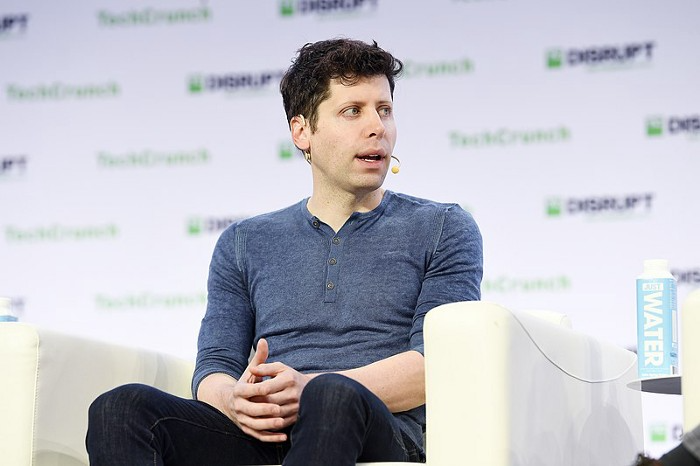
Sam Altman, CEO of Open AI, recently discussed AI's present and future.
Open AI is important. They're creating the cyberpunk and sci-fi worlds.
They use the most advanced algorithms and data sets.
GPT-3...sound familiar? Open AI built most copyrighting software. Peppertype, Jasper AI, Rytr. If you've used any, you'll be shocked by the quality.
Open AI isn't only GPT-3. They created DallE-2 and Whisper (a speech recognition software released last week).
What will they do next? What's the next great chance?
Sam Altman, CEO of Open AI, recently gave a lecture about the next trillion-dollar AI opportunity.
Who is the organization behind Open AI?
Open AI first. If you know, skip it.
Open AI is one of the earliest private AI startups. Elon Musk, Greg Brockman, and Rebekah Mercer established OpenAI in December 2015.
OpenAI has helped its citizens and AI since its birth.
They have scary-good algorithms.
Their GPT-3 natural language processing program is excellent.
The algorithm's exponential growth is astounding. GPT-2 came out in November 2019. May 2020 brought GPT-3.
Massive computation and datasets improved the technique in just a year. New York Times said GPT-3 could write like a human.
Same for Dall-E. Dall-E 2 was announced in April 2022. Dall-E 2 won a Colorado art contest.
Open AI's algorithms challenge jobs we thought required human innovation.
So what does Sam Altman think?
The Present Situation and AI's Limitations
During the interview, Sam states that we are still at the tip of the iceberg.
So I think so far, we’ve been in the realm where you can do an incredible copywriting business or you can do an education service or whatever. But I don’t think we’ve yet seen the people go after the trillion dollar take on Google.
He's right that AI can't generate net new human knowledge. It can train and synthesize vast amounts of knowledge, but it simply reproduces human work.
“It’s not going to cure cancer. It’s not going to add to the sum total of human scientific knowledge.”
But the key word is yet.
And that is what I think will turn out to be wrong that most surprises the current experts in the field.
Reinforcing his point that massive innovations are yet to come.
But where?
The Next $1 Trillion AI Company
Sam predicts a bio or genomic breakthrough.
There’s been some promising work in genomics, but stuff on a bench top hasn’t really impacted it. I think that’s going to change. And I think this is one of these areas where there will be these new $100 billion to $1 trillion companies started, and those areas are rare.
Avoid human trials since they take time. Bio-materials or simulators are suitable beginning points.
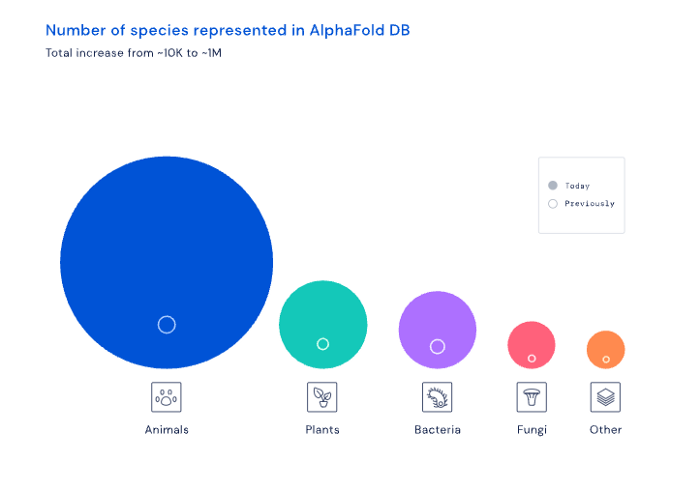
AI may have a breakthrough. DeepMind, an OpenAI competitor, has developed AlphaFold to predict protein 3D structures.
It could change how we see proteins and their function. AlphaFold could provide fresh understanding into how proteins work and diseases originate by revealing their structure. This could lead to Alzheimer's and cancer treatments. AlphaFold could speed up medication development by revealing how proteins interact with medicines.
Deep Mind offered 200 million protein structures for scientists to download (including sustainability, food insecurity, and neglected diseases).
Being in AI for 4+ years, I'm amazed at the progress. We're past the hype cycle, as evidenced by the collapse of AI startups like C3 AI, and have entered a productive phase.
We'll see innovative enterprises that could replace Google and other trillion-dollar companies.
What happens after AI adoption is scary and unpredictable. How will AGI (Artificial General Intelligence) affect us? Highly autonomous systems that exceed humans at valuable work (Open AI)
My guess is that the things that we’ll have to figure out are how we think about fairly distributing wealth, access to AGI systems, which will be the commodity of the realm, and governance, how we collectively decide what they can do, what they don’t do, things like that. And I think figuring out the answer to those questions is going to just be huge. — Sam Altman CEO
You might also like

Florian Wahl
3 years ago
An Approach to Product Strategy
I've been pondering product strategy and how to articulate it. Frameworks helped guide our thinking.
If your teams aren't working together or there's no clear path to victory, your product strategy may not be well-articulated or communicated (if you have one).
Before diving into a product strategy's details, it's important to understand its role in the bigger picture — the pieces that move your organization forward.
the overall picture
A product strategy is crucial, in my opinion. It's part of a successful product or business. It's the showpiece.
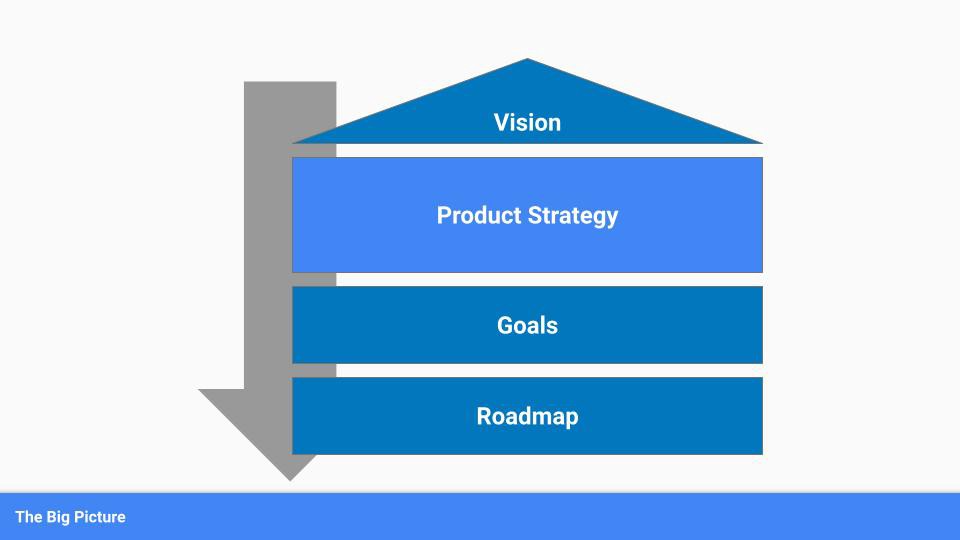
To simplify, we'll discuss four main components:
Vision
Product Management
Goals
Roadmap
Vision
Your company's mission? Your company/product in 35 years? Which headlines?
The vision defines everything your organization will do in the long term. It shows how your company impacted the world. It's your organization's rallying cry.
An ambitious but realistic vision is needed.
Without a clear vision, your product strategy may be inconsistent.
Product Management
Our main subject. Product strategy connects everything. It fulfills the vision.
In Part 2, we'll discuss product strategy.
Goals
This component can be goals, objectives, key results, targets, milestones, or whatever goal-tracking framework works best for your organization.
These product strategy metrics will help your team prioritize strategies and roadmaps.
Your company's goals should be unified. This fuels success.
Roadmap
The roadmap is your product strategy's timeline. It provides a prioritized view of your team's upcoming deliverables.
A roadmap is time-bound and includes measurable goals for your company. Your team's steps and capabilities for executing product strategy.
If your team has trouble prioritizing or defining a roadmap, your product strategy or vision is likely unclear.
Formulation of a Product Strategy
Now that we've discussed where your product strategy fits in the big picture, let's look at a framework.
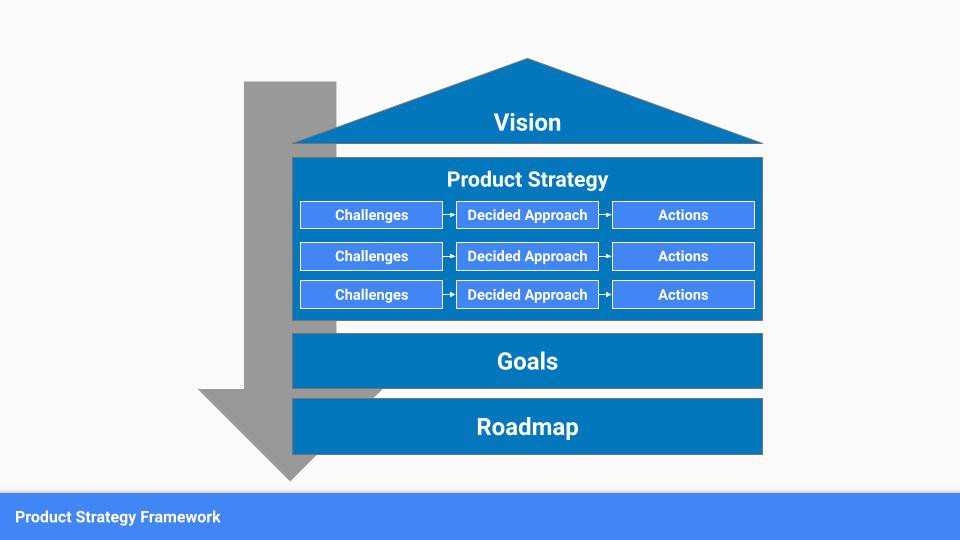
A product strategy should include challenges, an approach, and actions.
Challenges
First, analyze the problems/situations you're solving. It can be customer- or company-focused.
The analysis should explain the problems and why they're important. Try to simplify the situation and identify critical aspects.
Some questions:
What issues are we attempting to resolve?
What obstacles—internal or otherwise—are we attempting to overcome?
What is the opportunity, and why should we pursue it, in your opinion?
Decided Method
Second, describe your approach. This can be a set of company policies for handling the challenge. It's the overall approach to the first part's analysis.
The approach can be your company's bets, the solutions you've found, or how you'll solve the problems you've identified.
Again, these questions can help:
What is the value that we hope to offer to our clients?
Which market are we focusing on first?
What makes us stand out? Our benefit over rivals?
Actions
Third, identify actions that result from your approach. Second-part actions should be these.
Coordinate these actions. You may need to add products or features to your roadmap, acquire new capabilities through partnerships, or launch new marketing campaigns. Whatever fits your challenges and strategy.
Final questions:
What skills do we need to develop or obtain?
What is the chosen remedy? What are the main outputs?
What else ought to be added to our road map?
Put everything together
… and iterate!
Strategy isn't one-and-done. Changes occur. Economies change. Competitors emerge. Customer expectations change.
One unexpected event can make strategies obsolete quickly. Muscle it. Review, evaluate, and course-correct your strategies with your teams. Quarterly works. In a new or unstable industry, more often.

Enrique Dans
3 years ago
When we want to return anything, why on earth do stores still require a receipt?
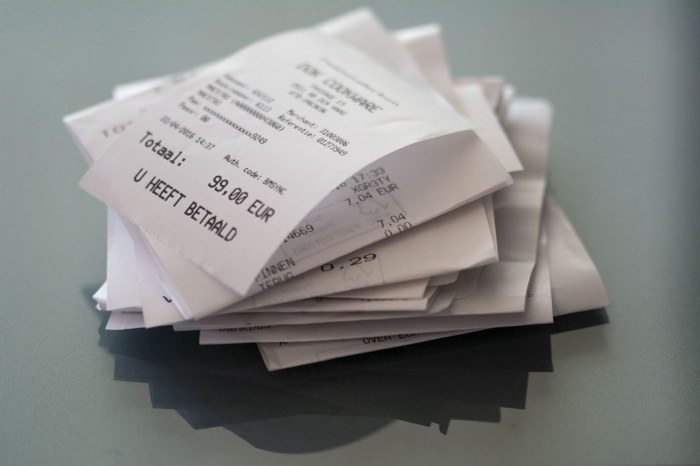
A friend told me of an incident she found particularly irritating: a retailer where she is a frequent client, with an account and loyalty card, asked for the item's receipt.
We all know that stores collect every bit of data they can on us, including our socio-demographic profile, address, shopping habits, and everything we've ever bought, so why would they need a fading receipt? Who knows? That their consumers try to pass off other goods? It's easy to verify past transactions to see when the item was purchased.
That's it. Why require receipts? Companies send us incentives, discounts, and other marketing, yet when we need something, we have to prove we're not cheating.
Why require us to preserve data and documents when our governments and governmental institutions already have them? Why do I need to carry documents like my driver's license if the authorities can check if I have one and what state it's in once I prove my identity?
We shouldn't be required to give someone data or documents they already have. The days of waiting up with our paperwork for a stern official to inform us something is missing are over.
How can retailers still ask if you have a receipt if we've made our slow, bureaucratic, and all-powerful government sensible? Then what? The shop may not accept your return (which has a two-year window, longer than most purchase tickets last) or they may just let you replace the item.
Isn't this an anachronism in the age of CRMs, customer files that know what we ate for breakfast, and loyalty programs? If government and bureaucracies have learnt to use its own files and make life easier for the consumer, why do retailers ask for a receipt?
They're adding friction to the system. They know we can obtain a refund, use our warranty, or get our money back. But if I ask for ludicrous criteria, like keeping the purchase receipt in your wallet (wallet? another anachronism, if I leave the house with only my smartphone! ), it will dissuade some individuals and tip the scales in their favor when it comes to limiting returns. Some manager will take credit for lowering returns and collect her annual bonus. Having the wrong metrics is common in management.
To slow things down, asking for a receipt is like asking us to perform a handstand and leap 20 times on one foot. You have my information, use it to send me everything, and know everything I've bought, yet when I need a two-way service, you refuse to utilize it and require that I keep it and prove it.
Refuse as customers. If retailers want our business, they should treat us well, not just when we spend money. If I come to return a product, claim its use or warranty, or be taught how to use it, I am the same person you treated wonderfully when I bought it. Remember that, and act accordingly.
A store should use my information for everything, not just what it wants. Keep my info, but don't sell me anything.

Darshak Rana
3 years ago
17 Google Secrets 99 Percent of People Don't Know
What can't Google do?
Seriously, nothing! Google rocks.
Google is a major player in online tools and services. We use it for everything, from research to entertainment.
Did I say entertain yourself?
Yes, with so many features and options, it can be difficult to fully utilize Google.
#1. Drive Google Mad
You can make Google's homepage dance if you want to be silly.
Just type “Google Gravity” into Google.com. Then select I'm lucky.
See the page unstick before your eyes!
#2 Play With Google Image
Google isn't just for work.
Then have fun with it!
You can play games right in your search results. When you need a break, google “Solitaire” or “Tic Tac Toe”.
#3. Do a Barrel Roll
Need a little more excitement in your life? Want to see Google dance?
Type “Do a barrel roll” into the Google search bar.
Then relax and watch your screen do a 360.
#4 No Internet? No issue!
This is a fun trick to use when you have no internet.
If your browser shows a “No Internet” page, simply press Space.
Boom!
We have dinosaurs! Now use arrow keys to save your pixelated T-Rex from extinction.
#5 Google Can Help
Play this Google coin flip game to see if you're lucky.
Enter “Flip a coin” into the search engine.
You'll see a coin flipping animation. If you get heads or tails, click it.
#6. Think with Google
My favorite Google find so far is the “Think with Google” website.
Think with Google is a website that offers marketing insights, research, and case studies.
I highly recommend it to entrepreneurs, small business owners, and anyone interested in online marketing.
#7. Google Can Read Images!
This is a cool Google trick that few know about.
You can search for images by keyword or upload your own by clicking the camera icon on Google Images.
Google will then show you all of its similar images.
Caution: You should be fine with your uploaded images being public.
#8. Modify the Google Logo!
Clicking on the “I'm Feeling Lucky” button on Google.com takes you to a random Google Doodle.
Each year, Google creates a Doodle to commemorate holidays, anniversaries, and other occasions.
#9. What is my IP?
Simply type “What is my IP” into Google to find out.
Your IP address will appear on the results page.
#10. Send a Self-Destructing Email With Gmail,
Create a new message in Gmail. Find an icon that resembles a lock and a clock near the SEND button. That's where the Confidential Mode is.
By clicking it, you can set an expiration date for your email. Expiring emails are automatically deleted from both your and the recipient's inbox.
#11. Blink, Google Blink!
This is a unique Google trick.
Type “blink HTML” into Google. The words “blink HTML” will appear and then disappear.
The text is displayed for a split second before being deleted.
To make this work, Google reads the HTML code and executes the “blink” command.
#12. The Answer To Everything
This is for all Douglas Adams fans.
The answer to life, the universe, and everything is 42, according to Google.
An allusion to Douglas Adams' Hitchhiker's Guide to the Galaxy, in which Ford Prefect seeks to understand life, the universe, and everything.
#13. Google in 1998
It's a blast!
Type “Google in 1998” into Google. "I'm feeling lucky"
You'll be taken to an old-school Google homepage.
It's a nostalgic trip for long-time Google users.
#14. Scholarships and Internships
Google can help you find college funding!
Type “scholarships” or “internships” into Google.
The number of results will surprise you.
#15. OK, Google. Dice!
To roll a die, simply type “Roll a die” into Google.
On the results page is a virtual dice that you can click to roll.
#16. Google has secret codes!
Hit the nine squares on the right side of your Google homepage to go to My Account. Then Personal Info.
You can add your favorite language to the “General preferences for the web” tab.
#17. Google Terminal
You can feel like a true hacker.
Just type “Google Terminal” into Google.com. "I'm feeling lucky"
Voila~!
You'll be taken to an old-school computer terminal-style page.
You can then type commands to see what happens.
Have you tried any of these activities? Tell me in the comments.
Read full article here