

More on Leadership

Caspar Mahoney
3 years ago
Changing Your Mindset From a Project to a Product
Product game mindsets? How do these vary from Project mindset?
1950s spawned the Iron Triangle. Project people everywhere know and live by it. In stakeholder meetings, it is used to stretch the timeframe, request additional money, or reduce scope.
Quality was added to this triangle as things matured.
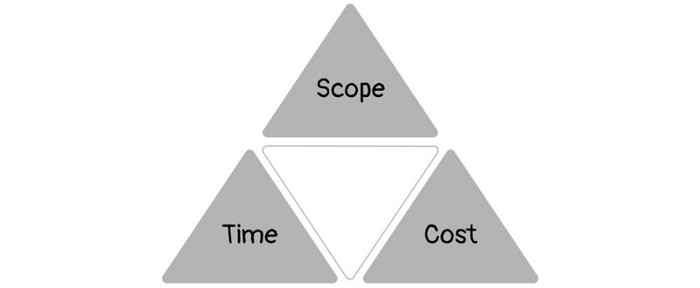
Quality was intended to be transformative, but none of these principles addressed why we conduct projects.
Value and benefits are key.
Product value is quantified by ROI, revenue, profit, savings, or other metrics. For me, every project or product delivery is about value.
Most project managers, especially those schooled 5-10 years or more ago (thousands working in huge corporations worldwide), understand the world in terms of the iron triangle. What does that imply? They worry about:
a) enough time to get the thing done.
b) have enough resources (budget) to get the thing done.
c) have enough scope to fit within (a) and (b) >> note, they never have too little scope, not that I have ever seen! although, theoretically, this could happen.
Boom—iron triangle.
To make the triangle function, project managers will utilize formal governance (Steering) to move those things. Increase money, scope, or both if time is short. Lacking funds? Increase time, scope, or both.
In current product development, shifting each item considerably may not yield value/benefit.
Even terrible. This approach will fail because it deprioritizes Value/Benefit by focusing the major stakeholders (Steering participants) and delivery team(s) on Time, Scope, and Budget restrictions.
Pre-agile, this problem was terrible. IT projects failed wildly. History is here.
Value, or benefit, is central to the product method. Product managers spend most of their time planning value-delivery paths.
Product people consider risk, schedules, scope, and budget, but value comes first. Let me illustrate.
Imagine managing internal products in an enterprise. Your core customer team needs a rapid text record of a chat to fix a problem. The consumer wants a feature/features added to a product you're producing because they think it's the greatest spot.
Project-minded, I may say;
Ok, I have budget as this is an existing project, due to run for a year. This is a new requirement to add to the features we’re already building. I think I can keep the deadline, and include this scope, as it sounds related to the feature set we’re building to give the desired result”.
This attitude repeats Scope, Time, and Budget.
Since it meets those standards, a project manager will likely approve it. If they have a backlog, they may add it and start specking it out assuming it will be built.
Instead, think like a product;
What problem does this feature idea solve? Is that problem relevant to the product I am building? Can that problem be solved quicker/better via another route ? Is it the most valuable problem to solve now? Is the problem space aligned to our current or future strategy? or do I need to alter/update the strategy?
A product mindset allows you to focus on timing, resource/cost, feasibility, feature detail, and so on after answering the aforementioned questions.
The above oversimplifies because
Leadership in discovery

Project managers are facilitators of ideas. This is as far as they normally go in the ‘idea’ space.
Business Requirements collection in classic project delivery requires extensive upfront documentation.
Agile project delivery analyzes requirements iteratively.
However, the project manager is a facilitator/planner first and foremost, therefore topic knowledge is not expected.
I mean business domain, not technical domain (to confuse matters, it is true that in some instances, it can be both technical and business domains that are important for a single individual to master).
Product managers are domain experts. They will become one if they are training/new.
They lead discovery.
Product Manager-led discovery is much more than requirements gathering.
Requirements gathering involves a Business Analyst interviewing people and documenting their requests.
The project manager calculates what fits and what doesn't using their Iron Triangle (presumably in their head) and reports back to Steering.
If this requirements-gathering exercise failed to identify requirements, what would a project manager do? or bewildered by project requirements and scope?
They would tell Steering they need a Business SME or Business Lead assigning or more of their time.
Product discovery requires the Product Manager's subject knowledge and a new mindset.
How should a Product Manager handle confusing requirements?
Product Managers handle these challenges with their talents and tools. They use their own knowledge to fill in ambiguity, but they have the discipline to validate those assumptions.
To define the problem, they may perform qualitative or quantitative primary research.
They might discuss with UX and Engineering on a whiteboard and test assumptions or hypotheses.
Do Product Managers escalate confusing requirements to Steering/Senior leaders? They would fix that themselves.
Product managers raise unclear strategy and outcomes to senior stakeholders. Open talks, soft skills, and data help them do this. They rarely raise requirements since they have their own means of handling them without top stakeholder participation.
Discovery is greenfield, exploratory, research-based, and needs higher-order stakeholder management, user research, and UX expertise.
Product Managers also aid discovery. They lead discovery. They will not leave customer/user engagement to a Business Analyst. Administratively, a business analyst could aid. In fact, many product organizations discourage business analysts (rely on PM, UX, and engineer involvement with end-users instead).
The Product Manager must drive user interaction, research, ideation, and problem analysis, therefore a Product professional must be skilled and confident.
Creating vs. receiving and having an entrepreneurial attitude
Product novices and project managers focus on details rather than the big picture. Project managers prefer spreadsheets to strategy whiteboards and vision statements.
These folks ask their manager or senior stakeholders, "What should we do?"
They then elaborate (in Jira, in XLS, in Confluence or whatever).
They want that plan populated fast because it reduces uncertainty about what's going on and who's supposed to do what.
Skilled Product Managers don't only ask folks Should we?
They're suggesting this, or worse, Senior stakeholders, here are some options. After asking and researching, they determine what value this product adds, what problems it solves, and what behavior it changes.
Therefore, to move into Product, you need to broaden your view and have courage in your ability to discover ideas, find insightful pieces of information, and collate them to form a valuable plan of action. You are constantly defining RoI and building Business Cases, so much so that you no longer create documents called Business Cases, it is simply ingrained in your work through metrics, intelligence, and insights.
Product Management is not a free lunch.
Plateless.
Plates and food must be prepared.
In conclusion, Product Managers must make at least three mentality shifts:
You put value first in all things. Time, money, and scope are not as important as knowing what is valuable.
You have faith in the field and have the ability to direct the search. YYou facilitate, but you don’t just facilitate. You wouldn't want to limit your domain expertise in that manner.
You develop concepts, strategies, and vision. You are not a waiter or an inbox where other people can post suggestions; you don't merely ask folks for opinion and record it. However, you excel at giving things that aren't clearly spoken or written down physical form.

Bart Krawczyk
2 years ago
Understanding several Value Proposition kinds will help you create better goods.
Fixing problems isn't enough.
Numerous articles and how-to guides on value propositions focus on fixing consumer concerns.
Contrary to popular opinion, addressing customer pain rarely suffices. Win your market category too.
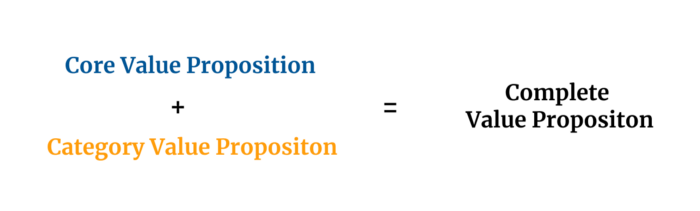
Core Value Statement
Value proposition usually means a product's main value.
Its how your product solves client problems. The product's core.
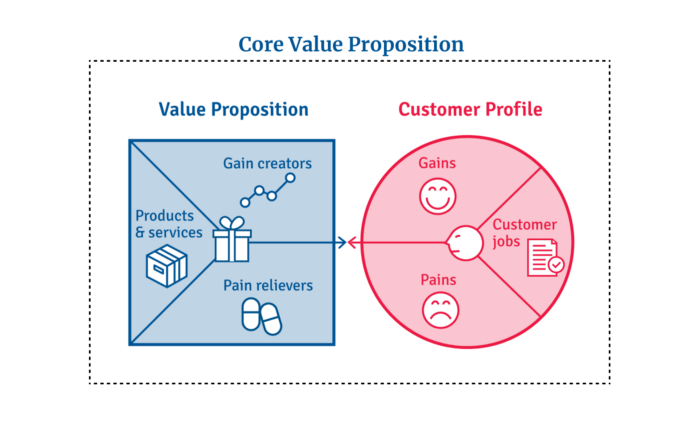
Answering these questions creates a relevant core value proposition:
What tasks is your customer trying to complete? (Jobs for clients)
How much discomfort do they feel while they perform this? (pains)
What would they like to see improved or changed? (gains)
After that, you create products and services that alleviate those pains and give value to clients.
Value Proposition by Category
Your product belongs to a market category and must follow its regulations, regardless of its value proposition.
Creating a new market category is challenging. Fitting into customers' product perceptions is usually better than trying to change them.
New product users simplify market categories. Products are labeled.
Your product will likely be associated with a collection of products people already use.
Example: IT experts will use your communication and management app.
If your target clients think it's an advanced mail software, they'll compare it to others and expect things like:
comprehensive calendar
spam detectors
adequate storage space
list of contacts
etc.
If your target users view your product as a task management app, things change. You can survive without a contact list, but not status management.
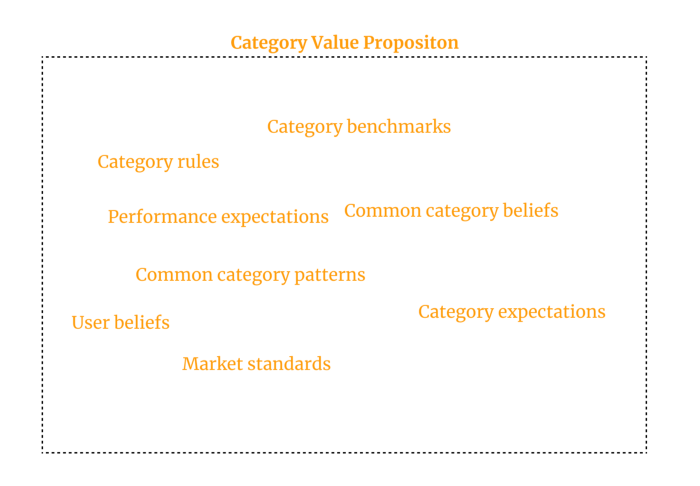
Find out what your customers compare your product to and if it fits your value offer. If so, adapt your product plan to dominate this market. If not, try different value propositions and messaging to put the product in the right context.
Finished Value Proposition
A comprehensive value proposition is when your solution addresses user problems and wins its market category.
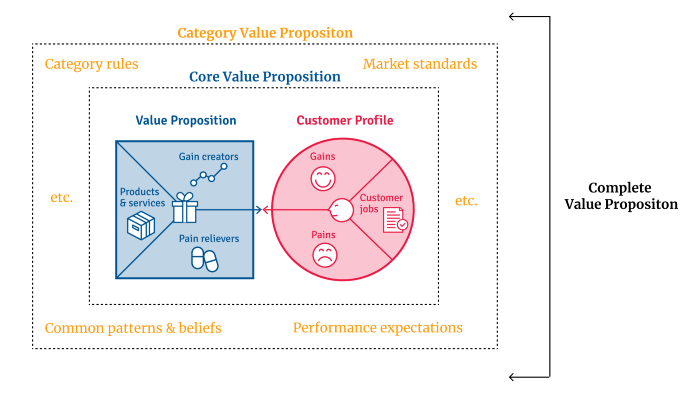
Addressing simply the primary value proposition may produce a valuable and original product, but it may struggle to cross the chasm into the mainstream market. Meeting expectations is easier than changing views.
Without a unique value proposition, you will drown in the red sea of competition.
To conclude:
Find out who your target consumer is and what their demands and problems are.
To meet these needs, develop and test a primary value proposition.
Speak with your most devoted customers. Recognize the alternatives they use to compare you against and the market segment they place you in.
Recognize the requirements and expectations of the market category.
To meet or surpass category standards, modify your goods.
Great products solve client problems and win their category.

Hunter Walk
2 years ago
Is it bad of me to want our portfolio companies to generate greater returns for outside investors than they did for us as venture capitalists?
Wishing for Lasting Companies, Not Penny Stocks or Goodwill Write-Downs
Get me a NASCAR-style company-logoed cremation urn (notice to the executor of my will, theres gonna be a lot of weird requests). I believe in working on projects that would be on your tombstone. As the Homebrew logo is tattooed on my shoulder, expanding the portfolio to my posthumous commemoration is easy. But this isn't an IRR victory lap; it's a hope that the firms we worked for would last beyond my lifetime.
![a little boy planting a dollar bill in the ground and pouring a watering can out on it, digital art [DALL-E]](https://storage.googleapis.com/int3grity/posts/V62hkReDx56S/images/vMwzqrYeXaYnUIMXAdTY9)
Venture investors too often take credit or distance themselves from startups based on circumstances. Successful companies tell stories of crucial introductions, strategy conversations, and other value. Defeats Even whether our term involves Board service or systematic ethical violations, I'm just a little investment, so there's not much I can do. Since I'm guilty, I'm tossing stones from within the glass home (although we try to own our decisions through the lifecycle).
Post-exit company trajectories are usually unconfounded. Off the cap table, no longer a shareholder (or a diminishing one as you sell off/distribute), eventually leaving the Board. You can cheer for the squad or forget about it, but you've freed the corporation and it's back to portfolio work.
As I look at the downward track of most SPACs and other tarnished IPOs from the last few years, I wonder how I would feel if those were my legacy. Is my job done? Yes. When investing in a business, the odds are against it surviving, let alone thriving and being able to find sunlight. SPAC sponsors, institutional buyers, retail investments. Free trade in an open market is their right. Risking and losing capital is the system working! But
We were lead or co-lead investors in our first three funds, but as additional VCs joined the company, we were pushed down the cap table. Voting your shares rarely matters; supporting the firm when they need it does. Being valuable, consistent, and helping the company improve builds trust with the founders.
I hope every startup we sponsor becomes a successful public company before, during, and after we benefit. My perspective of American capitalism. Well, a stock ticker has a lot of garbage, and I support all types of regulation simplification (in addition to being a person investor in the Long-Term Stock Exchange). Yet being owned by a large group of investors and making actual gains for them is great. Likewise does seeing someone you met when they were just starting out become a public company CEO without losing their voice, leadership, or beliefs.
I'm just thinking about what we can do from the start to realize value from our investments and build companies with bright futures. Maybe seed venture financing shouldn't impact those outcomes, but I'm not comfortable giving up that obligation.
You might also like

Sam Warain
3 years ago
The Brilliant Idea Behind Kim Kardashian's New Private Equity Fund
Kim Kardashian created Skky Partners. Consumer products, internet & e-commerce, consumer media, hospitality, and luxury are company targets.
Some call this another Kardashian publicity gimmick.
This maneuver is brilliance upon closer inspection. Why?
1) Kim has amassed a sizable social media fan base:
Over 320 million Instagram and 70 million Twitter users follow Kim Kardashian.
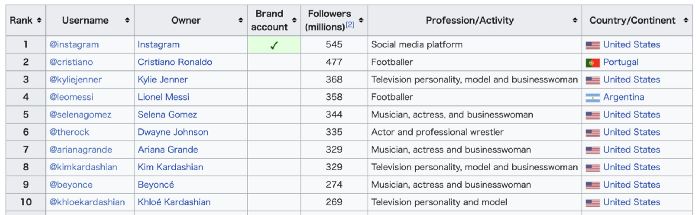
Kim Kardashian's Instagram account ranks 8th. Three Kardashians in top 10 is ridiculous.
This gives her access to consumer data. She knows what people are discussing. Investment firms need this data.
Quality, not quantity, of her followers matters. Studies suggest that her following are more engaged than Selena Gomez and Beyonce's.
Kim's followers are worth roughly $500 million to her brand, according to a research. They trust her and buy what she recommends.
2) She has a special aptitude for identifying trends.
Kim Kardashian can sense trends.
She's always ahead of fashion and beauty trends. She's always trying new things, too. She doesn't mind making mistakes when trying anything new. Her desire to experiment makes her a good business prospector.
Kim has also created a lifestyle brand that followers love. Kim is an entrepreneur, mom, and role model, not just a reality TV star or model. She's established a brand around her appearance, so people want to buy her things.
Her fragrance collection has sold over $100 million since its 2009 introduction, and her Sears apparel line did over $200 million in its first year.
SKIMS is her latest $3.2bn brand. She can establish multibillion-dollar firms with her enormous distribution platform.
Early founders would kill for Kim Kardashian's network.
Making great products is hard, but distribution is more difficult. — David Sacks, All-in-Podcast
3) She can delegate the financial choices to Jay Sammons, one of the greatest in the industry.
Jay Sammons is well-suited to develop Kim Kardashian's new private equity fund.
Sammons has 16 years of consumer investing experience at Carlyle. This will help Kardashian invest in consumer-facing enterprises.
Sammons has invested in Supreme and Beats Electronics, both of which have grown significantly. Sammons' track record and competence make him the obvious choice.
Kim Kardashian and Jay Sammons have joined forces to create a new business endeavor. The agreement will increase Kardashian's commercial empire. Sammons can leverage one of the world's most famous celebrities.
“Together we hope to leverage our complementary expertise to build the next generation consumer and media private equity firm” — Kim Kardashian
Kim Kardashian is a successful businesswoman. She developed an empire by leveraging social media to connect with fans. By developing a global lifestyle brand, she has sold things and experiences that have made her one of the world's richest celebrities.
She's a shrewd entrepreneur who knows how to maximize on herself and her image.
Imagine how much interest Kim K will bring to private equity and venture capital.
I'm curious about the company's growth.

Tech With Dom
3 years ago
6 Awesome Desk Accessories You Must Have!

I'm gadget-obsessed. So I shared my top 6 desk gadgets.
These gadgets improve my workflow and are handy for working from home.
Without further ado...
Computer light bar Xiaomi Mi
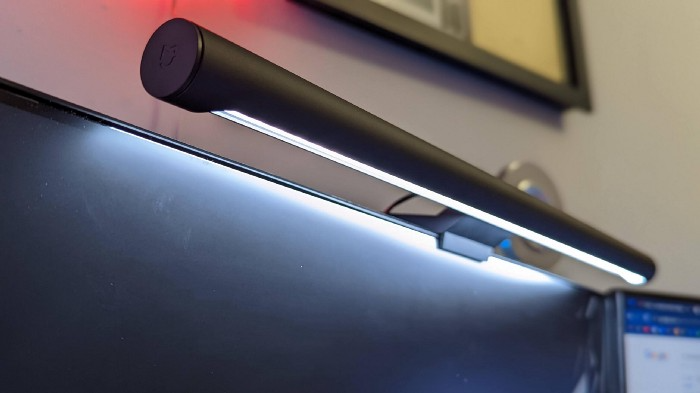
I've previously recommended the Xiaomi Mi Light Bar, and I still do. It's stylish and convenient.
The Mi bar is a monitor-mounted desk lamp. The lamp's hue and brightness can be changed with a stylish wireless remote.
Changeable hue and brightness make it ideal for late-night work.
Desk Mat 2.

I wasn't planning to include a desk surface in this article, but I find it improves computer use.
The mouse feels smoother and is a better palm rest than wood or glass.
I'm currently using the overkill Razer Goliathus Extended Chroma RGB Gaming Surface, but I like RGB.
Using a desk surface or mat makes computer use more comfortable, and it's not expensive.
Third, the Logitech MX Master 3 Mouse

The Logitech MX Master 3 or any from the MX Master series is my favorite mouse.
The side scroll wheel on these mice is a feature I've never seen on another mouse.
Side scroll wheels are great for spreadsheets and video editing. It would be hard for me to switch from my Logitech MX Master 3 to another mouse. Only gaming is off-limits.
Google Nest 4.
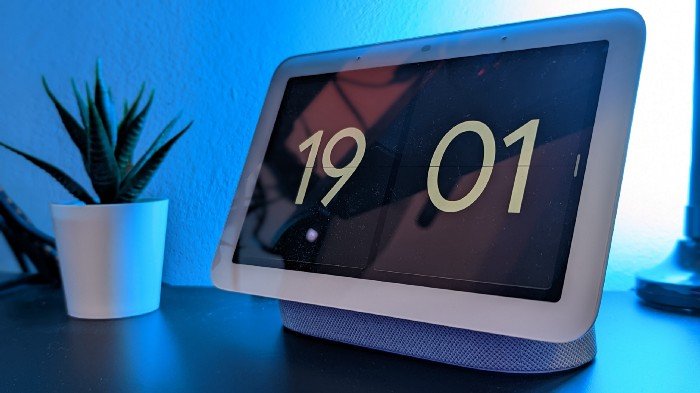
Without a smart assistant, my desk is useless. I'm currently using the second-generation Google Nest Hub, but I've also used the Amazon Echo Dot, Echo Spot, and Apple HomePod Mini.
As a Pixel 6 Pro user, the Nest Hub works best with my phone.
My Nest Hub plays news, music, and calendar events. It also lets me control lights and switches with my smartphone. It plays YouTube videos.
Google Pixel Stand, No. 5
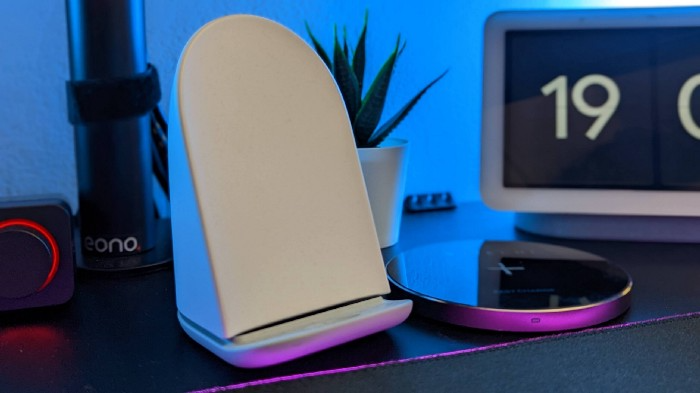
A wireless charger on my desk is convenient for charging my phone and other devices while I work. My desk has two wireless chargers. I have a Satechi aluminum fast charger and a second-generation Google Pixel Stand.
If I need to charge my phone and earbuds simultaneously, I use two wireless chargers. Satechi chargers are well-made and fast. Micro-USB is my only complaint.
The Pixel Stand converts compatible devices into a smart display for adjusting charging speeds and controlling other smart devices. My Pixel 6 Pro charges quickly. Here's my video review.
6. Anker Power Bank

Anker's 65W charger is my final recommendation. This online find was a must-have. This can charge my laptop and several non-wireless devices, perfect for any techie!
The charger has two USB-A ports and two USB-C ports, one with 45W and the other with 20W, so it can charge my iPad Pro and Pixel 6 Pro simultaneously.
Summary
These are some of my favorite office gadgets. My kit page has an updated list.
Links to the products mentioned in this article are in the appropriate sections. These are affiliate links.
You're up! Share the one desk gadget you can't live without and why.

The Velocipede
2 years ago
Stolen wallet
How a misplaced item may change your outlook

Losing your wallet means life stops. Money vanishes. No credit. Your identity is unverifiable. As you check your pockets for the missing object, you can't drive. You can't borrow a library book.
Last seen? intuitively. Every kid asks this, including yours. However, you know where you lost it: On the Providence River cycling trail. While pedaling vigorously, the wallet dropped out of your back pocket and onto the pavement.
A woman you know—your son's art teacher—says it will be returned. Faith.
You want that faith. Losing a wallet is all-consuming. You must presume it has been stolen and is being used to buy every diamond and non-fungible token on the market. Your identity may have been used to open bank accounts and fake passports. Because he used your license address, a ski mask-wearing man may be driving slowly past your house.
As you delete yourself by canceling cards, these images run through your head. You wait in limbo for replacements. Digital text on the DMV website promises your new license will come within 60 days and be approved by local and state law enforcement. In the following two months, your only defense is a screenshot.
Your wallet was ordinary. A worn, overstuffed leather rectangle. You understand how tenuous your existence has always been since you've never lost a wallet. You barely breathe without your documents.
Ironically, you wore a wallet-belt chain. You adored being a 1993 slacker for 15 years. Your wife just convinced you last year that your office job wasn't professional. You nodded and hid the chain.
Never lost your wallet. Until now.
Angry. Feeling stupid. How could you drop something vital? Why? Is the world cruel? No more dumb luck. You're always one pedal-stroke from death.
Then you get a call: We have your wallet.
Local post office, not cops.
The clerk said someone returned it. Due to trying to identify you, it's a chaos. It has your cards but no cash.
Your automobile screeches down the highway. You yell at the windshield, amazed. Submitted. Art teacher was right. Have some trust.
You thank the postmaster. You ramble through the story. The clerk doesn't know the customer, simply a neighborhood Good Samaritan. You wish you could thank that person for lifting your spirits.
You get home, beaming with gratitude. You thumb through your wallet, amazed that it’s all intact. Then you dig out your chain and reattach it.
Because even faith could use a little help.