


10 Predictions for Web3 and the Cryptoeconomy for 2022
By Surojit Chatterjee, Chief Product Officer
2021 proved to be a breakout year for crypto with BTC price gaining almost 70% yoy, Defi hitting $150B in value locked, and NFTs emerging as a new category. Here’s my view through the crystal ball into 2022 and what it holds for our industry:
1. Eth scalability will improve, but newer L1 chains will see substantial growth — As we welcome the next hundred million users to crypto and Web3, scalability challenges for Eth are likely to grow. I am optimistic about improvements in Eth scalability with the emergence of Eth2 and many L2 rollups. Traction of Solana, Avalanche and other L1 chains shows that we’ll live in a multi-chain world in the future. We’re also going to see newer L1 chains emerge that focus on specific use cases such as gaming or social media.
2. There will be significant usability improvements in L1-L2 bridges — As more L1 networks gain traction and L2s become bigger, our industry will desperately seek improvements in speed and usability of cross-L1 and L1-L2 bridges. We’re likely to see interesting developments in usability of bridges in the coming year.
3. Zero knowledge proof technology will get increased traction — 2021 saw protocols like ZkSync and Starknet beginning to get traction. As L1 chains get clogged with increased usage, ZK-rollup technology will attract both investor and user attention. We’ll see new privacy-centric use cases emerge, including privacy-safe applications, and gaming models that have privacy built into the core. This may also bring in more regulator attention to crypto as KYC/AML could be a real challenge in privacy centric networks.
4. Regulated Defi and emergence of on-chain KYC attestation — Many Defi protocols will embrace regulation and will create separate KYC user pools. Decentralized identity and on-chain KYC attestation services will play key roles in connecting users’ real identity with Defi wallet endpoints. We’ll see more acceptance of ENS type addresses, and new systems from cross chain name resolution will emerge.
5. Institutions will play a much bigger role in Defi participation — Institutions are increasingly interested in participating in Defi. For starters, institutions are attracted to higher than average interest-based returns compared to traditional financial products. Also, cost reduction in providing financial services using Defi opens up interesting opportunities for institutions. However, they are still hesitant to participate in Defi. Institutions want to confirm that they are only transacting with known counterparties that have completed a KYC process. Growth of regulated Defi and on-chain KYC attestation will help institutions gain confidence in Defi.
6. Defi insurance will emerge — As Defi proliferates, it also becomes the target of security hacks. According to London-based firm Elliptic, total value lost by Defi exploits in 2021 totaled over $10B. To protect users from hacks, viable insurance protocols guaranteeing users’ funds against security breaches will emerge in 2022.
7. NFT Based Communities will give material competition to Web 2.0 social networks — NFTs will continue to expand in how they are perceived. We’ll see creator tokens or fan tokens take more of a first class seat. NFTs will become the next evolution of users’ digital identity and passport to the metaverse. Users will come together in small and diverse communities based on types of NFTs they own. User created metaverses will be the future of social networks and will start threatening the advertising driven centralized versions of social networks of today.
8. Brands will start actively participating in the metaverse and NFTs — Many brands are realizing that NFTs are great vehicles for brand marketing and establishing brand loyalty. Coca-Cola, Campbell’s, Dolce & Gabbana and Charmin released NFT collectibles in 2021. Adidas recently launched a new metaverse project with Bored Ape Yacht Club. We’re likely to see more interesting brand marketing initiatives using NFTs. NFTs and the metaverse will become the new Instagram for brands. And just like on Instagram, many brands may start as NFT native. We’ll also see many more celebrities jumping in the bandwagon and using NFTs to enhance their personal brand.
9. Web2 companies will wake up and will try to get into Web3 — We’re already seeing this with Facebook trying to recast itself as a Web3 company. We’re likely to see other big Web2 companies dipping their toes into Web3 and metaverse in 2022. However, many of them are likely to create centralized and closed network versions of the metaverse.
10. Time for DAO 2.0 — We’ll see DAOs become more mature and mainstream. More people will join DAOs, prompting a change in definition of employment — never receiving a formal offer letter, accepting tokens instead of or along with fixed salaries, and working in multiple DAO projects at the same time. DAOs will also confront new challenges in terms of figuring out how to do M&A, run payroll and benefits, and coordinate activities in larger and larger organizations. We’ll see a plethora of tools emerge to help DAOs execute with efficiency. Many DAOs will also figure out how to interact with traditional Web2 companies. We’re likely to see regulators taking more interest in DAOs and make an attempt to educate themselves on how DAOs work.
Thanks to our customers and the ecosystem for an incredible 2021. Looking forward to another year of building the foundations for Web3. Wagmi.
More on Web3 & Crypto

Crypto Zen Monk
2 years ago
How to DYOR in the world of cryptocurrency
RESEARCH
We must create separate ideas and handle our own risks to be better investors. DYOR is crucial.
The only thing unsustainable is your cluelessness.
DYOR: Why
On social media, there is a lot of false information and divergent viewpoints. All of these facts might be accurate, but they might not be appropriate for your portfolio and investment preferences.
You become a more knowledgeable investor thanks to DYOR.
DYOR improves your portfolio's risk management.
My DYOR resources are below.

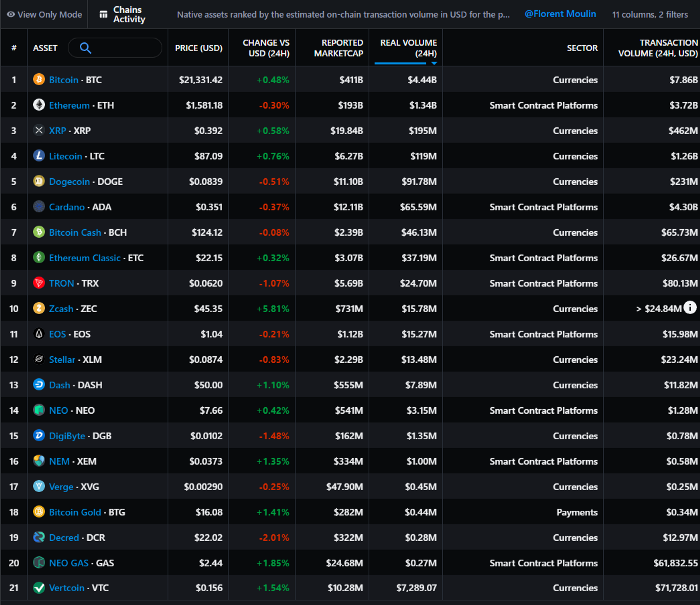
Messari: Major Blockchains' Activities
New York-based Messari provides cryptocurrency open data libraries.
Major blockchains offer 24-hour on-chain volume. https://messari.io/screener/most-active-chains-DB01F96B
What to do
Invest in stable cryptocurrencies. Sort Messari by Real Volume (24H) or Reported Market Cap.
Coingecko: Research on Ecosystems
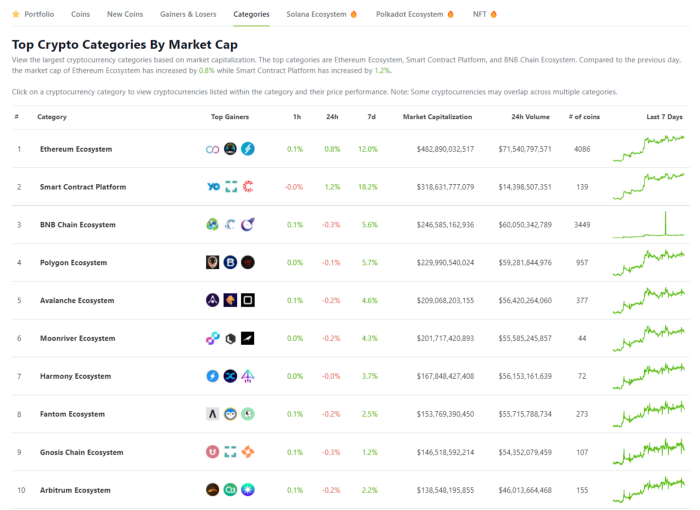
Top 10 Ecosystems by Coingecko are good.
What to do
Invest in quality.
Leading ten Ecosystems by Market Cap
There are a lot of coins in the ecosystem (second last column of above chart)
CoinGecko's Market Cap Crypto Categories Market capitalization-based cryptocurrency categories. Ethereum Ecosystem www.coingecko.com
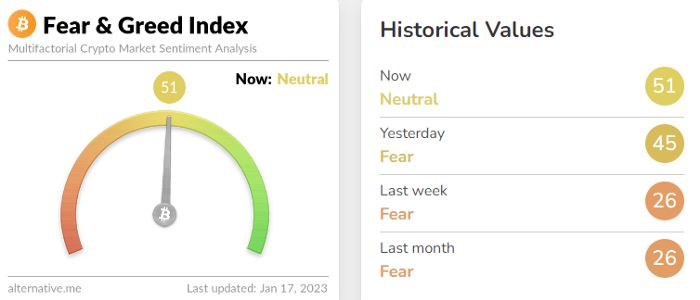
Fear & Greed Index for Bitcoin (FGI)
The Bitcoin market sentiment index ranges from 0 (extreme dread) to 100. (extreme greed).
How to Apply
See market sentiment:
Extreme fright = opportunity to buy
Extreme greed creates sales opportunity (market due for correction).

Glassnode
Glassnode gives facts, information, and confidence to make better Bitcoin, Ethereum, and cryptocurrency investments and trades.
Explore free and paid metrics.
Stock to Flow Ratio: Application
The popular Stock to Flow Ratio concept believes scarcity drives value. Stock to flow is the ratio of circulating Bitcoin supply to fresh production (i.e. newly mined bitcoins). The S/F Ratio has historically predicted Bitcoin prices. PlanB invented this metric.

Utilization: Ethereum Hash Rate
Ethereum miners produce an estimated number of hashes per second.

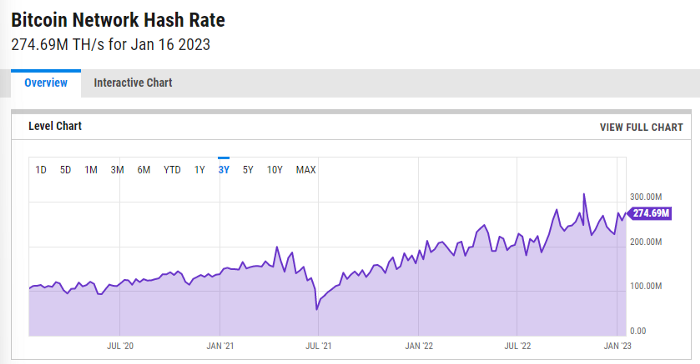
ycharts: Hash rate of the Bitcoin network
TradingView
TradingView is your go-to tool for investment analysis, watch lists, technical analysis, and recommendations from other traders/investors.

Research for a cryptocurrency project
Two key questions every successful project must ask: Q1: What is this project trying to solve? Is it a big problem or minor? Q2: How does this project make money?
Each cryptocurrency:
Check out the white paper.
check out the project's internet presence on github, twitter, and medium.
the transparency of it
Verify the team structure and founders. Verify their LinkedIn profile, academic history, and other qualifications. Search for their names with scam.
Where to purchase and use cryptocurrencies Is it traded on trustworthy exchanges?
From CoinGecko and CoinMarketCap, we may learn about market cap, circulations, and other important data.
The project must solve a problem. Solving a problem is the goal of the founders.
Avoid projects that resemble multi-level marketing or ponzi schemes.
Your use of social media
Use social media carefully or ignore it: Twitter, TradingView, and YouTube
Someone said this before and there are some truth to it. Social media bullish => short.
Your Behavior
Investigate. Spend time. You decide. Worth it!
Only you have the best interest in your financial future.

Jayden Levitt
3 years ago
The country of El Salvador's Bitcoin-obsessed president lost $61.6 million.
It’s only a loss if you sell, right?
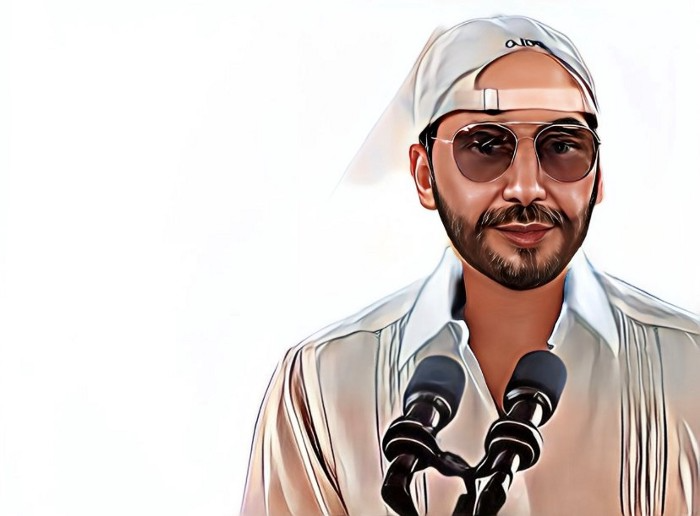
Nayib Bukele proclaimed himself “the world’s coolest dictator”.
His jokes aren't clear.
El Salvador's 43rd president self-proclaimed “CEO of El Salvador” couldn't be less presidential.
His thin jeans, aviator sunglasses, and baseball caps like a cartel lord.
He's popular, though.
Bukele won 53% of the vote by fighting violent crime and opposition party corruption.
El Salvador's 6.4 million inhabitants are riding the cryptocurrency volatility wave.
They were powerless.
Their autocratic leader, a former Yamaha Motors salesperson and Bitcoin believer, wants to help 70% unbanked locals.
He intended to give the citizens a way to save money and cut the country's $200 million remittance cost.
Transfer and deposit costs.
This makes logical sense when the president’s theatrics don’t blind you.
El Salvador's Bukele revealed plans to make bitcoin legal tender.
Remittances total $5.9 billion (23%) of the country's expenses.
Anything that reduces costs could boost the economy.
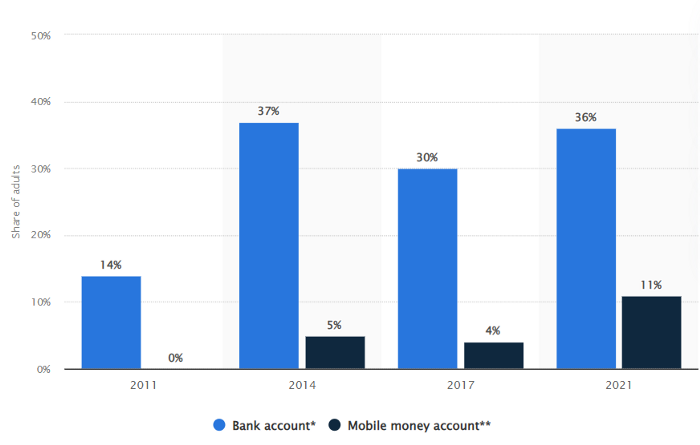
The country’s unbanked population is staggering. Here’s the data by % of people who either have a bank account (Blue) or a mobile money account (Black).
According to Bukele, 46% of the population has downloaded the Chivo Bitcoin Wallet.
In 2021, 36% of El Salvadorans had bank accounts.
Large rural countries like Kenya seem to have resolved their unbanked dilemma.
An economy surfaced where village locals would sell, trade and store network minutes and data as a store of value.
Kenyan phone networks realized unbanked people needed a safe way to accumulate wealth and have an emergency fund.
96% of Kenyans utilize M-PESA, which doesn't require a bank account.
The software involves human agents who hang out with cash and a phone.
These people are like ATMs.
You offer them cash to deposit money in your mobile money account or withdraw cash.
In a country with a faulty banking system, cash availability and a safe place to deposit it are important.
William Jack and Tavneet Suri found that M-PESA brought 194,000 Kenyan households out of poverty by making transactions cheaper and creating a safe store of value.
Mobile money, a service that allows monetary value to be stored on a mobile phone and sent to other users via text messages, has been adopted by most Kenyan households. We estimate that access to the Kenyan mobile money system M-PESA increased per capita consumption levels and lifted 194,000 households, or 2% of Kenyan households, out of poverty.
The impacts, which are more pronounced for female-headed households, appear to be driven by changes in financial behaviour — in particular, increased financial resilience and saving. Mobile money has therefore increased the efficiency of the allocation of consumption over time while allowing a more efficient allocation of labour, resulting in a meaningful reduction of poverty in Kenya.
Currently, El Salvador has 2,301 Bitcoin.
At publication, it's worth $44 million. That remains 41% of Bukele's original $105.6 million.
Unknown if the country has sold Bitcoin, but Bukeles keeps purchasing the dip.
It's still falling.
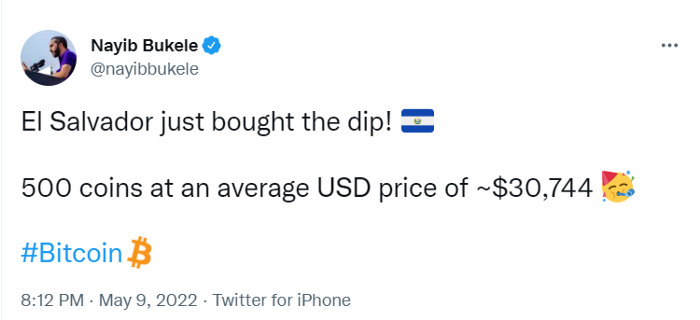
This might be a fantastic move for the impoverished country over the next five years, if they can live economically till Bitcoin's price recovers.
The evidence demonstrates that a store of value pulls individuals out of poverty, but others say Bitcoin is premature.
You may regard it as an aggressive endeavor to front run the next wave of adoption, offering El Salvador a financial upside.

Nitin Sharma
3 years ago
Web3 Terminology You Should Know
The easiest online explanation.

Web3 is growing. Crypto companies are growing.
Instagram, Adidas, and Stripe adopted cryptocurrency.

Bitcoin and other cryptocurrencies made web3 famous.
Most don't know where to start. Cryptocurrency, DeFi, etc. are investments.
Since we don't understand web3, I'll help you today.
Let’s go.
1. Web3
It is the third generation of the web, and it is built on the decentralization idea which means no one can control it.
There are static webpages that we can only read on the first generation of the web (i.e. Web 1.0).
Web 2.0 websites are interactive. Twitter, Medium, and YouTube.
Each generation controlled the website owner. Simply put, the owner can block us. However, data breaches and selling user data to other companies are issues.
They can influence the audience's mind since they have control.
Assume Twitter's CEO endorses Donald Trump. Result? Twitter would have promoted Donald Trump with tweets and graphics, enhancing his chances of winning.
We need a decentralized, uncontrollable system.
And then there’s Web3.0 to consider. As Bitcoin and Ethereum values climb, so has its popularity. Web3.0 is uncontrolled web evolution. It's good and bad.
Dapps, DeFi, and DAOs are here. It'll all be explained afterwards.
2. Cryptocurrencies:
No need to elaborate.
Bitcoin, Ethereum, Cardano, and Dogecoin are cryptocurrencies. It's digital money used for payments and other uses.
Programs must interact with cryptocurrencies.
3. Blockchain:
Blockchain facilitates bitcoin transactions, investments, and earnings.
This technology governs Web3. It underpins the web3 environment.
Let us delve much deeper.
Blockchain is simple. However, the name expresses the meaning.
Blockchain is a chain of blocks.
Let's use an image if you don't understand.
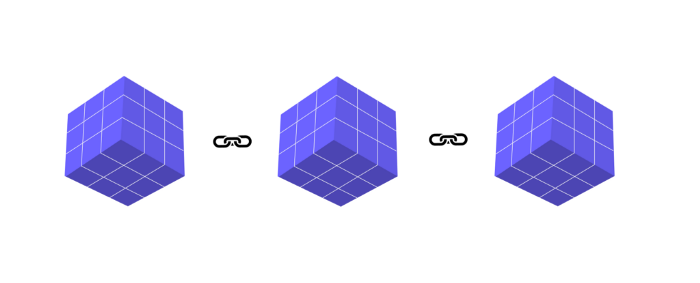
The graphic above explains blockchain. Think Blockchain. The block stores related data.
Here's more.
4. Smart contracts
Programmers and developers must write programs. Smart contracts are these blockchain apps.
That’s reasonable.
Decentralized web3.0 requires immutable smart contracts or programs.
5. NFTs
Blockchain art is NFT. Non-Fungible Tokens.
Explaining Non-Fungible Token may help.
Two sorts of tokens:
These tokens are fungible, meaning they can be changed. Think of Bitcoin or cash. The token won't change if you sell one Bitcoin and acquire another.
Non-Fungible Token: Since these tokens cannot be exchanged, they are exclusive. For instance, music, painting, and so forth.
Right now, Companies and even individuals are currently developing worthless NFTs.
The concept of NFTs is much improved when properly handled.
6. Dapp
Decentralized apps are Dapps. Instagram, Twitter, and Medium apps in the same way that there is a lot of decentralized blockchain app.
Curve, Yearn Finance, OpenSea, Axie Infinity, etc. are dapps.
7. DAOs
DAOs are member-owned and governed.
Consider it a company with a core group of contributors.
8. DeFi
We all utilize centrally regulated financial services. We fund these banks.
If you have $10,000 in your bank account, the bank can invest it and retain the majority of the profits.
We only get a penny back. Some banks offer poor returns. To secure a loan, we must trust the bank, divulge our information, and fill out lots of paperwork.
DeFi was built for such issues.
Decentralized banks are uncontrolled. Staking, liquidity, yield farming, and more can earn you money.
Web3 beginners should start with these resources.
You might also like

Aaron Dinin, PhD
3 years ago
There Are Two Types of Entrepreneurs in the World Make sure you are aware of your type!
Know why it's important.

The entrepreneur I was meeting with said, "I should be doing crypto, or maybe AI? Aren't those the hot spots? I should look there for a startup idea.”
I shook my head. Yes, they're exciting, but that doesn't mean they're best for you and your business.
“There are different types of entrepreneurs?” he asked.
I said "obviously." Two types, actually. Knowing what type of entrepreneur you are helps you build the right startup.
The two types of businesspeople
The best way for me to describe the two types of entrepreneurs is to start by telling you exactly the kinds of entrepreneurial opportunities I never get excited about: future opportunities.
In the early 1990s, my older brother showed me the World Wide Web and urged me to use it. Unimpressed, I returned to my Super Nintendo.
My roommate tried to get me to join Facebook as a senior in college. I remember thinking, This is dumb. Who'll use it?
In 2011, my best friend tried to convince me to buy bitcoin and I laughed.
Heck, a couple of years ago I had to buy a new car, and I never even considered buying something that didn’t require fossilized dinosaur bones.
I'm no visionary. I don't anticipate the future. I focus on the present.
This tendency makes me a problem-solving entrepreneur. I identify entrepreneurial opportunities by spotting flaws and/or inefficiencies in the world and devising solutions.
There are other ways to find business opportunities. Visionary entrepreneurs also exist. I don't mean visionary in the hyperbolic sense that implies world-changing impact. I mean visionary as an entrepreneur who identifies future technological shifts that will change how people work and live and create new markets.
Problem-solving and visionary entrepreneurs are equally good. But the two approaches to building companies are very different. Knowing the type of entrepreneur you are will help you build a startup that fits your worldview.
What is the distinction?
Let's use some simple hypotheticals to compare problem-solving and visionary entrepreneurship.
Imagine a city office building without nearby restaurants. Those office workers love to eat. Sometimes they'd rather eat out than pack a lunch. As an entrepreneur, you can solve the lack of nearby restaurants. You'd open a restaurant near that office, say a pizza parlor, and get customers because you solved the lack of nearby restaurants. Problem-solving entrepreneurship.
Imagine a new office building in a developing area with no residents or workers. In this scenario, a large office building is coming. The workers will need to eat then. As a visionary entrepreneur, you're excited about the new market and decide to open a pizzeria near the construction to meet demand.
Both possibilities involve the same product. You opened a pizzeria. How you launched that pizza restaurant and what will affect its success are different.
Why is the distinction important?
Let's say you opened a pizzeria near an office. You'll probably get customers. Because people are nearby and demand isn't being met, someone from a nearby building will stop in within the first few days of your pizzeria's grand opening. This makes solving the problem relatively risk-free. You'll get customers unless you're a fool.
The market you're targeting existed before you entered it, so you're not guaranteed success. This means people in that market solved the lack of nearby restaurants. Those office workers are used to bringing their own lunches. Why should your restaurant change their habits? Even when they eat out, they're used to traveling far. They've likely developed pizza preferences.
To be successful with your problem-solving startup, you must convince consumers to change their behavior, which is difficult.
Unlike opening a pizza restaurant near a construction site. Once the building opens, workers won't have many preferences or standardized food-getting practices. Your pizza restaurant can become the incumbent quickly. You'll be the first restaurant in the area, so you'll gain a devoted following that makes your food a routine.
Great, right? It's easier than changing people's behavior. The benefit comes with a risk. Opening a pizza restaurant near a construction site increases future risk. What if builders run out of money? No one moves in? What if the building's occupants are the National Association of Pizza Haters? Then you've opened a pizza restaurant next to pizza haters.
Which kind of businessperson are you?
This isn't to say one type of entrepreneur is better than another. Each type of entrepreneurship requires different skills.
As my simple examples show, a problem-solving entrepreneur must operate in markets with established behaviors and habits. To be successful, you must be able to teach a market a new way of doing things.
Conversely, the challenge of being a visionary entrepreneur is that you have to be good at predicting the future and getting in front of that future before other people.
Both are difficult in different ways. So, smart entrepreneurs don't just chase opportunities. Smart entrepreneurs pursue opportunities that match their skill sets.

Mike Tarullo
3 years ago
Even In a Crazy Market, Hire the Best People: The "First Ten" Rules
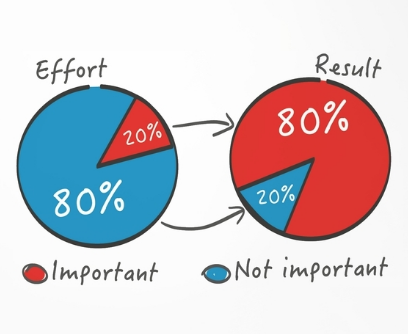
Hiring is difficult, but you shouldn't compromise on team members. Or it may suggest you need to look beyond years in a similar role/function.
Every hire should be someone we'd want as one of our first ten employees.
If you hire such people, your team will adapt, initiate, and problem-solve, and your company will grow. You'll stay nimble even as you scale, and you'll learn from your colleagues.
If you only hire for a specific role or someone who can execute the job, you'll become a cluster of optimizers, and talent will depart for a more fascinating company. A startup is continually changing, therefore you want individuals that embrace it.
As a leader, establishing ideal conditions for talent and having a real ideology should be high on your agenda. You can't eliminate attrition, nor would you want to, but you can hire people who will become your company's leaders.
In my last four jobs I was employee 2, 5, 3, and 5. So while this is all a bit self serving, you’re the one reading my writing — and I have some experience with who works out in the first ten!
First, we'll examine what they do well (and why they're beneficial for startups), then what they don't, and how to hire them.
First 10 are:
Business partners: Because it's their company, they take care of whatever has to be done and have ideas about how to do it. You can rely on them to always put the success of the firm first because it is their top priority (company success is strongly connected with success for early workers). This approach will eventually take someone to leadership positions.
High Speed Learners: They process knowledge quickly and can reach 80%+ competency in a new subject matter rather quickly. A growing business that is successful tries new things frequently. We have all lost a lot of money and time on employees who follow the wrong playbook or who wait for someone else within the company to take care of them.
Autodidacts learn by trial and error, osmosis, networking with others, applying first principles, and reading voraciously (articles, newsletters, books, and even social media). Although teaching is wonderful, you won't have time.
Self-scaling: They figure out a means to deal with issues and avoid doing the grunt labor over the long haul, increasing their leverage. Great people don't keep doing the same thing forever; as they expand, they use automation and delegation to fill in their lower branches. This is a crucial one; even though you'll still adore them, you'll have to manage their scope or help them learn how to scale on their own.
Free Range: You can direct them toward objectives rather than specific chores. Check-ins can be used to keep them generally on course without stifling invention instead of giving them precise instructions because doing so will obscure their light.
When people are inspired, they bring their own ideas about what a firm can be and become animated during discussions about how to get there.
Novelty Seeking: They look for business and personal growth chances. Give them fresh assignments and new directions to follow around once every three months.
Here’s what the First Ten types may not be:
Domain specialists. When you look at their resumes, you'll almost certainly think they're unqualified. Fortunately, a few strategically positioned experts may empower a number of First Ten types by serving on a leadership team or in advising capacities.
Balanced. These people become very invested, and they may be vulnerable to many types of stress. You may need to assist them in managing their own stress and coaching them through obstacles. If you are reading this and work at Banza, I apologize for not doing a better job of supporting this. I need to be better at it.
Able to handle micromanagement with ease. People who like to be in charge will suppress these people. Good decision-making should be delegated to competent individuals. Generally speaking, if you wish to scale.
Great startup team members have versatility, learning, innovation, and energy. When we hire for the function, not the person, we become dull and staid. Could this person go to another department if needed? Could they expand two levels in a few years?
First Ten qualities and experience level may have a weak inverse association. People with 20+ years of experience who had worked at larger organizations wanted to try something new and had a growth mentality. College graduates may want to be told what to do and how to accomplish it so they can stay in their lane and do what their management asks.
Does the First Ten archetype sound right for your org? Cool, let’s go hiring. How will you know when you’ve found one?
They exhibit adaptive excellence, excelling at a variety of unrelated tasks. It could be hobbies or professional talents. This suggests that they will succeed in the next several endeavors they pursue.
Successful risk-taking is doing something that wasn't certain to succeed, sometimes more than once, and making it do so. It's an attitude.
Rapid Rise: They regularly change roles and get promoted. However, they don't leave companies when the going gets tough. Look for promotions at every stop and at least one position with three or more years of experience.
You can ask them:
Tell me about a time when you started from scratch or achieved success. What occurred en route? You might request a variety of tales from various occupations or even aspects of life. They ought to be energized by this.
What new skills have you just acquired? It is not required to be work-related. They must be able to describe it and unintentionally become enthusiastic about it.
Tell me about a moment when you encountered a challenge and had to alter your strategy. The core of a startup is reinventing itself when faced with obstacles.
Tell me about a moment when you eliminated yourself from a position at work. They've demonstrated they can permanently solve one issue and develop into a new one, as stated above.
Why do you want to leave X position or Y duty? These people ought to be moving forward, not backward, all the time. Instead, they will discuss what they are looking forward to visiting your location.
Any questions? Due to their inherent curiosity and desire to learn new things, they should practically never run out of questions. You can really tell if they are sufficiently curious at this point.
People who see their success as being the same as the success of the organization are the best-case team members, in any market. They’ll grow and change with the company, and always try to prioritize what matters. You’ll find yourself more energized by your work because you’re surrounded by others who are as well. Happy teambuilding!
Nate Kostar
3 years ago
# DeaMau5’s PIXELYNX and Beatport Launch Festival NFTs
Pixelynx, a music metaverse gaming platform, has teamed up with Beatport, an online music retailer focusing in electronic music, to establish a Synth Heads non-fungible token (NFT) Collection.
Richie Hawtin, aka Deadmau5, and Joel Zimmerman, nicknamed Pixelynx, have invented a new music metaverse game platform called Pixelynx. In January 2022, they released their first Beatport NFT drop, which saw 3,030 generative NFTs sell out in seconds.
The limited edition Synth Heads NFTs will be released in collaboration with Junction 2, the largest UK techno festival, and having one will grant fans special access tickets and experiences at the London-based festival.
Membership in the Synth Head community, day passes to the Junction 2 Festival 2022, Junction 2 and Beatport apparel, special vinyl releases, and continued access to future ticket drops are just a few of the experiences available.
Five lucky NFT holders will also receive a Golden Ticket, which includes access to a backstage artist bar and tickets to Junction 2's next large-scale London event this summer, in addition to full festival entrance for both days.
The Junction 2 festival will take place at Trent Park in London on June 18th and 19th, and will feature performances from Four Tet, Dixon, Amelie Lens, Robert Hood, and a slew of other artists. Holders of the original Synth Head NFT will be granted admission to the festival's guestlist as well as line-jumping privileges.
The new Synth Heads NFTs collection contain 300 NFTs.
NFTs that provide IRL utility are in high demand.
The benefits of NFT drops related to In Real Life (IRL) utility aren't limited to Beatport and Pixelynx.
Coachella, a well-known music event, recently partnered with cryptocurrency exchange FTX to offer free NFTs to 2022 pass holders. Access to a dedicated entry lane, a meal and beverage pass, and limited-edition merchandise were all included with the NFTs.
Coachella also has its own NFT store on the Solana blockchain, where fans can buy Coachella NFTs and digital treasures that unlock exclusive on-site experiences, physical objects, lifetime festival passes, and "future adventures."
Individual artists and performers have begun taking advantage of NFT technology outside of large music festivals like Coachella.
DJ Tisto has revealed that he would release a VIP NFT for his upcoming "Eagle" collection during the EDC festival in Las Vegas in 2022. This NFT, dubbed "All Access Eagle," gives collectors the best chance to get NFTs from his first drop, as well as unique access to the music "Repeat It."
NFTs are one-of-a-kind digital assets that can be verified, purchased, sold, and traded on blockchains, opening up new possibilities for artists and businesses alike. Time will tell whether Beatport and Pixelynx's Synth Head NFT collection will be successful, but if it's anything like the first release, it's a safe bet.