



More on Marketing

Dung Claire Tran
3 years ago
Is the future of brand marketing with virtual influencers?
Digital influences that mimic humans are rising.
Lil Miquela has 3M Instagram followers, 3.6M TikTok followers, and 30K Twitter followers. She's been on the covers of Prada, Dior, and Calvin Klein magazines. Miquela released Not Mine in 2017 and launched Hard Feelings at Lollapazoolas this year. This isn't surprising, given the rise of influencer marketing.
This may be unexpected. Miquela's fake. Brud, a Los Angeles startup, produced her in 2016.
Lil Miquela is one of many rising virtual influencers in the new era of social media marketing. She acts like a real person and performs the same tasks as sports stars and models.
The emergence of online influencers
Before 2018, computer-generated characters were rare. Since the virtual human industry boomed, they've appeared in marketing efforts worldwide.
In 2020, the WHO partnered up with Atlanta-based virtual influencer Knox Frost (@knoxfrost) to gather contributions for the COVID-19 Solidarity Response Fund.
Lu do Magalu (@magazineluiza) has been the virtual spokeswoman for Magalu since 2009, using social media to promote reviews, product recommendations, unboxing videos, and brand updates. Magalu's 10-year profit was $552M.
In 2020, PUMA partnered with Southeast Asia's first virtual model, Maya (@mayaaa.gram). She joined Singaporean actor Tosh Zhang in the PUMA campaign. Local virtual influencer Ava Lee-Graham (@avagram.ai) partnered with retail firm BHG to promote their in-house labels.

In Japan, Imma (@imma.gram) is the face of Nike, PUMA, Dior, Salvatore Ferragamo SpA, and Valentino. Imma's bubblegum pink bob and ultra-fine fashion landed her on the cover of Grazia magazine.

Lotte Home Shopping created Lucy (@here.me.lucy) in September 2020. She made her TV debut as a Christmas show host in 2021. Since then, she has 100K Instagram followers and 13K TikTok followers.
Liu Yiexi gained 3 million fans in five days on Douyin, China's TikTok, in 2021. Her two-minute video went viral overnight. She's posted 6 videos and has 830 million Douyin followers.

China's virtual human industry was worth $487 million in 2020, up 70% year over year, and is expected to reach $875.9 million in 2021.
Investors worldwide are interested. Immas creator Aww Inc. raised $1 million from Coral Capital in September 2020, according to Bloomberg. Superplastic Inc., the Vermont-based startup behind influencers Janky and Guggimon, raised $16 million by 2020. Craft Ventures, SV Angels, and Scooter Braun invested. Crunchbase shows the company has raised $47 million.
The industries they represent, including Augmented and Virtual reality, were worth $14.84 billion in 2020 and are projected to reach $454.73 billion by 2030, a CAGR of 40.7%, according to PR Newswire.
Advantages for brands
Forbes suggests brands embrace computer-generated influencers. Examples:
Unlimited creative opportunities: Because brands can personalize everything—from a person's look and activities to the style of their content—virtual influencers may be suited to a brand's needs and personalities.
100% brand control: Brand managers now have more influence over virtual influencers, so they no longer have to give up and rely on content creators to include brands into their storytelling and style. Virtual influencers can constantly produce social media content to promote a brand's identity and ideals because they are completely scandal-free.
Long-term cost savings: Because virtual influencers are made of pixels, they may be reused endlessly and never lose their beauty. Additionally, they can move anywhere around the world and even into space to fit a brand notion. They are also always available. Additionally, the expense of creating their content will not rise in step with their expanding fan base.
Introduction to the metaverse: Statista reports that 75% of American consumers between the ages of 18 and 25 follow at least one virtual influencer. As a result, marketers that support virtual celebrities may now interact with younger audiences that are more tech-savvy and accustomed to the digital world. Virtual influencers can be included into any digital space, including the metaverse, as they are entirely computer-generated 3D personas. Virtual influencers can provide brands with a smooth transition into this new digital universe to increase brand trust and develop emotional ties, in addition to the young generations' rapid adoption of the metaverse.
Better engagement than in-person influencers: A Hype Auditor study found that online influencers have roughly three times the engagement of their conventional counterparts. Virtual influencers should be used to boost brand engagement even though the data might not accurately reflect the entire sector.
Concerns about influencers created by computers
Virtual influencers could encourage excessive beauty standards in South Korea, which has a $10.7 billion plastic surgery industry.
A classic Korean beauty has a small face, huge eyes, and pale, immaculate skin. Virtual influencers like Lucy have these traits. According to Lee Eun-hee, a professor at Inha University's Department of Consumer Science, this could make national beauty standards more unrealistic, increasing demand for plastic surgery or cosmetic items.

Other parts of the world raise issues regarding selling items to consumers who don't recognize the models aren't human and the potential of cultural appropriation when generating influencers of other ethnicities, called digital blackface by some.
Meta, Facebook and Instagram's parent corporation, acknowledges this risk.
“Like any disruptive technology, synthetic media has the potential for both good and harm. Issues of representation, cultural appropriation and expressive liberty are already a growing concern,” the company stated in a blog post. “To help brands navigate the ethical quandaries of this emerging medium and avoid potential hazards, (Meta) is working with partners to develop an ethical framework to guide the use of (virtual influencers).”
Despite theoretical controversies, the industry will likely survive. Companies think virtual influencers are the next frontier in the digital world, which includes the metaverse, virtual reality, and digital currency.
In conclusion
Virtual influencers may garner millions of followers online and help marketers reach youthful audiences. According to a YouGov survey, the real impact of computer-generated influencers is yet unknown because people prefer genuine connections. Virtual characters can supplement brand marketing methods. When brands are metaverse-ready, the author predicts virtual influencer endorsement will continue to expand.

Yucel F. Sahan
3 years ago
How I Created the Day's Top Product on Product Hunt
In this article, I'll describe a weekend project I started to make something. It was Product Hunt's #1 of the Day, #2 Weekly, and #4 Monthly product.
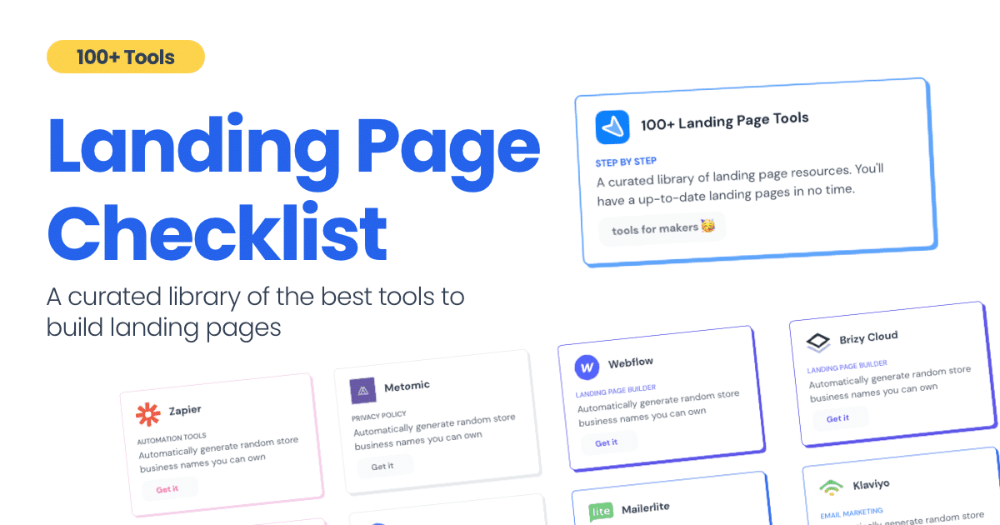
How did I make Landing Page Checklist so simple? Building and launching took 3 weeks. I worked 3 hours a day max. Weekends were busy.
It's sort of a long story, so scroll to the bottom of the page to see what tools I utilized to create Landing Page Checklist :x
As a matter of fact, it all started with the startups-investments blog; Startup Bulletin, that I started writing in 2018. No, don’t worry, I won’t be going that far behind. The twitter account where I shared the blog posts of this newsletter was inactive for a looong time. I was holding this Twitter account since 2009, I couldn’t bear to destroy it. At the same time, I was thinking how to evaluate this account.
So I looked for a weekend assignment.
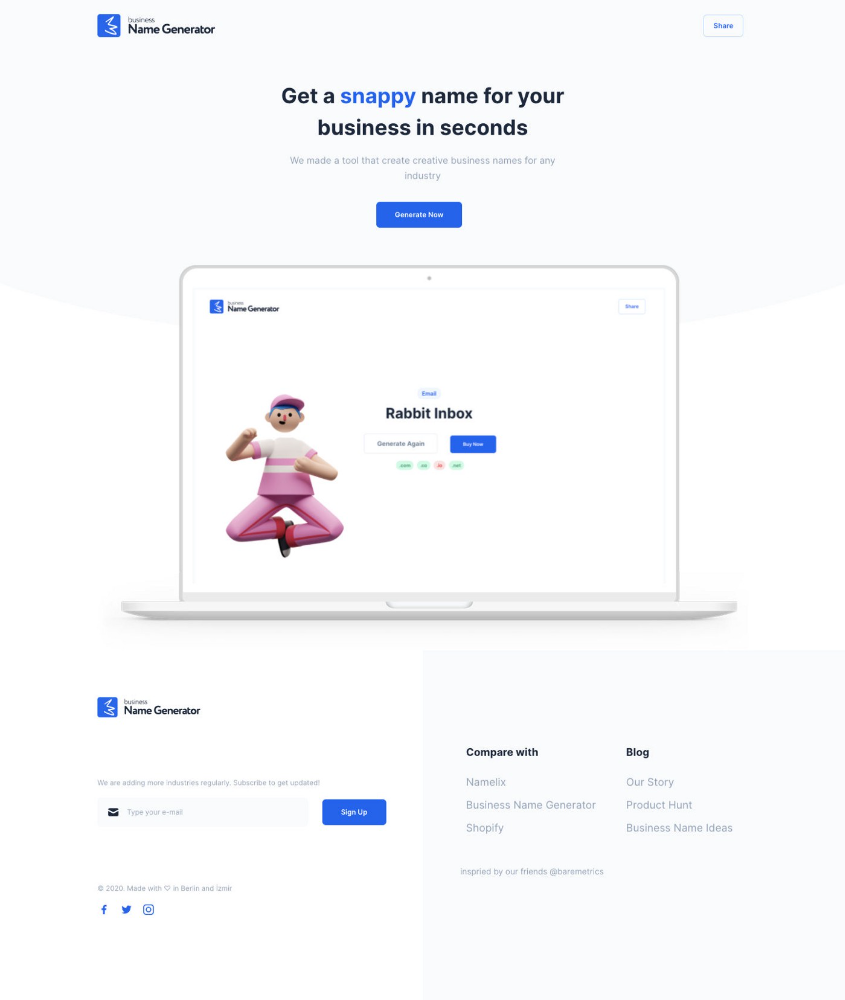
Weekend undertaking: Generate business names
Barash and I established a weekend effort to stay current. Building things helped us learn faster.
Simple. Startup Name Generator The utility generated random startup names. After market research for SEO purposes, we dubbed it Business Name Generator.
Backend developer Barash dislikes frontend work. He told me to write frontend code. Chakra UI and Tailwind CSS were recommended.
It was the first time I have heard about Tailwind CSS.
Before this project, I made mobile-web app designs in Sketch and shared them via Zeplin. I can read HTML-CSS or React code, but not write it. I didn't believe myself but followed Barash's advice.
My home page wasn't responsive when I started. Here it was:)
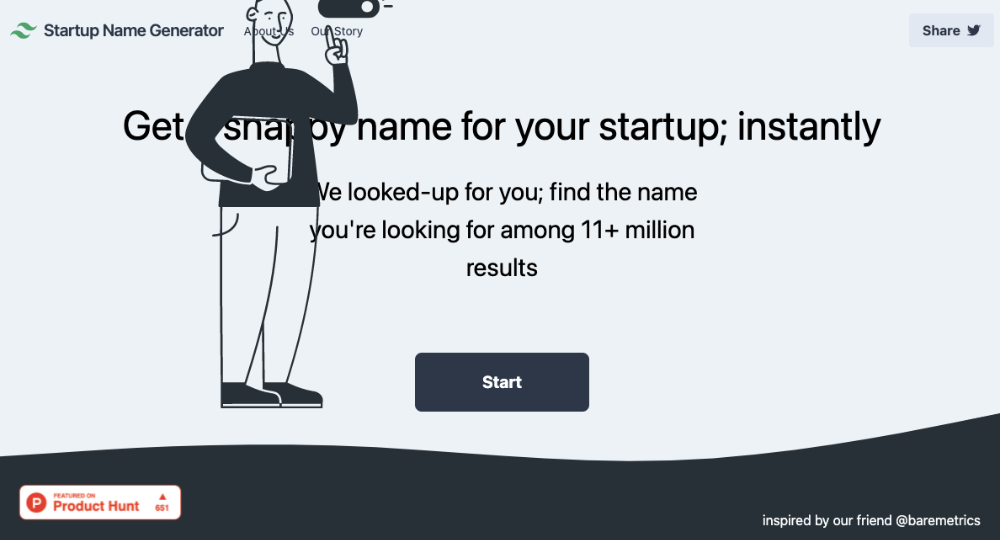
And then... Product Hunt had something I needed. Me-only! A website builder that gives you clean Tailwind CSS code and pre-made web components (like Elementor). Incredible.
I bought it right away because it was so easy to use. Best part: It's not just index.html. It includes all needed files. Like
postcss.config.js
README.md
package.json
among other things, tailwind.config.js
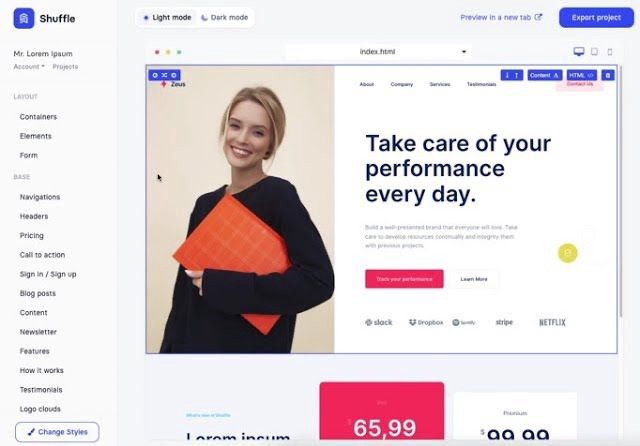
This is for non-techies.
Tailwind.build; which is Shuffle now, allows you to create and export projects for free (with limited features). You can try it by visiting their website.
After downloading the project, you can edit the text and graphics in Visual Studio (or another text editor). This HTML file can be hosted whenever.
Github is an easy way to host a landing page.
your project via Shuffle for export
your website's content, edit
Create a Gitlab, Github, or Bitbucket account.
to Github, upload your project folder.
Integrate Vercel with your Github account (or another platform below)
Allow them to guide you in steps.
Finally. If you push your code to Github using Github Desktop, you'll do it quickly and easily.
Speaking of; here are some hosting and serverless backend services for web applications and static websites for you host your landing pages for FREE!
I host landingpage.fyi on Vercel but all is fine. You can choose any platform below with peace in mind.
Vercel
Render
Netlify
After connecting your project/repo to Vercel, you don’t have to do anything on Vercel. Vercel updates your live website when you update Github Desktop. Wow!
Tails came out while I was using tailwind.build. Although it's prettier, tailwind.build is more mobile-friendly. I couldn't resist their lovely parts. Tails :)
Tails have several well-designed parts. Some components looked awful on mobile, but this bug helped me understand Tailwind CSS.
Unlike Shuffle, Tails does not include files when you export such as config.js, main.js, README.md. It just gives you the HTML code. Suffle.dev is a bit ahead in this regard and with mobile-friendly blocks if you ask me. Of course, I took advantage of both.
creativebusinessnames.co is inactive, but I'll leave a deployment link :)
Adam Wathan's YouTube videos and Tailwind's official literature helped me, but I couldn't have done it without Tails and Shuffle. These tools helped me make landing pages. I shouldn't have started over.
So began my Tailwind CSS adventure. I didn't build landingpage. I didn't plan it to be this long; sorry.
I learnt a lot while I was playing around with Shuffle and Tails Builders.
Long story short I built landingpage.fyi with the help of these tools;
Learning, building, and distribution
Shuffle (Started with a Shuffle Template)
Tails (Used components from here)
Sketch (to handle icons, logos, and .svg’s)
metatags.io (Auto Generator Meta Tags)
Vercel (Hosting)
Github Desktop (Pushing code to Github -super easy-)
Visual Studio Code (Edit my code)
Mailerlite (Capture Emails)
Jarvis / Conversion.ai (%90 of the text on website written by AI 😇 )
CookieHub (Consent Management)
That's all. A few things:
The Outcome
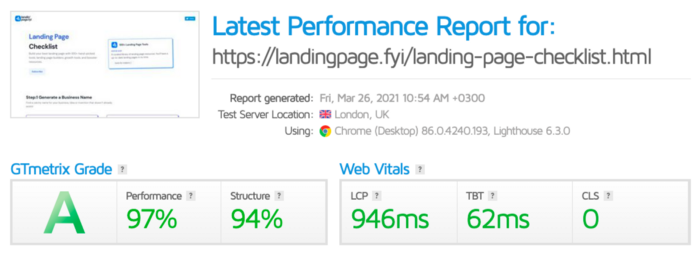
.fyi Domain: Why?

I'm often asked this.
I don't know, but I wanted to include the landing page term. Popular TLDs are gone. I saw my alternatives. brief and catchy.
CSS Tailwind Resources
I'll share project resources like Tails and Shuffle.
Beginner Tailwind (I lately enrolled in this course but haven’t completed it yet.)
Thanks for reading my blog's first post. Please share if you like it.

Francesca Furchtgott
3 years ago
Giving customers what they want or betraying the values of the brand?
A J.Crew collaboration for fashion label Eveliina Vintage is not a paradox; it is a solution.

Eveliina Vintage's capsule collection debuted yesterday at J.Crew. This J.Crew partnership stopped me in my tracks.
Eveliina Vintage sells vintage goods. Eeva Musacchia founded the shop in Finland in the 1970s. It's recognized for its one-of-a-kind slip dresses from the 1930s and 1940s.
I wondered why a vintage brand would partner with a mass shop. Fast fashion against vintage shopping? Will Eveliina Vintages customers be turned off?
But Eveliina Vintages customers don't care about sustainability. They want Eveliina's Instagram look. Eveliina Vintage collaborated with J.Crew to give customers what they wanted: more Eveliina at a lower price.
Vintage: A Fashion Option That Is Eco-Conscious
Secondhand shopping is a trendy response to quick fashion. J.Crew releases hundreds of styles annually. Waste and environmental damage have been criticized. A pair of jeans requires 1,800 gallons of water. J.Crew's limited-time deals promote more purchases. J.Crew items are likely among those Americans wear 7 times before discarding.
Consumers and designers have emphasized sustainability in recent years. Stella McCartney and Eileen Fisher are popular eco-friendly brands. They've also flocked to ThredUp and similar sites.
Gap, Levis, and Allbirds have listened to consumer requests. They promote recycling, ethical sourcing, and secondhand shopping.
Secondhand shoppers feel good about reusing and recycling clothing that might have ended up in a landfill.
Eco-conscious fashionistas shop vintage. These shoppers enjoy the thrill of the hunt (that limited-edition Chanel bag!) and showing off a unique piece (nobody will have my look!). They also reduce their environmental impact.
Is Eveliina Vintage capitalizing on an aesthetic or is it a sustainable brand?
Eveliina Vintage emphasizes environmental responsibility. Vogue's Amanda Musacchia emphasized sustainability. Amanda, founder Eeva's daughter, is a company leader.
But Eveliina's press message doesn't address sustainability, unlike Instagram. Scarcity and fame rule.
Eveliina Vintages Instagram has see-through dresses and lace-trimmed slip dresses. Celebrities and influencers are often photographed in Eveliina's apparel, which has 53,000+ followers. Vogue appreciates Eveliina's style. Multiple publications discuss Alexa Chung's Eveliina dress.
Eveliina Vintage markets its one-of-a-kind goods. It teases future content, encouraging visitors to return. Scarcity drives demand and raises clothing prices. One dress is $1,600+, but most are $500-$1,000.
The catch: Eveliina can't monetize its expanding popularity due to exorbitant prices and limited quantity. Why?
Most people struggle to pay for their clothing. But Eveliina Vintage lacks those more affordable entry-level products, in contrast to other luxury labels that sell accessories or perfume.
Many people have trouble fitting into their clothing. The bodies of most women in the past were different from those for which vintage clothing was designed. Each Eveliina dress's specific measurements are mentioned alongside it. Be careful, you can fall in love with an ill-fitting dress.
No matter how many people can afford it and fit into it, there is only one item to sell. To get the item before someone else does, those people must be on the Eveliina Vintage website as soon as it becomes available.
A Way for Eveliina Vintage to Make Money (and Expand) with J.Crew Its following
Eveliina Vintages' cooperation with J.Crew makes commercial sense.
This partnership spreads Eveliina's style. Slightly better pricing The $390 outfits have multicolored slips and gauzy cotton gowns. Sizes range from 00 to 24, which is wider than vintage racks.
Eveliina Vintage customers like the combination. Excited comments flood the brand's Instagram launch post. Nobody is mocking the 50-year-old vintage brand's fast-fashion partnership.
Vintage may be a sustainable fashion trend, but that's not why Eveliina's clients love the brand. They only care about the old look.
And that is a tale as old as fashion.
You might also like
Benjamin Lin
3 years ago
I sold my side project for $20,000: 6 lessons I learned
How I monetized and sold an abandoned side project for $20,000

The Origin Story
I've always wanted to be an entrepreneur but never succeeded. I often had business ideas, made a landing page, and told my buddies. Never got customers.
In April 2021, I decided to try again with a new strategy. I noticed that I had trouble acquiring an initial set of customers, so I wanted to start by acquiring a product that had a small user base that I could grow.
I found a SaaS marketplace called MicroAcquire.com where you could buy and sell SaaS products. I liked Shareit.video, an online Loom-like screen recorder.
Shareit.video didn't generate revenue, but 50 people visited daily to record screencasts.
Purchasing a Failed Side Project
I eventually bought Shareit.video for $12,000 from its owner.
$12,000 was probably too much for a website without revenue or registered users.
I thought time was most important. I could have recreated the website, but it would take months. $12,000 would give me an organized code base and a working product with a few users to monetize.
I considered buying a screen recording website and trying to grow it versus buying a new car or investing in crypto with the $12K.
Buying the website would make me a real entrepreneur, which I wanted more than anything.
Putting down so much money would force me to commit to the project and prevent me from quitting too soon.
A Year of Development
I rebranded the website to be called RecordJoy and worked on it with my cousin for about a year. Within a year, we made $5000 and had 3000 users.
We spent $3500 on ads, hosting, and software to run the business.
AppSumo promoted our $120 Life Time Deal in exchange for 30% of the revenue.
We put RecordJoy on maintenance mode after 6 months because we couldn't find a scalable user acquisition channel.
We improved SEO and redesigned our landing page, but nothing worked.

Despite not being able to grow RecordJoy any further, I had already learned so much from working on the project so I was fine with putting it on maintenance mode. RecordJoy still made $500 a month, which was great lunch money.
Getting Taken Over
One of our customers emailed me asking for some feature requests and I replied that we weren’t going to add any more features in the near future. They asked if we'd sell.
We got on a call with the customer and I asked if he would be interested in buying RecordJoy for 15k. The customer wanted around $8k but would consider it.
Since we were negotiating with one buyer, we put RecordJoy on MicroAcquire to see if there were other offers.

We quickly received 10+ offers. We got 18.5k. There was also about $1000 in AppSumo that we could not withdraw, so we agreed to transfer that over for $600 since about 40% of our sales on AppSumo usually end up being refunded.
Lessons Learned
First, create an acquisition channel
We couldn't discover a scalable acquisition route for RecordJoy. If I had to start another project, I'd develop a robust acquisition channel first. It might be LinkedIn, Medium, or YouTube.
Purchase Power of the Buyer Affects Acquisition Price
Some of the buyers we spoke to were individuals looking to buy side projects, as well as companies looking to launch a new product category. Individual buyers had less budgets than organizations.
Customers of AppSumo vary.
AppSumo customers value lifetime deals and low prices, which may not be a good way to build a business with recurring revenue. Designed for AppSumo users, your product may not connect with other users.
Try to increase acquisition trust
Acquisition often fails. The buyer can go cold feet, cease communicating, or run away with your stuff. Trusting the buyer ensures a smooth asset exchange. First acquisition meeting was unpleasant and price negotiation was tight. In later meetings, we spent the first few minutes trying to get to know the buyer’s motivations and background before jumping into the negotiation, which helped build trust.
Operating expenses can reduce your earnings.
Monitor operating costs. We were really happy when we withdrew the $5000 we made from AppSumo and Stripe until we realized that we had spent $3500 in operating fees. Spend money on software and consultants to help you understand what to build.
Don't overspend on advertising
We invested $1500 on Google Ads but made little money. For a side project, it’s better to focus on organic traffic from SEO rather than paid ads unless you know your ads are going to have a positive ROI.

Crypto Zen Monk
2 years ago
How to DYOR in the world of cryptocurrency
RESEARCH
We must create separate ideas and handle our own risks to be better investors. DYOR is crucial.
The only thing unsustainable is your cluelessness.
DYOR: Why
On social media, there is a lot of false information and divergent viewpoints. All of these facts might be accurate, but they might not be appropriate for your portfolio and investment preferences.
You become a more knowledgeable investor thanks to DYOR.
DYOR improves your portfolio's risk management.
My DYOR resources are below.

Messari: Major Blockchains' Activities
New York-based Messari provides cryptocurrency open data libraries.
Major blockchains offer 24-hour on-chain volume. https://messari.io/screener/most-active-chains-DB01F96B
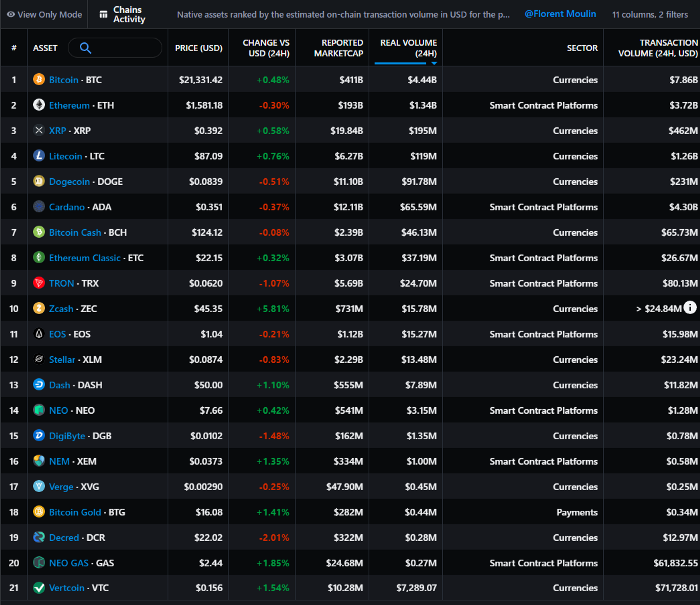
What to do
Invest in stable cryptocurrencies. Sort Messari by Real Volume (24H) or Reported Market Cap.
Coingecko: Research on Ecosystems
Top 10 Ecosystems by Coingecko are good.
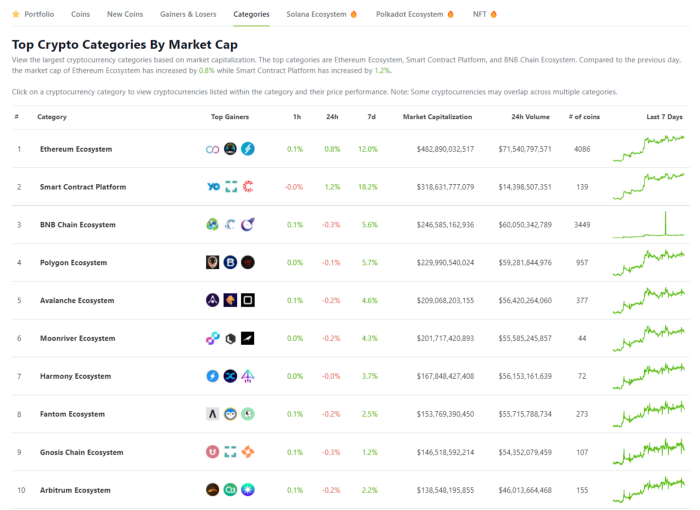
What to do
Invest in quality.
Leading ten Ecosystems by Market Cap
There are a lot of coins in the ecosystem (second last column of above chart)
CoinGecko's Market Cap Crypto Categories Market capitalization-based cryptocurrency categories. Ethereum Ecosystem www.coingecko.com
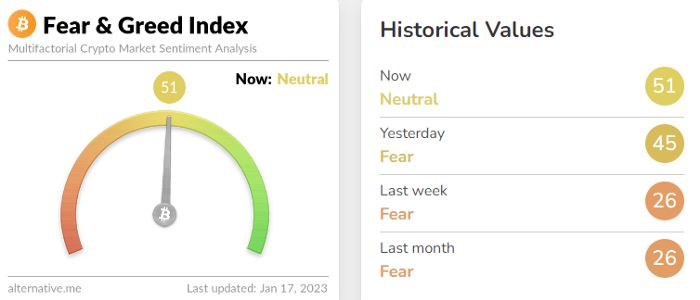
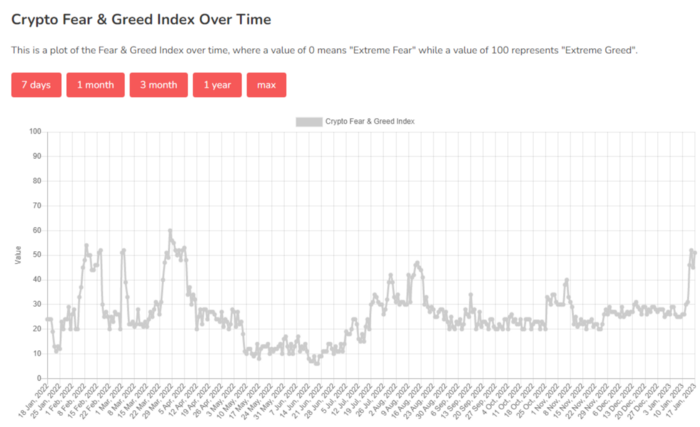
Fear & Greed Index for Bitcoin (FGI)
The Bitcoin market sentiment index ranges from 0 (extreme dread) to 100. (extreme greed).
How to Apply
See market sentiment:
Extreme fright = opportunity to buy
Extreme greed creates sales opportunity (market due for correction).
Glassnode
Glassnode gives facts, information, and confidence to make better Bitcoin, Ethereum, and cryptocurrency investments and trades.
Explore free and paid metrics.
Stock to Flow Ratio: Application
The popular Stock to Flow Ratio concept believes scarcity drives value. Stock to flow is the ratio of circulating Bitcoin supply to fresh production (i.e. newly mined bitcoins). The S/F Ratio has historically predicted Bitcoin prices. PlanB invented this metric.

Utilization: Ethereum Hash Rate
Ethereum miners produce an estimated number of hashes per second.
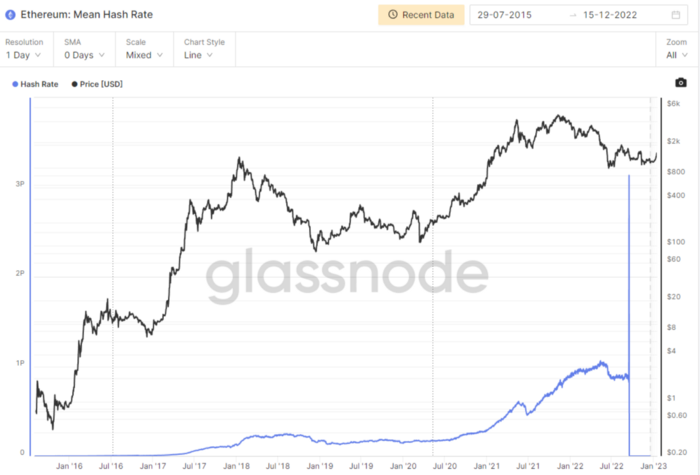
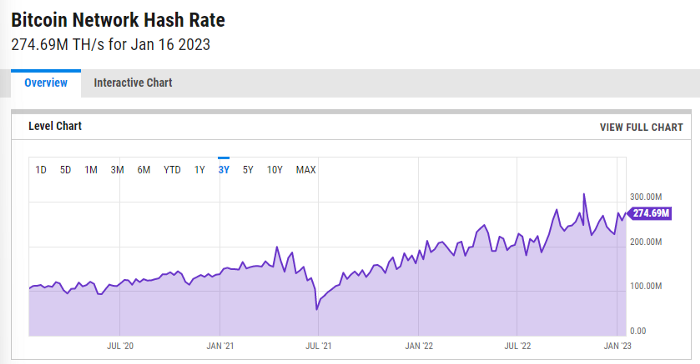
ycharts: Hash rate of the Bitcoin network
TradingView
TradingView is your go-to tool for investment analysis, watch lists, technical analysis, and recommendations from other traders/investors.

Research for a cryptocurrency project
Two key questions every successful project must ask: Q1: What is this project trying to solve? Is it a big problem or minor? Q2: How does this project make money?
Each cryptocurrency:
Check out the white paper.
check out the project's internet presence on github, twitter, and medium.
the transparency of it
Verify the team structure and founders. Verify their LinkedIn profile, academic history, and other qualifications. Search for their names with scam.
Where to purchase and use cryptocurrencies Is it traded on trustworthy exchanges?
From CoinGecko and CoinMarketCap, we may learn about market cap, circulations, and other important data.
The project must solve a problem. Solving a problem is the goal of the founders.
Avoid projects that resemble multi-level marketing or ponzi schemes.
Your use of social media
Use social media carefully or ignore it: Twitter, TradingView, and YouTube
Someone said this before and there are some truth to it. Social media bullish => short.
Your Behavior
Investigate. Spend time. You decide. Worth it!
Only you have the best interest in your financial future.

Abhimanyu Bhargava
3 years ago
VeeFriends Series 2: The Biggest NFT Opportunity Ever
VeeFriends is one NFT project I'm sure will last.
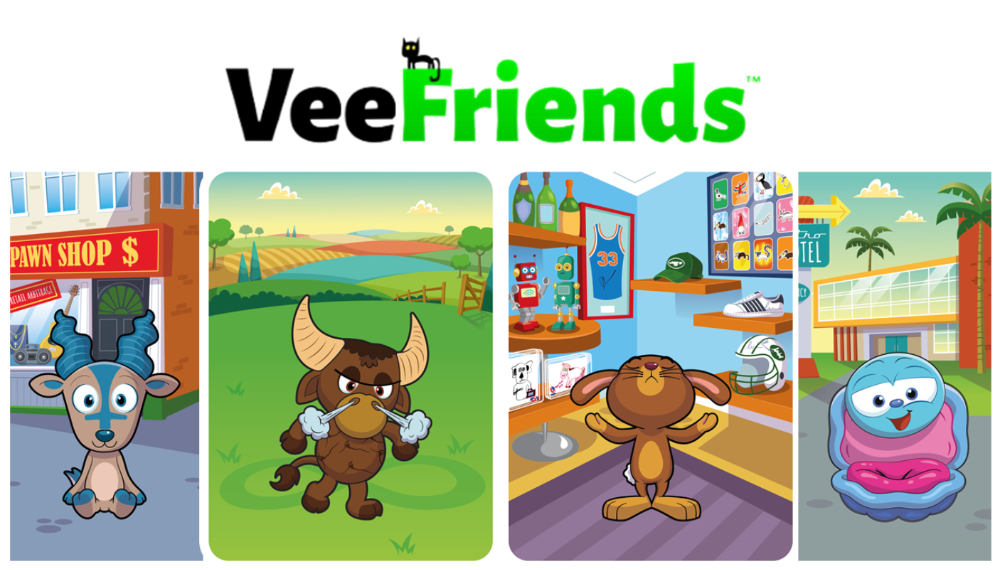
I believe in blockchain technology and JPEGs, aka NFTs. NFTs aren't JPEGs. It's not as it seems.
Gary Vaynerchuk is leading the pack with his new NFT project VeeFriends, I wrote a year ago. I was spot-on. It's the most innovative project I've seen.
Since its minting in May 2021, it has given its holders enormous value, most notably the first edition of VeeCon, a multi-day superconference featuring iconic and emerging leaders in NFTs and Popular Culture. First-of-its-kind NFT-ticketed Web3 conference to build friendships, share ideas, and learn together.
VeeFriends holders got free VeeCon NFT tickets. Attendees heard iconic keynote speeches, innovative talks, panels, and Q&A sessions.
It was a unique conference that most of us, including me, are looking forward to in 2023. The lineup was epic, and it allowed many to network in new ways. Really memorable learning. Here are a couple of gratitude posts from the attendees.
VeeFriends Series 2
This article explains VeeFriends if you're still confused.
GaryVee's hand-drawn doodles have evolved into wonderful characters. The characters' poses and backgrounds bring the VeeFriends IP to life.
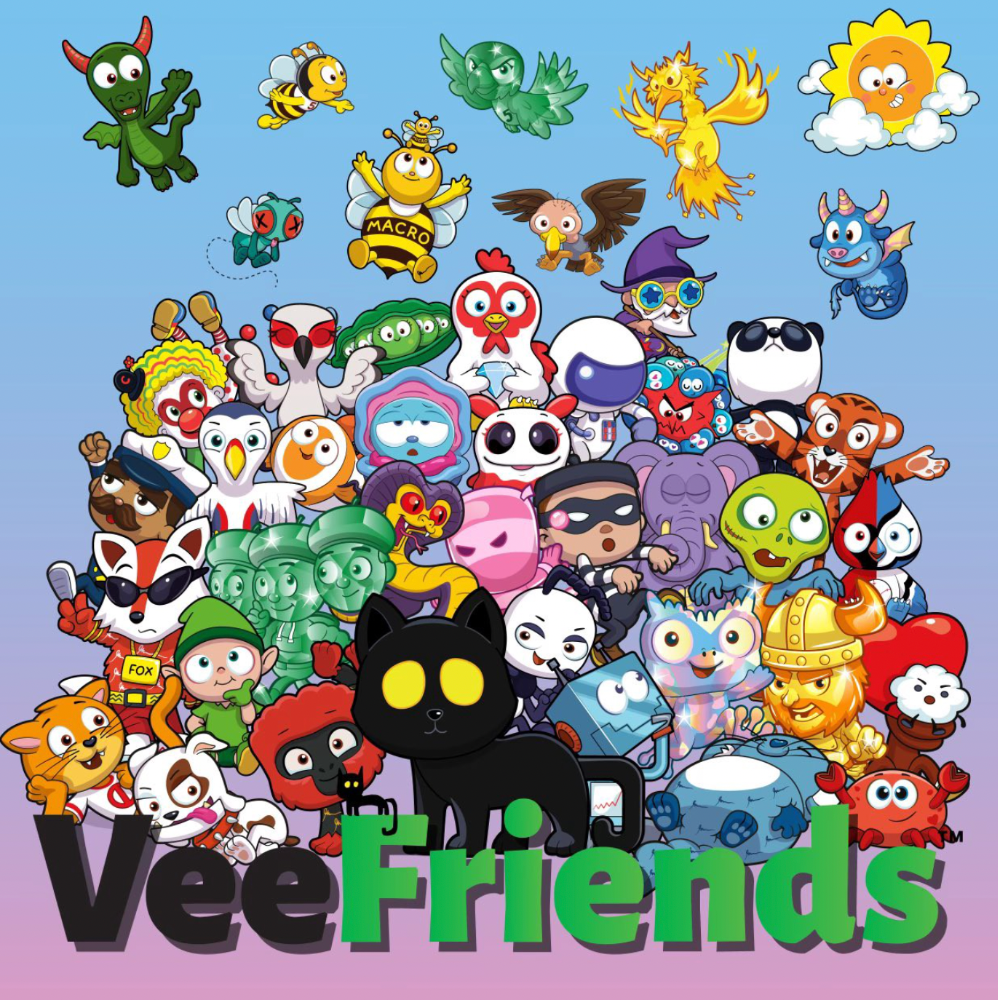
Yes, this is the second edition of VeeFriends, and at current prices, it's one of the best NFT opportunities in years. If you have the funds and risk appetite to invest in NFTs, VeeFriends Series 2 is worth every penny. Even if you can't invest, learn from their journey.
1. Art Is the Start
Many critics say VeeFriends artwork is below average and not by GaryVee. Art is often the key to future success.
Let's look at one of the first Mickey Mouse drawings. No one would have guessed that this would become one of the most beloved animated short film characters. In Walt Before Mickey, Walt Disney's original mouse Mortimer was less refined.
First came a mouse...
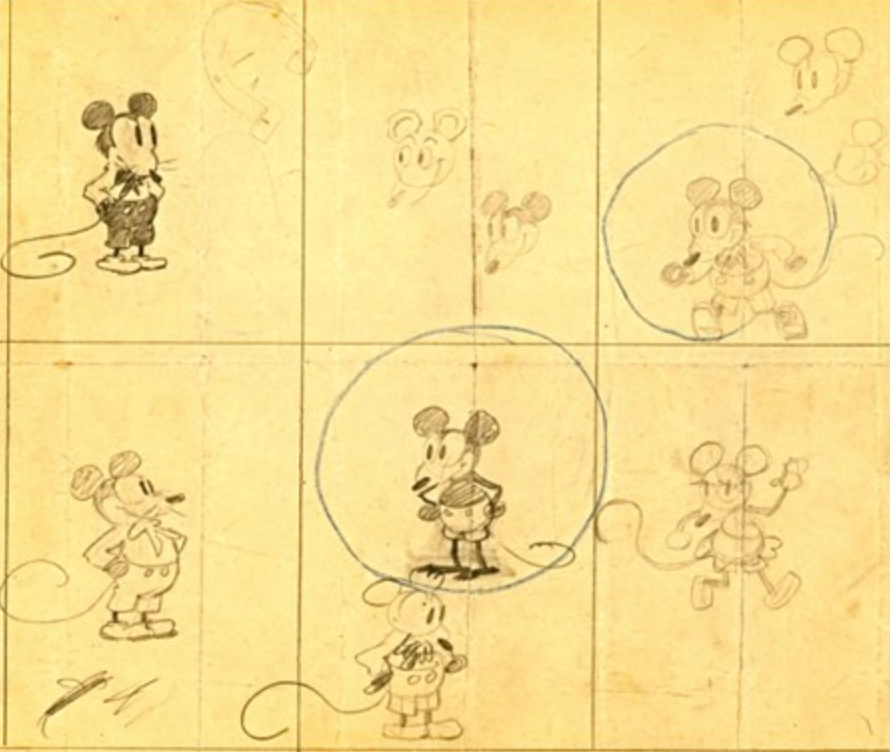
These sketches evolved into Steamboat Willie, Disney's first animated short film.
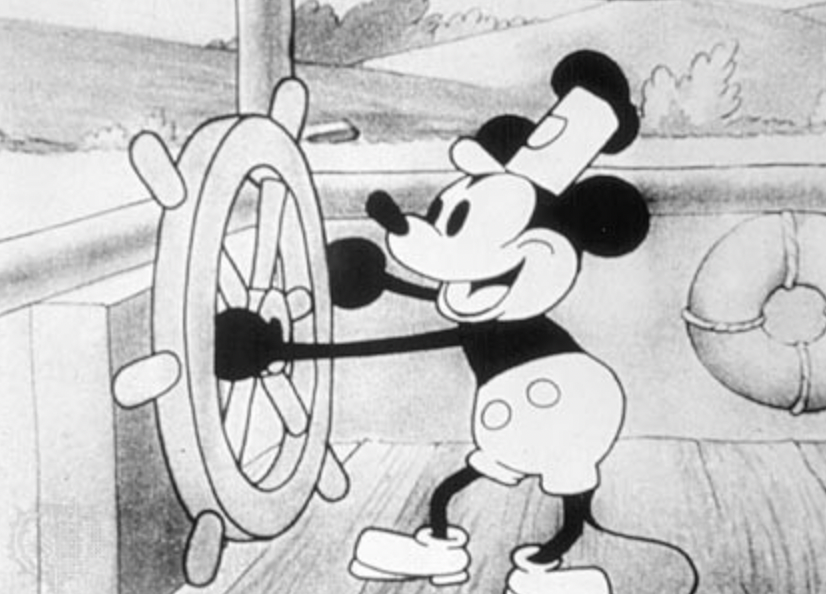
Fred Moore redesigned the character artwork into what we saw in cartoons as kids. Mickey Mouse's history is here.
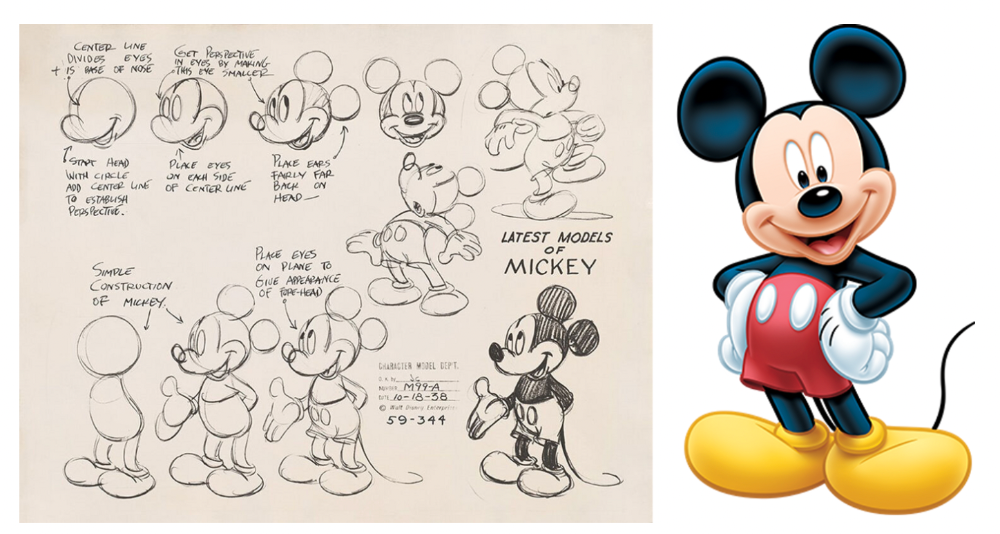
Looking at how different cartoon characters have evolved and gained popularity over decades, I believe Series 2 characters like Self-Aware Hare, Kind Kudu, and Patient Pig can do the same.
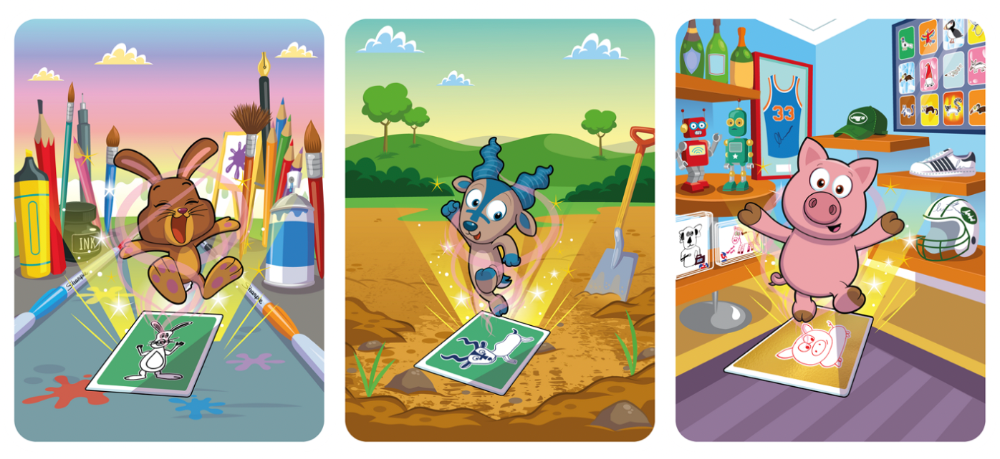
GaryVee captures this journey on the blockchain and lets early supporters become part of history. Time will tell if it rivals Disney, Pokemon, or Star Wars. Gary has been vocal about this vision.
2. VeeFriends is Intellectual Property for the Coming Generations
Most of us grew up watching cartoons, playing with toys, cards, and video games. Our interactions with fictional characters and the stories we hear shape us.
GaryVee is slowly curating an experience for the next generation with animated videos, card games, merchandise, toys, and more.
VeeFriends UNO, a collaboration with Mattel Creations, features 17 VeeFriends characters.
VeeFriends and Zerocool recently released Trading Cards featuring all 268 Series 1 characters and 15 new ones. Another way to build VeeFriends' collectibles brand.
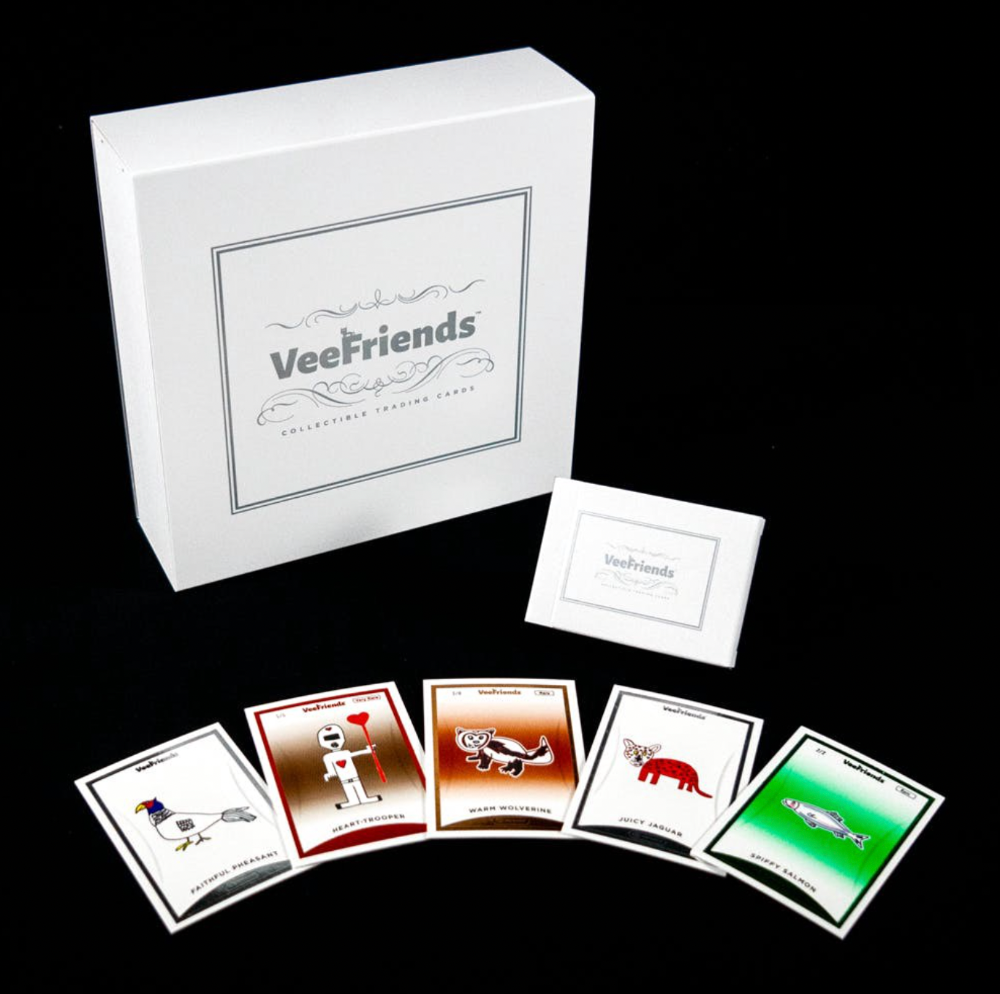
At Veecon, all the characters were collectible toys. Something will soon emerge.
Kids and adults alike enjoy the YouTube channel's animated shorts and VeeFriends Tunes. Here's a song by the holder's Optimistic Otter-loving daughter.
This VeeFriends story is only the beginning. I'm looking forward to animated short film series, coloring books, streetwear, candy, toys, physical collectibles, and other forms of VeeFriends IP.
3. Veefriends will always provide utilities
Smart contracts can be updated at any time and authenticated on a ledger.
VeeFriends Series 2 gives no promise of any utility whatsoever. GaryVee released no project roadmap. In the first few months after launch, many owners of specific characters or scenes received utilities.
Every benefit or perk you receive helps promote the VeeFriends brand.
Recent partnerships are listed below.
MaryRuth's Multivitamin Gummies
Productive Puffin holders from VeeFriends x Primitive
Pickleball Scene & Clown Holders Only
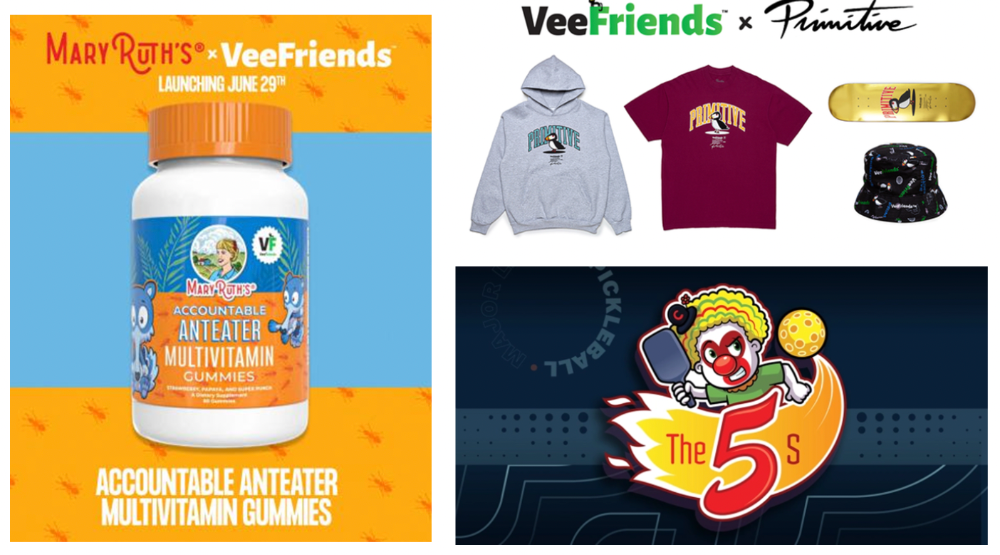
Pickleball & Competitive Clown Exclusive experience, anteater multivitamin gummies, and Puffin x Primitive merch
Considering the price of NFTs, it may not seem like much. It's just the beginning; you never know what the future holds. No other NFT project offers such diverse, ongoing benefits.
4. Garyvee's team is ready
Gary Vaynerchuk's team and record are undisputed. He's a serial entrepreneur and the Chairman & CEO of VaynerX, which includes VaynerMedia, VaynerCommerce, One37pm, and The Sasha Group.
Gary founded VaynerSports, Resy, and Empathy Wines. He's a Candy Digital Board Member, VCR Group Co-Founder, ArtOfficial Co-Founder, and VeeFriends Creator & CEO. Gary was recently named one of Fortune's Top 50 NFT Influencers.
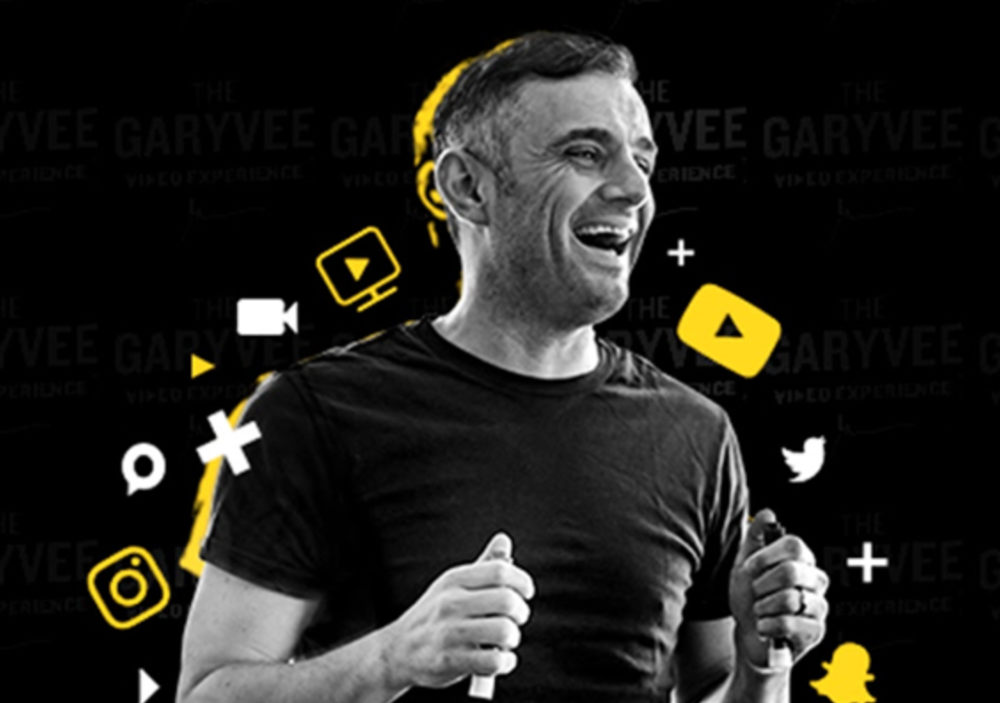
Gary Vayenerchuk aka GaryVee
Gary documents his daily life as a CEO on social media, which has 34 million followers and 272 million monthly views. GaryVee Audio Experience is a top podcast. He's a five-time New York Times best-seller and sought-after speaker.
Gary can observe consumer behavior to predict trends. He understood these trends early and pioneered them.
1997 — Realized e-potential commerce's and started winelibrary.com. In five years, he grew his father's wine business from $3M to $60M.
2006 — Realized content marketing's potential and started Wine Library on YouTube. TV
2009 — Estimated social media's potential (Web2) and invested in Facebook, Twitter, and Tumblr.
2014: Ethereum and Bitcoin investments
2021 — Believed in NFTs and Web3 enough to launch VeeFriends
GaryVee isn't all of VeeFriends. Andy Krainak, Dave DeRosa, Adam Ripps, Tyler Dowdle, and others work tirelessly to make VeeFriends a success.
GaryVee has said he'll let other businesses fail but not VeeFriends. We're just beginning his 40-year vision.
I have more confidence than ever in a company with a strong foundation and team.
5. Humans die, but characters live forever
What if GaryVee dies or can't work?
A writer's books can immortalize them. As long as their books exist, their words are immortal. Socrates, Hemingway, Aristotle, Twain, Fitzgerald, and others have become immortal.
Everyone knows Vincent Van Gogh's The Starry Night.
We all love reading and watching Peter Parker, Thor, or Jessica Jones. Their behavior inspires us. Stan Lee's message and stories live on despite his death.
GaryVee represents VeeFriends. Creating characters to communicate ensures that the message reaches even those who don't listen.
Gary wants his values and messages to be omnipresent in 268 characters. Messengers die, but their messages live on.
Gary envisions VeeFriends creating timeless stories and experiences. Ten years from now, maybe every kid will sing Patient Pig.
6. I love the intent.
Gary planned to create Workplace Warriors three years ago when he began designing Patient Panda, Accountable Ant, and Empathy elephant. The project stalled. When NFTs came along, he knew.
Gary wanted to create characters with traits he values, such as accountability, empathy, patience, kindness, and self-awareness. He wants future generations to find these traits cool. He hopes one or more of his characters will become pop culture icons.
These emotional skills aren't taught in schools or colleges, but they're crucial for business and life success. I love that someone is teaching this at scale.
In the end, intent matters.
Humans Are Collectors
Buy and collect things to communicate. Since the 1700s. Medieval people formed communities around hidden metals and stones. Many people still collect stamps and coins, and luxury and fashion are multi-trillion dollar industries. We're collectors.
The early 2020s NFTs will be remembered in the future. VeeFriends will define a cultural and technological shift in this era. VeeFriends Series 1 is the original hand-drawn art, but it's expensive. VeeFriends Series 2 is a once-in-a-lifetime opportunity at $1,000.
If you are new to NFTs, check out How to Buy a Non Fungible Token (NFT) For Beginners
This is a non-commercial article. Not financial or legal advice. Information isn't always accurate. Before making important financial decisions, consult a pro or do your own research.
This post is a summary. Read the full article here