

















More on Society & Culture

Michelle Teheux
3 years ago
Get Real, All You Grateful Laid-Off LinkedIn Users
WTF is wrong with you people?

When I was laid off as editor of my town's daily newspaper, I went silent on social media. I knew it was coming and had been quietly removing personal items each day, but the pain was intense.
I posted a day later. I didn't bad-mouth GateHouse Media but expressed my sadness at leaving the newspaper industry, pride in my accomplishments, and hope for success in another industry.
Normal job-loss response.
What do you recognize as abnormal?
The bullshit I’ve been reading from laid-off folks on LinkedIn.
If you're there, you know. Many Twitter or Facebook/Meta employees recently lost their jobs.
Well, many of them did not “lose their job,” actually. They were “impacted by the layoffs” at their former employer. I keep seeing that phrase.
Why don’t they want to actually say it? Why the euphemism?
Many are excited about the opportunities ahead. The jobless deny being sad.
They're ecstatic! They have big plans.
Hope so. Sincerely! Being laid off stinks, especially if, like me, your skills are obsolete. It's worse if, like me, you're too old to start a new career. Ageism exists despite denials.
Nowadays, professionalism seems to demand psychotic levels of fake optimism.
Why? Life is unpredictable. That's indisputable. You shouldn't constantly complain or cry in public, but you also shouldn't pretend everything's great.
It makes you look psychotic, not positive. It's like saying at work:
“I was impacted by the death of my spouse of 20 years this week, and many of you have reached out to me, expressing your sympathy. However, I’m choosing to remember the amazing things we shared. I feel confident that there is another marriage out there for me, and after taking a quiet weekend trip to reset myself, I’ll be out there looking for the next great marital adventure! #staypositive #available #opentolove
Also:
“Now looking for our next #dreamhome after our entire neighborhood was demolished by a wildfire last night. We feel so lucky to have lived near so many amazing and inspirational neighbors, all of whom we will miss as we go on our next housing adventure. The best house for us is yet to come! If you have a great neighborhood you’d recommend, please feel free to reach out and touch base with us! #newhouse #newneighborhood #newlife
Admit it. That’s creepy.
The constant optimism makes me feel sick to my stomach.
Viscerally.
I hate fakes.
Imagine a fake wood grain desk. Wouldn't it be better if the designer accepted that it's plastic and went with that?
Real is better but not always nice. When something isn't nice, you don't have to go into detail, but you also shouldn't pretend it's great.
How to announce your job loss to the world.
Do not pretend to be happy, but don't cry and drink vodka all afternoon.
Say you loved your job, and that you're looking for new opportunities.
Yes, if you'll miss your coworkers. Otherwise, don't badmouth. No bridge-burning!
Please specify the job you want. You may want to pivot.
Alternatively, try this.
You could always flame out.
If you've pushed yourself too far into toxic positivity, you may be ready to burn it all down. If so, make it worthwhile by writing something like this:
Well, I was shitcanned by the losers at #Acme today. That bitch Linda in HR threw me under the bus just because she saw that one of my “friends” tagged me in some beach pics on social media after I called in sick with Covid. The good thing is I will no longer have to watch my ass around that #asspincher Ron in accounting, but I’m sad that I will no longer have a cushy job with high pay or access to the primo office supplies I’ve been sneaking home for the last five years. (Those gel pens were the best!) I am going to be taking some time off to enjoy my unemployment and hammer down shots of Jägermeister but in about five months I’ll be looking for anything easy with high pay and great benefits. Reach out if you can help! #officesupplies #unemploymentrocks #drinkinglikeagirlboss #acmesucks
It beats the fake positivity.

umair haque
2 years ago
The reasons why our civilization is deteriorating
The Industrial Revolution's Curse: Why One Age's Power Prevents the Next Ones
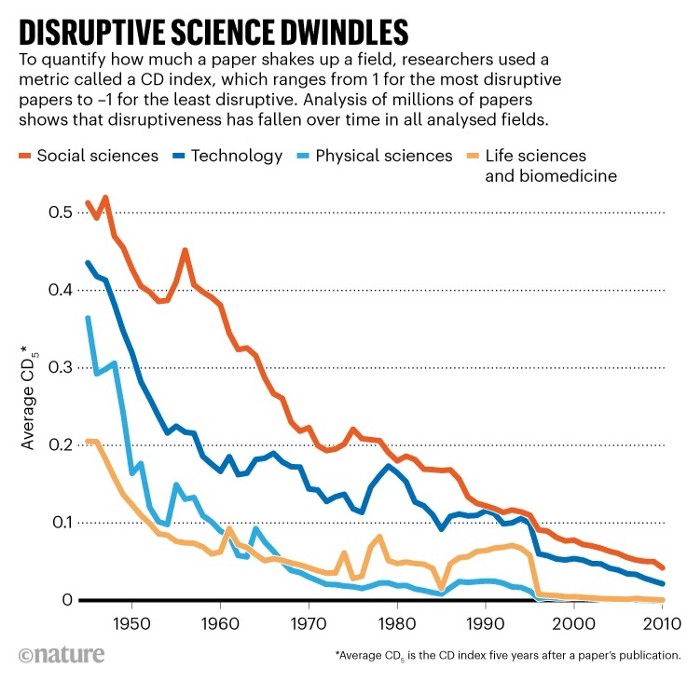
A surprising fact. Recently, Big Oil's 1970s climate change projections were disturbingly accurate. Of course, we now know that it worked tirelessly to deny climate change, polluting our societies to this day. That's a small example of the Industrial Revolution's curse.
Let me rephrase this nuanced and possibly weird thought. The chart above? Disruptive science is declining. The kind that produces major discoveries, new paradigms, and shattering prejudices.
Not alone. Our civilisation reached a turning point suddenly. Progress stopped and reversed for the first time in centuries.
The Industrial Revolution's Big Bang started it all. At least some humans had riches for the first time, if not all, and with that wealth came many things. Longer, healthier lives since now health may be publicly and privately invested in. For the first time in history, wealthy civilizations could invest their gains in pure research, a good that would have sounded frivolous to cultures struggling to squeeze out the next crop, which required every shoulder to the till.
So. Don't confuse me with the Industrial Revolution's curse. Industry progressed. Contrary. I'm claiming that the Big Bang of Progress is slowing, plateauing, and ultimately reversing. All social indicators show that. From progress itself to disruptive, breakthrough research, everything is slowing down.
It's troubling. Because progress slows and plateaus, pre-modern social problems like fascism, extremism, and fundamentalism return. People crave nostalgic utopias when they lose faith in modernity. That strongman may shield me from this hazardous life. If I accept my place in a blood-and-soil hierarchy, I have a stable, secure position and someone to punch and detest. It's no coincidence that as our civilization hits a plateau of progress, there is a tsunami pulling the world backwards, with people viscerally, openly longing for everything from theocracy to fascism to fundamentalism, an authoritarian strongman to soothe their fears and tell them what to do, whether in Britain, heartland America, India, China, and beyond.
However, one aspect remains unknown. Technology. Let me clarify.
How do most people picture tech? Say that without thinking. Most people think of social media or AI. Well, small correlation engines called artificial neurons are a far cry from biological intelligence, which functions in far more obscure and intricate ways, down to the subatomic level. But let's try it.
Today, tech means AI. But. Do you foresee it?
Consider why civilisation is plateauing and regressing. Because we can no longer provide the most basic necessities at the same rate. On our track, clean air, water, food, energy, medicine, and healthcare will become inaccessible to huge numbers within a decade or three. Not enough. There isn't, therefore prices for food, medicine, and energy keep rising, with occasional relief.
Why our civilizations are encountering what economists like me term a budget constraint—a hard wall of what we can supply—should be evident. Global warming and extinction. Megafires, megadroughts, megafloods, and failed crops. On a civilizational scale, good luck supplying the fundamentals that way. Industrial food production cannot feed a planet warming past two degrees. Crop failures, droughts, floods. Another example: glaciers melt, rivers dry up, and the planet's fresh water supply contracts like a heart attack.
Now. Let's talk tech again. Mostly AI, maybe phone apps. The unsettling reality is that current technology cannot save humanity. Not much.
AI can do things that have become cliches to titillate the masses. It may talk to you and act like a person. It can generate art, which means reproduce it, but nonetheless, AI art! Despite doubts, it promises to self-drive cars. Unimportant.
We need different technology now. AI won't grow crops in ash-covered fields, cleanse water, halt glaciers from melting, or stop the clear-cutting of the planet's few remaining forests. It's not useless, but on a civilizational scale, it's much less beneficial than its proponents claim. By the time it matures, AI can help deliver therapy, keep old people company, and even drive cars more efficiently. None of it can save our culture.
Expand that scenario. AI's most likely use? Replacing call-center workers. Support. It may help doctors diagnose, surgeons orient, or engineers create more fuel-efficient motors. This is civilizationally marginal.
Non-disruptive. Do you see the connection with the paper that indicated disruptive science is declining? AI exemplifies that. It's called disruptive, yet it's a textbook incremental technology. Oh, cool, I can communicate with a bot instead of a poor human in an underdeveloped country and have the same or more trouble being understood. This bot is making more people unemployed. I can now view a million AI artworks.
AI illustrates our civilization's trap. Its innovative technologies will change our lives. But as you can see, its incremental, delivering small benefits at most, and certainly not enough to balance, let alone solve, the broader problem of steadily dropping living standards as our society meets a wall of being able to feed itself with fundamentals.
Contrast AI with disruptive innovations we need. What do we need to avoid a post-Roman Dark Age and preserve our civilization in the coming decades? We must be able to post-industrially produce all our basic needs. We need post-industrial solutions for clean water, electricity, cement, glass, steel, manufacture for garments and shoes, starting with the fossil fuel-intensive plastic, cotton, and nylon they're made of, and even food.
Consider. We have no post-industrial food system. What happens when crop failures—already dangerously accelerating—reach a critical point? Our civilization is vulnerable. Think of ancient civilizations that couldn't survive the drying up of their water sources, the failure of their primary fields, which they assumed the gods would preserve forever, or an earthquake or sickness that killed most of their animals. Bang. Lost. They failed. They splintered, fragmented, and abandoned vast capitols and cities, and suddenly, in history's sight, poof, they were gone.
We're getting close. Decline equals civilizational peril.
We believe dumb notions about AI becoming disruptive when it's incremental. Most of us don't realize our civilization's risk because we believe these falsehoods. Everyone should know that we cannot create any thing at civilizational scale without fossil fuels. Most of us don't know it, thus we don't realize that the breakthrough technologies and systems we need don't manipulate information anymore. Instead, biotechnologies, largely but not genes, generate food without fossil fuels.
We need another Industrial Revolution. AI, apps, bots, and whatnot won't matter unless you think you can eat and drink them while the world dies and fascists, lunatics, and zealots take democracy's strongholds. That's dramatic, but only because it's already happening. Maybe AI can entertain you in that bunker while society collapses with smart jokes or a million Mondrian-like artworks. If civilization is to survive, it cannot create the new Industrial Revolution.
The revolution has begun, but only in small ways. Post-industrial fundamental systems leaders are developing worldwide. The Netherlands is leading post-industrial agriculture. That's amazing because it's a tiny country performing well. Correct? Discover how large-scale agriculture can function, not just you and me, aged hippies, cultivating lettuce in our backyards.
Iceland is leading bioplastics, which, if done well, will be a major advance. Of sure, microplastics are drowning the oceans. What should we do since we can't live without it? We need algae-based bioplastics for green plastic.
That's still young. Any of the above may not function on a civilizational scale. Bioplastics use algae, which can cause problems if overused. None of the aforementioned indicate the next Industrial Revolution is here. Contrary. Slowly.
We have three decades until everything fails. Before life ends. Curtain down. No more fields, rivers, or weather. Freshwater and life stocks have plummeted. Again, we've peaked and declined in our ability to live at today's relatively rich standards. Game over—no more. On a dying planet, producing the fundamentals for a civilisation that left it too late to construct post-industrial systems becomes next to impossible, with output dropping faster and quicker each year, quarter, and day.
Too slow. That's because it's not really happening. Most people think AI when I say tech. I get a politicized response if I say Green New Deal or Clean Industrial Revolution. Half the individuals I talk to have been politicized into believing that climate change isn't real and that any breakthrough technical progress isn't required, desirable, possible, or genuine. They'll suffer.
The Industrial Revolution curse. Every revolution creates new authorities, which ossify and refuse to relinquish their privileges. For fifty years, Big Oil has denied climate change, even though their scientists predicted it. We also have a software industry and its venture capital power centers that are happy for the average person to think tech means chatbots, not being able to produce basics for a civilization without destroying the planet, and billionaires who buy comms platforms for the same eye-watering amount of money it would take to save life on Earth.
The entire world's vested interests are against the next industrial revolution, which is understandable since they were established from fossil money. From finance to energy to corporate profits to entertainment, power in our world is the result of the last industrial revolution, which means it has no motivation or purpose to give up fossil money, as we are witnessing more brutally out in the open.
Thus, the Industrial Revolution's curse—fossil power—rules our globe. Big Agriculture, Big Pharma, Wall St., Silicon Valley, and many others—including politics, which they buy and sell—are basically fossil power, and they have no interest in generating or letting the next industrial revolution happen. That's why tiny enterprises like those creating bioplastics in Iceland or nations savvy enough to shun fossil power, like the Netherlands, which has a precarious relationship with nature, do it. However, fossil power dominates politics, economics, food, clothes, energy, and medicine, and it has no motivation to change.
Allow disruptive innovations again. As they occur, its position becomes increasingly vulnerable. If you were fossil power, would you allow another industrial revolution to destroy its privilege and wealth?
You might, since power and money haven't corrupted you. However, fossil power prevents us from building, creating, and growing what we need to survive as a society. I mean the entire economic, financial, and political power structure from the last industrial revolution, not simply Big Oil. My friends, fossil power's chokehold over our society is likely to continue suffocating the advances that could have spared our civilization from a decline that's now here and spiraling closer to oblivion.

Enrique Dans
3 years ago
When we want to return anything, why on earth do stores still require a receipt?
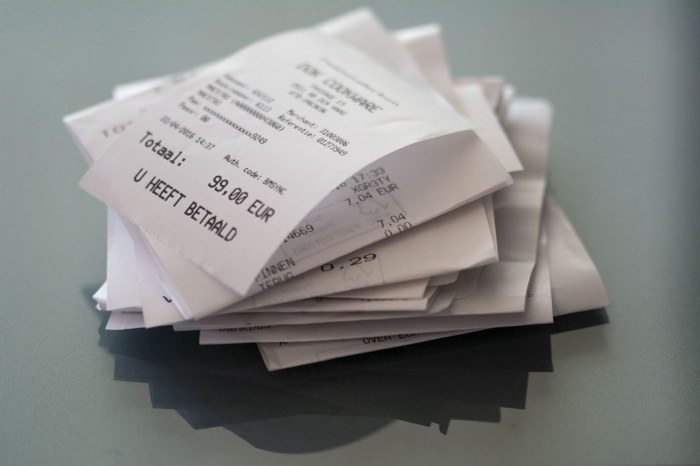
A friend told me of an incident she found particularly irritating: a retailer where she is a frequent client, with an account and loyalty card, asked for the item's receipt.
We all know that stores collect every bit of data they can on us, including our socio-demographic profile, address, shopping habits, and everything we've ever bought, so why would they need a fading receipt? Who knows? That their consumers try to pass off other goods? It's easy to verify past transactions to see when the item was purchased.
That's it. Why require receipts? Companies send us incentives, discounts, and other marketing, yet when we need something, we have to prove we're not cheating.
Why require us to preserve data and documents when our governments and governmental institutions already have them? Why do I need to carry documents like my driver's license if the authorities can check if I have one and what state it's in once I prove my identity?
We shouldn't be required to give someone data or documents they already have. The days of waiting up with our paperwork for a stern official to inform us something is missing are over.
How can retailers still ask if you have a receipt if we've made our slow, bureaucratic, and all-powerful government sensible? Then what? The shop may not accept your return (which has a two-year window, longer than most purchase tickets last) or they may just let you replace the item.
Isn't this an anachronism in the age of CRMs, customer files that know what we ate for breakfast, and loyalty programs? If government and bureaucracies have learnt to use its own files and make life easier for the consumer, why do retailers ask for a receipt?
They're adding friction to the system. They know we can obtain a refund, use our warranty, or get our money back. But if I ask for ludicrous criteria, like keeping the purchase receipt in your wallet (wallet? another anachronism, if I leave the house with only my smartphone! ), it will dissuade some individuals and tip the scales in their favor when it comes to limiting returns. Some manager will take credit for lowering returns and collect her annual bonus. Having the wrong metrics is common in management.
To slow things down, asking for a receipt is like asking us to perform a handstand and leap 20 times on one foot. You have my information, use it to send me everything, and know everything I've bought, yet when I need a two-way service, you refuse to utilize it and require that I keep it and prove it.
Refuse as customers. If retailers want our business, they should treat us well, not just when we spend money. If I come to return a product, claim its use or warranty, or be taught how to use it, I am the same person you treated wonderfully when I bought it. Remember that, and act accordingly.
A store should use my information for everything, not just what it wants. Keep my info, but don't sell me anything.
You might also like

Pat Vieljeux
3 years ago
The three-year business plan is obsolete for startups.
If asked, run.

An entrepreneur asked me about her pitch deck. A Platform as a Service (PaaS).
She told me she hadn't done her 5-year forecasts but would soon.
I said, Don't bother. I added "time-wasting."
“I've been asked”, she said.
“Who asked?”
“a VC”
“5-year forecast?”
“Yes”
“Get another VC. If he asks, it's because he doesn't understand your solution or to waste your time.”
Some VCs are lagging. They're still using steam engines.
10-years ago, 5-year forecasts were requested.
Since then, we've adopted a 3-year plan.
But It's outdated.
Max one year.
What has happened?
Revolutionary technology. NO-CODE.
Revolution's consequences?
Product viability tests are shorter. Hugely. SaaS and PaaS.
Let me explain:
Building a minimum viable product (MVP) that works only takes a few months.
1 to 2 months for practical testing.
Your company plan can be validated or rejected in 4 months as a consequence.
After validation, you can ask for VC money. Even while a prototype can generate revenue, you may not require any.
Good VCs won't ask for a 3-year business plan in that instance.
One-year, though.
If you want, establish a three-year plan, but realize that the second year will be different.
You may have changed your business model by then.
A VC isn't interested in a three-year business plan because your solution may change.
Your ability to create revenue will be key.
But also, to pivot.
They will be interested in your value proposition.
They will want to know what differentiates you from other competitors and why people will buy your product over another.
What will interest them is your resilience, your ability to bounce back.
Not to mention your mindset. The fact that you won’t get discouraged at the slightest setback.
The grit you have when facing adversity, as challenges will surely mark your journey.
The authenticity of your approach. They’ll want to know that you’re not just in it for the money, let alone to show off.
The fact that you put your guts into it and that you are passionate about it. Because entrepreneurship is a leap of faith, a leap into the void.
They’ll want to make sure you are prepared for it because it’s not going to be a walk in the park.
They’ll want to know your background and why you got into it.
They’ll also want to know your family history.
And what you’re like in real life.
So a 5-year plan…. You can bet they won’t give a damn. Like their first pair of shoes.

Sam Hickmann
3 years ago
What is this Fed interest rate everybody is talking about that makes or breaks the stock market?
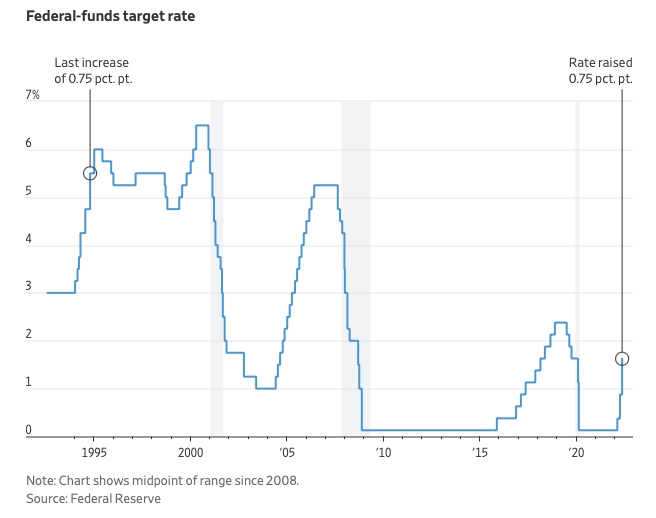
The Federal Funds Rate (FFR) is the target interest rate set by the Federal Reserve System (Fed)'s policy-making body (FOMC). This target is the rate at which the Fed suggests commercial banks borrow and lend their excess reserves overnight to each other.
The FOMC meets 8 times a year to set the target FFR. This is supposed to promote economic growth. The overnight lending market sets the actual rate based on commercial banks' short-term reserves. If the market strays too far, the Fed intervenes.
Banks must keep a certain percentage of their deposits in a Federal Reserve account. A bank's reserve requirement is a percentage of its total deposits. End-of-day bank account balances averaged over two-week reserve maintenance periods are used to determine reserve requirements.
If a bank expects to have end-of-day balances above what's needed, it can lend the excess to another institution.
The FOMC adjusts interest rates based on economic indicators that show inflation, recession, or other issues that affect economic growth. Core inflation and durable goods orders are indicators.
In response to economic conditions, the FFR target has changed over time. In the early 1980s, inflation pushed it to 20%. During the Great Recession of 2007-2009, the rate was slashed to 0.15 percent to encourage growth.
Inflation picked up in May 2022 despite earlier rate hikes, prompting today's 0.75 percent point increase. The largest increase since 1994. It might rise to around 3.375% this year and 3.1% by the end of 2024.
Hannah Elliott
3 years ago
Pebble Beach Auto Auctions Set $469M Record
The world's most prestigious vintage vehicle show included amazing autos and record-breaking sums.
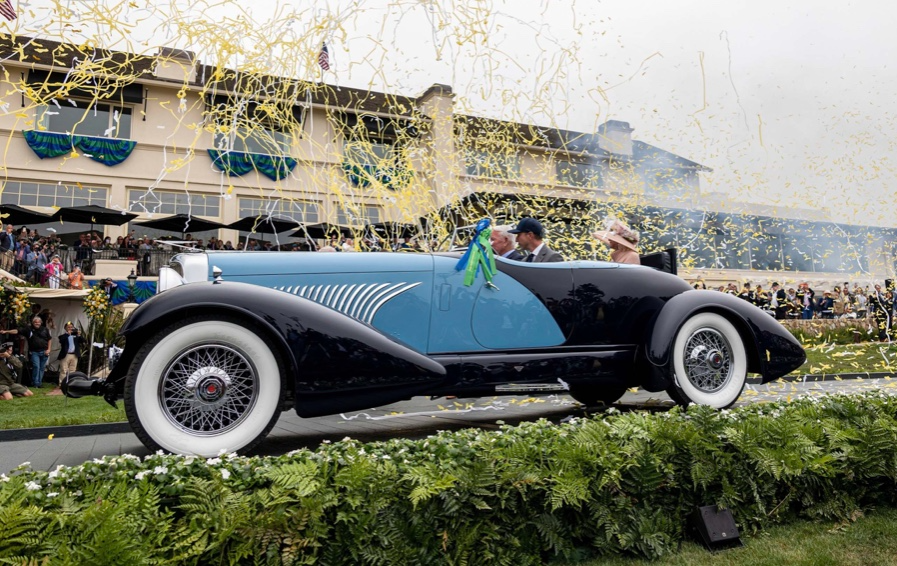
This 1932 Duesenberg J Figoni Sports Torpedo earned Best of Show in 2022.
David Paul Morris (DPM)/Bloomberg
2022 Pebble Beach Concours d'Elegance winner was a pre-war roadster.
Lee Anderson's 1932 Duesenberg J Figoni Sports Torpedo won Best of Show at Pebble Beach Golf Links near Carmel, Calif., on Sunday. First American win since 2013.
Sandra Button, chairperson of the annual concours, said the car, whose chassis and body had been separated for years, "marries American force with European style." "Its resurrection story is passionate."
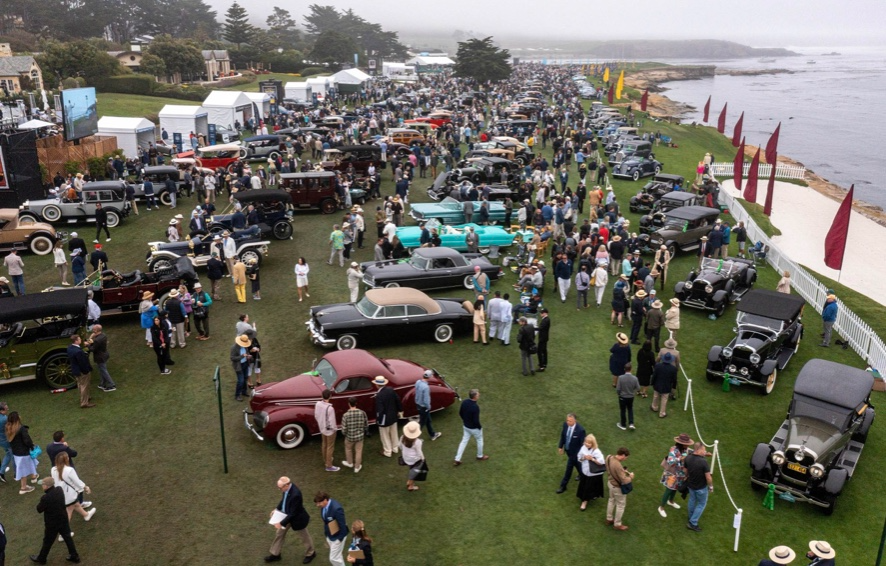
Pebble Beach Concours d'Elegance Auction
Since 1950, the Pebble Beach Concours d'Elegance has welcomed the world's most costly collectable vehicles for a week of parties, auctions, rallies, and high-roller meetings. The cold, dreary weather highlighted the automobiles' stunning lines and hues.
DPM/Bloomberg
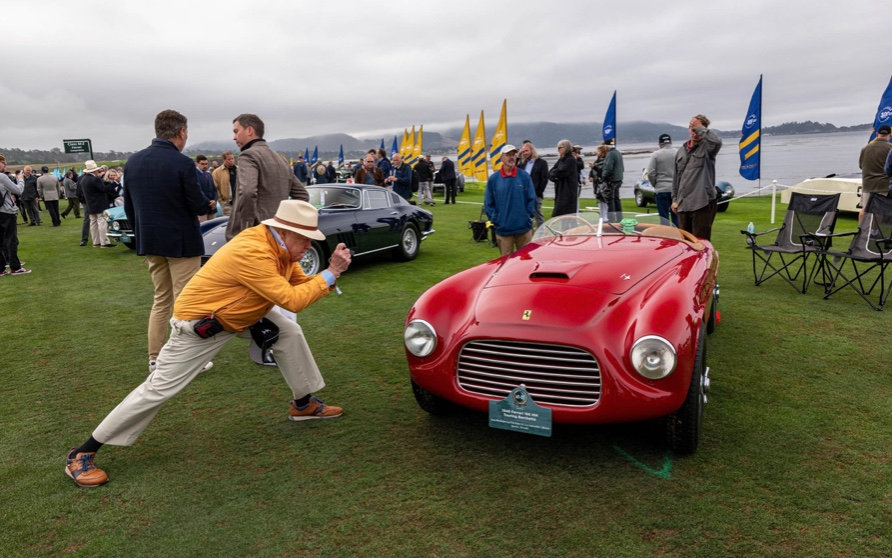
A visitor photographs a 1948 Ferrari 166 MM Touring Barchetta. This is one of 25 Ferraris manufactured in the years after World War II. First shown at the 1948 Turin Salon. Others finished Mille Miglia and Le Mans, which set the tone for Ferrari racing for years.
DPM/Bloomberg
This year's frontrunners were ultra-rare pre-war and post-war automobiles with long and difficult titles, such a 1937 Talbot-Lago T150C-SS Figoni & Falaschi Teardrop Coupe and a 1951 Talbot-Lago T26 Grand Sport Stabilimenti Farina Cabriolet.
The hefty, enormous coaches inspire visions of golden pasts when mysterious saloons swept over the road with otherworldly style, speed, and grace. Only the richest and most powerful people, like Indian maharaja and Hollywood stars, owned such vehicles.
Antonio Chopitea, a Peruvian sugar tycoon, ordered a new Duesenberg in Paris. Hemmings says the two-tone blue beauty was moved to the US and dismantled in the 1960s. Body and chassis were sold separately and rejoined decades later in a three-year, prize-winning restoration.
The concours is the highlight of Monterey Car Week, a five-day Super Bowl for car enthusiasts. Early events included Porsche and Ferrari displays, antique automobile races, and new-vehicle debuts. Many auto executives call Monterey Car Week the "new auto show."
Many visitors were drawn to the record-breaking auctions.
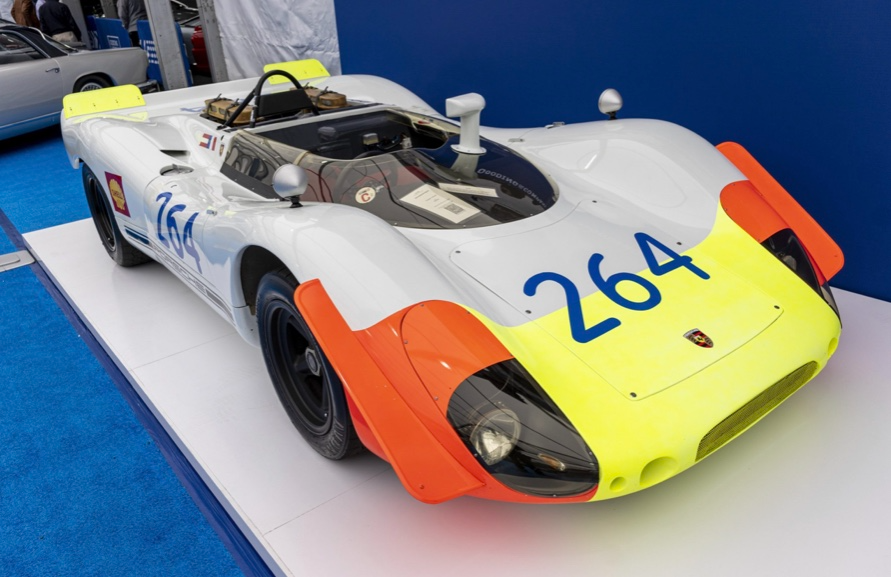
A 1969 Porsche 908/02 auctioned for $4.185 million. Flat-eight air-cooled engine, 90.6-inch wheelbase, 1,320-pound weight. Vic Elford, Richard Attwood, Rudi Lins, Gérard Larrousse, Kurt Ahrens Jr., Masten Gregory, and Pedro Rodriguez drove it, according to Gooding.
DPM/Bloomberg
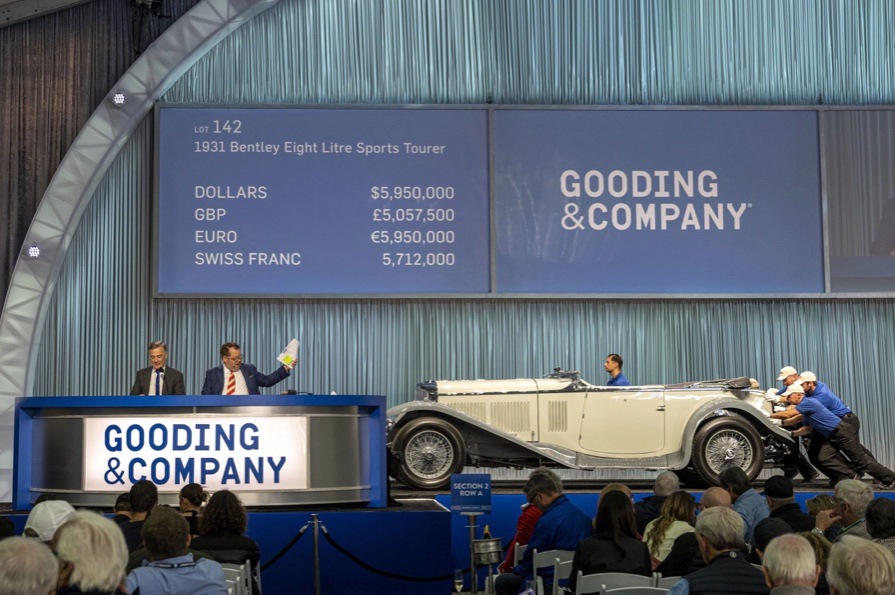
The 1931 Bentley Eight Liter Sports Tourer doesn't meet its reserve. Gooding & Co., the official auction house of the concours, made more than $105 million and had an 82% sell-through rate. This powerful open-top tourer is one of W.O. Bentley's 100 automobiles. Only 80 remain.
DPM/Bloomberg
The final auction on Aug. 21 brought in $456.1 million, breaking the previous high of $394.48 million established in 2015 in Monterey. “The week put an exclamation point on what has been an exceptional year for the collector automobile market,” Hagerty analyst John Wiley said.
Many cars that go unsold at public auction are sold privately in the days after. After-sales pushed the week's haul to $469 million on Aug. 22, up 18.9% from 2015's record.
In today's currencies, 2015's record sales amount to $490 million, Wiley noted. The dollar is degrading faster than old autos.
Still, 113 million-dollar automobiles sold. The average car sale price was $583,211, up from $446,042 last year, while multimillion-dollar hammer prices made up around 75% of total sales.
Industry insiders and market gurus expected that stock market volatility, the crisis in Ukraine, and the dollar-euro exchange rate wouldn't influence the world's biggest spenders.
Classic.com's CEO said there's no hint of a recession in an e-mail. Big sales and crowds.

Ticket-holders wore huge hats, flowery skirts, and other Kentucky Derby-esque attire. Coffee, beverages, and food are extra.
DPM/Bloomberg
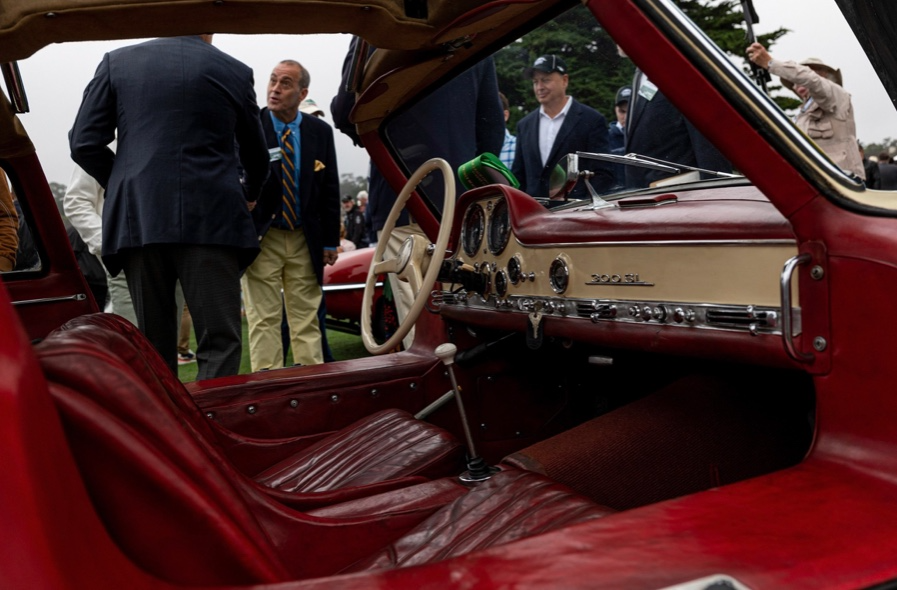
Mercedes-Benz 300 SL Gullwing, 1955. Mercedes produced the two-seat gullwing coupe from 1954–1957 and the roadster from 1957–1963. It was once West Germany's fastest and most powerful automobile. You'd be hard-pressed to locate one for less $1 million.
DPM/Bloomberg
1955 Ferrari 410 Sport sold for $22 million at RM Sotheby's. It sold a 1937 Mercedes-Benz 540K Sindelfingen Roadster for $9.9 million and a 1924 Hispano-Suiza H6C Transformable Torpedo for $9.245 million. The family-run mansion sold $221.7 million with a 90% sell-through rate, up from $147 million in 2021. This year, RM Sotheby's cars averaged $1.3 million.
Not everyone saw such great benefits.
Gooding & Co., the official auction house of the concours, made more than $105 million and had an 82% sell-through rate. 1937 Bugatti Type 57SC Atalante, 1990 Ferrari F40, and 1994 Bugatti EB110 Super Sport were top sellers.
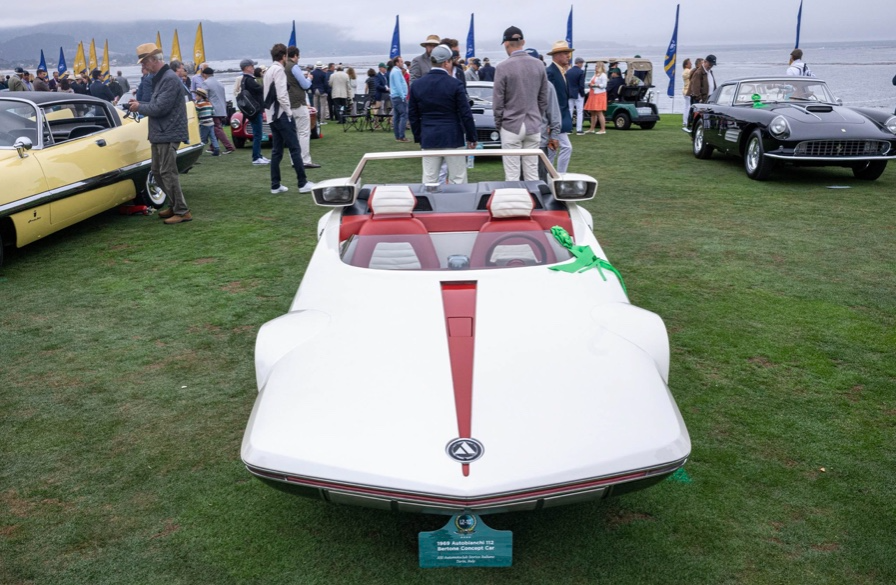
The 1969 Autobianchi A112 Bertone. This idea two-seater became a Hot Wheels toy but was never produced. It has a four-speed manual drive and an inline-four mid-engine arrangement like the Lamborghini Miura.
DPM/Bloomberg
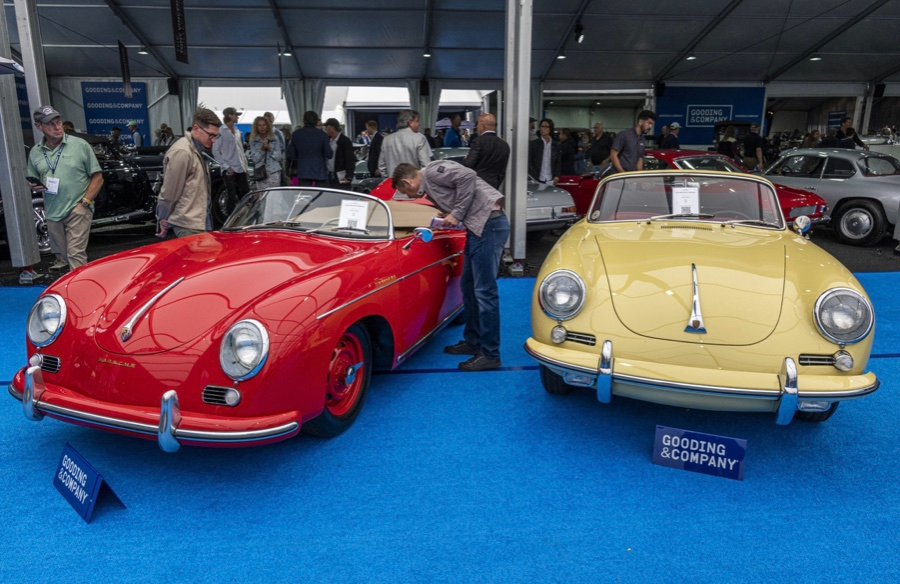
1956 Porsche 356 A Speedster at Gooding & Co. The Porsche 356 is a lightweight, rear-engine, rear-wheel drive vehicle that lacks driving power but is loved for its rounded, Beetle-like hardtop coupé and open-top versions.
DPM/Bloomberg
Mecum sold $50.8 million with a 64% sell-through rate, down from $53.8 million and 77% in 2021. Its top lot, a 1958 Ferrari 250 GT 'Tour de France' Alloy Coupe, sold for $2.86 million, but its average price was $174,016.
Bonhams had $27.8 million in sales with an 88% sell-through rate. The same sell-through generated $35.9 million in 2021.
Gooding & Co. and RM Sotheby's posted all 10 top sales, leaving Bonhams, Mecum, and Hagerty-owned Broad Arrow fighting for leftovers. Six of the top 10 sellers were Ferraris, which remain the gold standard for collectable automobiles. Their prices have grown over decades.
Classic.com's Calle claimed RM Sotheby's "stole the show," but "BroadArrow will be a force to reckon with."
Although pre-war cars were hot, '80s and '90s cars showed the most appreciation and attention. Generational transition and new buyer profile."
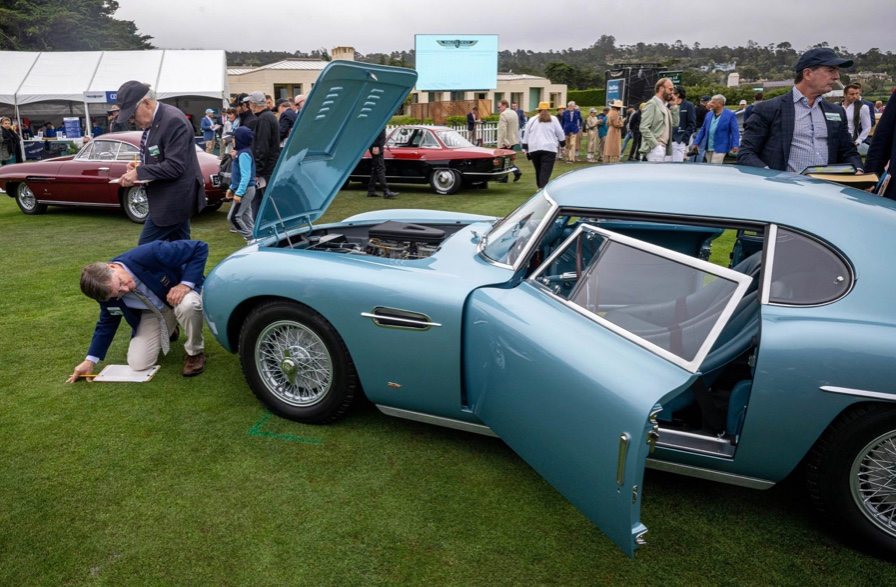
2022 Pebble Beach Concours d'Elegance judges inspect 1953 Siata 208. The rounded coupe was introduced at the 1952 Turin Auto Show in Italy and is one of 18 ever produced. It sports a 120hp Fiat engine, five-speed manual transmission, and alloy drum brakes. Owners liked their style, but not their reliability.
DPM/Bloomberg
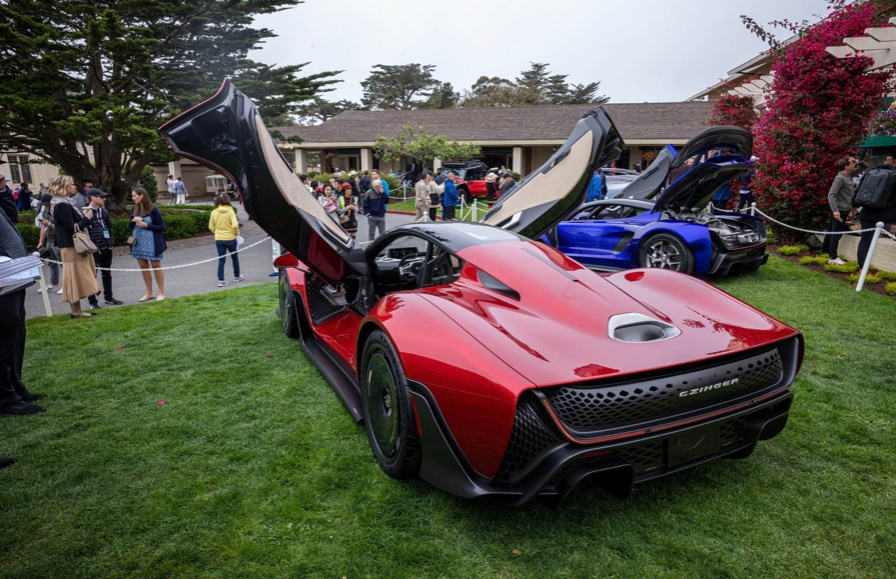
The Czinger 21 CV Max at Pebble Beach. Monterey Car Week concentrates on historic and classic automobiles, but modern versions like this Czinger hypercar also showed.
DPM/Bloomberg
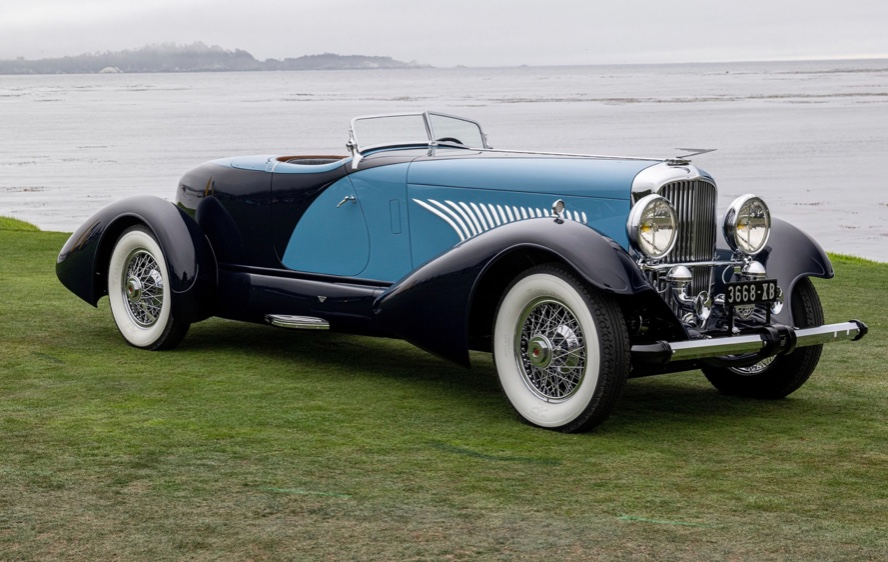
The 1932 Duesenberg J Figoni Sports Torpedo won Best in Show in 2022. Lee and Penny Anderson of Naples, Fla., own the once-separate-chassis-from-body automobile.
DPM/Bloomberg