


Bored Ape Yacht Club creator raises $450 million at a $4 billion valuation.
Yuga Labs, owner of three of the biggest NFT brands on the market, announced today a $450 million funding round. The money will be used to create a media empire based on NFTs, starting with games and a metaverse project.
The team's Otherside metaverse project is an MMORPG meant to connect the larger NFT universe. They want to create “an interoperable world” that is “gamified” and “completely decentralized,” says Wylie Aronow, aka Gordon Goner, co-founder of Bored Ape Yacht Club. “We think the real Ready Player One experience will be player run.”
Just a few weeks ago, Yuga Labs announced the acquisition of CryptoPunks and Meebits from Larva Labs. The deal brought together three of the most valuable NFT collections, giving Yuga Labs more IP to work with when developing games and metaverses. Last week, ApeCoin was launched as a cryptocurrency that will be governed independently and used in Yuga Labs properties.
Otherside will be developed by “a few different game studios,” says Yuga Labs CEO Nicole Muniz. The company plans to create development tools that allow NFTs from other projects to work inside their world. “We're welcoming everyone into a walled garden.”
However, Yuga Labs believes that other companies are approaching metaverse projects incorrectly, allowing the startup to stand out. People won't bond spending time in a virtual space with nothing going on, says Yuga Labs co-founder Greg Solano, aka Gargamel. Instead, he says, people bond when forced to work together.
In order to avoid getting smacked, Solano advises making friends. “We don't think a Zoom chat and walking around saying ‘hi' creates a deep social experience.” Yuga Labs refused to provide a release date for Otherside. Later this year, a play-to-win game is planned.
The funding round was led by Andreessen Horowitz, a major investor in the Web3 space. It previously backed OpenSea and Coinbase. Animoca Brands, Coinbase, and MoonPay are among those who have invested. Andreessen Horowitz general partner Chris Lyons will join Yuga Labs' board. The Financial Times broke the story last month.
"META IS A DOMINANT DIGITAL EXPERIENCE PROVIDER IN A DYSTOPIAN FUTURE."
This emerging [Web3] ecosystem is important to me, as it is to companies like Meta,” Chris Dixon, head of Andreessen Horowitz's crypto arm, tells The Verge. “In a dystopian future, Meta is the dominant digital experience provider, and it controls all the money and power.” (Andreessen Horowitz co-founder Marc Andreessen sits on Meta's board and invested early in Facebook.)
Yuga Labs has been profitable so far. According to a leaked pitch deck, the company made $137 million last year, primarily from its NFT brands, with a 95% profit margin. (Yuga Labs declined to comment on deck figures.)
But the company has built little so far. According to OpenSea data, it has only released one game for a limited time. That means Yuga Labs gets hundreds of millions of dollars to build a gaming company from scratch, based on a hugely lucrative art project.
Investors fund Yuga Labs based on its success. That's what they did, says Dixon, “they created a culture phenomenon”. But ultimately, the company is betting on the same thing that so many others are: that a metaverse project will be the next big thing. Now they must construct it.
More on Web3 & Crypto

Scott Hickmann
4 years ago
YouTube
This is a YouTube video:

Ajay Shrestha
2 years ago
Bitcoin's technical innovation: addressing the issue of the Byzantine generals
The 2008 Bitcoin white paper solves the classic computer science consensus problem.
Issue Statement
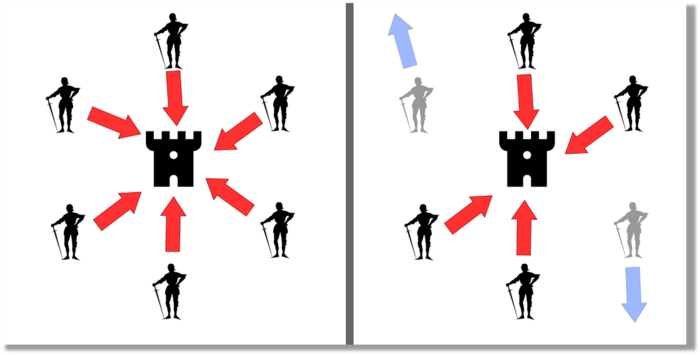
The Byzantine Generals Problem (BGP) is called after an allegory in which several generals must collaborate and attack a city at the same time to win (figure 1-left). Any general who retreats at the last minute loses the fight (figure 1-right). Thus, precise messengers and no rogue generals are essential. This is difficult without a trusted central authority.
In their 1982 publication, Leslie Lamport, Robert Shostak, and Marshall Please termed this topic the Byzantine Generals Problem to simplify distributed computer systems.
Consensus in a distributed computer network is the issue. Reaching a consensus on which systems work (and stay in the network) and which don't makes maintaining a network tough (i.e., needs to be removed from network). Challenges include unreliable communication routes between systems and mis-reporting systems.
Solving BGP can let us construct machine learning solutions without single points of failure or trusted central entities. One server hosts model parameters while numerous workers train the model. This study describes fault-tolerant Distributed Byzantine Machine Learning.
Bitcoin invented a mechanism for a distributed network of nodes to agree on which transactions should go into the distributed ledger (blockchain) without a trusted central body. It solved BGP implementation. Satoshi Nakamoto, the pseudonymous bitcoin creator, solved the challenge by cleverly combining cryptography and consensus mechanisms.
Disclaimer
This is not financial advice. It discusses a unique computer science solution.
Bitcoin
Bitcoin's white paper begins:
“A purely peer-to-peer version of electronic cash would allow online payments to be sent directly from one party to another without going through a financial institution.” Source: https://www.ussc.gov/sites/default/files/pdf/training/annual-national-training-seminar/2018/Emerging_Tech_Bitcoin_Crypto.pdf
Bitcoin's main parts:
The open-source and versioned bitcoin software that governs how nodes, miners, and the bitcoin token operate.
The native kind of token, known as a bitcoin token, may be created by mining (up to 21 million can be created), and it can be transferred between wallet addresses in the bitcoin network.
Distributed Ledger, which contains exact copies of the database (or "blockchain") containing each transaction since the first one in January 2009.
distributed network of nodes (computers) running the distributed ledger replica together with the bitcoin software. They broadcast the transactions to other peer nodes after validating and accepting them.
Proof of work (PoW) is a cryptographic requirement that must be met in order for a miner to be granted permission to add a new block of transactions to the blockchain of the cryptocurrency bitcoin. It takes the form of a valid hash digest. In order to produce new blocks on average every 10 minutes, Bitcoin features a built-in difficulty adjustment function that modifies the valid hash requirement (length of nonce). PoW requires a lot of energy since it must continually generate new hashes at random until it satisfies the criteria.
The competing parties known as miners carry out continuous computing processing to address recurrent cryptography issues. Transaction fees and some freshly minted (mined) bitcoin are the rewards they receive. The amount of hashes produced each second—or hash rate—is a measure of mining capacity.
Cryptography, decentralization, and the proof-of-work consensus method are Bitcoin's most unique features.
Bitcoin uses encryption
Bitcoin employs this established cryptography.
Hashing
digital signatures based on asymmetric encryption
Hashing (SHA-256) (SHA-256)
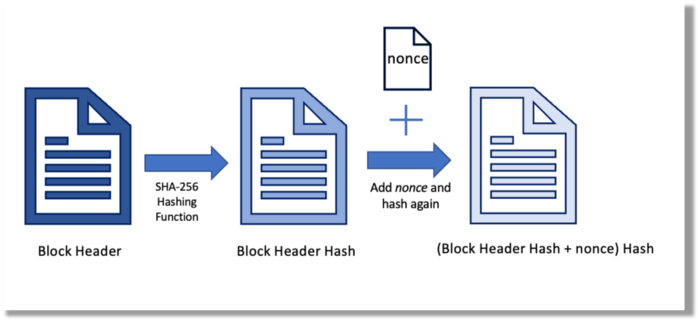
Hashing converts unique plaintext data into a digest. Creating the plaintext from the digest is impossible. Bitcoin miners generate new hashes using SHA-256 to win block rewards.
A new hash is created from the current block header and a variable value called nonce. To achieve the required hash, mining involves altering the nonce and re-hashing.
The block header contains the previous block hash and a Merkle root, which contains hashes of all transactions in the block. Thus, a chain of blocks with increasing hashes links back to the first block. Hashing protects new transactions and makes the bitcoin blockchain immutable. After a transaction block is mined, it becomes hard to fabricate even a little entry.
Asymmetric Cryptography Digital Signatures
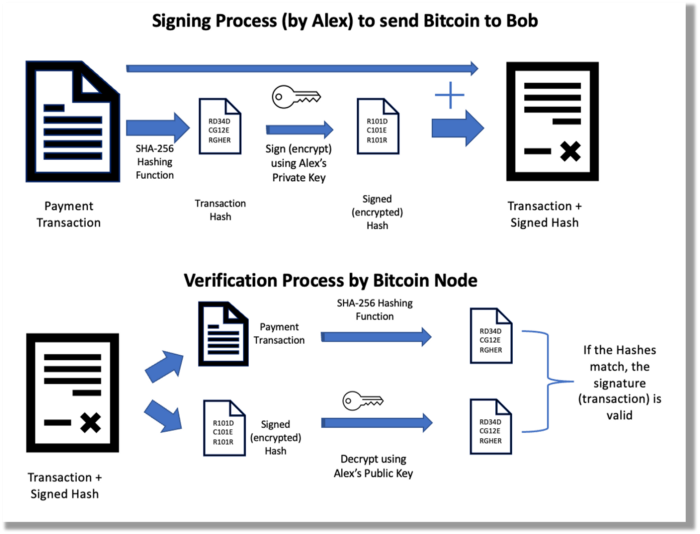
Asymmetric cryptography (public-key encryption) requires each side to have a secret and public key. Public keys (wallet addresses) can be shared with the transaction party, but private keys should not. A message (e.g., bitcoin payment record) can only be signed by the owner (sender) with the private key, but any node or anybody with access to the public key (visible in the blockchain) can verify it. Alex will submit a digitally signed transaction with a desired amount of bitcoin addressed to Bob's wallet to a node to send bitcoin to Bob. Alex alone has the secret keys to authorize that amount. Alex's blockchain public key allows anyone to verify the transaction.
Solution
Now, apply bitcoin to BGP. BGP generals resemble bitcoin nodes. The generals' consensus is like bitcoin nodes' blockchain block selection. Bitcoin software on all nodes can:
Check transactions (i.e., validate digital signatures)
2. Accept and propagate just the first miner to receive the valid hash and verify it accomplished the task. The only way to guess the proper hash is to brute force it by repeatedly producing one with the fixed/current block header and a fresh nonce value.
Thus, PoW and a dispersed network of nodes that accept blocks from miners that solve the unfalsifiable cryptographic challenge solve consensus.
Suppose:
Unreliable nodes
Unreliable miners
Bitcoin accepts the longest chain if rogue nodes cause divergence in accepted blocks. Thus, rogue nodes must outnumber honest nodes in accepting/forming the longer chain for invalid transactions to reach the blockchain. As of November 2022, 7000 coordinated rogue nodes are needed to takeover the bitcoin network.
Dishonest miners could also try to insert blocks with falsified transactions (double spend, reverse, censor, etc.) into the chain. This requires over 50% (51% attack) of miners (total computational power) to outguess the hash and attack the network. Mining hash rate exceeds 200 million (source). Rewards and transaction fees encourage miners to cooperate rather than attack. Quantum computers may become a threat.
Visit my Quantum Computing post.
Quantum computers—what are they? Quantum computers will have a big influence. towardsdatascience.com
Nodes have more power than miners since they can validate transactions and reject fake blocks. Thus, the network is secure if honest nodes are the majority.
Summary
Table 1 compares three Byzantine Generals Problem implementations.
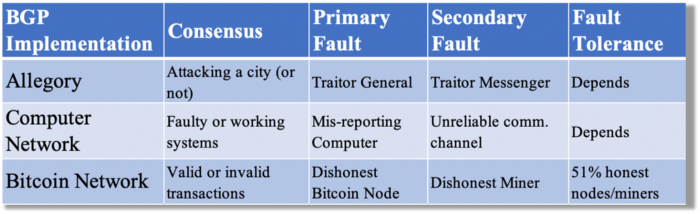
Bitcoin white paper and implementation solved the consensus challenge of distributed systems without central governance. It solved the illusive Byzantine Generals Problem.
Resources
Resources
Source-code for Bitcoin Core Software — https://github.com/bitcoin/bitcoin
Bitcoin white paper — https://bitcoin.org/bitcoin.pdf
https://www.microsoft.com/en-us/research/publication/byzantine-generals-problem/
https://www.microsoft.com/en-us/research/uploads/prod/2016/12/The-Byzantine-Generals-Problem.pdf
Genuinely Distributed Byzantine Machine Learning, El-Mahdi El-Mhamdi et al., 2020. ACM, New York, NY, https://doi.org/10.1145/3382734.3405695

Ren & Heinrich
3 years ago
200 DeFi Projects were examined. Here is what I learned.

I analyze the top 200 DeFi crypto projects in this article.
This isn't a study. The findings benefit crypto investors.
Let’s go!
A set of data
I analyzed data from defillama.com. In my analysis, I used the top 200 DeFis by TVL in October 2022.
Total Locked Value
The chart below shows platform-specific locked value.
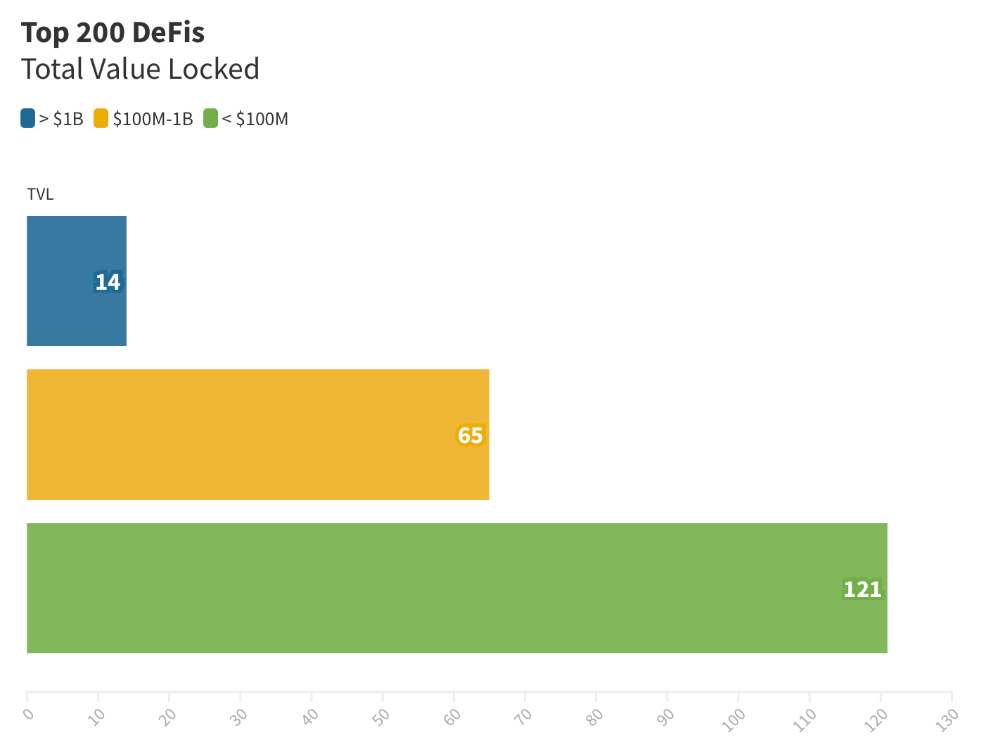
14 platforms had $1B+ TVL. 65 platforms have $100M-$1B TVL. The remaining 121 platforms had TVLs below $100 million, with the lowest being $23 million.
TVLs are distributed Pareto. Top 40% of DeFis account for 80% of TVLs.
Compliant Blockchains
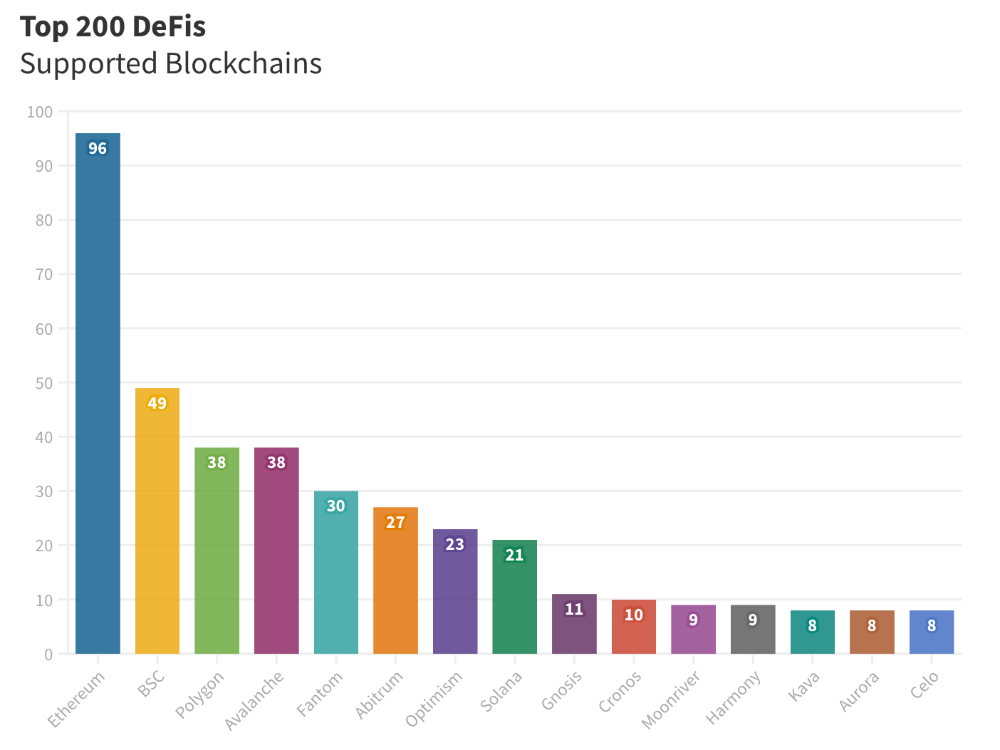
Ethereum's blockchain leads DeFi. 96 of the examined projects offer services on Ethereum. Behind BSC, Polygon, and Avalanche.
Five platforms used 10+ blockchains. 36 between 2-10 159 used 1 blockchain.
Use Cases for DeFi
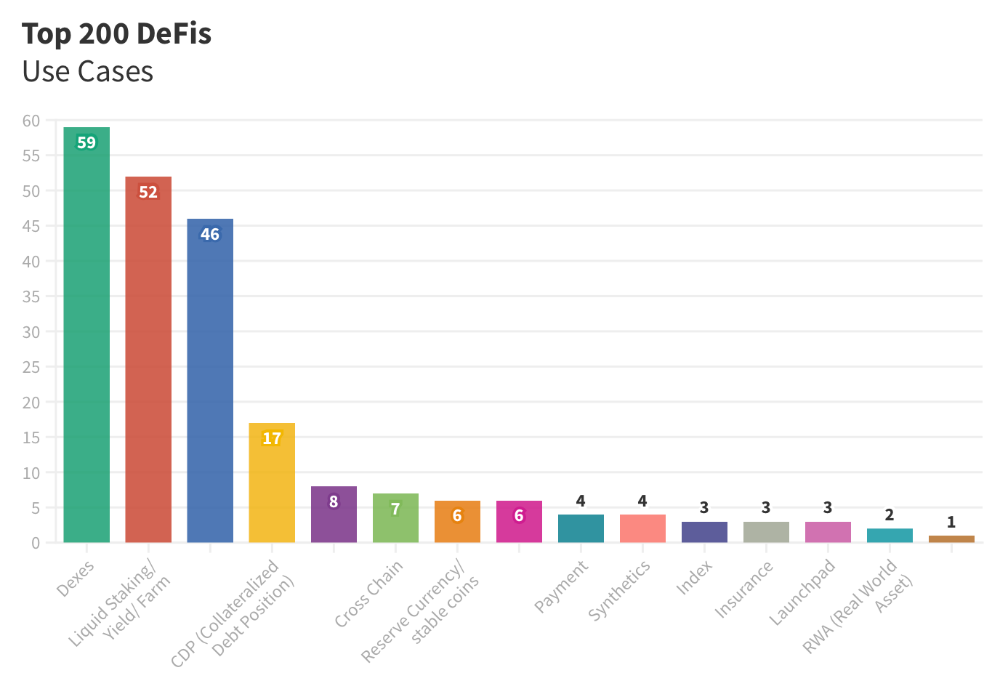
The chart below shows platform use cases. Each platform has decentralized exchanges, liquid staking, yield farming, and lending.
These use cases are DefiLlama's main platform features.
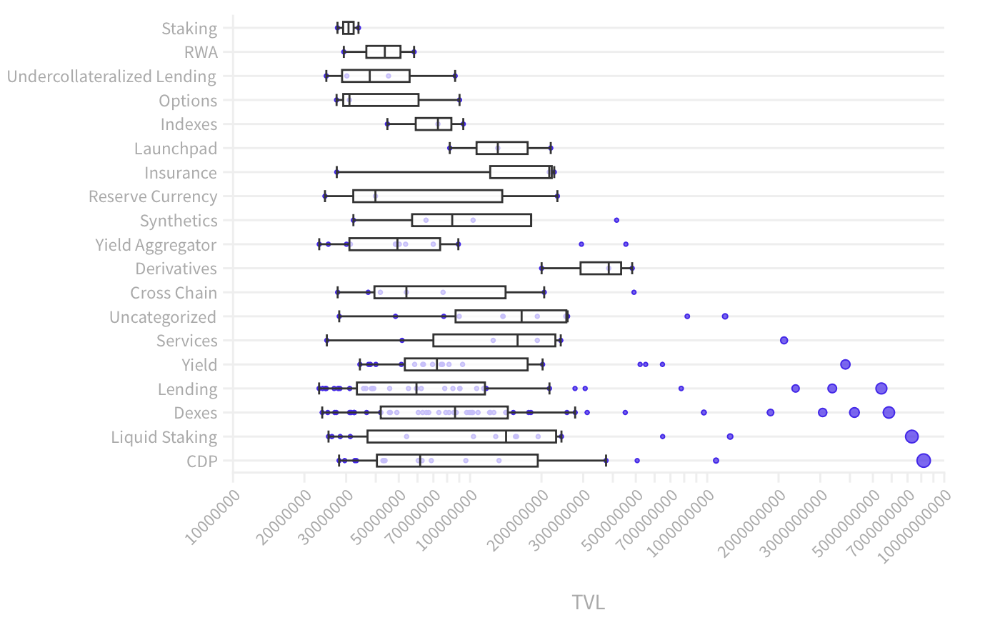
Which use case costs the most? Chart explains. Collateralized debt, liquid staking, dexes, and lending have high TVLs.
The DeFi Industry
I compared three high-TVL platforms (Maker DAO, Balancer, AAVE). The columns show monthly TVL and token price changes. The graph shows monthly Bitcoin price changes.
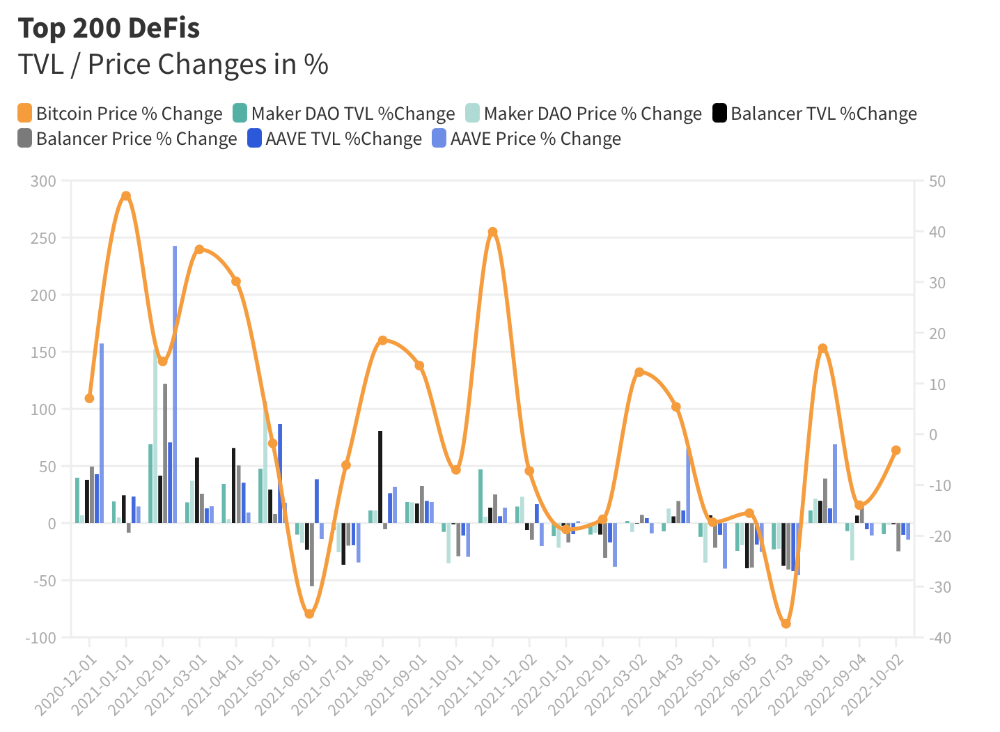
Each platform's market moves similarly.
Probably because most DeFi deposits are cryptocurrencies. Since individual currencies are highly correlated with Bitcoin, it's not surprising that they move in unison.
Takeaways
This analysis shows that the most common DeFi services (decentralized exchanges, liquid staking, yield farming, and lending) also have the highest average locked value.
Some projects run on one or two blockchains, while others use 15 or 20. Our analysis shows that a project's blockchain count has no correlation with its success.
It's hard to tell if certain use cases are rising. Bitcoin's price heavily affects the entire DeFi market.
TVL seems to be a good indicator of a DeFi platform's success and quality. Higher TVL platforms are cheaper. They're a better long-term investment because they gain or lose less value than DeFis with lower TVLs.
You might also like

Dr. Linda Dahl
3 years ago
We eat corn in almost everything. Is It Important?

Corn Kid got viral on TikTok after being interviewed by Recess Therapy. Tariq, called the Corn Kid, ate a buttery ear of corn in the video. He's corn crazy. He thinks everyone just has to try it. It turns out, whether we know it or not, we already have.
Corn is a fruit, veggie, and grain. It's the second-most-grown crop. Corn makes up 36% of U.S. exports. In the U.S., it's easy to grow and provides high yields, as proven by the vast corn belt spanning the Midwest, Great Plains, and Texas panhandle. Since 1950, the corn crop has doubled to 10 billion bushels.
You say, "Fine." We shouldn't just grow because we can. Why so much corn? What's this corn for?
Why is practical and political. Michael Pollan's The Omnivore's Dilemma has the full narrative. Early 1970s food costs increased. Nixon subsidized maize to feed the public. Monsanto genetically engineered corn seeds to make them hardier, and soon there was plenty of corn. Everyone ate. Woot! Too much corn followed. The powers-that-be had to decide what to do with leftover corn-on-the-cob.
They are fortunate that corn has a wide range of uses.
First, the edible variants. I divide corn into obvious and stealth.
Obvious corn includes popcorn, canned corn, and corn on the cob. This form isn't always digested and often comes out as entire, polka-dotting poop. Cornmeal can be ground to make cornbread, polenta, and corn tortillas. Corn provides antioxidants, minerals, and vitamins in moderation. Most synthetic Vitamin C comes from GMO maize.
Corn oil, corn starch, dextrose (a sugar), and high-fructose corn syrup are often overlooked. They're stealth corn because they sneak into practically everything. Corn oil is used for frying, baking, and in potato chips, mayonnaise, margarine, and salad dressing. Baby food, bread, cakes, antibiotics, canned vegetables, beverages, and even dairy and animal products include corn starch. Dextrose appears in almost all prepared foods, excluding those with high-fructose corn syrup. HFCS isn't as easily digested as sucrose (from cane sugar). It can also cause other ailments, which we'll discuss later.
Most foods contain corn. It's fed to almost all food animals. 96% of U.S. animal feed is corn. 39% of U.S. corn is fed to livestock. But animals prefer other foods. Omnivore chickens prefer insects, worms, grains, and grasses. Captive cows are fed a total mixed ration, which contains corn. These animals' products, like eggs and milk, are also corn-fed.
There are numerous non-edible by-products of corn that are employed in the production of items like:
fuel-grade ethanol
plastics
batteries
cosmetics
meds/vitamins binder
carpets, fabrics
glutathione
crayons
Paint/glue

How does corn influence you? Consider quick food for dinner. You order a cheeseburger, fries, and big Coke at the counter (or drive-through in the suburbs). You tell yourself, "No corn." All that contains corn. Deconstruct:
Cows fed corn produce meat and cheese. Meat and cheese were bonded with corn syrup and starch (same). The bun (corn flour and dextrose) and fries were fried in maize oil. High fructose corn syrup sweetens the drink and helps make the cup and straw.
Just about everything contains corn. Then what? A cornspiracy, perhaps? Is eating too much maize an issue, or should we strive to stay away from it whenever possible?
As I've said, eating some maize can be healthy. 92% of U.S. corn is genetically modified, according to the Center for Food Safety. The adjustments are expected to boost corn yields. Some sweet corn is genetically modified to produce its own insecticide, a protein deadly to insects made by Bacillus thuringiensis. It's safe to eat in sweet corn. Concerns exist about feeding agricultural animals so much maize, modified or not.
High fructose corn syrup should be consumed in moderation. Fructose, a sugar, isn't easily metabolized. Fructose causes diabetes, fatty liver, obesity, and heart disease. It causes inflammation, which might aggravate gout. Candy, packaged sweets, soda, fast food, juice drinks, ice cream, ice cream topping syrups, sauces & condiments, jams, bread, crackers, and pancake syrup contain the most high fructose corn syrup. Everyday foods with little nutrients. Check labels and choose cane sugar or sucrose-sweetened goods. Or, eat corn like the Corn Kid.

David G Chen
3 years ago
If you want to earn money, stop writing for entertainment.
When you stop blogging for a few weeks, your views and profits plummet.
Because you're writing fascinating posts for others. Everyone's done ithat…
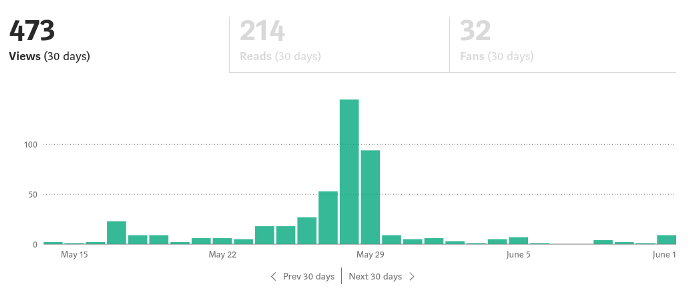
If I keep writing, the graph should maintain velocity, you could say. If I wrote more, it could rise.
However, entertaining pieces still tend to roller coaster and jump.
this type of writing is like a candle. They burn out and must be replaced. You must continuously light new ones to maintain the illumination.
When you quit writing, your income stops.
A substitute
Instead of producing amusing articles, try solving people's issues. You should answer their search questions.
Here's what happens when you answer their searches.
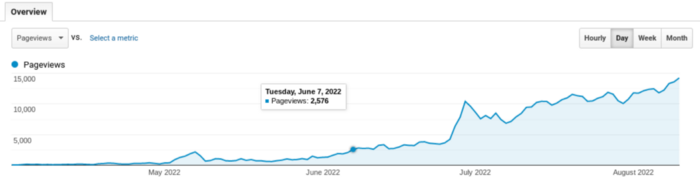
My website's Google analytics. As a dentist, I answer oral health questions.
This chart vs. Medium is pretty glaring, right?
As of yesterday, it was averaging 15k page views each day.
How much would you make on Medium with 15k daily views?
Evergreen materials
In SEO, this is called evergreen content.
Your content is like a lush, evergreen forest, and by green I mean Benjamins.
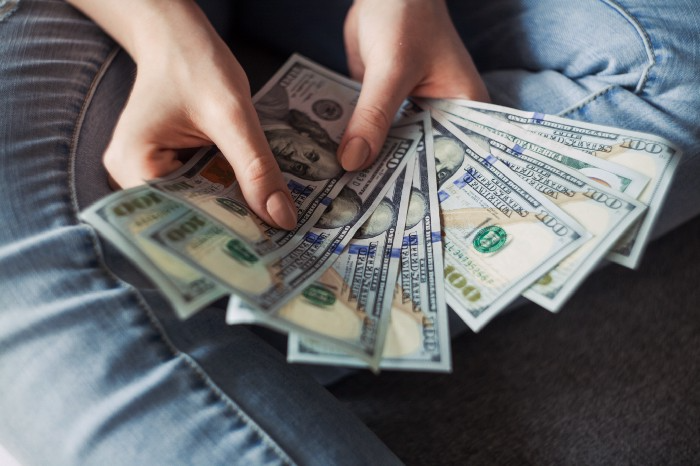
Do you have knowledge that you can leverage? Why not help your neighbors and the world?
Answer search inquiries and help others. You'll be well rewarded.
This is better than crafting candle-like content that fizzles out quickly.
Is beauty really ephemeral like how flowers bloom? Nah, I prefer watching forests grow instead (:

Yogita Khatri
3 years ago
Moonbirds NFT sells for $1 million in first week
On Saturday, Moonbird #2642, one of the collection's rarest NFTs, sold for a record 350 ETH (over $1 million) on OpenSea.
The Sandbox, a blockchain-based gaming company based in Hong Kong, bought the piece. The seller, "oscuranft" on OpenSea, made around $600,000 after buying the NFT for 100 ETH a week ago.
Owl avatars
Moonbirds is a 10,000 owl NFT collection. It is one of the quickest collections to achieve bluechip status. Proof, a media startup founded by renowned VC Kevin Rose, launched Moonbirds on April 16.
Rose is currently a partner at True Ventures, a technology-focused VC firm. He was a Google Ventures general partner and has 1.5 million Twitter followers.
Rose has an NFT podcast on Proof. It follows Proof Collective, a group of 1,000 NFT collectors and artists, including Beeple, who hold a Proof Collective NFT and receive special benefits.
These include early access to the Proof podcast and in-person events.
According to the Moonbirds website, they are "the official Proof PFP" (picture for proof).
Moonbirds NFTs sold nearly $360 million in just over a week, according to The Block Research and Dune Analytics. Its top ten sales range from $397,000 to $1 million.
In the current market, Moonbirds are worth 33.3 ETH. Each NFT is 2.5 ETH. Holders have gained over 12 times in just over a week.
Why was it so popular?
The Block Research's NFT analyst, Thomas Bialek, attributes Moonbirds' rapid rise to Rose's backing, the success of his previous Proof Collective project, and collectors' preference for proven NFT projects.
Proof Collective NFT holders have made huge gains. These NFTs were sold in a Dutch auction last December for 5 ETH each. According to OpenSea, the current floor price is 109 ETH.
According to The Block Research, citing Dune Analytics, Proof Collective NFTs have sold over $39 million to date.
Rose has bigger plans for Moonbirds. Moonbirds is introducing "nesting," a non-custodial way for holders to stake NFTs and earn rewards.
Holders of NFTs can earn different levels of status based on how long they keep their NFTs locked up.
"As you achieve different nest status levels, we can offer you different benefits," he said. "We'll have in-person meetups and events, as well as some crazy airdrops planned."
Rose went on to say that Proof is just the start of "a multi-decade journey to build a new media company."