



More on Entrepreneurship/Creators

Matthew O'Riordan
3 years ago
Trends in SaaS Funding from 2016 to 2022
Christopher Janz of Point Nine Capital created the SaaS napkin in 2016. This post shows how founders have raised cash in the last 6 years. View raw data.
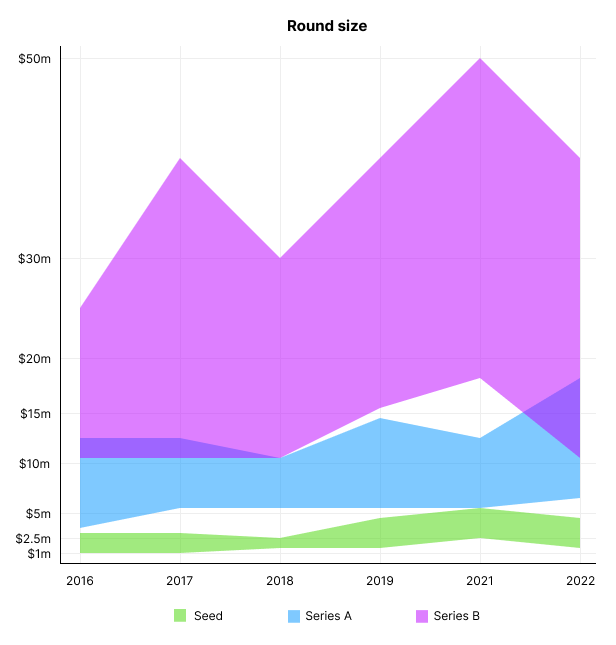
Round size
Unsurprisingly, round sizes have expanded and will taper down in 2022. In 2016, pre-seed rounds were $200k to $500k; currently, they're $1-$2m. Despite the macroeconomic scenario, Series A have expanded from $3m to $12m in 2016 to $6m and $18m in 2022.
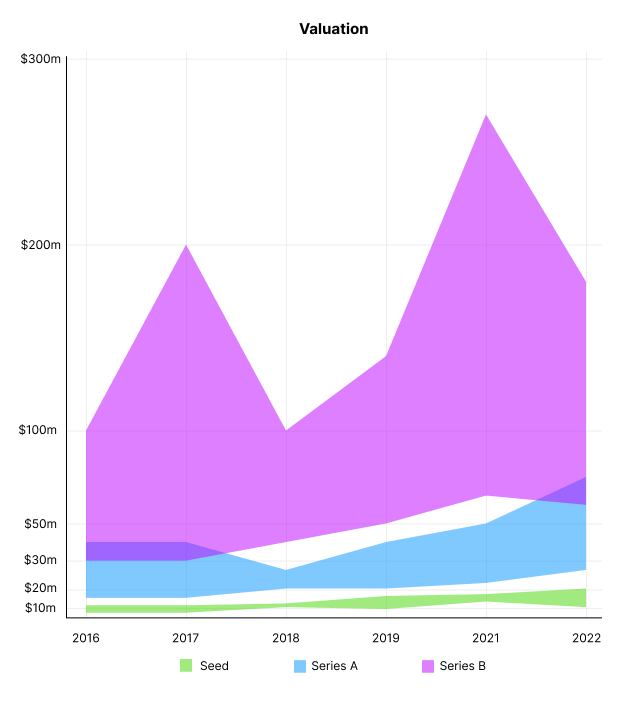
Valuation
There are hints that valuations are rebounding this year. Pre-seed valuations in 2022 are $12m from $3m in 2016, and Series B prices are $270m from $100m in 2016.
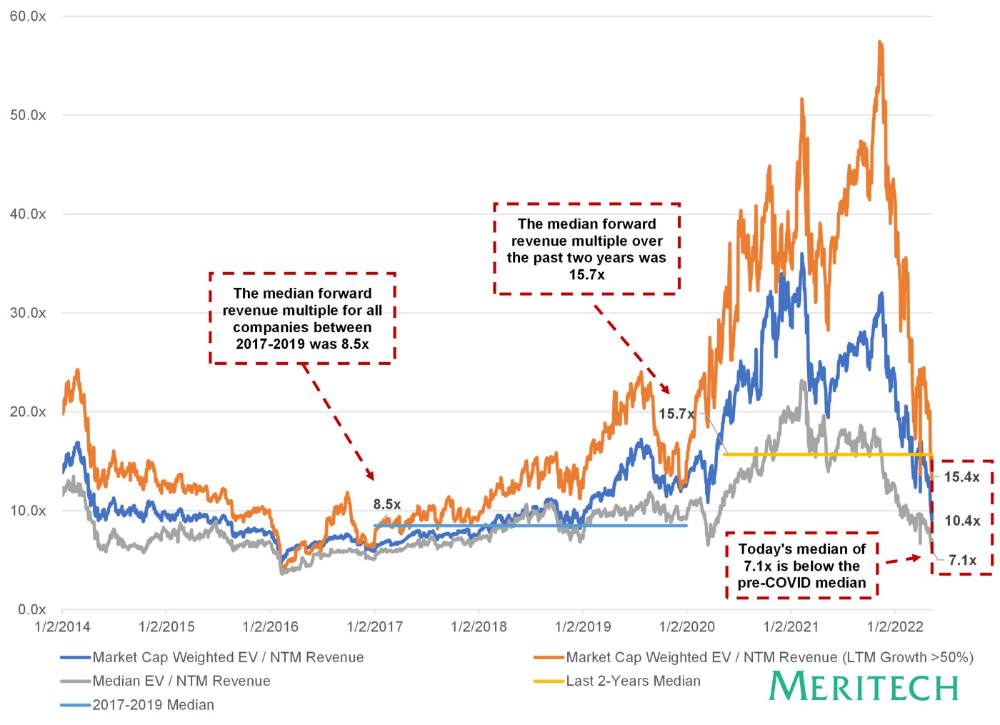
Compared to public SaaS multiples, Series B valuations more closely reflect the market, but Seed and Series A prices seem to be inflated regardless of the market.
I'd like to know how each annual cohort performed for investors, based on the year they invested and the valuations. I can't access this information.
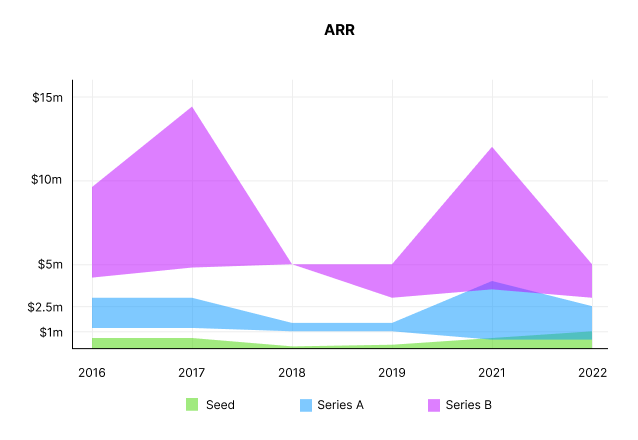
ARR
Seed firms' ARR forecasts have risen from $0 to $0.6m to $0 to $1m. 2016 expected $1.2m to $3m, 2021 $0.5m to $4m, and this year $0.5m to $2.5m, suggesting that Series A firms may raise with less ARR today. Series B minutes fell from $4.2m to $3m.
Capitalization Rate
2022 is the year that VCs start discussing capital efficiency in portfolio meetings. Given the economic shift in the markets and the stealthy VC meltdown, it's not surprising. Christopher Janz added capital efficiency to the SaaS Napkin as a new statistic for Series A (3.5x) and Series B. (2.5x). Your investors must live under a rock if they haven't asked about capital efficiency. If you're unsure:
The Capital Efficiency Ratio is the ratio of how much a company has spent growing revenue and how much they’re receiving in return. It is the broadest measure of company effectiveness in generating ARR
What next?
No one knows what's next, including me. All startup and growing enterprises around me are tightening their belts and extending their runways in anticipation of a difficult fundraising ride. If you're wanting to raise money but can wait, wait till the market is more stable and access to money is easier.

Jared Heyman
3 years ago
The survival and demise of Y Combinator startups
I've written a lot about Y Combinator's success, but as any startup founder or investor knows, many startups fail.
Rebel Fund invests in the top 5-10% of new Y Combinator startups each year, so we focus on identifying and supporting the most promising technology startups in our ecosystem. Given the power law dynamic and asymmetric risk/return profile of venture capital, we worry more about our successes than our failures. Since the latter still counts, this essay will focus on the proportion of YC startups that fail.
Since YC's launch in 2005, the figure below shows the percentage of active, inactive, and public/acquired YC startups by batch.
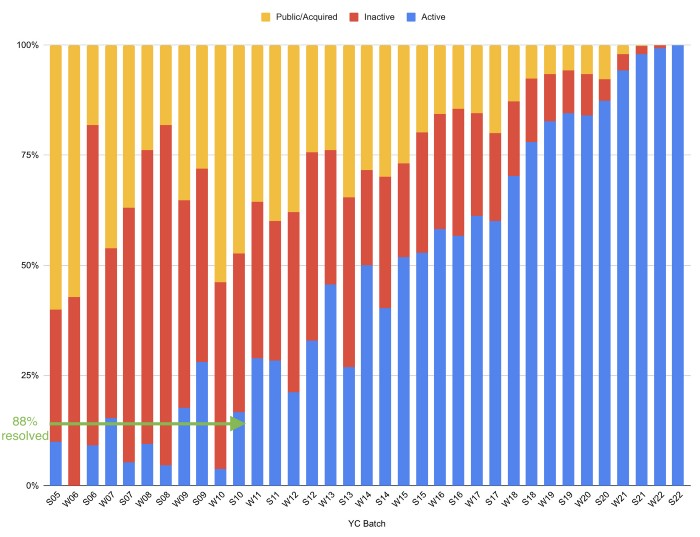
As more startups finish, the blue bars (active) decrease significantly. By 12 years, 88% of startups have closed or exited. Only 7% of startups reach resolution each year.
YC startups by status after 12 years:
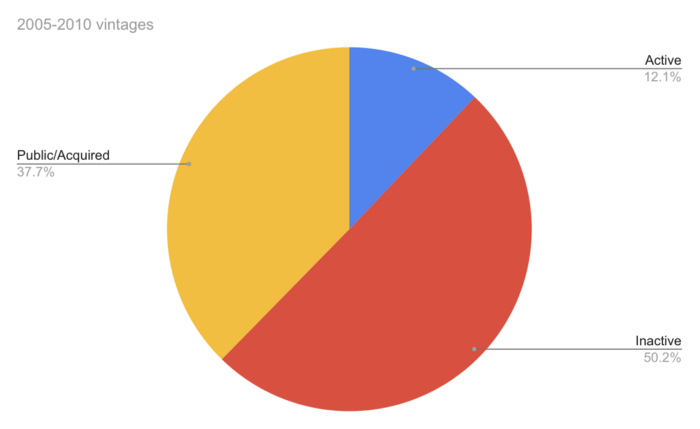
Half the startups have failed, over one-third have exited, and the rest are still operating.
In venture investing, it's said that failed investments show up before successful ones. This is true for YC startups, but only in their early years.
Below, we only present resolved companies from the first chart. Some companies fail soon after establishment, but after a few years, the inactive vs. public/acquired ratio stabilizes around 55:45. After a few years, a YC firm is roughly as likely to quit as fail, which is better than I imagined.
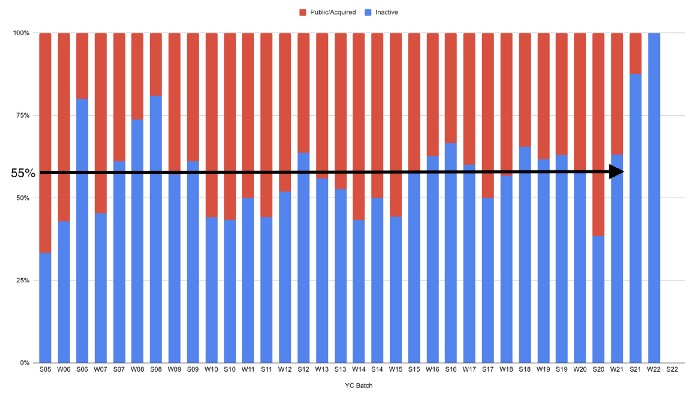
I prepared this post because Rebel investors regularly question me about YC startup failure rates and how long it takes for them to exit or shut down.
Early-stage venture investors can overlook it because 100x investments matter more than 0x investments.
YC founders can ignore it because it shouldn't matter if many of their peers succeed or fail ;)
Evgenii Nelepko
3 years ago
My 3 biggest errors as a co-founder and CEO
Reflections on the closed company Hola! Dating app
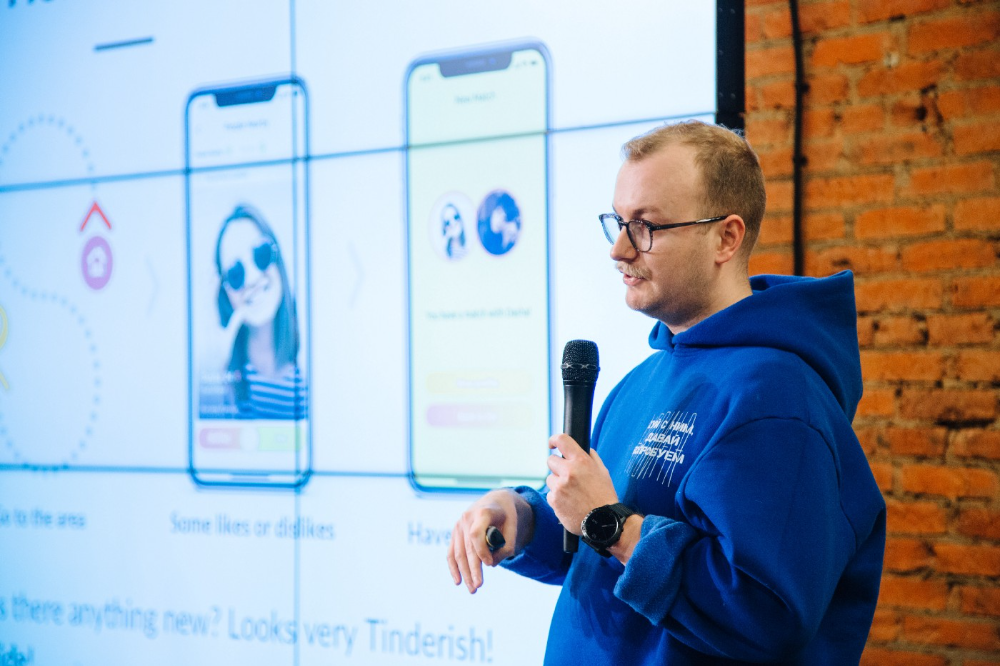
I'll discuss my fuckups as an entrepreneur and CEO. All of them refer to the dating app Hola!, which I co-founded and starred in.
Spring 2021 was when we started. Two techies and two non-techies created a dating app. Pokemon Go and Tinder were combined.
Online dating is a business, and it takes two weeks from a like to a date. We questioned online dating app users if they met anyone offline last year.
75% replied yes, 50% sometimes, 25% usually.
Offline dating is popular, yet people have concerns.
Men are reluctant to make mistakes in front of others.
Women are curious about the background of everyone who approaches them.
We designed unique mechanics that let people date after a match. No endless chitchat. Women would be safe while men felt like cowboys.
I wish to emphasize three faults that lead to founders' estrangement.
This detachment ultimately led to us shutting down the company.
The wrong technology stack
Situation
Instead of generating a faster MVP and designing an app in a universal stack for iOS and Android, I argued we should pilot the app separately for iOS and Android. Technical founders' expertise made this possible.
Self-reflection
Mistaken strategy. We lost time and resources developing two apps at once. We chose iOS since it's more profitable. Apple took us out after the release, citing Guideline 4.3 Spam. After 4 months, we had nothing. We had a long way to go to get the app on Android and the Store.
I suggested creating a uniform platform for the company's growth. This makes parallel product development easier. The strategist's lack of experience and knowledge made it a piece of crap.
What would I have changed if I could?
We should have designed an Android universal stack. I expected Apple to have issues with a dating app.
Our approach should have been to launch something and subsequently improve it, but prejudice won.
The lesson
Discuss the IT stack with your CTO. It saves time and money. Choose the easiest MVP method.

2. A tardy search for investments
Situation
Though the universe and other founders encouraged me to locate investors first, I started pitching when we almost had an app.
When angels arrived, it was time to close. The app was banned, war broke out, I left the country, and the other co-founders stayed. We had no savings.
Self-reflection
I loved interviewing users. I'm proud of having done 1,000 interviews. I wanted to understand people's pain points and improve the product.
Interview results no longer affected the product. I was terrified to start pitching. I filled out accelerator applications and redid my presentation. You must go through that so you won't be terrified later.
What would I have changed if I could?
Get an external or internal mentor to help me with my first pitch as soon as possible. I'd be supported if criticized. He'd cheer with me if there was enthusiasm.
In 99% of cases, I'm comfortable jumping into the unknown, but there are exceptions. The mentor's encouragement would have prompted me to act sooner.
The lesson
Begin fundraising immediately. Months may pass. Show investors your pre-MVP project. Draw inferences from feedback.
3. Role ambiguity
Situation
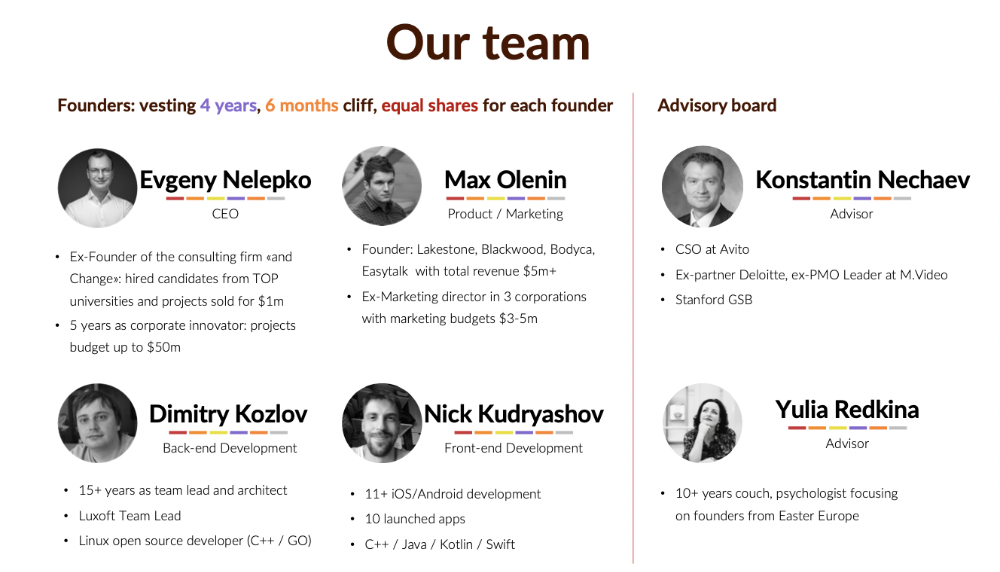
My technical co-founders were also part-time lead developers, which produced communication issues. As co-founders, we communicated well and recognized the problems. Stakes, vesting, target markets, and approach were agreed upon.
We were behind schedule. Technical debt and strategic gap grew.
Bi-daily and weekly reviews didn't help. Each time, there were explanations. Inside, I was freaking out.
Self-reflection
I am a fairly easy person to talk to. I always try to stick to agreements; otherwise, my head gets stuffed with unnecessary information, interpretations, and emotions.
Sit down -> talk -> decide -> do -> evaluate the results. Repeat it.
If I don't get detailed comments, I start ruining everyone's mood. If there's a systematic violation of agreements without a good justification, I won't join the project or I'll end the collaboration.
What would I have done otherwise?
This is where it’s scariest to draw conclusions. Probably the most logical thing would have been not to start the project as we started it. But that was already a completely different project. So I would not have done anything differently and would have failed again.
But I drew conclusions for the future.
The lesson
First-time founders should find an adviser or team coach for a strategic session. It helps split the roles and responsibilities.
You might also like

Sad NoCoiner
3 years ago
Two Key Money Principles You Should Understand But Were Never Taught

Prudence is advised. Be debt-free. Be frugal. Spend less.
This advice sounds nice, but it rarely works.
Most people never learn these two money rules. Both approaches will impact how you see personal finance.
It may safeguard you from inflation or the inability to preserve money.
Let’s dive in.
#1: Making long-term debt your ally
High-interest debt hurts consumers. Many credit cards carry 25% yearly interest (or more), so always pay on time. Otherwise, you’re losing money.
Some low-interest debt is good. Especially when buying an appreciating asset with borrowed money.
Inflation helps you.
If you borrow $800,000 at 3% interest and invest it at 7%, you'll make $32,000 (4%).
As money loses value, fixed payments get cheaper. Your assets' value and cash flow rise.
The never-in-debt crowd doesn't know this. They lose money paying off mortgages and low-interest loans early when they could have bought assets instead.
#2: How To Buy Or Build Assets To Make Inflation Irrelevant
Dozens of studies demonstrate actual wage growth is static; $2.50 in 1964 was equivalent to $22.65 now.
These reports never give solutions unless they're selling gold.
But there is one.
Assets beat inflation.
$100 invested into the S&P 500 would have an inflation-adjusted return of 17,739.30%.
Likewise, you can build assets from nothing. Doing is easy and quick. The returns can boost your income by 10% or more.
The people who obsess over inflation inadvertently make the problem worse for themselves. They wait for The Big Crash to buy assets. Or they moan about debt clocks and spending bills instead of seeking a solution.
Conclusion
Being ultra-prudent is like playing golf with a putter to avoid hitting the ball into the water. Sure, you might not slice a drive into the pond. But, you aren’t going to play well either. Or have very much fun.
Money has rules.
Avoiding debt or investment risks will limit your rewards. Long-term, being too cautious hurts your finances.
Disclaimer: This article is for entertainment purposes only. It is not financial advice, always do your own research.

Coinbase
4 years ago
10 Predictions for Web3 and the Cryptoeconomy for 2022
By Surojit Chatterjee, Chief Product Officer
2021 proved to be a breakout year for crypto with BTC price gaining almost 70% yoy, Defi hitting $150B in value locked, and NFTs emerging as a new category. Here’s my view through the crystal ball into 2022 and what it holds for our industry:
1. Eth scalability will improve, but newer L1 chains will see substantial growth — As we welcome the next hundred million users to crypto and Web3, scalability challenges for Eth are likely to grow. I am optimistic about improvements in Eth scalability with the emergence of Eth2 and many L2 rollups. Traction of Solana, Avalanche and other L1 chains shows that we’ll live in a multi-chain world in the future. We’re also going to see newer L1 chains emerge that focus on specific use cases such as gaming or social media.
2. There will be significant usability improvements in L1-L2 bridges — As more L1 networks gain traction and L2s become bigger, our industry will desperately seek improvements in speed and usability of cross-L1 and L1-L2 bridges. We’re likely to see interesting developments in usability of bridges in the coming year.
3. Zero knowledge proof technology will get increased traction — 2021 saw protocols like ZkSync and Starknet beginning to get traction. As L1 chains get clogged with increased usage, ZK-rollup technology will attract both investor and user attention. We’ll see new privacy-centric use cases emerge, including privacy-safe applications, and gaming models that have privacy built into the core. This may also bring in more regulator attention to crypto as KYC/AML could be a real challenge in privacy centric networks.
4. Regulated Defi and emergence of on-chain KYC attestation — Many Defi protocols will embrace regulation and will create separate KYC user pools. Decentralized identity and on-chain KYC attestation services will play key roles in connecting users’ real identity with Defi wallet endpoints. We’ll see more acceptance of ENS type addresses, and new systems from cross chain name resolution will emerge.
5. Institutions will play a much bigger role in Defi participation — Institutions are increasingly interested in participating in Defi. For starters, institutions are attracted to higher than average interest-based returns compared to traditional financial products. Also, cost reduction in providing financial services using Defi opens up interesting opportunities for institutions. However, they are still hesitant to participate in Defi. Institutions want to confirm that they are only transacting with known counterparties that have completed a KYC process. Growth of regulated Defi and on-chain KYC attestation will help institutions gain confidence in Defi.
6. Defi insurance will emerge — As Defi proliferates, it also becomes the target of security hacks. According to London-based firm Elliptic, total value lost by Defi exploits in 2021 totaled over $10B. To protect users from hacks, viable insurance protocols guaranteeing users’ funds against security breaches will emerge in 2022.
7. NFT Based Communities will give material competition to Web 2.0 social networks — NFTs will continue to expand in how they are perceived. We’ll see creator tokens or fan tokens take more of a first class seat. NFTs will become the next evolution of users’ digital identity and passport to the metaverse. Users will come together in small and diverse communities based on types of NFTs they own. User created metaverses will be the future of social networks and will start threatening the advertising driven centralized versions of social networks of today.
8. Brands will start actively participating in the metaverse and NFTs — Many brands are realizing that NFTs are great vehicles for brand marketing and establishing brand loyalty. Coca-Cola, Campbell’s, Dolce & Gabbana and Charmin released NFT collectibles in 2021. Adidas recently launched a new metaverse project with Bored Ape Yacht Club. We’re likely to see more interesting brand marketing initiatives using NFTs. NFTs and the metaverse will become the new Instagram for brands. And just like on Instagram, many brands may start as NFT native. We’ll also see many more celebrities jumping in the bandwagon and using NFTs to enhance their personal brand.
9. Web2 companies will wake up and will try to get into Web3 — We’re already seeing this with Facebook trying to recast itself as a Web3 company. We’re likely to see other big Web2 companies dipping their toes into Web3 and metaverse in 2022. However, many of them are likely to create centralized and closed network versions of the metaverse.
10. Time for DAO 2.0 — We’ll see DAOs become more mature and mainstream. More people will join DAOs, prompting a change in definition of employment — never receiving a formal offer letter, accepting tokens instead of or along with fixed salaries, and working in multiple DAO projects at the same time. DAOs will also confront new challenges in terms of figuring out how to do M&A, run payroll and benefits, and coordinate activities in larger and larger organizations. We’ll see a plethora of tools emerge to help DAOs execute with efficiency. Many DAOs will also figure out how to interact with traditional Web2 companies. We’re likely to see regulators taking more interest in DAOs and make an attempt to educate themselves on how DAOs work.
Thanks to our customers and the ecosystem for an incredible 2021. Looking forward to another year of building the foundations for Web3. Wagmi.

Merve Yılmaz
3 years ago
Dopamine detox
This post is for you if you can't read or study for 5 minutes.

If you clicked this post, you may be experiencing problems focusing on tasks. A few minutes of reading may tire you. Easily distracted? Using social media and video games for hours without being sidetracked may impair your dopamine system.
When we achieve a goal, the brain secretes dopamine. It might be as simple as drinking water or as crucial as college admission. Situations vary. Various events require different amounts.
Dopamine is released when we start learning but declines over time. Social media algorithms provide new material continually, making us happy. Social media use slows down the system. We can't continue without an award. We return to social media and dopamine rewards.
Mice were given a button that released dopamine into their brains to study the hormone. The mice lost their hunger, thirst, and libido and kept pressing the button. Think this is like someone who spends all day gaming or on Instagram?
When we cause our brain to release so much dopamine, the brain tries to balance it in 2 ways:
1- Decreases dopamine production
2- Dopamine cannot reach its target.
Too many quick joys aren't enough. We'll want more joys. Drugs and alcohol are similar. Initially, a beer will get you drunk. After a while, 3-4 beers will get you drunk.
Social media is continually changing. Updates to these platforms keep us interested. When social media conditions us, we can't read a book.
Same here. I used to complete a book in a day and work longer without distraction. Now I'm addicted to Instagram. Daily, I spend 2 hours on social media. This must change. My life needs improvement. So I started the 50-day challenge.
I've compiled three dopamine-related methods.
Recommendations:
Day-long dopamine detox
First, take a day off from all your favorite things. Social media, gaming, music, junk food, fast food, smoking, alcohol, friends. Take a break.
Hanging out with friends or listening to music may seem pointless. Our minds are polluted. One day away from our pleasures can refresh us.
2. One-week dopamine detox by selecting
Choose one or more things to avoid. Social media, gaming, music, junk food, fast food, smoking, alcohol, friends. Try a week without Instagram or Twitter. I use this occasionally.
One week all together
One solid detox week. It's the hardest program. First or second options are best for dopamine detox. Time will help you.
You can walk, read, or pray during a dopamine detox. Many options exist. If you want to succeed, you must avoid instant gratification. Success after hard work is priceless.