



More on Cooking

Scott Hickmann
3 years ago Draft
This is a draft
My wallpape


Joseph Mavericks
3 years ago
Apples Top 100 Meeting: Steve Jobs's Secret Agenda's Lessons
Jobs' secret emails became public due to a litigation with Samsung.
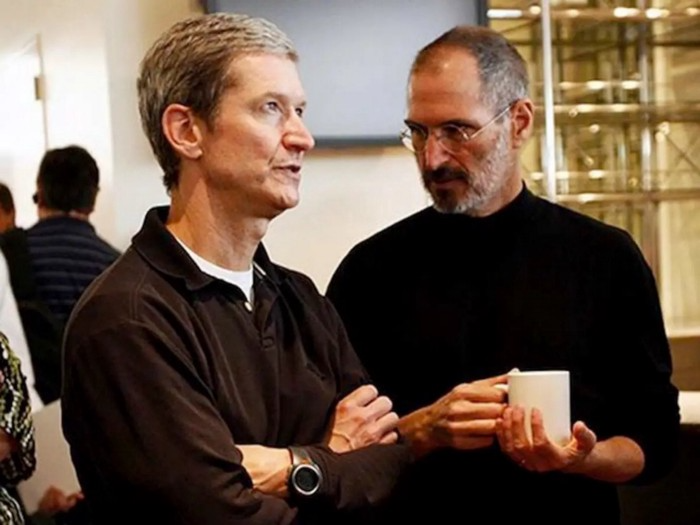
Steve Jobs sent Phil Schiller an email at the end of 2010. Top 100 A was the codename for Apple's annual Top 100 executive meetings. The 2011 one was scheduled.
Everything about this gathering is secret, even attendance. The location is hidden, and attendees can't even drive themselves. Instead, buses transport them to a 2-3 day retreat.
Due to a litigation with Samsung, this Top 100 meeting's agenda was made public in 2014. This was a critical milestone in Apple's history, not a Top 100 meeting. Apple had many obstacles in the 2010s to remain a technological leader. Apple made more money with non-PC goods than with its best-selling Macintosh series. This was the last Top 100 gathering Steve Jobs would attend before passing, and he wanted to make sure his messages carried on before handing over his firm to Tim Cook.
In this post, we'll discuss lessons from Jobs' meeting agenda. Two sorts of entrepreneurs can use these tips:
Those who manage a team in a business and must ensure that everyone is working toward the same goals, upholding the same principles, and being inspired by the same future.
Those who are sole proprietors or independent contractors and who must maintain strict self-discipline in order to stay innovative in their industry and adhere to their own growth strategy.
Here's Steve Jobs's email outlining the annual meeting agenda. It's an 11-part summary of the company's shape and strategy.
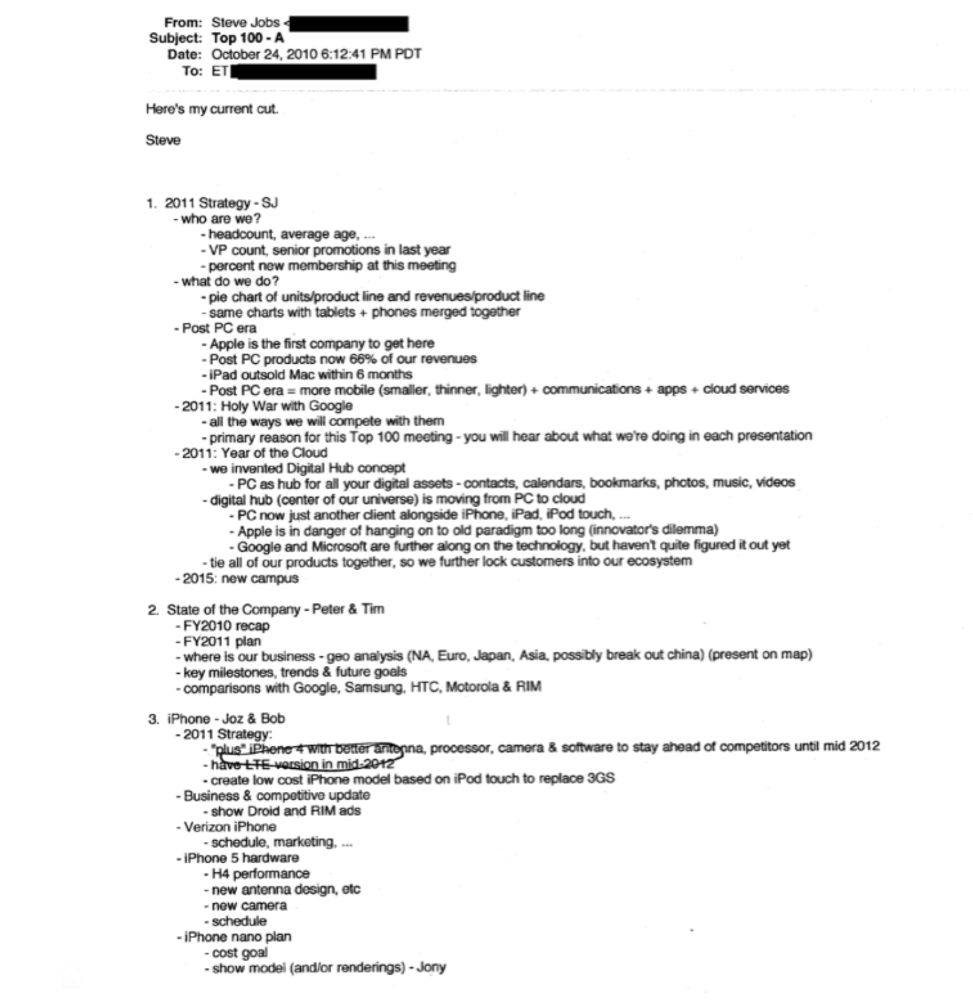
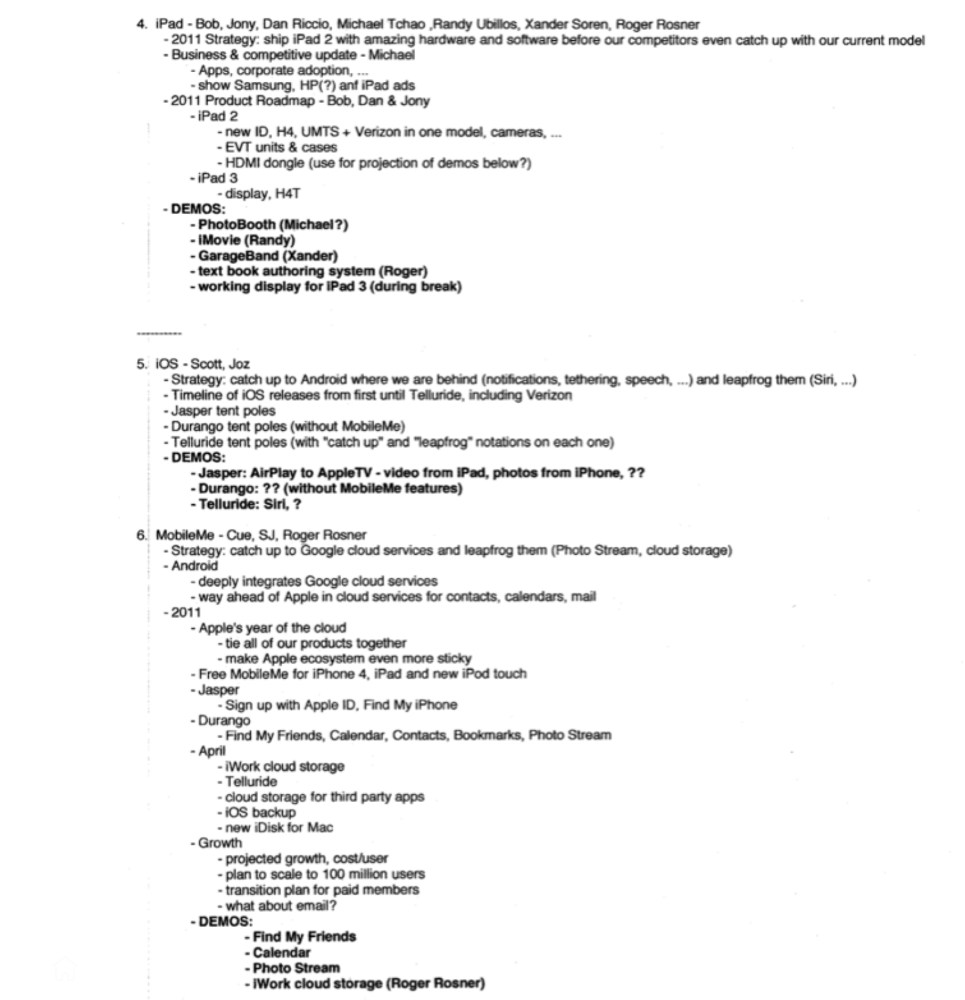
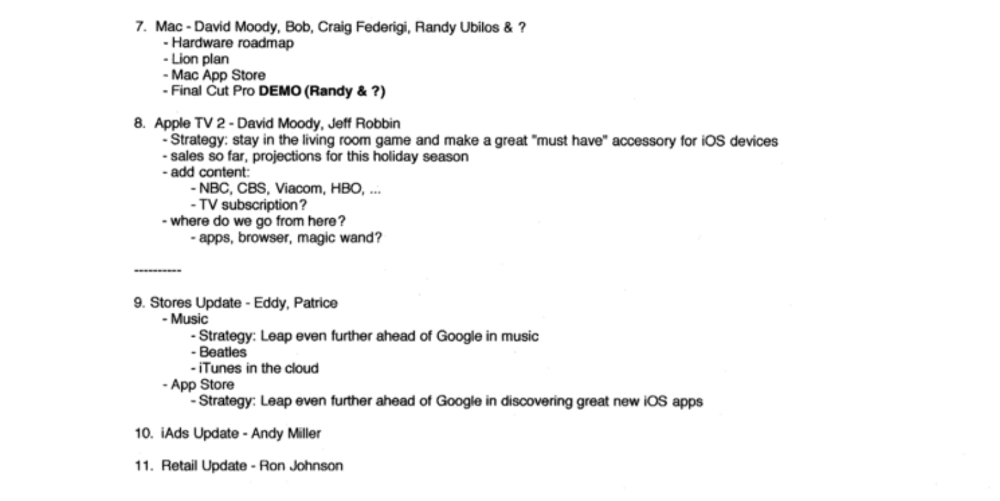
Steve Jobs outlines Apple's 2011 strategy, 10/24/10
1. Correct your data
Business leaders must comprehend their company's metrics. Jobs either mentions critical information he already knows or demands slides showing the numbers he wants. These numbers fall under 2 categories:
Metrics for growth and strategy
As we will see, this was a crucial statistic for Apple since it signaled the beginning of the Post PC era and required them to make significant strategic changes in order to stay ahead of the curve. Post PC products now account for 66% of our revenues.
Within six months, iPad outsold Mac, another sign of the Post-PC age. As we will see, Jobs thought the iPad would be the next big thing, and item number four on the agenda is one of the most thorough references to the iPad.
Geographical analysis: Here, Jobs emphasizes China, where the corporation has a slower start than anticipated. China was dominating Apple's sales growth with 16% of revenue one year after this meeting.
Metrics for people & culture
The individuals that make up a firm are more significant to its success than its headcount or average age. That holds true regardless of size, from a 5-person startup to a Fortune 500 firm. Jobs was aware of this, which is why his suggested agenda begins by emphasizing demographic data.
Along with the senior advancements in the previous year's requested statistic, it's crucial to demonstrate that if the business is growing, the employees who make it successful must also grow.
2. Recognize the vulnerabilities and strengths of your rivals
Steve Jobs was known for attacking his competition in interviews and in his strategies and roadmaps. This agenda mentions 18 competitors, including:
Google 7 times
Android 3 times
Samsung 2 times
Jobs' agenda email was issued 6 days after Apple's Q4 results call (2010). On the call, Jobs trashed Google and Android. His 5-minute intervention included:
Google has acknowledged that the present iteration of Android is not tablet-optimized.
Future Android tablets will not work (Dead On Arrival)
While Google Play only has 90,000 apps, the Apple App Store has 300,000.
Android is extremely fragmented and is continuing to do so.
The App Store for iPad contains over 35,000 applications. The market share of the latest generation of tablets (which debuted in 2011) will be close to nil.
Jobs' aim in blasting the competition on that call was to reassure investors about the upcoming flood of new tablets. Jobs often criticized Google, Samsung, and Microsoft, but he also acknowledged when they did a better job. He was great at detecting his competitors' advantages and devising ways to catch up.
Jobs doesn't hold back when he says in bullet 1 of his agenda: "We further lock customers into our ecosystem while Google and Microsoft are further along on the technology, but haven't quite figured it out yet tie all of our goods together."
The plan outlined in bullet point 5 is immediately clear: catch up to Android where we are falling behind (notifications, tethering, and speech), and surpass them (Siri,). It's important to note that Siri frequently let users down and never quite lived up to expectations.
Regarding MobileMe, see Bullet 6 Jobs admits that when it comes to cloud services like contacts, calendars, and mail, Google is far ahead of Apple.
3. Adapt or perish
Steve Jobs was a visionary businessman. He knew personal computers were the future when he worked on the first Macintosh in the 1980s.
Jobs acknowledged the Post-PC age in his 2010 D8 interview.
Will the tablet replace the laptop, Walt Mossberg questioned Jobs? Jobs' response:
“You know, when we were an agrarian nation, all cars were trucks, because that’s what you needed on the farm. As vehicles started to be used in the urban centers and America started to move into those urban and suburban centers, cars got more popular and innovations like automatic transmission and things that you didn’t care about in a truck as much started to become paramount in cars. And now, maybe 1 out of every 25 vehicles is a truck, where it used to be 100%. PCs are going to be like trucks. They’re still going to be around, still going to have a lot of value, but they’re going to be used by one out of X people.”
Imagine how forward-thinking that was in 2010, especially for the Macintosh creator. You have to be willing to recognize that things were changing and that it was time to start over and focus on the next big thing.
Post-PC is priority number 8 in his 2010 agenda's 2011 Strategy section. Jobs says Apple is the first firm to get here and that Post PC items account about 66% of our income. The iPad outsold the Mac in 6 months, and the Post-PC age means increased mobility (smaller, thinner, lighter). Samsung had just introduced its first tablet, while Apple was working on the iPad 3. (as mentioned in bullet 4).
4. Plan ahead (and different)
Jobs' agenda warns that Apple risks clinging to outmoded paradigms. Clayton Christensen explains in The Innovators Dilemma that huge firms neglect disruptive technologies until they become profitable. Samsung's Galaxy tab, released too late, never caught up to Apple.
Apple faces a similar dilemma with the iPhone, its cash cow for over a decade. It doesn't sell as much because consumers aren't as excited about new iPhone launches and because technology is developing and cell phones may need to be upgraded.
Large companies' established consumer base typically hinders innovation. Clayton Christensen emphasizes that loyal customers from established brands anticipate better versions of current products rather than something altogether fresh and new technologies.
Apple's marketing is smart. Apple's ecosystem is trusted by customers, and its products integrate smoothly. So much so that Apple can afford to be a disruptor by doing something no one has ever done before, something the world's largest corporation shouldn't be the first to try. Apple can test the waters and produce a tremendous innovation tsunami, something few corporations can do.
In March 2011, Jobs appeared at an Apple event. During his address, Steve reminded us about Apple's brand:
“It’s in Apple’s DNA, that technology alone is not enough. That it’s technology married with liberal arts, married with the humanities that yields us the results that make our hearts sink. And nowhere is that more true that in these Post-PC devices.“
More than a decade later, Apple remains one of the most innovative and trailblazing companies in the Post-PC world (industry-disrupting products like Airpods or the Apple Watch came out after that 2011 strategy meeting), and it has reinvented how we use laptops with its M1-powered line of laptops offering unprecedented performance.
A decade after Jobs' death, Apple remains the world's largest firm, and its former CEO had a crucial part in its expansion. If you can do 1% of what Jobs did, you may be 1% as successful.
Not bad.

Dr. Linda Dahl
3 years ago
We eat corn in almost everything. Is It Important?

Corn Kid got viral on TikTok after being interviewed by Recess Therapy. Tariq, called the Corn Kid, ate a buttery ear of corn in the video. He's corn crazy. He thinks everyone just has to try it. It turns out, whether we know it or not, we already have.
Corn is a fruit, veggie, and grain. It's the second-most-grown crop. Corn makes up 36% of U.S. exports. In the U.S., it's easy to grow and provides high yields, as proven by the vast corn belt spanning the Midwest, Great Plains, and Texas panhandle. Since 1950, the corn crop has doubled to 10 billion bushels.
You say, "Fine." We shouldn't just grow because we can. Why so much corn? What's this corn for?
Why is practical and political. Michael Pollan's The Omnivore's Dilemma has the full narrative. Early 1970s food costs increased. Nixon subsidized maize to feed the public. Monsanto genetically engineered corn seeds to make them hardier, and soon there was plenty of corn. Everyone ate. Woot! Too much corn followed. The powers-that-be had to decide what to do with leftover corn-on-the-cob.
They are fortunate that corn has a wide range of uses.
First, the edible variants. I divide corn into obvious and stealth.
Obvious corn includes popcorn, canned corn, and corn on the cob. This form isn't always digested and often comes out as entire, polka-dotting poop. Cornmeal can be ground to make cornbread, polenta, and corn tortillas. Corn provides antioxidants, minerals, and vitamins in moderation. Most synthetic Vitamin C comes from GMO maize.
Corn oil, corn starch, dextrose (a sugar), and high-fructose corn syrup are often overlooked. They're stealth corn because they sneak into practically everything. Corn oil is used for frying, baking, and in potato chips, mayonnaise, margarine, and salad dressing. Baby food, bread, cakes, antibiotics, canned vegetables, beverages, and even dairy and animal products include corn starch. Dextrose appears in almost all prepared foods, excluding those with high-fructose corn syrup. HFCS isn't as easily digested as sucrose (from cane sugar). It can also cause other ailments, which we'll discuss later.
Most foods contain corn. It's fed to almost all food animals. 96% of U.S. animal feed is corn. 39% of U.S. corn is fed to livestock. But animals prefer other foods. Omnivore chickens prefer insects, worms, grains, and grasses. Captive cows are fed a total mixed ration, which contains corn. These animals' products, like eggs and milk, are also corn-fed.
There are numerous non-edible by-products of corn that are employed in the production of items like:
fuel-grade ethanol
plastics
batteries
cosmetics
meds/vitamins binder
carpets, fabrics
glutathione
crayons
Paint/glue

How does corn influence you? Consider quick food for dinner. You order a cheeseburger, fries, and big Coke at the counter (or drive-through in the suburbs). You tell yourself, "No corn." All that contains corn. Deconstruct:
Cows fed corn produce meat and cheese. Meat and cheese were bonded with corn syrup and starch (same). The bun (corn flour and dextrose) and fries were fried in maize oil. High fructose corn syrup sweetens the drink and helps make the cup and straw.
Just about everything contains corn. Then what? A cornspiracy, perhaps? Is eating too much maize an issue, or should we strive to stay away from it whenever possible?
As I've said, eating some maize can be healthy. 92% of U.S. corn is genetically modified, according to the Center for Food Safety. The adjustments are expected to boost corn yields. Some sweet corn is genetically modified to produce its own insecticide, a protein deadly to insects made by Bacillus thuringiensis. It's safe to eat in sweet corn. Concerns exist about feeding agricultural animals so much maize, modified or not.
High fructose corn syrup should be consumed in moderation. Fructose, a sugar, isn't easily metabolized. Fructose causes diabetes, fatty liver, obesity, and heart disease. It causes inflammation, which might aggravate gout. Candy, packaged sweets, soda, fast food, juice drinks, ice cream, ice cream topping syrups, sauces & condiments, jams, bread, crackers, and pancake syrup contain the most high fructose corn syrup. Everyday foods with little nutrients. Check labels and choose cane sugar or sucrose-sweetened goods. Or, eat corn like the Corn Kid.
You might also like

Rachel Greenberg
3 years ago
6 Causes Your Sales Pitch Is Unintentionally Repulsing Customers
Skip this if you don't want to discover why your lively, no-brainer pitch isn't making $10k a month.

You don't want to be repulsive as an entrepreneur or anyone else. Making friends, influencing people, and converting strangers into customers will be difficult if your words evoke disgust, distrust, or disrespect. You may be one of many entrepreneurs who do this obliviously and involuntarily.
I've had to master selling my skills to recruiters (to land 6-figure jobs on Wall Street), selling companies to buyers in M&A transactions, and selling my own companies' products to strangers-turned-customers. I probably committed every cardinal sin of sales repulsion before realizing it was me or my poor salesmanship strategy.
If you're launching a new business, frustrated by low conversion rates, or just curious if you're repelling customers, read on to identify (and avoid) the 6 fatal errors that can kill any sales pitch.
1. The first indication
So many people fumble before they even speak because they assume their role is to convince the buyer. In other words, they expect to pressure, arm-twist, and combat objections until they convert the buyer. Actuality, the approach stinks of disgust, and emotionally-aware buyers would feel "gross" immediately.
Instead of trying to persuade a customer to buy, ask questions that will lead them to do so on their own. When a customer discovers your product or service on their own, they need less outside persuasion. Why not position your offer in a way that leads customers to sell themselves on it?
2. A flawless performance
Are you memorizing a sales script, tweaking video testimonials, and expunging historical blemishes before hitting "publish" on your new campaign? If so, you may be hurting your conversion rate.
Perfection may be a step too far and cause prospects to mistrust your sincerity. Become a great conversationalist to boost your sales. Seriously. Being charismatic is hard without being genuine and showing a little vulnerability.
People like vulnerability, even if it dents your perfect facade. Show the customer's stuttering testimonial. Open up about your or your company's past mistakes (and how you've since improved). Make your sales pitch a two-way conversation. Let the customer talk about themselves to build rapport. Real people sell, not canned scripts and movie-trailer testimonials.
If marketing or sales calls feel like a performance, you may be doing something wrong or leaving money on the table.
3. Your greatest phobia
Three minutes into prospect talks, I'd start sweating. I was talking 100 miles per hour, covering as many bases as possible to avoid the ones I feared. I knew my then-offering was inadequate and my firm had fears I hadn't addressed. So I word-vomited facts, features, and everything else to avoid the customer's concerns.
Do my prospects know I'm insecure? Maybe not, but it added an unnecessary and unhelpful layer of paranoia that kept me stressed, rushed, and on edge instead of connecting with the prospect. Skirting around a company, product, or service's flaws or objections is a poor, temporary, lazy (and cowardly) decision.
How can you project confidence and trust if you're afraid? Before you make another sales call, face your shortcomings, weak points, and objections. Your company won't be everyone's cup of tea, but you should have answers to every question or objection. You should be your business's top spokesperson and defender.
4. The unintentional apologies
Have you ever begged for a sale? I'm going to say no, however you may be unknowingly emitting sorry, inferior, insecure energy.
Young founders, first-time entrepreneurs, and those with severe imposter syndrome may elevate their target customer. This is common when trying to get first customers for obvious reasons.
Since you're truly new at this, you naturally lack experience.
You don't have the self-confidence boost of thousands or hundreds of closed deals or satisfied client results to remind you that your good or service is worthwhile.
Getting those initial few clients seems like the most difficult task, as if doing so will decide the fate of your company as a whole (it probably won't, and you shouldn't actually place that much emphasis on any one transaction).
Customers can smell fear, insecurity, and anxiety just like they can smell B.S. If you believe your product or service improves clients' lives, selling it should feel like a benevolent act of service, not a sleazy money-grab. If you're a sincere entrepreneur, prospects will believe your proposition; if you're apprehensive, they'll notice.
Approach every sale as if you're fine with or without it. This has improved my salesmanship, marketing skills, and mental health. When you put pressure on yourself to close a sale or convince a difficult prospect "or else" (your company will fail, your rent will be late, your electricity will be cut), you emit desperation and lower the quality of your pitch. There's no point.
5. The endless promises
We've all read a million times how to answer or disprove prospects' arguments and add extra incentives to speed or secure the close. Some objections shouldn't be refuted. What if I told you not to offer certain incentives, bonuses, and promises? What if I told you to walk away from some prospects, even if it means losing your sales goal?
If you market to enough people, make enough sales calls, or grow enough companies, you'll encounter prospects who can't be satisfied. These prospects have endless questions, concerns, and requests for more, more, more that you'll never satisfy. These people are a distraction, a resource drain, and a test of your ability to cut losses before they erode your sanity and profit margin.
To appease or convert these insatiably needy, greedy Nellies into customers, you may agree with or acquiesce to every request and demand — even if you can't follow through. Once you overpromise and answer every hole they poke, their trust in you may wane quickly.
Telling a prospect what you can't do takes courage and integrity. If you're honest, upfront, and willing to admit when a product or service isn't right for the customer, you'll gain respect and positive customer experiences. Sometimes honesty is the most refreshing pitch and the deal-closer.
6. No matter what
Have you ever said, "I'll do anything to close this sale"? If so, you've probably already been disqualified. If a prospective customer haggles over a price, requests a discount, or continues to wear you down after you've made three concessions too many, you have a metal hook in your mouth, not them, and it may not end well. Why?
If you're so willing to cut a deal that you cut prices, comp services, extend payment plans, waive fees, etc., you betray your own confidence that your product or service was worth the stated price. They wonder if anyone is paying those prices, if you've ever had a customer (who wasn't a blood relative), and if you're legitimate or worth your rates.
Once a prospect senses that you'll do whatever it takes to get them to buy, their suspicions rise and they wonder why.
Why are you cutting pricing if something is wrong with you or your service?
Why are you so desperate for their sale?
Why aren't more customers waiting in line to pay your pricing, and if they aren't, what on earth are they doing there?
That's what a prospect thinks when you reveal your lack of conviction, desperation, and willingness to give up control. Some prospects will exploit it to drain you dry, while others will be too frightened to buy from you even if you paid them.
Walking down a two-way street. Be casual.
If we track each act of repulsion to an uneasiness, fear, misperception, or impulse, it's evident that these sales and marketing disasters were forced communications. Stiff, imbalanced, divisive, combative, bravado-filled, and desperate. They were unnatural and accepted a power struggle between two sparring, suspicious, unequal warriors, rather than a harmonious oneness of two natural, but opposite parties shaking hands.
Sales should be natural, harmonious. Sales should feel good for both parties, not like one party is having their arm twisted.
You may be doing sales wrong if it feels repulsive, icky, or degrading. If you're thinking cringe-worthy thoughts about yourself, your product, service, or sales pitch, imagine what you're projecting to prospects. Don't make it unpleasant, repulsive, or cringeworthy.

Glorin Santhosh
3 years ago
Start organizing your ideas by using The Second Brain.
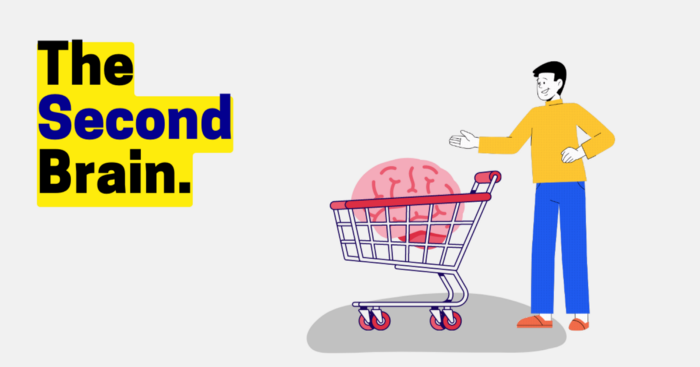
Building A Second Brain helps us remember connections, ideas, inspirations, and insights. Using contemporary technologies and networks increases our intelligence.
This approach makes and preserves concepts. It's a straightforward, practical way to construct a second brain—a remote, centralized digital store for your knowledge and its sources.
How to build ‘The Second Brain’
Have you forgotten any brilliant ideas? What insights have you ignored?
We're pressured to read, listen, and watch informative content. Where did the data go? What happened?
Our brains can store few thoughts at once. Our brains aren't idea banks.
Building a Second Brain helps us remember thoughts, connections, and insights. Using digital technologies and networks expands our minds.
Ten Rules for Creating a Second Brain
1. Creative Stealing
Instead of starting from scratch, integrate other people's ideas with your own.
This way, you won't waste hours starting from scratch and can focus on achieving your goals.
Users of Notion can utilize and customize each other's templates.
2. The Habit of Capture
We must record every idea, concept, or piece of information that catches our attention since our minds are fragile.
When reading a book, listening to a podcast, or engaging in any other topic-related activity, save and use anything that resonates with you.
3. Recycle Your Ideas
Reusing our own ideas across projects might be advantageous since it helps us tie new information to what we already know and avoids us from starting a project with no ideas.
4. Projects Outside of Category
Instead of saving an idea in a folder, group it with documents for a project or activity.
If you want to be more productive, gather suggestions.
5. Burns Slowly
Even if you could finish a job, work, or activity if you focused on it, you shouldn't.
You'll get tired and can't advance many projects. It's easier to divide your routine into daily tasks.
Few hours of daily study is more productive and healthier than entire nights.
6. Begin with a surplus
Instead of starting with a blank sheet when tackling a new subject, utilise previous articles and research.
You may have read or saved related material.
7. Intermediate Packets
A bunch of essay facts.
You can utilize it as a document's section or paragraph for different tasks.
Memorize useful information so you can use it later.
8. You only know what you make
We can see, hear, and read about anything.
What matters is what we do with the information, whether that's summarizing it or writing about it.
9. Make it simpler for yourself in the future.
Create documents or files that your future self can easily understand. Use your own words, mind maps, or explanations.
10. Keep your thoughts flowing.
If you don't employ the knowledge in your second brain, it's useless.
Few people exercise despite knowing its benefits.
Conclusion:
You may continually move your activities and goals closer to completion by organizing and applying your information in a way that is results-focused.
Profit from the information economy's explosive growth by turning your specialized knowledge into cash.
Make up original patterns and linkages between topics.
You may reduce stress and information overload by appropriately curating and managing your personal information stream.
Learn how to apply your significant experience and specific knowledge to a new job, business, or profession.
Without having to adhere to tight, time-consuming constraints, accumulate a body of relevant knowledge and concepts over time.
Take advantage of all the learning materials that are at your disposal, including podcasts, online courses, webinars, books, and articles.

Dung Claire Tran
3 years ago
Is the future of brand marketing with virtual influencers?
Digital influences that mimic humans are rising.
Lil Miquela has 3M Instagram followers, 3.6M TikTok followers, and 30K Twitter followers. She's been on the covers of Prada, Dior, and Calvin Klein magazines. Miquela released Not Mine in 2017 and launched Hard Feelings at Lollapazoolas this year. This isn't surprising, given the rise of influencer marketing.
This may be unexpected. Miquela's fake. Brud, a Los Angeles startup, produced her in 2016.
Lil Miquela is one of many rising virtual influencers in the new era of social media marketing. She acts like a real person and performs the same tasks as sports stars and models.
The emergence of online influencers
Before 2018, computer-generated characters were rare. Since the virtual human industry boomed, they've appeared in marketing efforts worldwide.
In 2020, the WHO partnered up with Atlanta-based virtual influencer Knox Frost (@knoxfrost) to gather contributions for the COVID-19 Solidarity Response Fund.
Lu do Magalu (@magazineluiza) has been the virtual spokeswoman for Magalu since 2009, using social media to promote reviews, product recommendations, unboxing videos, and brand updates. Magalu's 10-year profit was $552M.
In 2020, PUMA partnered with Southeast Asia's first virtual model, Maya (@mayaaa.gram). She joined Singaporean actor Tosh Zhang in the PUMA campaign. Local virtual influencer Ava Lee-Graham (@avagram.ai) partnered with retail firm BHG to promote their in-house labels.

In Japan, Imma (@imma.gram) is the face of Nike, PUMA, Dior, Salvatore Ferragamo SpA, and Valentino. Imma's bubblegum pink bob and ultra-fine fashion landed her on the cover of Grazia magazine.

Lotte Home Shopping created Lucy (@here.me.lucy) in September 2020. She made her TV debut as a Christmas show host in 2021. Since then, she has 100K Instagram followers and 13K TikTok followers.
Liu Yiexi gained 3 million fans in five days on Douyin, China's TikTok, in 2021. Her two-minute video went viral overnight. She's posted 6 videos and has 830 million Douyin followers.

China's virtual human industry was worth $487 million in 2020, up 70% year over year, and is expected to reach $875.9 million in 2021.
Investors worldwide are interested. Immas creator Aww Inc. raised $1 million from Coral Capital in September 2020, according to Bloomberg. Superplastic Inc., the Vermont-based startup behind influencers Janky and Guggimon, raised $16 million by 2020. Craft Ventures, SV Angels, and Scooter Braun invested. Crunchbase shows the company has raised $47 million.
The industries they represent, including Augmented and Virtual reality, were worth $14.84 billion in 2020 and are projected to reach $454.73 billion by 2030, a CAGR of 40.7%, according to PR Newswire.
Advantages for brands
Forbes suggests brands embrace computer-generated influencers. Examples:
Unlimited creative opportunities: Because brands can personalize everything—from a person's look and activities to the style of their content—virtual influencers may be suited to a brand's needs and personalities.
100% brand control: Brand managers now have more influence over virtual influencers, so they no longer have to give up and rely on content creators to include brands into their storytelling and style. Virtual influencers can constantly produce social media content to promote a brand's identity and ideals because they are completely scandal-free.
Long-term cost savings: Because virtual influencers are made of pixels, they may be reused endlessly and never lose their beauty. Additionally, they can move anywhere around the world and even into space to fit a brand notion. They are also always available. Additionally, the expense of creating their content will not rise in step with their expanding fan base.
Introduction to the metaverse: Statista reports that 75% of American consumers between the ages of 18 and 25 follow at least one virtual influencer. As a result, marketers that support virtual celebrities may now interact with younger audiences that are more tech-savvy and accustomed to the digital world. Virtual influencers can be included into any digital space, including the metaverse, as they are entirely computer-generated 3D personas. Virtual influencers can provide brands with a smooth transition into this new digital universe to increase brand trust and develop emotional ties, in addition to the young generations' rapid adoption of the metaverse.
Better engagement than in-person influencers: A Hype Auditor study found that online influencers have roughly three times the engagement of their conventional counterparts. Virtual influencers should be used to boost brand engagement even though the data might not accurately reflect the entire sector.
Concerns about influencers created by computers
Virtual influencers could encourage excessive beauty standards in South Korea, which has a $10.7 billion plastic surgery industry.
A classic Korean beauty has a small face, huge eyes, and pale, immaculate skin. Virtual influencers like Lucy have these traits. According to Lee Eun-hee, a professor at Inha University's Department of Consumer Science, this could make national beauty standards more unrealistic, increasing demand for plastic surgery or cosmetic items.

Other parts of the world raise issues regarding selling items to consumers who don't recognize the models aren't human and the potential of cultural appropriation when generating influencers of other ethnicities, called digital blackface by some.
Meta, Facebook and Instagram's parent corporation, acknowledges this risk.
“Like any disruptive technology, synthetic media has the potential for both good and harm. Issues of representation, cultural appropriation and expressive liberty are already a growing concern,” the company stated in a blog post. “To help brands navigate the ethical quandaries of this emerging medium and avoid potential hazards, (Meta) is working with partners to develop an ethical framework to guide the use of (virtual influencers).”
Despite theoretical controversies, the industry will likely survive. Companies think virtual influencers are the next frontier in the digital world, which includes the metaverse, virtual reality, and digital currency.
In conclusion
Virtual influencers may garner millions of followers online and help marketers reach youthful audiences. According to a YouGov survey, the real impact of computer-generated influencers is yet unknown because people prefer genuine connections. Virtual characters can supplement brand marketing methods. When brands are metaverse-ready, the author predicts virtual influencer endorsement will continue to expand.