


More on Entrepreneurship/Creators

Pat Vieljeux
3 years ago
Your entrepreneurial experience can either be a beautiful adventure or a living hell with just one decision.
Choose.
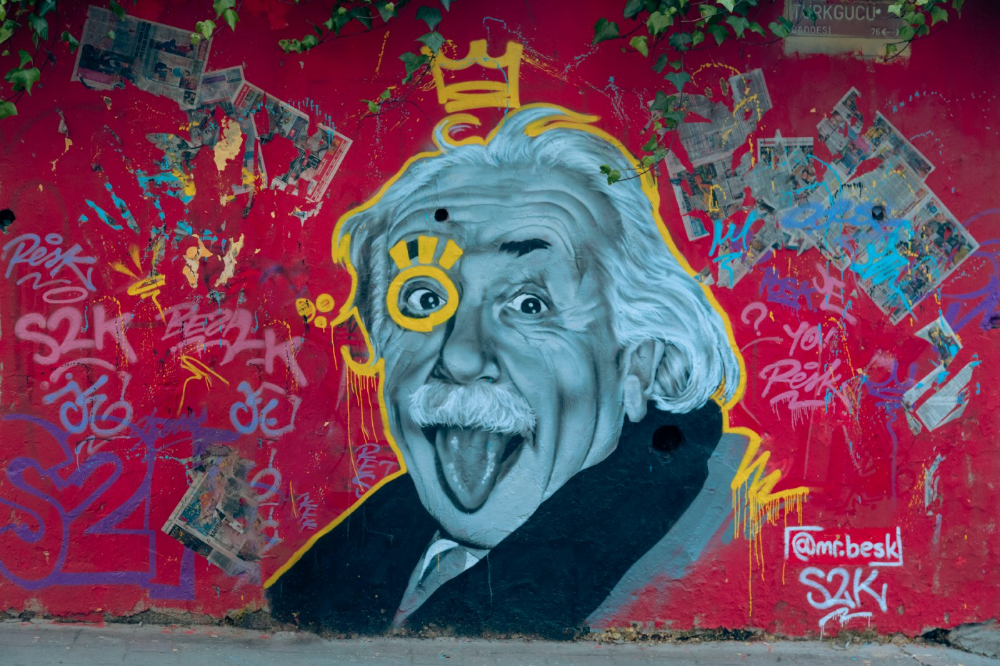
DNA makes us distinct.
We act alike. Most people follow the same road, ignoring differences. We remain quiet about our uniqueness for fear of exclusion (family, social background, religion). We live a more or less imposed life.
Off the beaten path, we stand out from the others. We obey without realizing we're sewing a shroud. We're told to do as everyone else and spend 40 years dreaming of a golden retirement and regretting not living.
“One of the greatest regrets in life is being what others would want you to be, rather than being yourself.” - Shannon L. Alder
Others dare. Again, few are creative; most follow the example of those who establish a business for the sake of entrepreneurship. To live.
They pick a potential market and model their MVP on an existing solution. Most mimic others, alter a few things, appear to be original, and end up with bland products, adding to an already crowded market.
SaaS, PaaS, etc. followed suit. It's reduced pricing, profitability, and product lifespan.
As competitors become more aggressive, their profitability diminishes, making life horrible for them and their employees. They fail to innovate, cut costs, and close their company.
Few of them look happy and fulfilled.
How did they do it?
The answer is unsettlingly simple.
They are themselves.
They start their company, propelled at first by a passion or maybe a calling.
Then, at their own pace, they create it with the intention of resolving a dilemma.
They assess what others are doing and consider how they might improve it.
In contrast to them, they respond to it in their own way by adding a unique personal touch. Therefore, it is obvious.
Originals, like their DNA, can't be copied. Or if they are, they're poorly printed. Originals are unmatched. Artist-like. True collectors only buy Picasso paintings by the master, not forgeries, no matter how good.
Imaginative people are constantly ahead. Copycats fall behind unless they innovate. They watch their competition continuously. Their solution or product isn't sexy. They hope to cash in on their copied product by flooding the market.
They're mostly pirates. They're short-sighted, unlike creators.
Creators see further ahead and have no rivals. They use copiers to confirm a necessity. To maintain their individuality, creators avoid copying others. They find copying boring. It's boring. They oppose plagiarism.
It's thrilling and inspiring.
It will also make them more able to withstand their opponents' tension. Not to mention roadblocks. For creators, impediments are games.
Others fear it. They race against the clock and fear threats that could interrupt their momentum since they lack inventiveness and their product has a short life cycle.
Creators have time on their side. They're dedicated. Clearly. Passionate booksellers will have their own bookstore. Their passion shows in their book choices. Only the ones they love.
The copier wants to display as many as possible, including mediocre authors, and will cut costs. All this to dominate the market. They're digging their own grave.
The bookseller is just one example. I could give you tons of them.
Closing remarks
Entrepreneurs might follow others or be themselves. They risk exhaustion trying to predict what their followers will do.
It's true.
Life offers choices.
Being oneself or doing as others do, with the possibility of regretting not expressing our uniqueness and not having lived.
“Be yourself; everyone else is already taken”. Oscar Wilde
The choice is yours.

MAJESTY AliNICOLE WOW!
2 years ago
YouTube's faceless videos are growing in popularity, but this is nothing new.
I've always bucked social media norms. YouTube doesn't compare. Traditional video made me zig when everyone zagged. Audio, picture personality animation, thought movies, and slide show videos are most popular and profitable.

YouTube's business is shifting. While most video experts swear by the idea that YouTube success is all about making personal and professional Face-Share-Videos, those who use YouTube for business know things are different.
In this article, I will share concepts from my mini master class Figures to Followers: Prioritizing Purposeful Profits Over Popularity on YouTube to Create the Win-Win for You, Your Audience & More and my forthcoming publication The WOWTUBE-PRENEUR FACTOR EVOLUTION: The Basics of Powerfully & Profitably Positioning Yourself as a Video Communications Authority to Broadcast Your WOW Effect as a Video Entrepreneur.
I've researched the psychology, anthropology, and anatomy of significant social media platforms as an entrepreneur and social media marketing expert. While building my YouTube empire, I've paid particular attention to what works for short, mid, and long-term success, whether it's a niche-focused, lifestyle, or multi-interest channel.
Most new, semi-new, and seasoned YouTubers feel vlog-style or live-on-camera videos are popular. Faceless, animated, music-text-based, and slideshow videos do well for businesses.
Buyer-consumer vs. content-consumer thinking is totally different when absorbing content. Profitability and popularity are closely related, however most people become popular with traditional means but not profitable.
In my experience, Faceless videos are more profitable, although it depends on the channel's style. Several professionals are now teaching in their courses that non-traditional films are making the difference in their business success and popularity.
Face-Share-Personal-Touch videos make audiences feel like they know the personality, but they're not profitable.
Most spend hours creating articles, videos, and thumbnails to seem good. That's how most YouTubers gained their success in the past, but not anymore.
Looking the part and performing a typical role in videos doesn't convert well, especially for newbie channels.
Working with video marketers and YouTubers for years, I've noticed that most struggle to be consistent with content publishing since they exclusively use formats that need extensive development. Camera and green screen set ups, shooting/filming, and editing for post productions require their time, making it less appealing to post consistently, especially if they're doing all the work themselves.
Because they won't make simple format videos or audio videos with an overlay image, they overcomplicate the procedure (even with YouTube Shorts), and they leave their channels for weeks or months. Again, they believe YouTube only allows specific types of videos. Even though this procedure isn't working, they plan to keep at it.
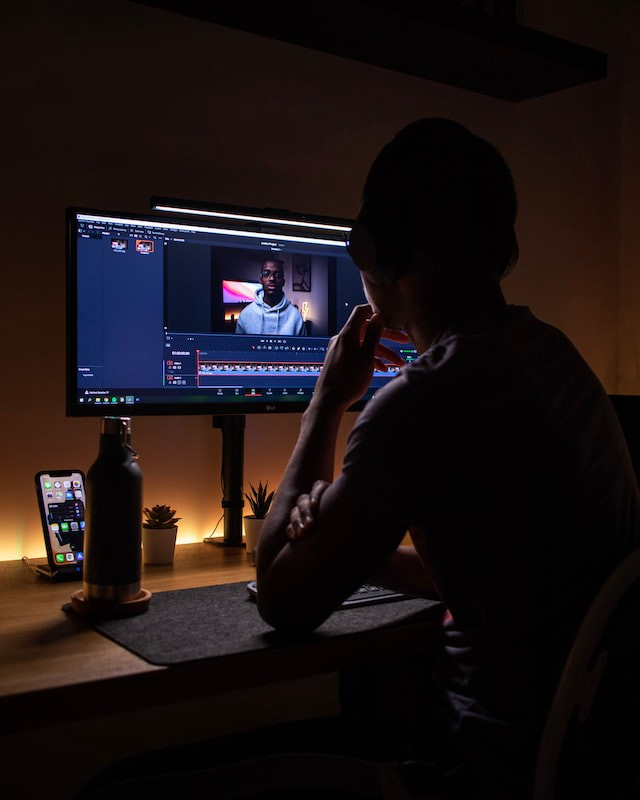
A successful YouTube channel needs multiple video formats to suit viewer needs, I teach. Face-Share-Personal Touch and Faceless videos are both useful.
How people engage with YouTube content has changed over the years, and the average customer is no longer interested in an all-video channel.
Face-Share-Personal-Touch videos are great
Google Live
Online training
Giving listeners a different way to access your podcast that is being broadcast on sites like Anchor, BlogTalkRadio, Spreaker, Google, Apple Store, and others Many people enjoy using a video camera to record themselves while performing the internet radio, Facebook, or Instagram Live versions of their podcasts.
Video Blog Updates
even more
Faceless videos are popular for business and benefit both entrepreneurs and audiences.
For the business owner/entrepreneur…
Less production time results in time dollar savings.
enables the business owner to demonstrate the diversity of content development
For the Audience…
The channel offers a variety of appealing content options.
The same format is not monotonous or overly repetitive for the viewers.
Below are a couple videos from YouTube guru Make Money Matt's channel, which has over 347K subscribers.
Enjoy
24 Best Niches to Make Money on YouTube Without Showing Your Face
Make Money on YouTube Without Making Videos (Free Course)
In conclusion, you have everything it takes to build your own YouTube brand and empire. Learn the rules, then adapt them to succeed.
Please reread this and the other suggested articles for optimal benefit.
I hope this helped. How has this article helped you? Follow me for more articles like this and more multi-mission expressions.

Bastian Hasslinger
3 years ago
Before 2021, most startups had excessive valuations. It is currently causing issues.
Higher startup valuations are often favorable for all parties. High valuations show a business's potential. New customers and talent are attracted. They earn respect.
Everyone benefits if a company's valuation rises.
Founders and investors have always been incentivized to overestimate a company's value.
Post-money valuations were inflated by 2021 market expectations and the valuation model's mechanisms.
Founders must understand both levers to handle a normalizing market.
2021, the year of miracles
2021 must've seemed miraculous to entrepreneurs, employees, and VCs. Valuations rose, and funding resumed after the first Covid-19 epidemic caution.
In 2021, VC investments increased from $335B to $643B. 518 new worldwide unicorns vs. 134 in 2020; 951 US IPOs vs. 431.
Things can change quickly, as 2020-21 showed.
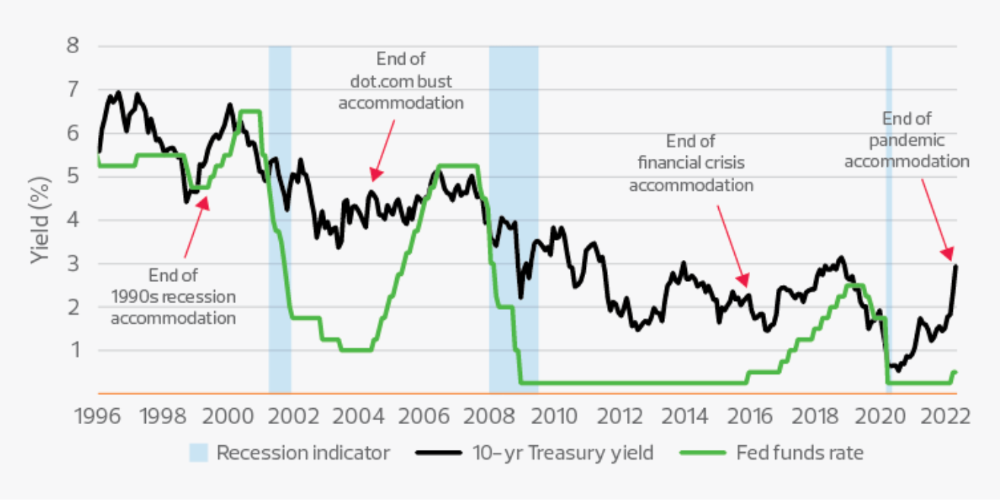
Rising interest rates, geopolitical developments, and normalizing technology conditions drive down share prices and tech company market caps in 2022. Zoom, the poster-child of early lockdown success, is down 37% since 1st Jan.
Once-inflated valuations can become a problem in a normalizing market, especially for founders, employees, and early investors.
the reason why startups are always overvalued
To see why inflated valuations are a problem, consider one of its causes.
Private company values only fluctuate following a new investment round, unlike publicly-traded corporations. The startup's new value is calculated simply:
(Latest round share price) x (total number of company shares)
This is the industry standard Post-Money Valuation model.
Let’s illustrate how it works with an example. If a VC invests $10M for 1M shares (at $10/share), and the company has 10M shares after the round, its Post-Money Valuation is $100M (10/share x 10M shares).
This approach might seem like the most natural way to assess a business, but the model often unintentionally overstates the underlying value of the company even if the share price paid by the investor is fair. All shares aren't equal.
New investors in a corporation will always try to minimize their downside risk, or the amount they lose if things go wrong. New investors will try to negotiate better terms and pay a premium.
How the value of a struggling SpaceX increased
SpaceX's 2008 Series D is an example. Despite the financial crisis and unsuccessful rocket launches, the company's Post-Money Valuation was 36% higher after the investment round. Why?
Series D SpaceX shares were protected. In case of liquidation, Series D investors were guaranteed a 2x return before other shareholders.
Due to downside protection, investors were willing to pay a higher price for this new share class.
The Post-Money Valuation model overpriced SpaceX because it viewed all the shares as equal (they weren't).
Why entrepreneurs, workers, and early investors stand to lose the most
Post-Money Valuation is an effective and sufficient method for assessing a startup's valuation, despite not taking share class disparities into consideration.
In a robust market, where the firm valuation will certainly expand with the next fundraising round or exit, the inflated value is of little significance.
Fairness endures. If a corporation leaves at a greater valuation, each stakeholder will receive a proportional distribution. (i.e., 5% of a $100M corporation yields $5M).
SpaceX's inherent overvaluation was never a problem. Had it been sold for less than its Post-Money Valuation, some shareholders, including founders, staff, and early investors, would have seen their ownership drop.
The unforgiving world of 2022
In 2022, founders, employees, and investors who benefited from inflated values will face below-valuation exits and down-rounds.
For them, 2021 will be a curse, not a blessing.
Some tech giants are worried. Klarna's valuation fell from $45B (Oct 21) to $30B (Jun 22), Canvas from $40B to $27B, and GoPuffs from $17B to $8.3B.
Shazam and Blue Apron have to exit or IPO at a cheaper price. Premium share classes are protected, while others receive less. The same goes for bankrupts.
Those who continue at lower valuations will lose reputation and talent. When their value declines by half, generous employee stock options become less enticing, and their ability to return anything is questioned.
What can we infer about the present situation?
Such techniques to enhance your company's value or stop a normalizing market are fiction.
The current situation is a painful reminder for entrepreneurs and a crucial lesson for future firms.
The devastating market fall of the previous six months has taught us one thing:
Keep in mind that any valuation is speculative. Money Post A startup's valuation is a highly simplified approximation of its true value, particularly in the early phases when it lacks significant income or a cutting-edge product. It is merely a projection of the future and a hypothetical meter. Until it is achieved by an exit, a valuation is nothing more than a number on paper.
Assume the value of your company is lower than it was in the past. Your previous valuation might not be accurate now due to substantial changes in the startup financing markets. There is little reason to think that your company's value will remain the same given the 50%+ decline in many newly listed IT companies. Recognize how the market situation is changing and use caution.
Recognize the importance of the stake you hold. Each share class has a unique value that varies. Know the sort of share class you own and how additional contractual provisions affect the market value of your security. Frameworks have been provided by Metrick and Yasuda (Yale & UC) and Gornall and Strebulaev (Stanford) for comprehending the terms that affect investors' cash-flow rights upon withdrawal. As a result, you will be able to more accurately evaluate your firm and determine the worth of each share class.
Be wary of approving excessively protective share terms.
The trade-offs should be considered while negotiating subsequent rounds. Accepting punitive contractual terms could first seem like a smart option in order to uphold your inflated worth, but you should proceed with caution. Such provisions ALWAYS result in misaligned shareholders, with common shareholders (such as you and your staff) at the bottom of the list.
You might also like

Crypto Zen Monk
2 years ago
How to DYOR in the world of cryptocurrency
RESEARCH
We must create separate ideas and handle our own risks to be better investors. DYOR is crucial.
The only thing unsustainable is your cluelessness.
DYOR: Why
On social media, there is a lot of false information and divergent viewpoints. All of these facts might be accurate, but they might not be appropriate for your portfolio and investment preferences.
You become a more knowledgeable investor thanks to DYOR.
DYOR improves your portfolio's risk management.
My DYOR resources are below.
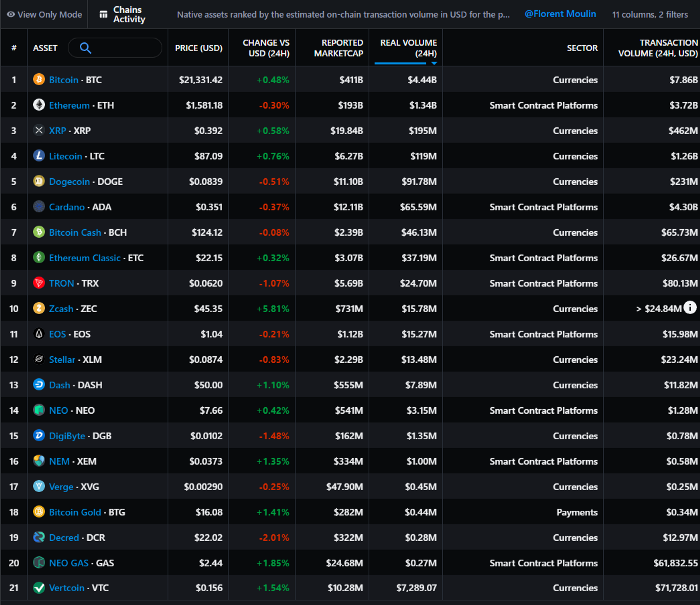
Messari: Major Blockchains' Activities
New York-based Messari provides cryptocurrency open data libraries.
Major blockchains offer 24-hour on-chain volume. https://messari.io/screener/most-active-chains-DB01F96B
What to do
Invest in stable cryptocurrencies. Sort Messari by Real Volume (24H) or Reported Market Cap.
Coingecko: Research on Ecosystems
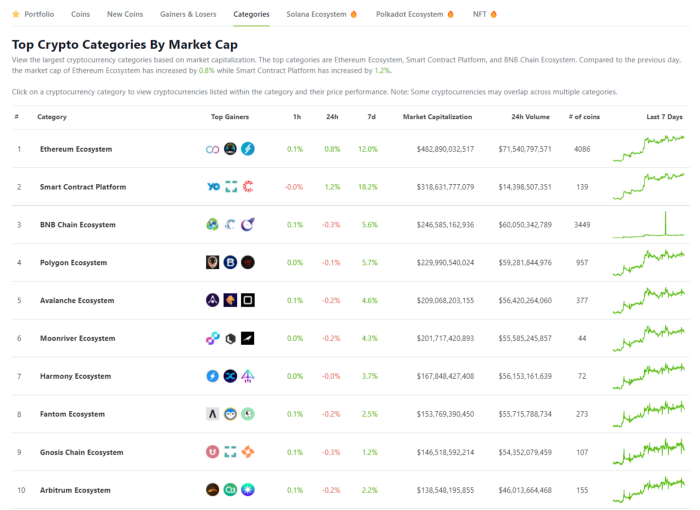
Top 10 Ecosystems by Coingecko are good.
What to do
Invest in quality.
Leading ten Ecosystems by Market Cap
There are a lot of coins in the ecosystem (second last column of above chart)
CoinGecko's Market Cap Crypto Categories Market capitalization-based cryptocurrency categories. Ethereum Ecosystem www.coingecko.com
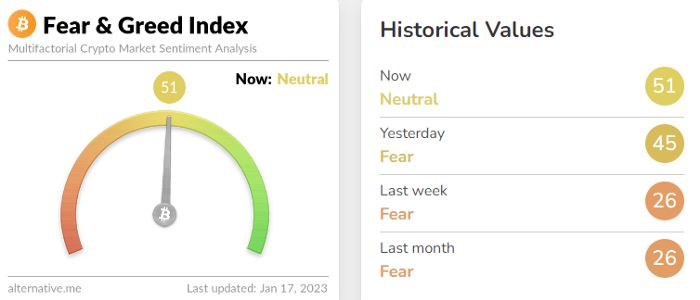
Fear & Greed Index for Bitcoin (FGI)
The Bitcoin market sentiment index ranges from 0 (extreme dread) to 100. (extreme greed).
How to Apply
See market sentiment:
Extreme fright = opportunity to buy
Extreme greed creates sales opportunity (market due for correction).

Glassnode
Glassnode gives facts, information, and confidence to make better Bitcoin, Ethereum, and cryptocurrency investments and trades.
Explore free and paid metrics.
Stock to Flow Ratio: Application
The popular Stock to Flow Ratio concept believes scarcity drives value. Stock to flow is the ratio of circulating Bitcoin supply to fresh production (i.e. newly mined bitcoins). The S/F Ratio has historically predicted Bitcoin prices. PlanB invented this metric.

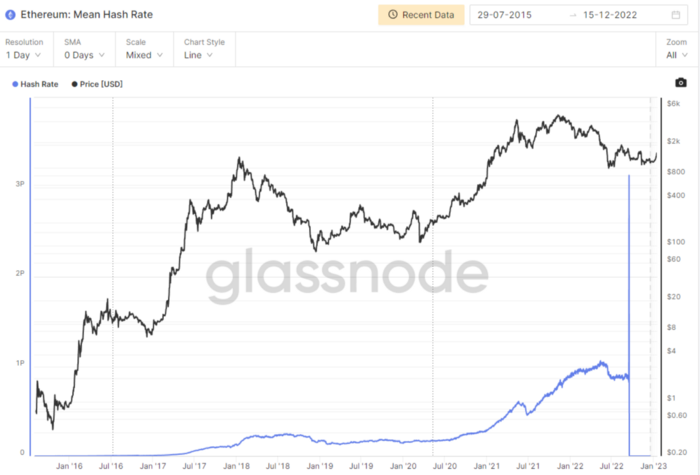
Utilization: Ethereum Hash Rate
Ethereum miners produce an estimated number of hashes per second.
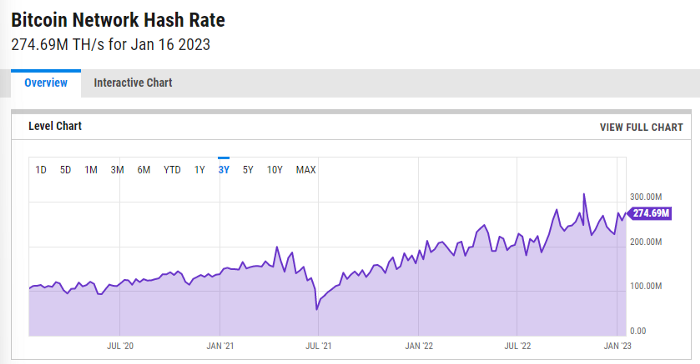
ycharts: Hash rate of the Bitcoin network
TradingView
TradingView is your go-to tool for investment analysis, watch lists, technical analysis, and recommendations from other traders/investors.

Research for a cryptocurrency project
Two key questions every successful project must ask: Q1: What is this project trying to solve? Is it a big problem or minor? Q2: How does this project make money?
Each cryptocurrency:
Check out the white paper.
check out the project's internet presence on github, twitter, and medium.
the transparency of it
Verify the team structure and founders. Verify their LinkedIn profile, academic history, and other qualifications. Search for their names with scam.
Where to purchase and use cryptocurrencies Is it traded on trustworthy exchanges?
From CoinGecko and CoinMarketCap, we may learn about market cap, circulations, and other important data.
The project must solve a problem. Solving a problem is the goal of the founders.
Avoid projects that resemble multi-level marketing or ponzi schemes.
Your use of social media
Use social media carefully or ignore it: Twitter, TradingView, and YouTube
Someone said this before and there are some truth to it. Social media bullish => short.
Your Behavior
Investigate. Spend time. You decide. Worth it!
Only you have the best interest in your financial future.

Sneaker News
3 years ago
This Month Will See The Release Of Travis Scott x Nike Footwear
Following the catastrophes at Astroworld, Travis Scott was swiftly vilified by both media outlets and fans alike, and the names who had previously supported him were quickly abandoned. Nike, on the other hand, remained silent, only delaying the release of La Flame's planned collaborations, such as the Air Max 1 and Air Trainer 1, indefinitely. While some may believe it is too soon for the artist to return to the spotlight, the Swoosh has other ideas, as Nice Kicks reveals that these exact sneakers will be released in May.
Both the Travis Scott x Nike Air Max 1 and the Travis Scott x Nike Air Trainer 1 are set to come in two colorways this month. Tinker Hatfield's renowned runner will meet La Flame's "Baroque Brown" and "Saturn Gold" make-ups, which have been altered with backwards Swooshes and outdoors-themed webbing. The high-top trainer is being customized with Hatfield's "Wheat" and "Grey Haze" palettes, both of which include zippers across the heel, co-branded patches, and other details.
See below for a closer look at the four footwear. TravisScott.com is expected to release the shoes on May 20th, according to Nice Kicks. Following that, on May 27th, Nike SNKRS will release the shoe.
Travis Scott x Nike Air Max 1 "Baroque Brown"
Release Date: 2022
Color: Baroque Brown/Lemon Drop/Wheat/Chile Red
Mens: $160
Style Code: DO9392-200
Pre-School: $85
Style Code: DN4169-200
Infant & Toddler: $70
Style Code: DN4170-200
Travis Scott x Nike Air Max 1 "Saturn Gold"
Release Date: 2022
Color: N/A
Mens: $160
Style Code: DO9392-700
Travis Scott x Nike Air Trainer 1 "Wheat"
Restock Date: May 27th, 2022 (Friday)
Original Release Date: May 20th, 2022 (Friday)
Color: N/A
Mens: $140
Style Code: DR7515-200
Travis Scott x Nike Air Trainer 1 "Grey Haze"
Restock Date: May 27th, 2022 (Friday)
Original Release Date: May 20th, 2022 (Friday)
Color: N/A
Mens: $140
Style Code: DR7515-001

Liz Martin
3 years ago
What Motivated Amazon to Spend $1 Billion for The Rings of Power?
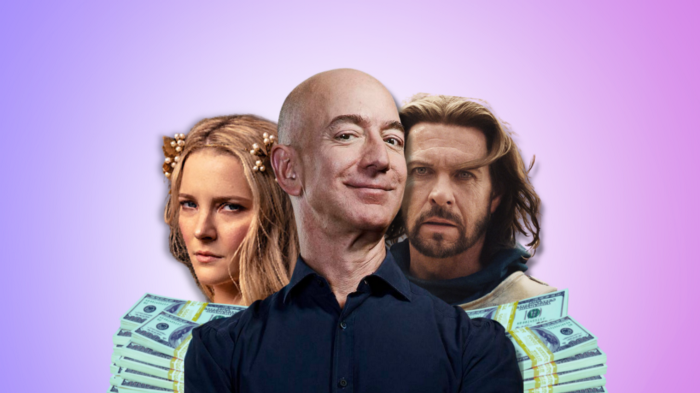
Amazon's Rings of Power is the most costly TV series ever made. This is merely a down payment towards Amazon's grand goal.
Here's a video:
Amazon bought J.R.R. Tolkien's fantasy novels for $250 million in 2017. This agreement allows Amazon to create a Tolkien series for Prime Video.
The business spent years developing and constructing a Lord of the Rings prequel. Rings of Power premiered on September 2, 2022.
It drew 25 million global viewers in 24 hours. Prime Video's biggest debut.
An Exorbitant Budget
The most expensive. First season cost $750 million to $1 billion, making it the most costly TV show ever.
Jeff Bezos has spent years looking for the next Game of Thrones, a critically and commercially successful original series. Rings of Power could help.
Why would Amazon bet $1 billion on one series?
It's Not Just About the Streaming War
It's simple to assume Amazon just wants to win. Since 2018, the corporation has been fighting Hulu, Netflix, HBO, Apple, Disney, and NBC. Each wants your money, talent, and attention. Amazon's investment goes beyond rivalry.
Subscriptions Are the Bait
Audible, Amazon Music, and Prime Video are subscription services, although the company's fundamental business is retail. Amazon's online stores contribute over 50% of company revenue. Subscription services contribute 6.8%. The company's master plan depends on these subscriptions.
Streaming videos on Prime increases membership renewals. Free trial participants are more likely to join. Members buy twice as much as non-members.
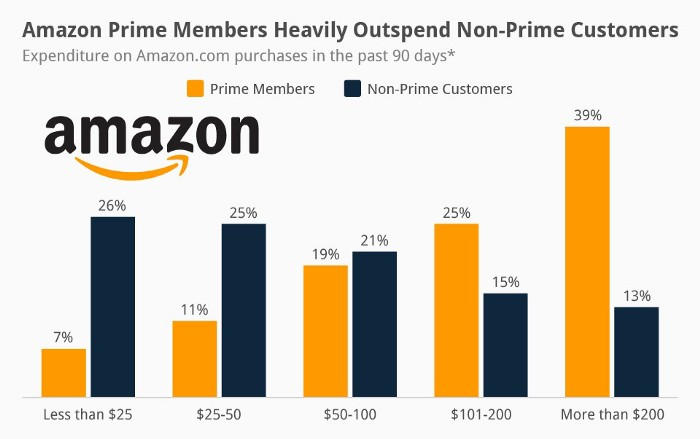
Amazon Studios doesn't generate original programming to earn from Prime Video subscriptions. It aims to retain and attract clients.
Amazon can track what you watch and buy. Its algorithm recommends items and services. Mckinsey says you'll use more Amazon products, shop at Amazon stores, and watch Amazon entertainment.
In 2015, the firm launched the first season of The Man in the High Castle, a dystopian alternate history TV series depicting a world ruled by Nazi Germany and Japan after World War II.
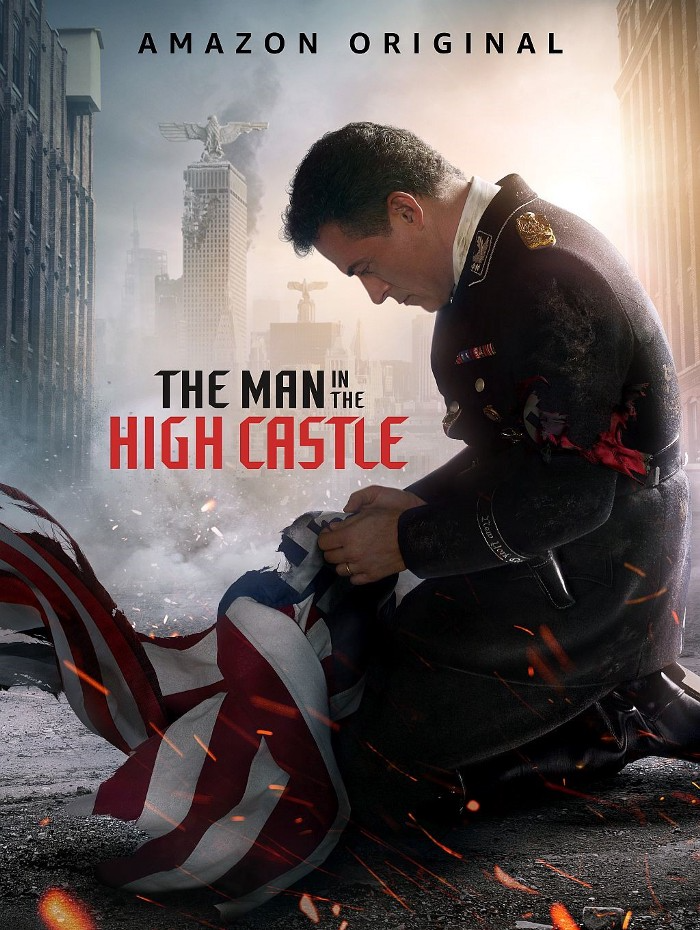
This $72 million production earned two Emmys. It garnered 1.15 million new Prime users globally.
When asked about his Hollywood investment, Bezos said, "A Golden Globe helps us sell more shoes."
Selling more footwear
Amazon secured a deal with DirecTV to air Thursday Night Football in restaurants and bars. First streaming service to have exclusive NFL games.
This isn't just about Thursday night football, says media analyst Ritchie Greenfield. This sells t-shirts. This may be a ticket. Amazon does more than stream games.
The Rings of Power isn't merely a production showcase, either. This sells Tolkien's fantasy novels such Lord of the Rings, The Hobbit, and The Silmarillion.
This tiny commitment keeps you in Amazon's ecosystem.