


More on Science

Laura Sanders
3 years ago
Xenobots, tiny living machines, can duplicate themselves.
Strange and complex behavior of frog cell blobs
A xenobot “parent,” shaped like a hungry Pac-Man (shown in red false color), created an “offspring” xenobot (green sphere) by gathering loose frog cells in its opening.
Tiny “living machines” made of frog cells can make copies of themselves. This newly discovered renewal mechanism may help create self-renewing biological machines.
According to Kirstin Petersen, an electrical and computer engineer at Cornell University who studies groups of robots, “this is an extremely exciting breakthrough.” She says self-replicating robots are a big step toward human-free systems.
Researchers described the behavior of xenobots earlier this year (SN: 3/31/21). Small clumps of skin stem cells from frog embryos knitted themselves into small spheres and started moving. Cilia, or cellular extensions, powered the xenobots around their lab dishes.
The findings are published in the Proceedings of the National Academy of Sciences on Dec. 7. The xenobots can gather loose frog cells into spheres, which then form xenobots.
The researchers call this type of movement-induced reproduction kinematic self-replication. The study's coauthor, Douglas Blackiston of Tufts University in Medford, Massachusetts, and Harvard University, says this is typical. For example, sexual reproduction requires parental sperm and egg cells. Sometimes cells split or budded off from a parent.
“This is unique,” Blackiston says. These xenobots “find loose parts in the environment and cobble them together.” This second generation of xenobots can move like their parents, Blackiston says.
The researchers discovered that spheroid xenobots could only produce one more generation before dying out. The original xenobots' shape was predicted by an artificial intelligence program, allowing for four generations of replication.
A C shape, like an openmouthed Pac-Man, was predicted to be a more efficient progenitor. When improved xenobots were let loose in a dish, they began scooping up loose cells into their gaping “mouths,” forming more sphere-shaped bots (see image below). As many as 50 cells clumped together in the opening of a parent to form a mobile offspring. A xenobot is made up of 4,000–6,000 frog cells.
Petersen likes the Xenobots' small size. “The fact that they were able to do this at such a small scale just makes it even better,” she says. Miniature xenobots could sculpt tissues for implantation or deliver therapeutics inside the body.
Beyond the xenobots' potential jobs, the research advances an important science, says study coauthor and Tufts developmental biologist Michael Levin. The science of anticipating and controlling the outcomes of complex systems, he says.
“No one could have predicted this,” Levin says. “They regularly surprise us.” Researchers can use xenobots to test the unexpected. “This is about advancing the science of being less surprised,” Levin says.

Tomas Pueyo
2 years ago
Soon, a Starship Will Transform Humanity
SpaceX's Starship.
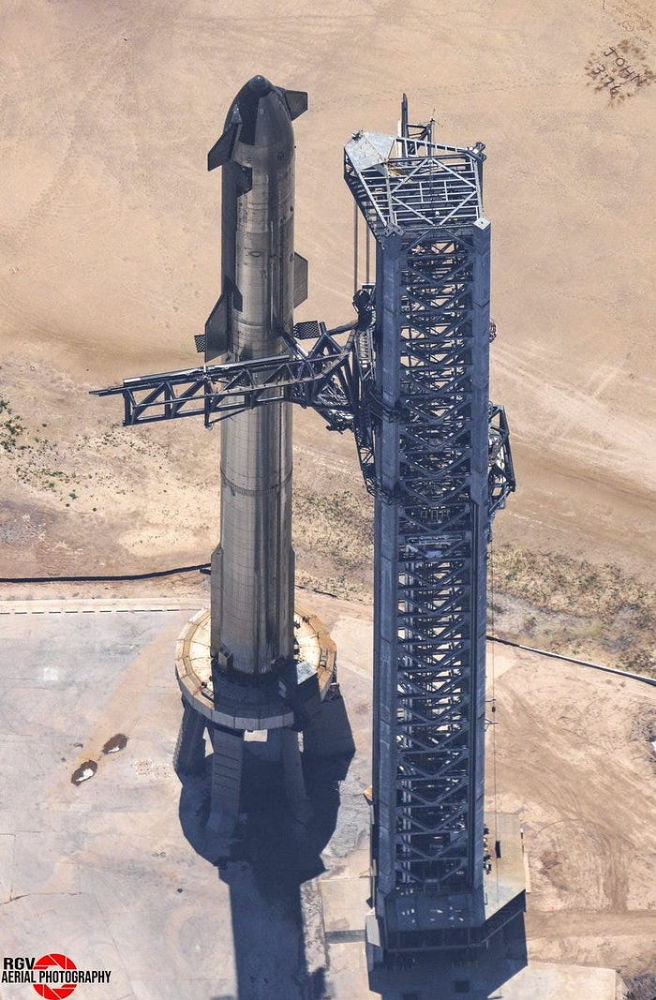
Launched last week.
Four minutes in:
SpaceX will succeed. When it does, its massiveness will matter.
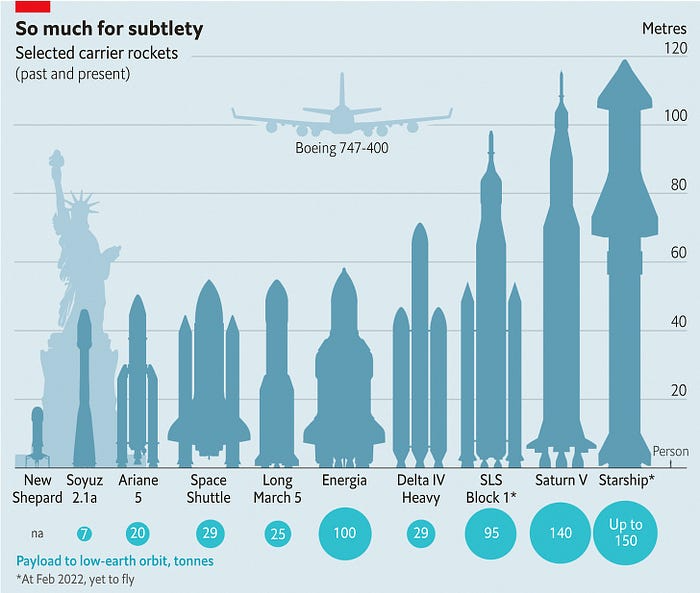
Its payload will revolutionize space economics.
Civilization will shift.
We don't yet understand how this will affect space and Earth culture. Grab it.
The Cost of Space Transportation Has Decreased Exponentially
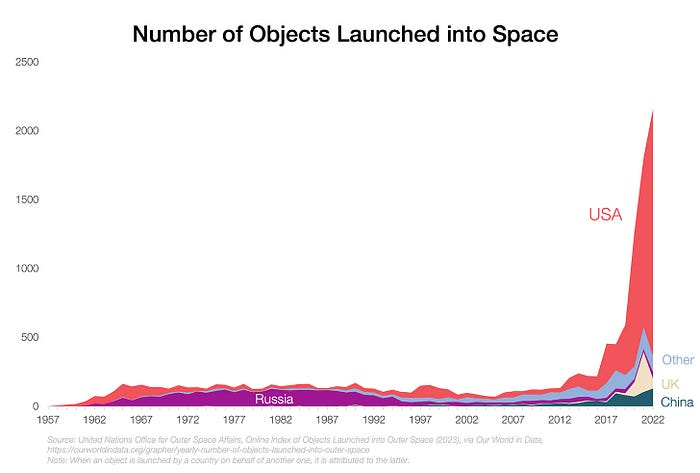
Space launches have increased dramatically in recent years.
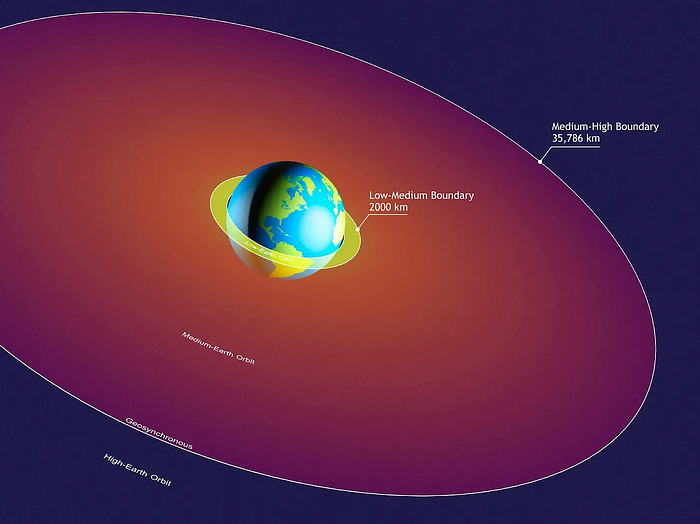
We mostly send items to LEO, the green area below:
SpaceX's reusable rockets can send these things to LEO. Each may launch dozens of payloads into space.
With all these launches, we're sending more than simply things to space. Volume and mass. Since the 1980s, launching a kilogram of payload to LEO has become cheaper:
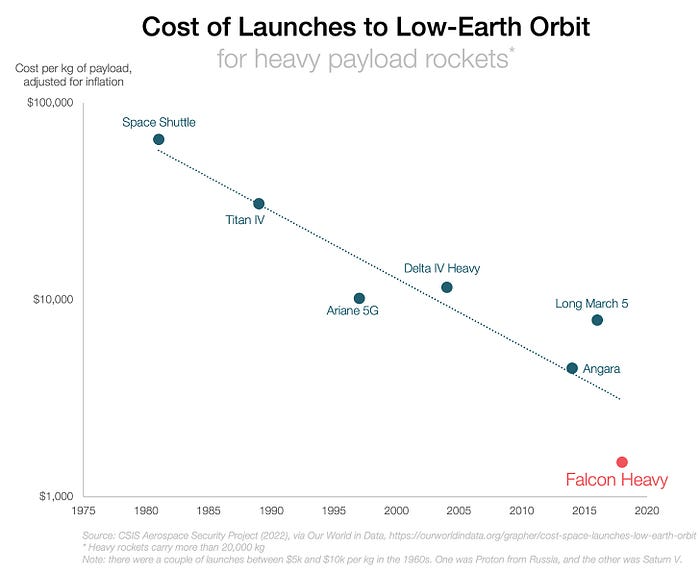
One kilogram in a large rocket cost over $75,000 in the 1980s. Carrying one astronaut cost nearly $5M! Falcon Heavy's $1,500/kg price is 50 times lower. SpaceX's larger, reusable rockets are amazing.
SpaceX's Starship rocket will continue. It can carry over 100 tons to LEO, 50% more than the current Falcon heavy. Thousands of launches per year. Elon Musk predicts Falcon Heavy's $1,500/kg cost will plummet to $100 in 23 years.
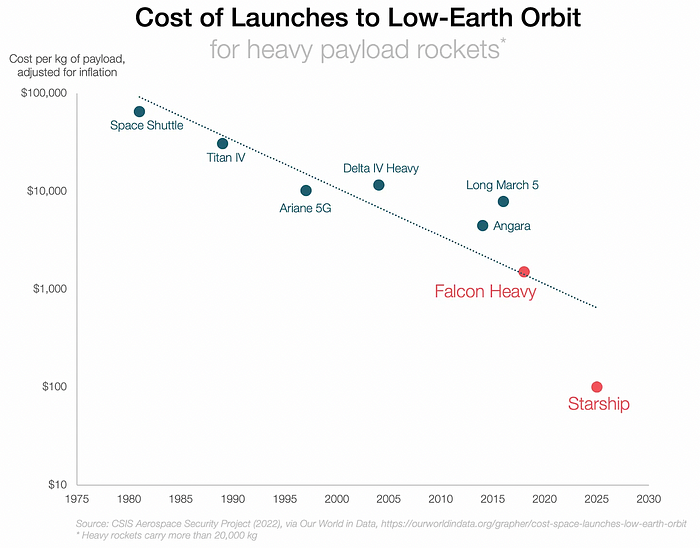
In context:
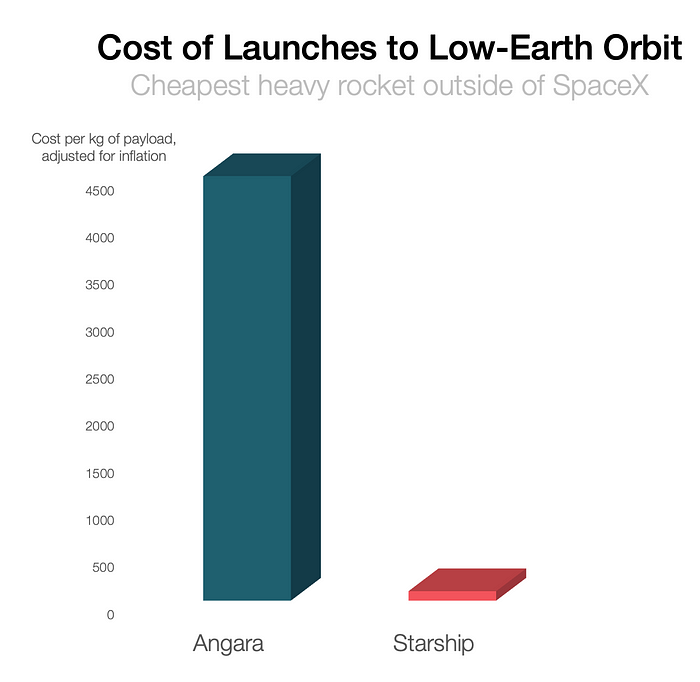
People underestimate this.
2. The Benefits of Affordable Transportation
Compare Earth's transportation costs:
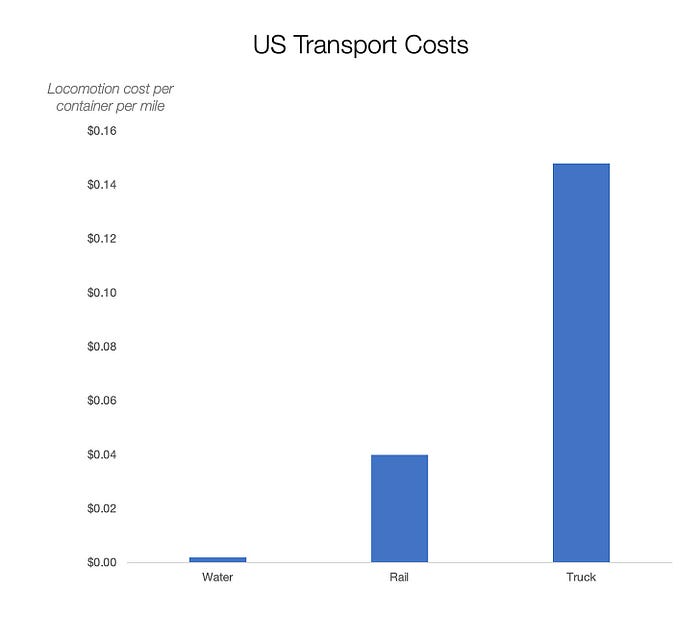
It's no surprise that the US and Northern Europe are the wealthiest and have the most navigable interior waterways.

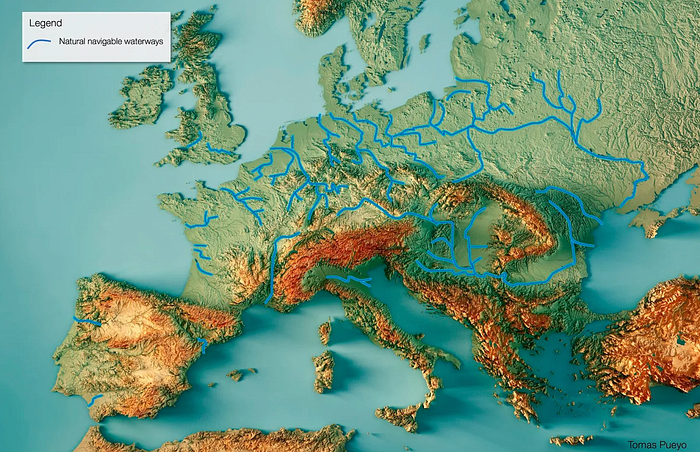
So what? since sea transportation is cheaper than land. Inland waterways are even better than sea transportation since weather is less of an issue, currents can be controlled, and rivers serve two banks instead of one for coastal transportation.
In France, because population density follows river systems, rivers are valuable. Cheap transportation brought people and money to rivers, especially their confluences.
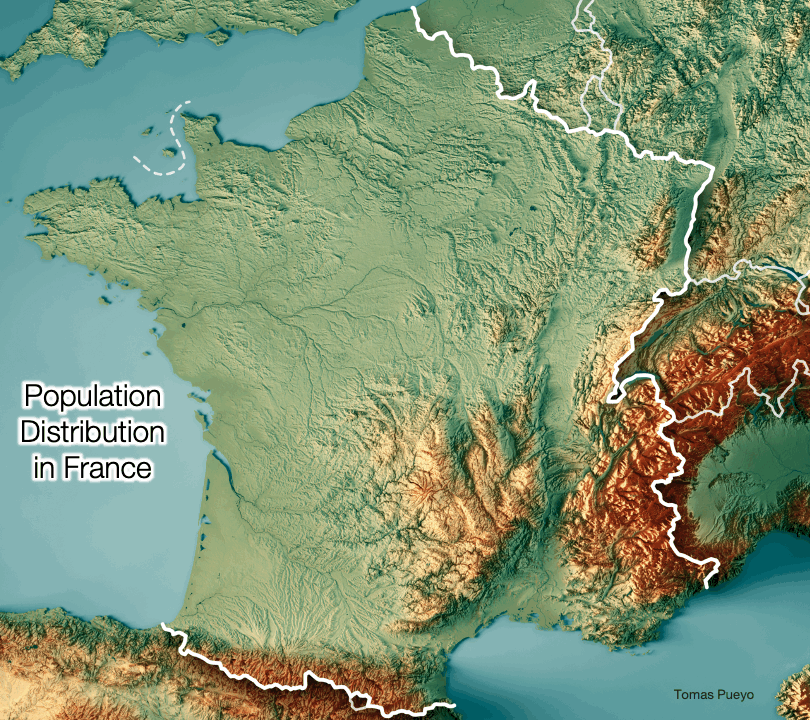
How come? Why were humans surrounding rivers?
Imagine selling meat for $10 per kilogram. Transporting one kg one kilometer costs $1. Your margin decreases $1 each kilometer. You can only ship 10 kilometers. For example, you can only trade with four cities:
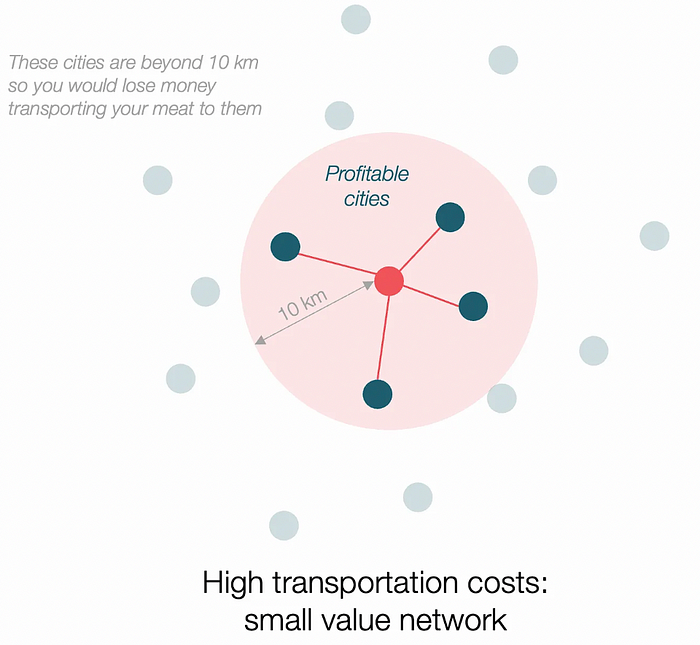
If instead, your cost of transportation is half, what happens? It costs you $0.5 per km. You now have higher margins with each city you traded with. More importantly, you can reach 20-km markets.
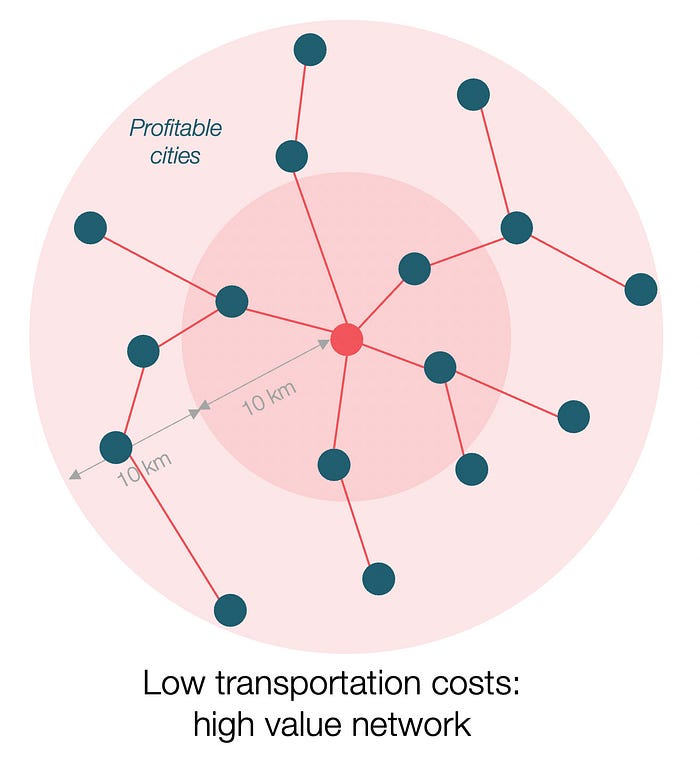
However, 2x distance 4x surface! You can now trade with sixteen cities instead of four! Metcalfe's law states that a network's value increases with its nodes squared. Since now sixteen cities can connect to yours. Each city now has sixteen connections! They get affluent and can afford more meat.
Rivers lower travel costs, connecting many cities, which can trade more, get wealthy, and buy more.
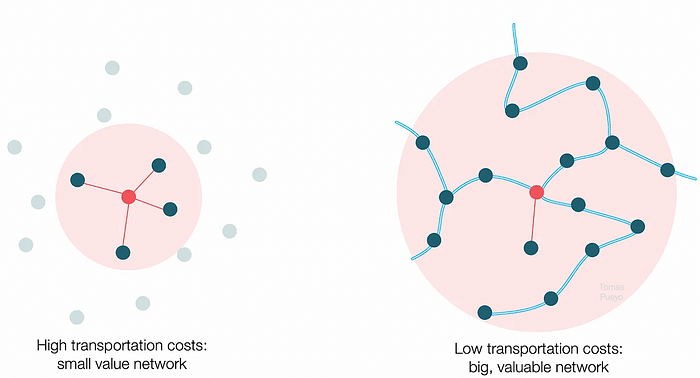
The right network is worth at least an order of magnitude more than the left! The cheaper the transport, the more trade at a lower cost, the more income generated, the more that wealth can be reinvested in better canals, bridges, and roads, and the wealth grows even more.
Throughout history. Rome was established around cheap Mediterranean transit and preoccupied with cutting overland transportation costs with their famous roadways. Communications restricted their empire.

The Egyptians lived around the Nile, the Vikings around the North Sea, early Japan around the Seto Inland Sea, and China started canals in the 5th century BC.
Transportation costs shaped empires.Starship is lowering new-world transit expenses. What's possible?
3. Change Organizations, Change Companies, Change the World
Starship is a conveyor belt to LEO. A new world of opportunity opens up as transportation prices drop 100x in a decade.
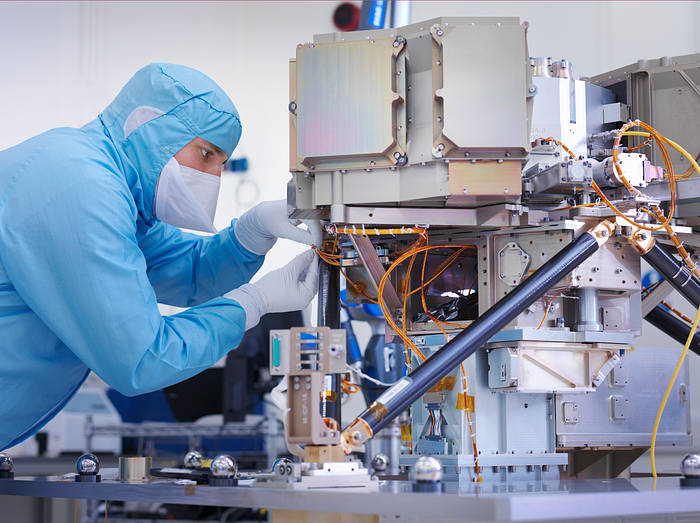
Satellite engineers have spent decades shedding milligrams. Weight influenced every decision: pricing structure, volumes to be sent, material selections, power sources, thermal protection, guiding, navigation, and control software. Weight was everything in the mission. To pack as much science into every millimeter, NASA missions had to be miniaturized. Engineers were indoctrinated against mass.
No way.
Starship is not constrained by any space mission, robotic or crewed.
Starship obliterates the mass constraint and every last vestige of cultural baggage it has gouged into the minds of spacecraft designers. A dollar spent on mass optimization no longer buys a dollar saved on launch cost. It buys nothing. It is time to raise the scope of our ambition and think much bigger. — Casey Handmer, Starship is still not understood
A Tesla Roadster in space makes more sense.
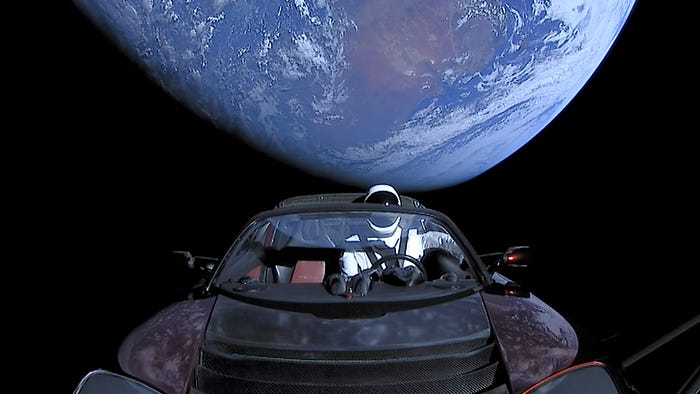
It went beyond bad PR. It told the industry: Did you care about every microgram? No more. My rockets are big enough to send a Tesla without noticing. Industry watchers should have noticed.
Most didn’t. Artemis is a global mission to send astronauts to the Moon and build a base. Artemis uses disposable Space Launch System rockets. Instead of sending two or three dinky 10-ton crew habitats over the next decade, Starship might deliver 100x as much cargo and create a base for 1,000 astronauts in a year or two. Why not? Because Artemis remains in a pre-Starship paradigm where each kilogram costs a million dollars and we must aggressively descope our objective.
Space agencies can deliver 100x more payload to space for the same budget with 100x lower costs and 100x higher transportation volumes. How can space economy saturate this new supply?
Before Starship, NASA supplied heavy equipment for Moon base construction. After Starship, Caterpillar and Deere may space-qualify their products with little alterations. Instead than waiting decades for NASA engineers to catch up, we could send people to build a space outpost with John Deere equipment in a few years.
History is littered with the wreckage of former industrial titans that underestimated the impact of new technology and overestimated their ability to adapt: Blockbuster, Motorola, Kodak, Nokia, RIM, Xerox, Yahoo, IBM, Atari, Sears, Hitachi, Polaroid, Toshiba, HP, Palm, Sony, PanAm, Sega, Netscape, Compaq, GM… — Casey Handmer, Starship is still not understood
Everyone saw it coming, but senior management failed to realize that adaption would involve moving beyond their established business practice. Others will if they don't.
4. The Starship Possibilities
It's Starlink.

SpaceX invented affordable cargo space and grasped its implications first. How can we use all this inexpensive cargo nobody knows how to use?
Satellite communications seemed like the best way to capitalize on it. They tried. Starlink, designed by SpaceX, provides fast, dependable Internet worldwide. Beaming information down is often cheaper than cable. Already profitable.
Starlink is one use for all this cheap cargo space. Many more. The longer firms ignore the opportunity, the more SpaceX will acquire.
What are these chances?
Satellite imagery is outdated and lacks detail. We can improve greatly. Synthetic aperture radar can take beautiful shots like this:

Have you ever used Google Maps and thought, "I want to see this in more detail"? What if I could view Earth live? What if we could livestream an infrared image of Earth?

We could launch hundreds of satellites with such mind-blowing visual precision of the Earth that we would dramatically improve the accuracy of our meteorological models; our agriculture; where crime is happening; where poachers are operating in the savannah; climate change; and who is moving military personnel where. Is that useful?
What if we could see Earth in real time? That affects businesses? That changes society?

Will Lockett
3 years ago
Thanks to a recent development, solar energy may prove to be the best energy source.
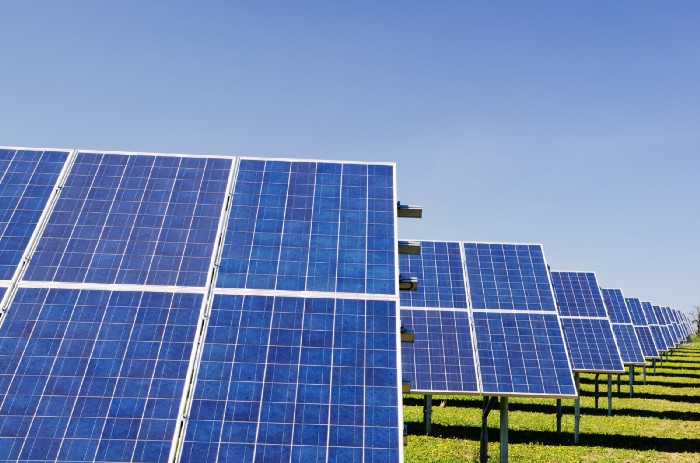
Perovskite solar cells will revolutionize everything.
Humanity is in a climatic Armageddon. Our widespread ecological crimes of the previous century are catching up with us, and planet-scale karma threatens everyone. We must adjust to new technologies and lifestyles to avoid this fate. Even solar power, a renewable energy source, has climate problems. A recent discovery could boost solar power's eco-friendliness and affordability. Perovskite solar cells are amazing.
Perovskite is a silicon-like semiconductor. Semiconductors are used to make computer chips, LEDs, camera sensors, and solar cells. Silicon makes sturdy and long-lasting solar cells, thus it's used in most modern solar panels.
Perovskite solar cells are far better. First, they're easy to make at room temperature, unlike silicon cells, which require long, intricate baking processes. This makes perovskite cells cheaper to make and reduces their carbon footprint. Perovskite cells are efficient. Most silicon panel solar farms are 18% efficient, meaning 18% of solar radiation energy is transformed into electricity. Perovskite cells are 25% efficient, making them 38% more efficient than silicon.
However, perovskite cells are nowhere near as durable. A normal silicon panel will lose efficiency after 20 years. The first perovskite cells were ineffective since they lasted barely minutes.
Recent research from Princeton shows that perovskite cells can endure 30 years. The cells kept their efficiency, therefore no sacrifices were made.
No electrical or chemical engineer here, thus I can't explain how they did it. But strangely, the team said longevity isn't the big deal. In the next years, perovskite panels will become longer-lasting. How do you test a panel if you only have a month or two? This breakthrough technique needs a uniform method to estimate perovskite life expectancy fast. The study's key milestone was establishing a standard procedure.
Lab-based advanced aging tests are their solution. Perovskite cells decay faster at higher temperatures, so scientists can extrapolate from that. The test heated the panel to 110 degrees and waited for its output to reduce by 20%. Their panel lasted 2,100 hours (87.5 days) before a 20% decline.
They did some math to extrapolate this data and figure out how long the panel would have lasted in different climates, and were shocked to find it would last 30 years in Princeton. This made perovskite panels as durable as silicon panels. This panel could theoretically be sold today.
This technology will soon allow these brilliant panels to be released into the wild. This technology could be commercially viable in ten, maybe five years.
Solar power will be the best once it does. Solar power is cheap and low-carbon. Perovskite is the cheapest renewable energy source if we switch to it. Solar panel manufacturing's carbon footprint will also drop.
Perovskites' impact goes beyond cost and carbon. Silicon panels require harmful mining and contain toxic elements (cadmium). Perovskite panels don't require intense mining or horrible materials, making their production and expiration more eco-friendly.
Solar power destroys habitat. Massive solar farms could reduce biodiversity and disrupt local ecology by destroying vital habitats. Perovskite cells are more efficient, so they can shrink a solar farm while maintaining energy output. This reduces land requirements, making perovskite solar power cheaper, and could reduce solar's environmental impact.
Perovskite solar power is scalable and environmentally friendly. Princeton scientists will speed up the development and rollout of this energy.
Why bother with fusion, fast reactors, SMRs, or traditional nuclear power? We're close to developing a nearly perfect environmentally friendly power source, and we have the tools and systems to do so quickly. It's also affordable, so we can adopt it quickly and let the developing world use it to grow. Even I struggle to justify spending billions on fusion when a great, cheap technology outperforms it. Perovskite's eco-credentials and cost advantages could save the world and power humanity's future.
You might also like

Scott Galloway
3 years ago
First Health
ZERO GRACE/ZERO MALICE
Amazon's purchase of One Medical could speed up American healthcare
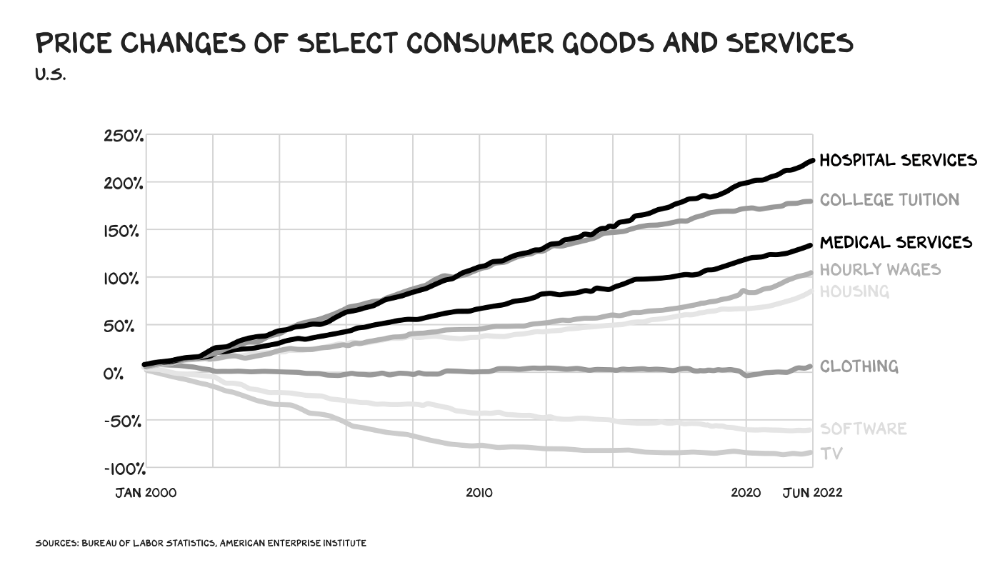
The U.S. healthcare industry is a 7-ton seal bleeding at sea. Predators are circling. Unearned margin: price increases relative to inflation without quality improvements. Amazon is the 11-foot megalodon with 7-inch teeth. Amazon is no longer circling... but attacking.
In 2020 dollars, per capita U.S. healthcare spending increased from $2,968 in 1980 to $12,531. The result is a massive industry with 13% of the nation's workers and a fifth of GDP.
Doctor No
In 40 years, healthcare has made progress. From 73.7 in 1980 to 78.8 in 2019, life expectancy rose (before Covid knocked it back down a bit). Pharmacological therapies have revolutionized, and genetic research is paying off. The financial return, improvement split by cost increases, is terrible. No country has expense rises like the U.S., and no one spends as much per capita as we do. Developed countries have longer life expectancies, healthier populations, and less economic hardship.
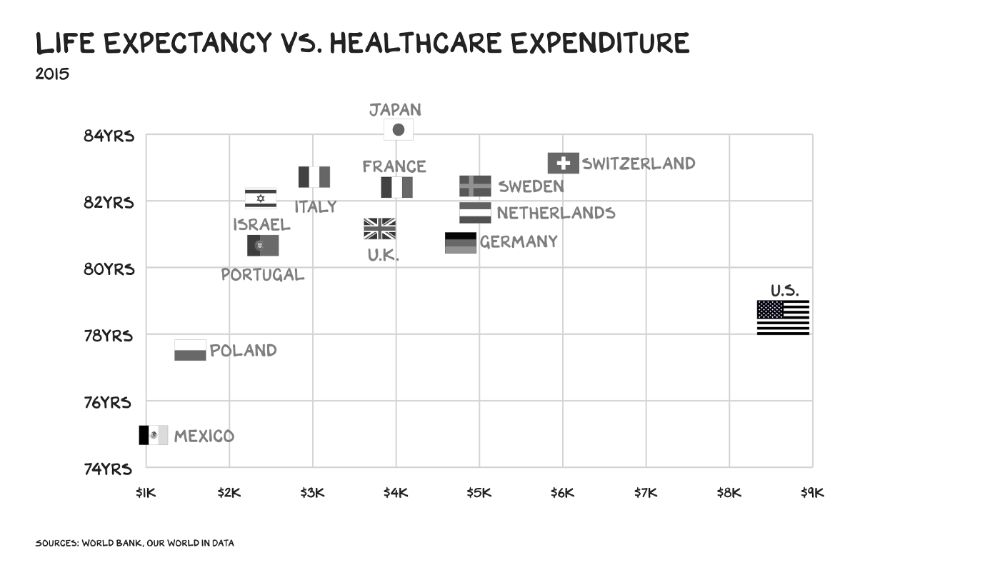
Two-thirds of U.S. personal bankruptcies are due to medical expenses and/or missed work. Mom or Dad getting cancer could bankrupt many middle-class American families. 40% of American adults delayed or skipped needed care due to cost. Every healthcare improvement seems to have a downside. Same pharmacological revolution that helped millions caused opioid epidemic. Our results are poor in many areas: The U.S. has a high infant mortality rate.
Healthcare is the second-worst retail industry in the country. Gas stations are #1. Imagine walking into a Best Buy to buy a TV and a Blue Shirt associate requests you fill out the same 14 pages of paperwork you filled out yesterday. Then you wait in a crowded room until they call you, 20 minutes after the scheduled appointment you were asked to arrive early for, to see the one person in the store who can talk to you about TVs, who has 10 minutes for you. The average emergency room wait time in New York is 6 hours and 10 minutes.
If it's bad for the customer, it's worse for the business. Physicians spend 27% of their time helping patients; 49% on EHRs. Documentation, order entry, billing, and inbox management. Spend a decade getting an M.D., then become a bureaucrat.
No industry better illustrates scale diseconomies. If we got the same return on healthcare spending as other countries, we'd all live to 100. We could spend less, live longer and healthier, and pay off the national debt in 15 years. U.S. healthcare is the worst ever.
What now? Competition is at the heart of capitalism, the worst system of its kind.
Priority Time
Amazon is buying One Medical for $3.9 billion. I think this deal will liberate society. Two years in, I think One Medical is great. When I got Covid, I pressed the One Medical symbol on my phone; a nurse practitioner prescribed Paxlovid and told me which pharmacies had it in stock.
Amazon enables the company's vision. One Medical's stock is down to $10 from $40 at the start of 2021. Last year, it lost $250 million and needs cash (Amazon has $60 billion). ONEM must grow. The service has 736,000 members. Half of U.S. households have Amazon Prime. Finally, delivery. One Medical is a digital health/physical office hybrid, but you must pick up medication at the pharmacy. Upgrade your Paxlovid delivery time after a remote consultation. Amazon's core competency means it'll happen. Healthcare speed and convenience will feel alien.
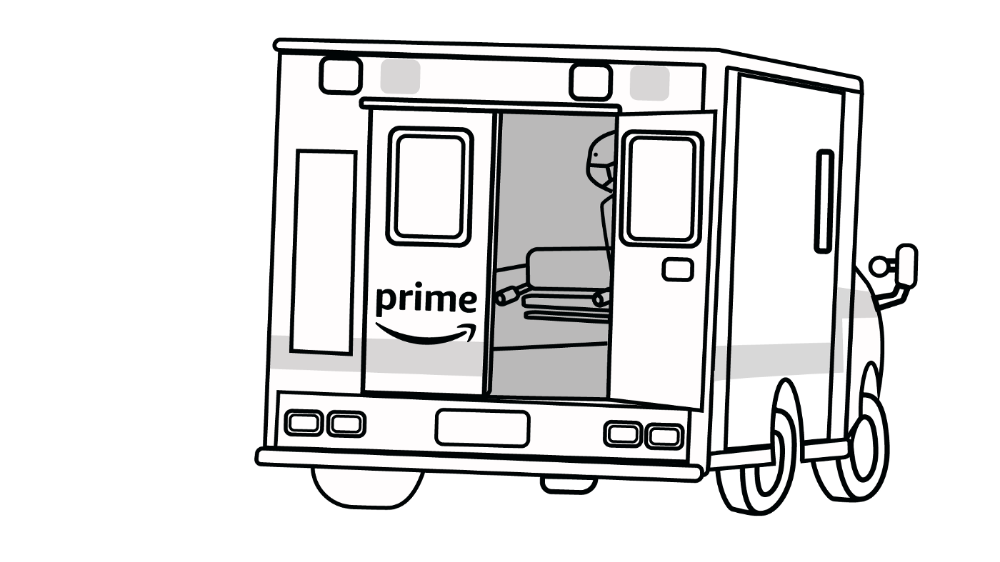
It's been a long, winding road to disruption. Amazon, JPMorgan, and Berkshire Hathaway formed Haven four years ago to provide better healthcare for their 1.5 million employees. It rocked healthcare stocks the morning of the press release, but folded in 2021.
Amazon Care is an employee-focused service. Home-delivered virtual health services and nurses. It's doing well, expanding nationwide, and providing healthcare for other companies. Hilton is Amazon Care's biggest customer. The acquisition of One Medical will bring 66 million Prime households capital, domain expertise, and billing infrastructure. Imagine:
"Alexa, I'm hot and my back hurts."
"Connecting you to a Prime doctor now."
Want to vs. Have to
I predicted Amazon entering healthcare years ago. Why? For the same reason Apple is getting into auto. Amazon's P/E is 56, double Walmart's. The corporation must add $250 billion in revenue over the next five years to retain its share price. White-label clothes or smart home products won't generate as much revenue. It must enter a huge market without scale, operational competence, and data skills.
Current Situation
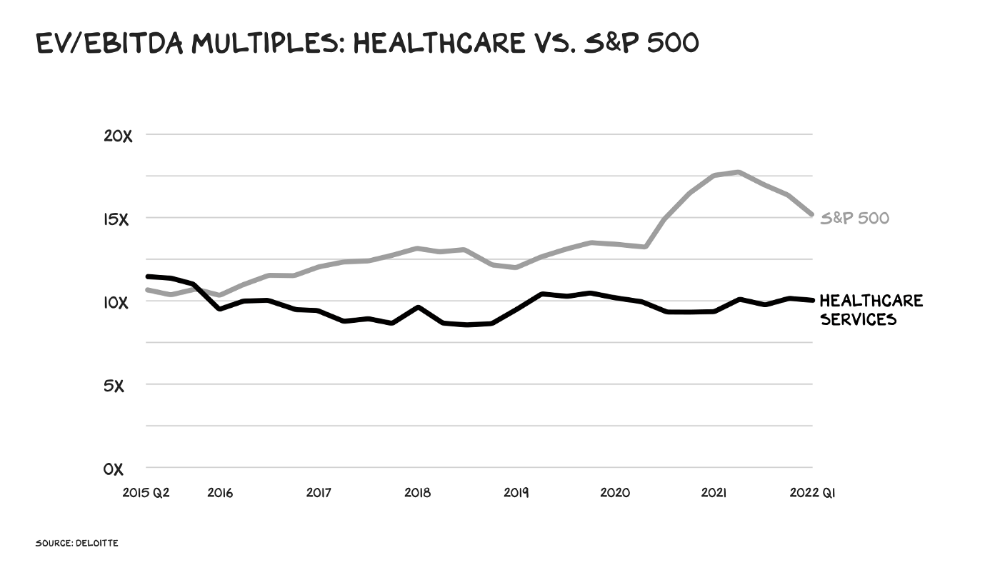
Healthcare reform benefits both consumers and investors. In 2015, healthcare services had S&P 500-average multiples. The market is losing faith in public healthcare businesses' growth. Healthcare services have lower EV/EBITDA multiples than the S&P 500.
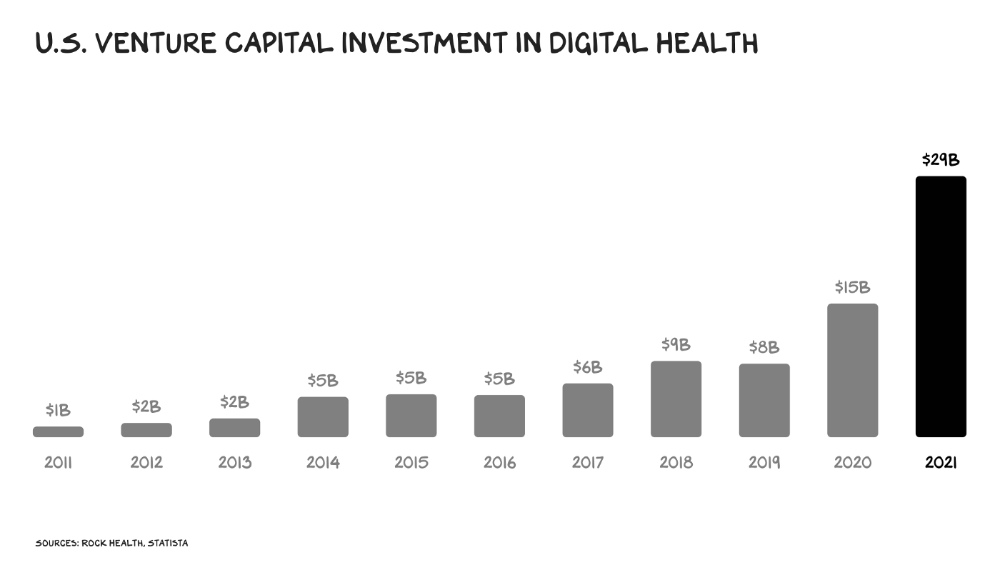
Amazon isn't the only prey-hunter. Walmart and Alibaba are starting pharmacies. Uber is developing medical transportation. Private markets invested $29 billion in telehealth last year, up 95% from 2020.
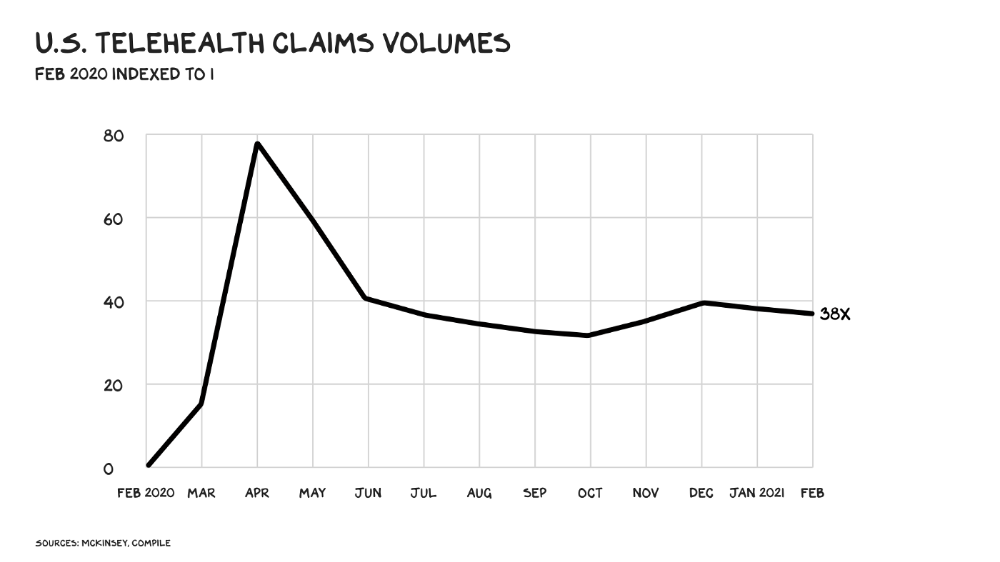
The pandemic accelerated telehealth, the immediate unlock. After the first positive Covid case in the U.S., services that had to be delivered in person shifted to Zoom... We lived. We grew. Video house calls continued after in-person visits were allowed. McKinsey estimates telehealth visits are 38 times pre-pandemic levels. Doctors adopted the technology, regulators loosened restrictions, and patients saved time. We're far from remote surgery, but many patient visits are unnecessary. A study of 40 million patients during lockdown found that for chronic disease patients, online visits didn't affect outcomes. This method of care will only improve.
Amazon's disruption will be significant and will inspire a flood of capital, startups, and consumer brands. Mark Cuban launched a pharmacy that eliminates middlemen in January. Outcome? A 90-day supply of acid-reflux medication costs $17. Medicare could have saved $3.6 billion by buying generic drugs from Cuban's pharmacy. Other apex predators will look at different limbs of the carcass for food. Nike could enter healthcare via orthopedics, acupuncture, and chiropractic. LVMH, L'Oréal, and Estée Lauder may launch global plastic surgery brands. Hilton and Four Seasons may open hospitals. Lennar and Pulte could build "Active Living" communities that Nana would leave feet first, avoiding the expense and tragedy of dying among strangers.
Risks
Privacy matters: HIV status is different from credit card and billing address. Most customers (60%) feel fine sharing personal health data via virtual technologies, though. Unavoidable. 85% of doctors believe data-sharing and interoperability will become the norm. Amazon is the most trusted tech company for handling personal data. Not Meta: Amazon.
What about antitrust, then?
Amazon should be required to spin off AWS and/or Amazon Fulfillment and banned from promoting its own products. It should be allowed to acquire hospitals. One Medical's $3.9 billion acquisition is a drop in the bucket compared to UnitedHealth's $498 billion market valuation.
Antitrust enforcement shouldn't assume some people/firms are good/bad. It should recognize that competition is good and focus on making markets more competitive in each deal. The FTC should force asset divestitures in e-commerce, digital marketing, and social media. These companies can also promote competition in a social ill.
U.S. healthcare makes us fat, depressed, and broke. Competition has produced massive value and prosperity across most of our economy.
Dear Amazon … bring it.

Enrique Dans
3 years ago
You may not know about The Merge, yet it could change society
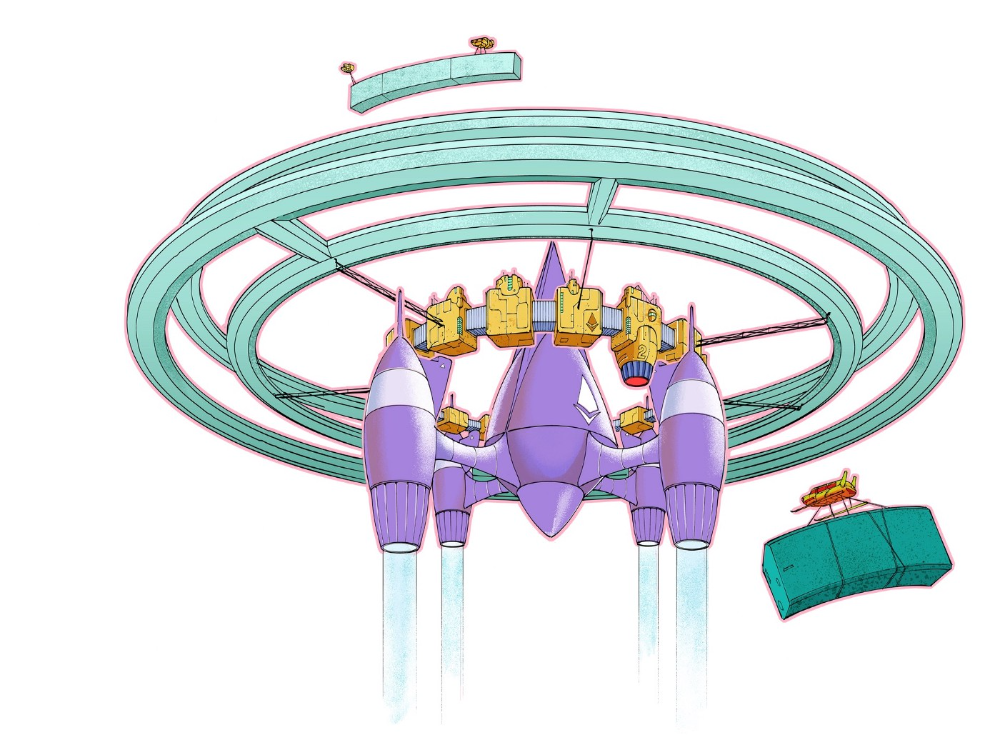
Ethereum is the second-largest cryptocurrency. The Merge, a mid-September event that will convert Ethereum's consensus process from proof-of-work to proof-of-stake if all goes according to plan, will be a game changer.
Why is Ethereum ditching proof-of-work? Because it can. We're talking about a fully functioning, open-source ecosystem with a capacity for evolution that other cryptocurrencies lack, a change that would allow it to scale up its performance from 15 transactions per second to 100,000 as its blockchain is used for more and more things. It would reduce its energy consumption by 99.95%. Vitalik Buterin, the system's founder, would play a less active role due to decentralization, and miners, who validated transactions through proof of work, would be far less important.
Why has this conversion taken so long and been so cautious? Because it involves modifying a core process while it's running to boost its performance. It requires running the new mechanism in test chains on an ever-increasing scale, assessing participant reactions, and checking for issues or restrictions. The last big test was in early June and was successful. All that's left is to converge the mechanism with the Ethereum blockchain to conclude the switch.
What's stopping Bitcoin, the leader in market capitalization and the cryptocurrency that began blockchain's appeal, from doing the same? Satoshi Nakamoto, whoever he or she is, departed from public life long ago, therefore there's no community leadership. Changing it takes a level of consensus that is impossible to achieve without strong leadership, which is why Bitcoin's evolution has been sluggish and conservative, with few modifications.
Secondly, The Merge will balance the consensus mechanism (proof-of-work or proof-of-stake) and the system decentralization or centralization. Proof-of-work prevents double-spending, thus validators must buy hardware. The system works, but it requires a lot of electricity and, as it scales up, tends to re-centralize as validators acquire more hardware and the entire network activity gets focused in a few nodes. Larger operations save more money, which increases profitability and market share. This evolution runs opposed to the concept of decentralization, and some anticipate that any system that uses proof of work as a consensus mechanism will evolve towards centralization, with fewer large firms able to invest in efficient network nodes.
Yet radical bitcoin enthusiasts share an opposite argument. In proof-of-stake, transaction validators put their funds at stake to attest that transactions are valid. The algorithm chooses who validates each transaction, giving more possibilities to nodes that put more coins at stake, which could open the door to centralization and government control.
In both cases, we're talking about long-term changes, but Bitcoin's proof-of-work has been evolving longer and seems to confirm those fears, while proof-of-stake is only employed in coins with a minuscule volume compared to Ethereum and has no predictive value.
As of mid-September, we will have two significant cryptocurrencies, each with a different consensus mechanisms and equally different characteristics: one is intrinsically conservative and used only for economic transactions, while the other has been evolving in open source mode, and can be used for other types of assets, smart contracts, or decentralized finance systems. Some even see it as the foundation of Web3.
Many things could change before September 15, but The Merge is likely to be a turning point. We'll have to follow this closely.

obimy.app
3 years ago
How TikTok helped us grow to 6 million users
This resulted to obimy's new audience.
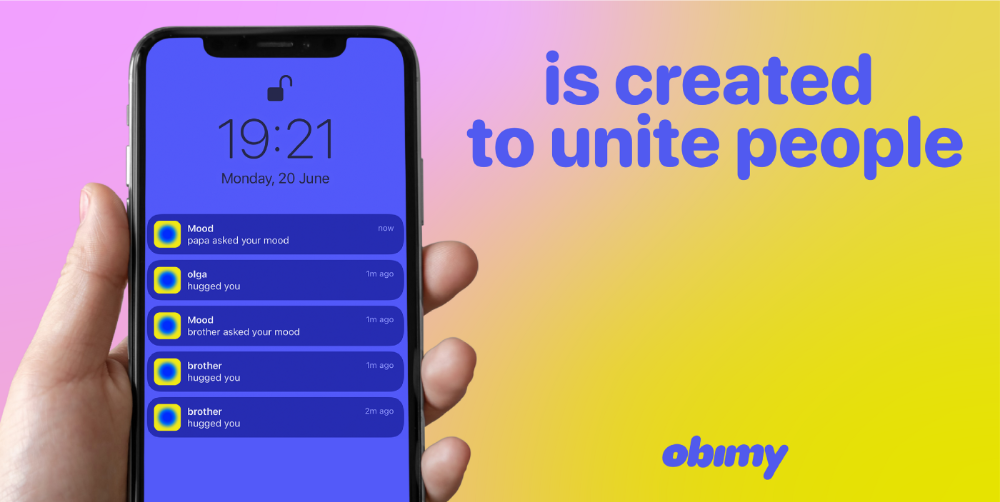
Hi! obimy's official account. Here, we'll teach app developers and marketers. In 2022, our downloads increased dramatically, so we'll share what we learned.
obimy is what we call a ‘senseger’. It's a new method to communicate digitally. Instead of text, obimy users connect through senses and moods. Feeling playful? Flirt with your partner, pat a pal, or dump water on a classmate. Each feeling is an interactive animation with vibration. It's a wordless app. App Store and Google Play have obimy.
We had 20,000 users in 2022. Two to five thousand of them opened the app monthly. Our DAU metric was 500.
We have 6 million users after 6 months. 500,000 individuals use obimy daily. obimy was the top lifestyle app this week in the U.S.
And TikTok helped.
TikTok fuels obimys' growth. It's why our app exploded. How and what did we learn? Our Head of Marketing, Anastasia Avramenko, knows.
our actions prior to TikTok
We wanted to achieve product-market fit through organic expansion. Quora, Reddit, Facebook Groups, Facebook Ads, Google Ads, Apple Search Ads, and social media activity were tested. Nothing worked. Our CPI was sometimes $4, so unit economics didn't work.
We studied our markets and made audience hypotheses. We promoted our goods and studied our audience through social media quizzes. Our target demographic was Americans in long-distance relationships. I designed quizzes like Test the Strength of Your Relationship to better understand the user base. After each quiz, we encouraged users to download the app to enhance their connection and bridge the distance.
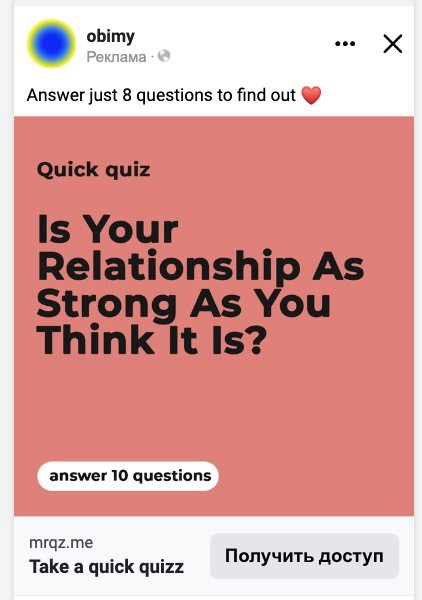
We got 1,000 responses for $50. This helped us comprehend the audience's grief and coping strategies (aka our rivals). I based action items on answers given. If you can't embrace a loved one, use obimy.
We also tried Facebook and Google ads. From the start, we knew it wouldn't work.
We were desperate to discover a free way to get more users.
Our journey to TikTok
TikTok is a great venue for emerging creators. It also helped reach people. Before obimy, my TikTok videos garnered 12 million views without sponsored promotion.
We had to act. TikTok was required.

I wasn't a TikTok user before obimy. Initially, I uploaded promotional content. Call-to-actions appear strange next to dancing challenges and my money don't jiggle jiggle. I learned TikTok. Watch TikTok for an hour was on my to-do list. What a dream job!
Our most popular movies presented the app alongside text outlining what it does. We started promoting them in Europe and the U.S. and got a 16% CTR and $1 CPI, an improvement over our previous efforts.
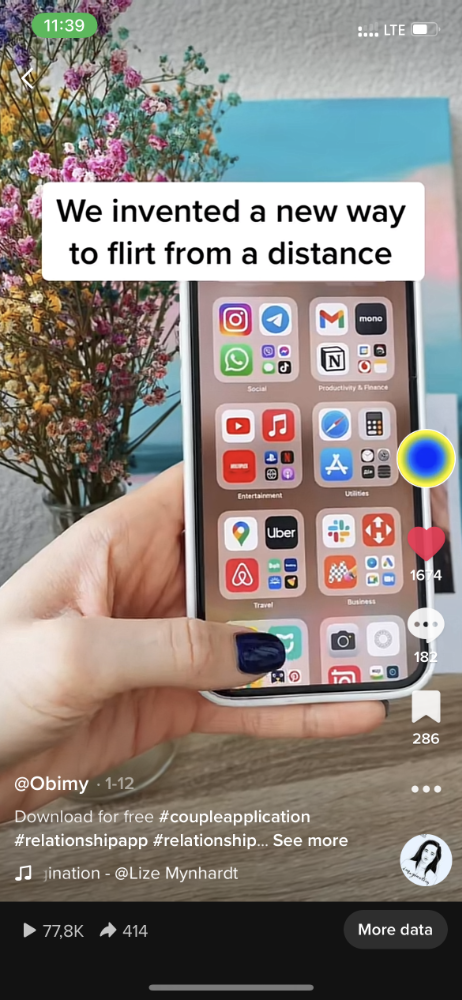
Somehow, we were expanding. So we came up with new hypotheses, calls to action, and content.
Four months passed, yet we saw no organic growth.
Russia attacked Ukraine.
Our app aimed to be helpful. For now, we're focusing on our Ukrainian audience. I posted sloppy TikToks illustrating how obimy can help during shelling or air raids.
In two hours, Kostia sent me our visitor count. Our servers crashed.
Initially, we had several thousand daily users. Over 200,000 users joined obimy in a week. They posted obimy videos on TikTok, drawing additional users. We've also resumed U.S. video promotion.
We gained 2,000,000 new members with less than $100 in ads, primarily in the U.S. and U.K.
TikTok helped.
The figures
We were confident we'd chosen the ideal tool for organic growth.
Over 45 million people have viewed our own videos plus a ton of user-generated content with the hashtag #obimy.
About 375 thousand people have liked all of our individual videos.
The number of downloads and the virality of videos are directly correlated.
Where are we now?
TikTok fuels our organic growth. We post 56 videos every week and pay to promote viral content.
We use UGC and influencers. We worked with Universal Music Italy on Eurovision. They offered to promote us through their million-follower TikTok influencers. We thought their followers would improve our audience, but it didn't matter. Integration didn't help us. Users that share obimy videos with their followers can reach several million views, which affects our download rate.
After the dust settled, we determined our key audience was 13-18-year-olds. They want to express themselves, but it's sometimes difficult. We're searching for methods to better engage with our users. We opened a Discord server to discuss anime and video games and gather app and content feedback.
TikTok helps us test product updates and hypotheses. Example: I once thought we might raise MAU by prompting users to add strangers as friends. Instead of asking our team to construct it, I made a TikTok urging users to share invite URLs. Users share links under every video we upload, embracing people worldwide.
Key lessons
Don't direct-sell. TikTok isn't for Instagram, Facebook, or YouTube promo videos. Conventional advertisements don't fit. Most users will swipe up and watch humorous doggos.
More product videos are better. Finally. So what?
Encourage interaction. Tagging friends in comments or making videos with the app promotes it more than any marketing spend.
Be odd and risqué. A user mistakenly sent a French kiss to their mom in one of our most popular videos.
TikTok helps test hypotheses and build your user base. It also helps develop apps. In our upcoming blog, we'll guide you through obimy's design revisions based on TikTok. Follow us on Twitter, Instagram, and TikTok.