

More on Web3 & Crypto

ANDREW SINGER
3 years ago
Crypto seen as the ‘future of money’ in inflation-mired countries
Crypto as the ‘future of money' in inflation-stricken nations
Citizens of devalued currencies “need” crypto. “Nice to have” in the developed world.
According to Gemini's 2022 Global State of Crypto report, cryptocurrencies “evolved from what many considered a niche investment into an established asset class” last year.
More than half of crypto owners in Brazil (51%), Hong Kong (51%), and India (54%), according to the report, bought cryptocurrency for the first time in 2021.
The study found that inflation and currency devaluation are powerful drivers of crypto adoption, especially in emerging market (EM) countries:
“Respondents in countries that have seen a 50% or greater devaluation of their currency against the USD over the last decade were more than 5 times as likely to plan to purchase crypto in the coming year.”
Between 2011 and 2021, the real lost 218 percent of its value against the dollar, and 45 percent of Brazilians surveyed by Gemini said they planned to buy crypto in 2019.
The rand (South Africa's currency) has fallen 103 percent in value over the last decade, second only to the Brazilian real, and 32 percent of South Africans expect to own crypto in the coming year. Mexico and India, the third and fourth highest devaluation countries, followed suit.
Compared to the US dollar, Hong Kong and the UK currencies have not devalued in the last decade. Meanwhile, only 5% and 8% of those surveyed in those countries expressed interest in buying crypto.
What can be concluded? Noah Perlman, COO of Gemini, sees various crypto use cases depending on one's location.
‘Need to have' investment in countries where the local currency has devalued against the dollar, whereas in the developed world it is still seen as a ‘nice to have'.
Crypto as money substitute
As an adjunct professor at New York University School of Law, Winston Ma distinguishes between an asset used as an inflation hedge and one used as a currency replacement.
Unlike gold, he believes Bitcoin (BTC) is not a “inflation hedge”. They acted more like growth stocks in 2022. “Bitcoin correlated more closely with the S&P 500 index — and Ether with the NASDAQ — than gold,” he told Cointelegraph. But in the developing world, things are different:
“Inflation may be a primary driver of cryptocurrency adoption in emerging markets like Brazil, India, and Mexico.”
According to Justin d'Anethan, institutional sales director at the Amber Group, a Singapore-based digital asset firm, early adoption was driven by countries where currency stability and/or access to proper banking services were issues. Simply put, he said, developing countries want alternatives to easily debased fiat currencies.
“The larger flows may still come from institutions and developed countries, but the actual users may come from places like Lebanon, Turkey, Venezuela, and Indonesia.”
“Inflation is one of the factors that has and continues to drive adoption of Bitcoin and other crypto assets globally,” said Sean Stein Smith, assistant professor of economics and business at Lehman College.
But it's only one factor, and different regions have different factors, says Stein Smith. As a “instantaneously accessible, traceable, and cost-effective transaction option,” investors and entrepreneurs increasingly recognize the benefits of crypto assets. Other places promote crypto adoption due to “potential capital gains and returns”.
According to the report, “legal uncertainty around cryptocurrency,” tax questions, and a general education deficit could hinder adoption in Asia Pacific and Latin America. In Africa, 56% of respondents said more educational resources were needed to explain cryptocurrencies.
Not only inflation, but empowering our youth to live better than their parents without fear of failure or allegiance to legacy financial markets or products, said Monica Singer, ConsenSys South Africa lead. Also, “the issue of cash and remittances is huge in Africa, as is the issue of social grants.”
Money's future?
The survey found that Brazil and Indonesia had the most cryptocurrency ownership. In each country, 41% of those polled said they owned crypto. Only 20% of Americans surveyed said they owned cryptocurrency.
These markets are more likely to see cryptocurrencies as the future of money. The survey found:
“The majority of respondents in Latin America (59%) and Africa (58%) say crypto is the future of money.”
Brazil (66%), Nigeria (63%), Indonesia (61%), and South Africa (57%). Europe and Australia had the fewest believers, with Denmark at 12%, Norway at 15%, and Australia at 17%.
Will the Ukraine conflict impact adoption?
The poll was taken before the war. Will the devastating conflict slow global crypto adoption growth?
With over $100 million in crypto donations directly requested by the Ukrainian government since the war began, Stein Smith says the war has certainly brought crypto into the mainstream conversation.
“This real-world demonstration of decentralized money's power could spur wider adoption, policy debate, and increased use of crypto as a medium of exchange.”
But the war may not affect all developing nations. “The Ukraine war has no impact on African demand for crypto,” Others loom larger. “Yes, inflation, but also a lack of trust in government in many African countries, and a young demographic very familiar with mobile phones and the internet.”
A major success story like Mpesa in Kenya has influenced the continent and may help accelerate crypto adoption. Creating a plan when everyone you trust fails you is directly related to the African spirit, she said.
On the other hand, Ma views the Ukraine conflict as a sort of crisis check for cryptocurrencies. For those in emerging markets, the Ukraine-Russia war has served as a “stress test” for the cryptocurrency payment rail, he told Cointelegraph.
“These emerging markets may see the greatest future gains in crypto adoption.”
Inflation and currency devaluation are persistent global concerns. In such places, Bitcoin and other cryptocurrencies are now seen as the “future of money.” Not in the developed world, but that could change with better regulation and education. Inflation and its impact on cash holdings are waking up even Western nations.
Read original post here.

CyberPunkMetalHead
3 years ago
It's all about the ego with Terra 2.0.
UST depegs and LUNA crashes 99.999% in a fraction of the time it takes the Moon to orbit the Earth.
Fat Man, a Terra whistle-blower, promises to expose Do Kwon's dirty secrets and shady deals.

The Terra community has voted to relaunch Terra LUNA on a new blockchain. The Terra 2.0 Pheonix-1 blockchain went live on May 28, 2022, and people were airdropped the new LUNA, now called LUNA, while the old LUNA became LUNA Classic.
Does LUNA deserve another chance? To answer this, or at least start a conversation about the Terra 2.0 chain's advantages and limitations, we must assess its fundamentals, ideology, and long-term vision.
Whatever the result, our analysis must be thorough and ruthless. A failure of this magnitude cannot happen again, so we must magnify every potential breaking point by 10.
Will UST and LUNA holders be compensated in full?
The obvious. First, and arguably most important, is to restore previous UST and LUNA holders' bags.
Terra 2.0 has 1,000,000,000,000 tokens to distribute.
25% of a community pool
Holders of pre-attack LUNA: 35%
10% of aUST holders prior to attack
Holders of LUNA after an attack: 10%
UST holders as of the attack: 20%
Every LUNA and UST holder has been compensated according to the above proposal.
According to self-reported data, the new chain has 210.000.000 tokens and a $1.3bn marketcap. LUNC and UST alone lost $40bn. The new token must fill this gap. Since launch:
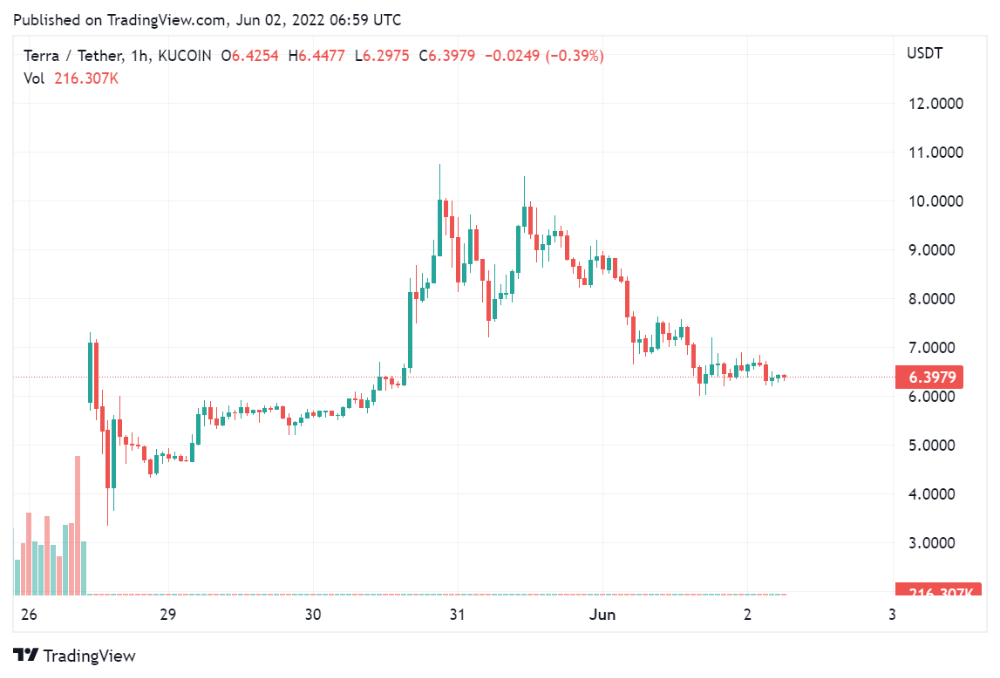
LUNA holders collectively own $1b worth of LUNA if we subtract the 25% community pool airdrop from the current market cap and assume airdropped LUNA was never sold.
At the current supply, the chain must grow 40 times to compensate holders. At the current supply, LUNA must reach $240.
LUNA needs a full-on Bull Market to make LUNC and UST holders whole.
Who knows if you'll be whole? From the time you bought to the amount and price, there are too many variables to determine if Terra can cover individual losses.
The above distribution doesn't consider individual cases. Terra didn't solve individual cases. It would have been huge.
What does LUNA offer in terms of value?
UST's marketcap peaked at $18bn, while LUNC's was $41bn. LUNC and UST drove the Terra chain's value.
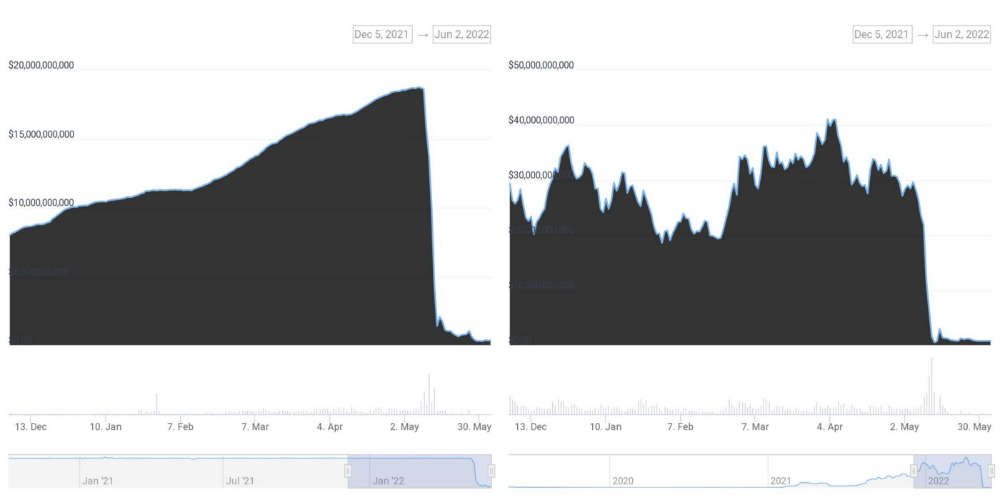
After it was confirmed (again) that algorithmic stablecoins are bad, Terra 2.0 will no longer support them.
Algorithmic stablecoins contributed greatly to Terra's growth and value proposition. Terra 2.0 has no product without algorithmic stablecoins.
Terra 2.0 has an identity crisis because it has no actual product. It's like Volkswagen faking carbon emission results and then stopping car production.
A project that has already lost the trust of its users and nearly all of its value cannot survive without a clear and in-demand use case.
Do Kwon, how about him?
Oh, the Twitter-caller-poor? Who challenges crypto billionaires to break his LUNA chain? Who dissolved Terra Labs South Korea before depeg? Arrogant guy?
That's not a good image for LUNA, especially when making amends. I think he should step down and let a nicer person be Terra 2.0's frontman.
The verdict
Terra has a terrific community with an arrogant, unlikeable leader. The new LUNA chain must grow 40 times before it can start making up its losses, and even then, not everyone's losses will be covered.
I won't invest in Terra 2.0 or other algorithmic stablecoins in the near future. I won't be near any Do Kwon-related project within 100 miles. My opinion.
Can Terra 2.0 be saved? Comment below.

Jayden Levitt
3 years ago
The country of El Salvador's Bitcoin-obsessed president lost $61.6 million.
It’s only a loss if you sell, right?
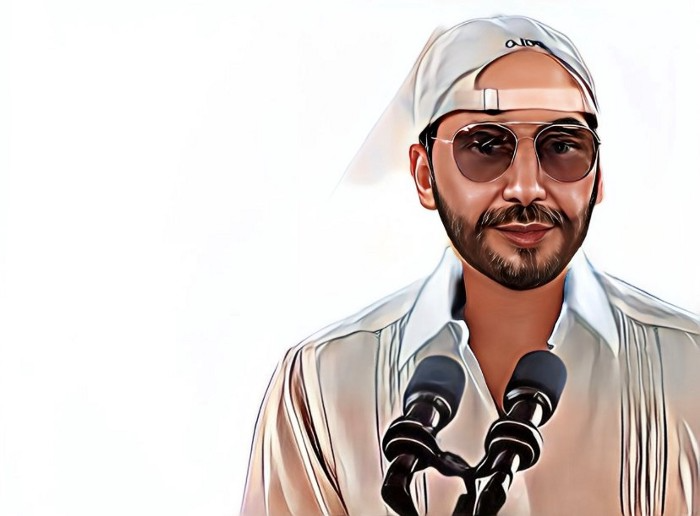
Nayib Bukele proclaimed himself “the world’s coolest dictator”.
His jokes aren't clear.
El Salvador's 43rd president self-proclaimed “CEO of El Salvador” couldn't be less presidential.
His thin jeans, aviator sunglasses, and baseball caps like a cartel lord.
He's popular, though.
Bukele won 53% of the vote by fighting violent crime and opposition party corruption.
El Salvador's 6.4 million inhabitants are riding the cryptocurrency volatility wave.
They were powerless.
Their autocratic leader, a former Yamaha Motors salesperson and Bitcoin believer, wants to help 70% unbanked locals.
He intended to give the citizens a way to save money and cut the country's $200 million remittance cost.
Transfer and deposit costs.
This makes logical sense when the president’s theatrics don’t blind you.
El Salvador's Bukele revealed plans to make bitcoin legal tender.
Remittances total $5.9 billion (23%) of the country's expenses.
Anything that reduces costs could boost the economy.
The country’s unbanked population is staggering. Here’s the data by % of people who either have a bank account (Blue) or a mobile money account (Black).
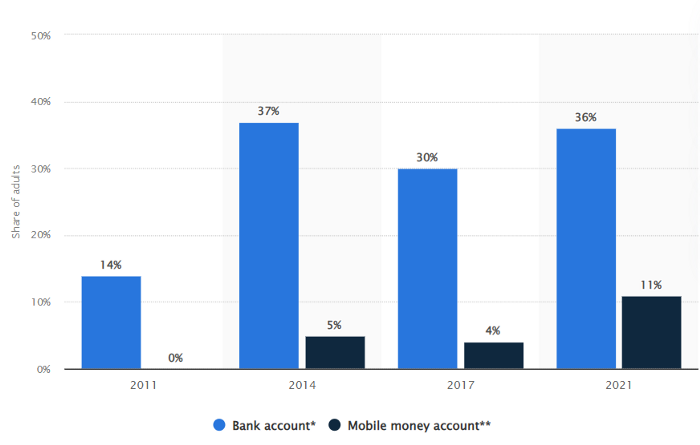
According to Bukele, 46% of the population has downloaded the Chivo Bitcoin Wallet.
In 2021, 36% of El Salvadorans had bank accounts.
Large rural countries like Kenya seem to have resolved their unbanked dilemma.
An economy surfaced where village locals would sell, trade and store network minutes and data as a store of value.
Kenyan phone networks realized unbanked people needed a safe way to accumulate wealth and have an emergency fund.
96% of Kenyans utilize M-PESA, which doesn't require a bank account.
The software involves human agents who hang out with cash and a phone.
These people are like ATMs.
You offer them cash to deposit money in your mobile money account or withdraw cash.
In a country with a faulty banking system, cash availability and a safe place to deposit it are important.
William Jack and Tavneet Suri found that M-PESA brought 194,000 Kenyan households out of poverty by making transactions cheaper and creating a safe store of value.
Mobile money, a service that allows monetary value to be stored on a mobile phone and sent to other users via text messages, has been adopted by most Kenyan households. We estimate that access to the Kenyan mobile money system M-PESA increased per capita consumption levels and lifted 194,000 households, or 2% of Kenyan households, out of poverty.
The impacts, which are more pronounced for female-headed households, appear to be driven by changes in financial behaviour — in particular, increased financial resilience and saving. Mobile money has therefore increased the efficiency of the allocation of consumption over time while allowing a more efficient allocation of labour, resulting in a meaningful reduction of poverty in Kenya.
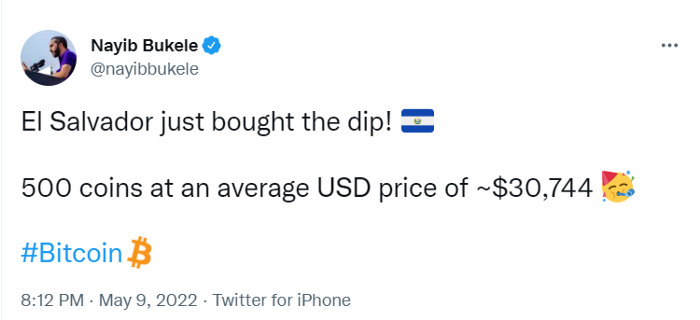
Currently, El Salvador has 2,301 Bitcoin.
At publication, it's worth $44 million. That remains 41% of Bukele's original $105.6 million.
Unknown if the country has sold Bitcoin, but Bukeles keeps purchasing the dip.
It's still falling.
This might be a fantastic move for the impoverished country over the next five years, if they can live economically till Bitcoin's price recovers.
The evidence demonstrates that a store of value pulls individuals out of poverty, but others say Bitcoin is premature.
You may regard it as an aggressive endeavor to front run the next wave of adoption, offering El Salvador a financial upside.
You might also like

Alex Mathers
3 years ago
8 guidelines to help you achieve your objectives 5x fast

If you waste time every day, even though you're ambitious, you're not alone.
Many of us could use some new time-management strategies, like these:
Focus on the following three.
You're thinking about everything at once.
You're overpowered.
It's mental. We just have what's in front of us. So savor the moment's beauty.
Prioritize 1-3 things.
To be one of the most productive people you and I know, follow these steps.
Get along with boredom.
Many of us grow bored, sweat, and turn on Netflix.
We shout, "I'm rarely bored!" Look at me! I'm happy.
Shut it, Sally.
You're not making wonderful things for the world. Boredom matters.
If you can sit with it for a second, you'll get insight. Boredom? Breathe.
Go blank.
Then watch your creativity grow.
Check your MacroVision once more.
We don't know what to do with our time, which contributes to time-wasting.
Nobody does, either. Jeff Bezos won't hand-deliver that crap to you.
Daily vision checks are required.
Also:
What are 5 things you'd love to create in the next 5 years?
You're soul-searching. It's food.
Return here regularly, and you'll adore the high you get from doing valuable work.
Improve your thinking.
What's Alex's latest nonsense?
I'm talking about overcoming our own thoughts. Worrying wastes so much time.
Too many of us are assaulted by lies, myths, and insecurity.
Stop letting your worries massage you into a worried coma like a Thai woman.
Optimizing your thoughts requires accepting what you can't control.
It means letting go of unhelpful thoughts and returning to the moment.
Keep your blood sugar level.
I gave up gluten, donuts, and sweets.
This has really boosted my energy.
Blood-sugar-spiking carbs make us irritable and tired.
These day-to-day ups and downs aren't productive. It's crucial.
Know how your diet affects insulin levels. Now I have more energy and can do more without clenching my teeth.
Reduce harmful carbs to boost energy.
Create a focused setting for yourself.
When we optimize the mind, we have more energy and use our time better because we're not tense.
Changing our environment can also help us focus. Disabling alerts is one example.
Too hot makes me procrastinate and irritable.
List five items that hinder your productivity.
You may be amazed at how much you may improve by removing distractions.
Be responsible.
Accountability is a time-saver.
Creating an emotional pull to finish things.
Writing down our goals makes us accountable.
We can engage a coach or work with an accountability partner to feel horrible if we don't show up and finish on time.
‘Hey Jake, I’m going to write 1000 words every day for 30 days — you need to make sure I do.’ ‘Sure thing, Nathan, I’ll be making sure you check in daily with me.’
Tick.
You might also blog about your ambitions to show your dedication.
Now you can't hide when you promised to appear.
Acquire a liking for bravery.
Boldness changes everything.
I sometimes feel lazy and wonder why. If my food and sleep are in order, I should assess my footing.
Most of us live backward. Doubtful. Uncertain. Feelings govern us.
Backfooting isn't living. It's lame, and you'll soon melt. Live boldly now.
Be assertive.
Get disgustingly into everything. Expand.
Even if it's hard, stop being a b*tch.
Those that make Mr. Bold Bear their spirit animal benefit. Save time to maximize your effect.
Jason Kottke
3 years ago
Lessons on Leadership from the Dancing Guy
This is arguably the best three-minute demonstration I've ever seen of anything. Derek Sivers turns a shaky video of a lone dancing guy at a music festival into a leadership lesson.
A leader must have the courage to stand alone and appear silly. But what he's doing is so straightforward that it's almost instructive. This is critical. You must be simple to follow!
Now comes the first follower, who plays an important role: he publicly demonstrates how to follow. The leader embraces him as an equal, so it's no longer about the leader — it's about them, plural. He's inviting his friends to join him. It takes courage to be the first follower! You stand out and dare to be mocked. Being a first follower is a style of leadership that is underappreciated. The first follower elevates a lone nut to the position of leader. If the first follower is the spark that starts the fire, the leader is the flint.
This link was sent to me by @ottmark, who noted its resemblance to Kurt Vonnegut's three categories of specialists required for revolution.
The rarest of these specialists, he claims, is an actual genius – a person capable generating seemingly wonderful ideas that are not widely known. "A genius working alone is generally dismissed as a crazy," he claims.
The second type of specialist is much easier to find: a highly intellectual person in good standing in his or her community who understands and admires the genius's new ideas and can attest that the genius is not insane. "A person like him working alone can only crave loudly for changes, but fail to say what their shapes should be," Slazinger argues.
Jeff Veen reduced the three personalities to "the inventor, the investor, and the evangelist" on Twitter.

The woman
3 years ago
Because he worked on his side projects during working hours, my junior was fired and sued.
Many developers do it, but I don't approve.

Aren't many programmers part-time? Many work full-time but also freelance. If the job agreement allows it, I see no problem.
Tech businesses' policies vary. I have a friend in Google, Germany. According to his contract, he couldn't do an outside job. Google owns any code he writes while employed.
I was shocked. Later, I found that different Google regions have different policies.
A corporation can normally establish any agreement before hiring you. They're negotiable. When there's no agreement, state law may apply. In court, law isn't so simple.
I won't delve into legal details. Instead, let’s talk about the incident.
How he was discovered
In one month, he missed two deadlines. His boss was frustrated because the assignment wasn't difficult to miss twice. When a team can't finish work on time, they all earn bad grades.
He annoyed the whole team. One team member (anonymous) told the project manager he worked on side projects during office hours. He may have missed deadlines because of this.
The project manager was furious. He needed evidence. The manager caught him within a week. The manager told higher-ups immediately.
The company wanted to set an example
Management could terminate him and settle the problem. But the company wanted to set an example for those developers who breached the regulation.
Because dismissal isn't enough. Every organization invests heavily in developer hiring. If developers depart or are fired after a few months, the company suffers.
The developer spent 10 months there. The employer sacked him and demanded ten months' pay. Or they'd sue him.
It was illegal and unethical. The youngster paid the fine and left the company quietly to protect his career.
Right or wrong?
Is the developer's behavior acceptable? Let's discuss developer malpractice.
During office hours, may developers work on other projects? If they're bored during office hours, they might not. Check the employment contract or state law.
If there's no employment clause, check country/state law. Because you can't justify breaking the law. Always. Most employers own their employees' work hours unless it's a contractual position.
If the company agrees, it's fine.
I also oppose companies that force developers to work overtime without pay.
Most states and countries have laws that help companies and workers. Law supports employers in this case. If any of the following are true, the company/employer owns the IP under California law.
using the business's resources
any equipment, including a laptop used for business.
company's mobile device.
offices of the company.
business time as well. This is crucial. Because this occurred in the instance of my junior.
Company resources are dangerous. Because your company may own the product's IP. If you have seen the TV show Silicon Valley, you have seen a similar situation there, right?
Conclusion
Simple rule. I avoid big side projects. I work on my laptop on weekends for side projects. I'm safe. But I also know that my company might not be happy with that.
As an employee, I suppose I can. I can make side money. I won't promote it, but I'll respect their time, resources, and task. I also sometimes work extra time to finish my company’s deadlines.