



More on Personal Growth

Maria Urkedal York
3 years ago
When at work, don't give up; instead, think like a designer.
How to reframe irritation and go forward

“… before you can figure out where you are going, you need to know where you are, and once you know and accept where you are, you can design your way to where you want to be.” — Bill Burnett and Dave Evans
“You’ve been here before. But there are some new ingredients this time. What can tell yourself that will make you understand that now isn’t just like last year? That there’s something new in this August.”
My coach paused. I sighed, inhaled deeply, and considered her question.
What could I say? I simply needed a plan from her so everything would fall into place and I could be the happy, successful person I want to be.
Time passed. My mind was exhausted from running all morning, all summer, or the last five years, searching for what to do next and how to get there.
Calmer, I remembered that my coach's inquiry had benefited me throughout the summer. The month before our call, I read Designing Your Work Life — How to Thrive and Change and Find Happiness at Work from Standford University’s Bill Burnett and Dave Evans.
A passage in their book felt like a lifeline: “We have something important to say to you: Wherever you are in your work life, whatever job you are doing, it’s good enough. For now. Not forever. For now.”
As I remembered this book on the coaching call, I wondered if I could embrace where I am in August and say my job life is good enough for now. Only temporarily.
I've done that since. I'm getting unstuck.
Here's how you can take the first step in any area where you feel stuck.
How to acquire the perspective of "Good enough for now" for yourself
We’ve all heard the advice to just make the best of a bad situation. That´s not bad advice, but if you only make the best of a bad situation, you are still in a bad situation. It doesn’t get to the root of the problem or offer an opportunity to change the situation. You’re more cheerfully navigating lousiness, which is an improvement, but not much of one and rather hard to sustain over time.” — Bill Burnett and Dave Evans
Reframing Burnett at Evans says good enough for now is the key to being happier at work. Because, as they write, a designer always has options.
Choosing to believe things are good enough for now is liberating. It helps us feel less victimized and less judged. Accepting our situation helps us become unstuck.
Let's break down the process, which designers call constructing your way ahead, into steps you can take today.
Writing helps get started. First, write down your challenge and why it's essential to you. If pen and paper help, try this strategy:
Make the decision to accept the circumstance as it is. Designers always begin by acknowledging the truth of the situation. You now refrain from passing judgment. Instead, you simply describe the situation as accurately as you can. This frees us from negative thought patterns that prevent us from seeing the big picture and instead keep us in a tunnel of negativity.
Look for a reframing right now. Begin with good enough for the moment. Take note of how your body feels as a result. Tell yourself repeatedly that whatever is occurring is sufficient for the time being. Not always, but just now. If you want to, you can even put it in writing and repeatedly breathe it in, almost like a mantra.
You can select a reframe that is more relevant to your situation once you've decided that you're good enough for now and have allowed yourself to believe it. Try to find another perspective that is possible, for instance, if you feel unappreciated at work and your perspective of I need to use and be recognized for all my new skills in my job is making you sad and making you want to resign. For instance, I can learn from others at work and occasionally put my new abilities to use.
After that, leave your mind and act in accordance with your new perspective. Utilize the designer's bias for action to test something out and create a prototype that you can learn from. Your beginning point for creating experiences that will support the new viewpoint derived from the aforementioned point is the new perspective itself. By doing this, you recognize a circumstance at work where you can provide value to yourself or your workplace and then take appropriate action. Send two or three coworkers from whom you wish to learn anything an email, for instance, asking them to get together for coffee or a talk.
Choose tiny, doable actions. You prioritize them at work.
Let's assume you're feeling disconnected at work, so you make a list of folks you may visit each morning or invite to lunch. If you're feeling unmotivated and tired, take a daily walk and treat yourself to a decent coffee.
This may be plenty for now. If you want to take this procedure further, use Burnett and Evans' internet tools and frameworks.
Developing the daily practice of reframing
“We’re not discontented kids in the backseat of the family minivan, but how many of us live our lives, especially our work lives, as if we are?” — Bill Burnett and Dave Evans
I choose the good enough for me perspective every day, often. No quick fix. Am a failing? Maybe a little bit, but I like to think of it more as building muscle.
This way, every time I tell myself it's ok, I hear you. For now, that muscle gets stronger.
Hopefully, reframing will become so natural for us that it will become a habit, and not a technique anymore.
If you feel like you’re stuck in your career or at work, the reframe of Good enough, for now, might be valuable, so just go ahead and try it out right now.
And while you’re playing with this, why not think of other areas of your life too, like your relationships, where you live — even your writing, and see if you can feel a shift?

Tim Denning
3 years ago
In this recession, according to Mark Cuban, you need to outwork everyone
Here’s why that’s baloney

Mark Cuban popularized entrepreneurship.
Shark Tank (which made Mark famous) made starting a business glamorous to attract more entrepreneurs. First off
This isn't an anti-billionaire rant.
Mark Cuban has done excellent. He's a smart, principled businessman. I enjoy his Web3 work. But Mark's work and productivity theories are absurd.
You don't need to outwork everyone in this recession to live well.
You won't be able to outwork me.
Yuck! Mark's words made me gag.
Why do boys think working is a football game where the winner wins a Super Bowl trophy? To outwork you.
Hard work doesn't equal intelligence.
Highly clever professionals spend 4 hours a day in a flow state, then go home to relax with family.
If you don't put forth the effort, someone else will.
- Mark.
He'll burn out. He's delusional and doesn't understand productivity. Boredom or disconnection spark our best thoughts.
TikTok outlaws boredom.
In a spare minute, we check our phones because we can't stand stillness.
All this work p*rn makes things worse. When is it okay to feel again? Because I can’t feel anything when I’m drowning in work and haven’t had a holiday in 2 years.
Your rivals are actively attempting to undermine you.
Ohhh please Mark…seriously.
This isn't a Tom Hanks war film. Relax. Not everyone is a rival. Only yourself is your competitor. To survive the recession, be better than a year ago.
If you get rich, great. If not, there's more to life than Lambos and angel investments.
Some want to relax and enjoy life. No competition. We witness people with lives trying to endure the recession and record-high prices.
This fictitious rival worsens life and work.

If you are truly talented, you will motivate others to work more diligently and effectively.
No Mark. Soz.
If you're a good leader, you won't brag about working hard and treating others like cogs. Treat them like humans. You'll have EQ.
Silly statements like this are caused by an out-of-control ego. No longer watch Shark Tank.
Ego over humanity.
Good leaders will urge people to keep together during the recession. Good leaders support those who are laid off and need a reference.
Not harder, quicker, better. That created my mental health problems 10 years ago.
Truth: we want to work less.
The promotion of entrepreneurship is ludicrous.
Marvel superheroes. Seriously, relax Max.
I used to write about entrepreneurship, then I quit. Many WeWork Adam Neumanns. Carelessness.
I now utilize the side hustle title when writing about online company or entrepreneurship. Humanizes.
Stop glorifying. Thinking we'll all be Elon Musks who send rockets to Mars is delusional. Most of us won't create companies employing hundreds.
OK.
The true epidemic is glorification. fewer selfies Little birdy needs less bank account screenshots. Less Uber talk.
We're exhausted.
Fun, ego-free business can transform the world. Take a relax pill.
Work as if someone were attempting to take everything from you.
I've seen people lose everything.
Myself included. My 20s startup failed. I was almost bankrupt. I thought I'd never recover. Nope.
Best thing ever.
Losing everything reveals your true self. Unintelligent entrepreneur egos perish instantly. Regaining humility revitalizes relationships.
Money's significance shifts. Stop chasing it like a puppy with a bone.
Fearing loss is unfounded.
Here is a more effective approach than outworking nobody.
(You'll thrive in the recession and become wealthy.)
Smarter work
Overworking is donkey work.
You don't want to be a career-long overworker. Instead than wasting time, write down what you do. List tasks and processes.
Keep doing/outsource the list. Step-by-step each task. Continuously systematize.
Then recruit a digital employee like Zapier or a virtual assistant in the same country.
Intelligent, not difficult.
If your big break could burn in hell, diversify like it will.
People err by focusing on one chance.
Chances can vanish. All-in risky. Instead of working like a Mark Cuban groupie, diversify your income.
If you're employed, your customer is your employer.
Sell the same abilities twice and add 2-3 contract clients. Reduce your hours at your main job and take on more clients.
Leave brand loyalty behind
Mark desires his employees' worship.
That's stupid. When times are bad, layoffs multiply. The problem is the false belief that companies care. No. A business maximizes profit and pays you the least.
To care or overpay is anti-capitalist (that run the world). Be honest.
I was a banker. Then the bat virus hit and jobs disappeared faster than I urinate after a night of drinking.
Start being disloyal now since your company will cheerfully replace you with a better applicant. Meet recruiters and hiring managers on LinkedIn. Whenever something goes wrong at work, act.
Loyalty to self and family. Nobody.
Outwork this instead
Mark doesn't suggest outworking inflation instead of people.
Inflation erodes your time on earth. If you ignore inflation, you'll work harder for less pay every minute.
Financial literacy beats inflation.
Get a side job and earn money online
So you can stop outworking everyone.
Internet leverages time. Same effort today yields exponential results later. There are still whole places not online.
Instead of working forever, generate money online.
Final Words
Overworking is stupid. Don't listen to wealthy football jocks.
Work isn't everything. Prioritize diversification, internet income streams, boredom, and financial knowledge throughout the recession.
That’s how to get wealthy rather than burnout-rich.

Rajesh Gupta
3 years ago
Why Is It So Difficult to Give Up Smoking?

I started smoking in 2002 at IIT BHU. Most of us thought it was enjoyable at first. I didn't realize the cost later.
In 2005, during my final semester, I lost my father. Suddenly, I felt more accountable for my mother and myself.
I quit before starting my first job in Bangalore. I didn't see any smoking friends in my hometown for 2 months before moving to Bangalore.
For the next 5-6 years, I had no regimen and smoked only when drinking.
Due to personal concerns, I started smoking again after my 2011 marriage. Now smoking was a constant guilty pleasure.
I smoked 3-4 cigarettes a day, but never in front of my family or on weekends. I used to excuse this with pride! First office ritual: smoking. Even with guilt, I couldn't stop this time because of personal concerns.
After 8-9 years, in mid 2019, a personal development program solved all my problems. I felt complete in myself. After this, I just needed one cigarette each day.
The hardest thing was leaving this final cigarette behind, even though I didn't want it.
James Clear's Atomic Habits was published last year. I'd only read 2-3 non-tech books before reading this one in August 2021. I knew everything but couldn't use it.
In April 2022, I realized the compounding effect of a bad habit thanks to my subconscious mind. 1 cigarette per day (excluding weekends) equals 240 = 24 packs per year, which is a lot. No matter how much I did, it felt negative.
Then I applied the 2nd principle of this book, identifying the trigger. I tried to identify all the major triggers of smoking. I found social drinking is one of them & If I am able to control it during that time, I can easily control it in other situations as well. Going further whenever I drank, I was pre-determined to ignore the craving at any cost. Believe me, it was very hard initially but gradually this craving started fading away even with drinks.
I've been smoke-free for 3 months. Now I know a bad habit's effects. After realizing the power of habits, I'm developing other good habits which I ignored all my life.
You might also like

Aaron Dinin, PhD
3 years ago
I put my faith in a billionaire, and he destroyed my business.
How did his money blind me?

Like most fledgling entrepreneurs, I wanted a mentor. I met as many nearby folks with "entrepreneur" in their LinkedIn biographies for coffee.
These meetings taught me a lot, and I'd suggest them to any new creator. Attention! Meeting with many experienced entrepreneurs means getting contradictory advice. One entrepreneur will tell you to do X, then the next one you talk to may tell you to do Y, which are sometimes opposites. You'll have to chose which suggestion to take after the chats.
I experienced this. Same afternoon, I had two coffee meetings with experienced entrepreneurs. The first meeting was with a billionaire entrepreneur who took his company public.
I met him in a swanky hotel lobby and ordered a drink I didn't pay for. As a fledgling entrepreneur, money was scarce.
During the meeting, I demoed the software I'd built, he liked it, and we spent the hour discussing what features would make it a success. By the end of the meeting, he requested I include a killer feature we both agreed would attract buyers. The feature was complex and would require some time. The billionaire I was sipping coffee with in a beautiful hotel lobby insisted people would love it, and that got me enthusiastic.
The second meeting was with a young entrepreneur who had recently raised a small amount of investment and looked as eager to pitch me as I was to pitch him. I forgot his name. I mostly recall meeting him in a filthy coffee shop in a bad section of town and buying his pricey cappuccino. Water for me.
After his pitch, I demoed my app. When I was done, he barely noticed. He questioned my customer acquisition plan. Who was my client? What did they offer? What was my plan? Etc. No decent answers.
After our meeting, he insisted I spend more time learning my market and selling. He ignored my questions about features. Don't worry about features, he said. Customers will request features. First, find them.
Putting your faith in results over relevance
Problems plagued my afternoon. I met with two entrepreneurs who gave me differing advice about how to proceed, and I had to decide which to pursue. I couldn't decide.
Ultimately, I followed the advice of the billionaire.
Obviously.
Who wouldn’t? That was the guy who clearly knew more.
A few months later, I constructed the feature the billionaire said people would line up for.
The new feature was unpopular. I couldn't even get the billionaire to answer an email showing him what I'd done. He disappeared.
Within a few months, I shut down the company, wasting all the time and effort I'd invested into constructing the killer feature the billionaire said I required.
Would follow the struggling entrepreneur's advice have saved my company? It would have saved me time in retrospect. Potential consumers would have told me they didn't want what I was producing, and I could have shut down the company sooner or built something they did want. Both outcomes would have been better.
Now I know, but not then. I favored achievement above relevance.
Success vs. relevance
The millionaire gave me advice on building a large, successful public firm. A successful public firm is different from a startup. Priorities change in the last phase of business building, which few entrepreneurs reach. He gave wonderful advice to founders trying to double their stock values in two years, but it wasn't beneficial for me.
The other failing entrepreneur had relevant, recent experience. He'd recently been in my shoes. We still had lots of problems. He may not have achieved huge success, but he had valuable advice on how to pass the closest hurdle.
The money blinded me at the moment. Not alone So much of company success is defined by money valuations, fundraising, exits, etc., so entrepreneurs easily fall into this trap. Money chatter obscures the value of knowledge.
Don't base startup advice on a person's income. Focus on what and when the person has learned. Relevance to you and your goals is more important than a person's accomplishments when considering advice.

Amelie Carver
3 years ago
Web3 Needs More Writers to Educate Us About It
WRITE FOR THE WEB3
Why web3’s messaging is lost and how crypto winter is growing growth seeds

People interested in crypto, blockchain, and web3 typically read Bitcoin and Ethereum's white papers. It's a good idea. Documents produced for developers and academia aren't always the ideal resource for beginners.
Given the surge of extremely technical material and the number of fly-by-nights, rug pulls, and other scams, it's little wonder mainstream audiences regard the blockchain sector as an expensive sideshow act.
What's the solution?
Web3 needs more than just builders.
After joining TikTok, I followed Amy Suto of SutoScience. Amy switched from TV scriptwriting to IT copywriting years ago. She concentrates on web3 now. Decentralized autonomous organizations (DAOs) are seeking skilled copywriters for web3.
Amy has found that web3's basics are easy to grasp; you don't need technical knowledge. There's a paradigm shift in knowing the basics; be persistent and patient.
Apple is positioning itself as a data privacy advocate, leveraging web3's zero-trust ethos on data ownership.
Finn Lobsien, who writes about web3 copywriting for the Mirror and Twitter, agrees: acronyms and abstractions won't do.
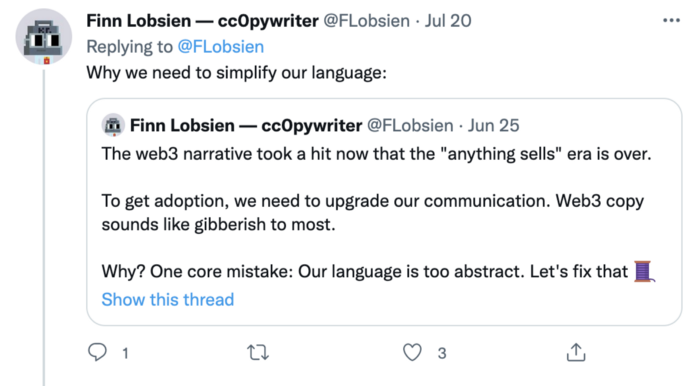
Web3 preached to the choir. Curious newcomers have only found whitepapers and scams when trying to learn why the community loves it. No wonder people resist education and buy-in.
Due to the gender gap in crypto (Crypto Bro is not just a stereotype), it attracts people singing to the choir or trying to cash in on the next big thing.
Last year, the industry was booming, so writing wasn't necessary. Now that the bear market has returned (for everyone, but especially web3), holding readers' attention is a valuable skill.
White papers and the Web3
Why does web3 rely so much on non-growth content?
Businesses must polish and improve their messaging moving into the 2022 recession. The 2021 tech boom provided such a sense of affluence and (unsustainable) growth that no one needed great marketing material. The market found them.
This was especially true for web3 and the first-time crypto believers. Obviously. If they knew which was good.
White papers help. White papers are highly technical texts that walk a reader through a product's details. How Does a White Paper Help Your Business and That White Paper Guy discuss them.
They're meant for knowledgeable readers. Investors and the technical (academic/developer) community read web3 white papers. White papers are used when a product is extremely technical or difficult to assist an informed reader to a conclusion. Web3 uses them most often for ICOs (initial coin offerings).

White papers for web3 education help newcomers learn about the web3 industry's components. It's like sending a first-grader to the Annotated Oxford English Dictionary to learn to read. It's a reference, not a learning tool, for words.
Newcomers can use platforms that teach the basics. These included Coinbase's Crypto Basics tutorials or Cryptochicks Academy, founded by the mother of Ethereum's inventor to get more women utilizing and working in crypto.
Discord and Web3 communities
Discord communities are web3's opposite. Discord communities involve personal communications and group involvement.
Online audience growth begins with community building. User personas prefer 1000 dedicated admirers over 1 million lukewarm followers, and the language is much more easygoing. Discord groups are renowned for phishing scams, compromised wallets, and incorrect information, especially since the crypto crisis.
White papers and Discord increase industry insularity. White papers are complicated, and Discord has a high risk threshold.
Web3 and writing ads
Copywriting is emotional, but white papers are logical. It uses the brain's quick-decision centers. It's meant to make the reader invest immediately.
Not bad. People think sales are sleazy, but they can spot the poor things.
Ethical copywriting helps you reach the correct audience. People who gain a following on Medium are likely to have copywriting training and a readership (or three) in mind when they publish. Tim Denning and Sinem Günel know how to identify a target audience and make them want to learn more.
In a fast-moving market, copywriting is less about long-form content like sales pages or blogs, but many organizations do. Instead, the copy is concise, individualized, and high-value. Tweets, email marketing, and IM apps (Discord, Telegram, Slack to a lesser extent) keep engagement high.
What does web3's messaging lack? As DAOs add stricter copyrighting, narrative and connecting tales seem to be missing.
Web3 is passionate about constructing the next internet. Now, they can connect their passion to a specific audience so newcomers understand why.
Wayne Duggan
3 years ago
What An Inverted Yield Curve Means For Investors
The yield spread between 10-year and 2-year US Treasury bonds has fallen below 0.2 percent, its lowest level since March 2020. A flattening or negative yield curve can be a bad sign for the economy.
What Is An Inverted Yield Curve?
In the yield curve, bonds of equal credit quality but different maturities are plotted. The most commonly used yield curve for US investors is a plot of 2-year and 10-year Treasury yields, which have yet to invert.
A typical yield curve has higher interest rates for future maturities. In a flat yield curve, short-term and long-term yields are similar. Inverted yield curves occur when short-term yields exceed long-term yields. Inversions of yield curves have historically occurred during recessions.
Inverted yield curves have preceded each of the past eight US recessions. The good news is they're far leading indicators, meaning a recession is likely not imminent.
Every US recession since 1955 has occurred between six and 24 months after an inversion of the two-year and 10-year Treasury yield curves, according to the San Francisco Fed. So, six months before COVID-19, the yield curve inverted in August 2019.
Looking Ahead
The spread between two-year and 10-year Treasury yields was 0.18 percent on Tuesday, the smallest since before the last US recession. If the graph above continues, a two-year/10-year yield curve inversion could occur within the next few months.
According to Bank of America analyst Stephen Suttmeier, the S&P 500 typically peaks six to seven months after the 2s-10s yield curve inverts, and the US economy enters recession six to seven months later.
Investors appear unconcerned about the flattening yield curve. This is in contrast to the iShares 20+ Year Treasury Bond ETF TLT +2.19% which was down 1% on Tuesday.
Inversion of the yield curve and rising interest rates have historically harmed stocks. Recessions in the US have historically coincided with or followed the end of a Federal Reserve rate hike cycle, not the start.